Ecommerce Automation: Replace Your Team with n8n Templates

Discover n8n templates for ecommerce automation. Replace competitors tracking, listing creation & marketing teams with AI-powered workflows. Cut 60-70% costs.
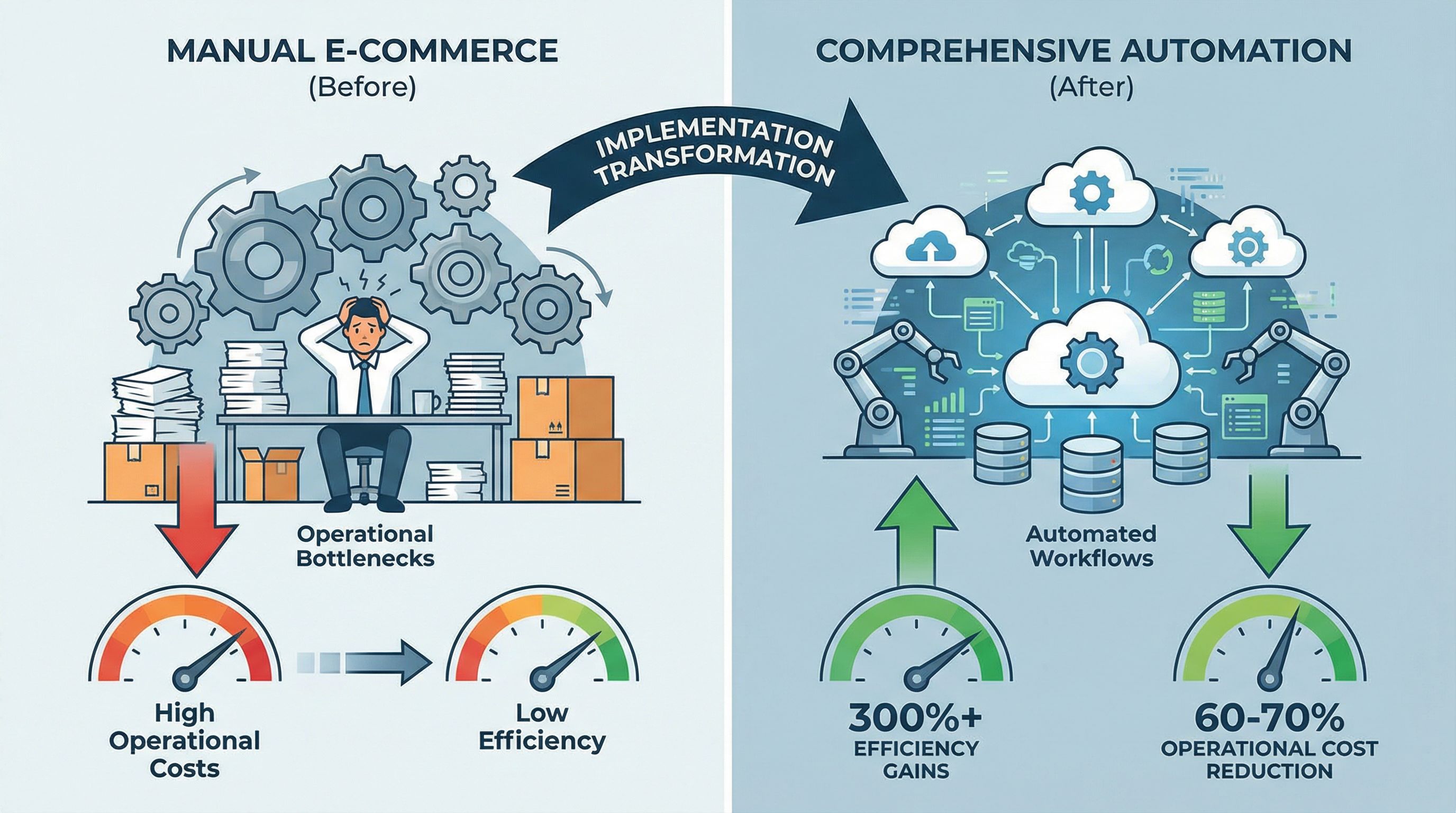
The ecommerce landscape in 2026 has fundamentally shifted. What once required a team of five specialists can now be accomplished by automated workflow systems. This transformation isn't theoretical—businesses implementing comprehensive ecommerce automation solutions are achieving 300%+ efficiency gains while reducing operational costs by 60-70%.
The catalyst? N8N workflow automation combined with AI integration. Unlike traditional automation tools offering limited pre-built solutions, n8n templates provide a flexible, visual framework with 500+ native integrations and AI capabilities that enable non-technical teams to build sophisticated automation systems. Organizations typically see ROI within 60-90 days through elimination of 3-5 full-time operational roles, reduced software costs, and 15-30% conversion rate improvements.
This guide breaks down traditional ecommerce roles—competitive intelligence analysts, content creators, marketing coordinators, and support teams—showing the specific n8n workflow templates that automate each function. Each section includes the manual responsibilities being replaced and the exact workflow architecture that handles them.
Replacing Competitive Intelligence Analysts with Automated Tracking
Traditional Role Responsibilities:
- Monitor 10-50 competitor websites daily for price changes
- Track product launches, discontinuations, and catalog updates
- Analyze competitor promotions and marketing campaigns
- Compile weekly competitive intelligence reports
- Alert team to significant market movements
Why This Role is Fully Automatable
Manual competitor monitoring is ineffective in fast-moving markets. By the time a human analyst notices a pricing change or product launch, the competitive window has often closed. The work is repetitive, time-consuming, and requires constant vigilance—exactly what automation excels at.
How to Build a Comprehensive Competitor Monitoring System
An effective competitor tracking workflow monitors multiple dimensions simultaneously:
Price monitoring:
- Track competitor pricing across all SKUs in real-time
- Detect price changes within minutes of implementation
- Automatically calculate price positioning and margin impact
- Generate alerts when competitors cross strategic pricing thresholds
Product catalog surveillance:
- Monitor new product launches and discontinuations
- Track changes in product descriptions, images, and features
- Identify shifts in product categorization and positioning
- Analyze review velocity and rating trends
Market position tracking:
- Monitor Best Seller Rank (BSR) movements across categories
- Track search ranking positions for key terms
- Analyze sponsored ad presence and estimated spend
- Detect stock-out situations and inventory patterns
Ready-to-Use n8n Workflow Templates
Building these monitoring systems from scratch requires technical expertise and significant time investment. Fortunately, using BrowserAct (a reliable scraping node that handles CAPTCHA verification automatically), the n8n community has created proven templates for ecommerce competitor tracking that deploy in minutes:
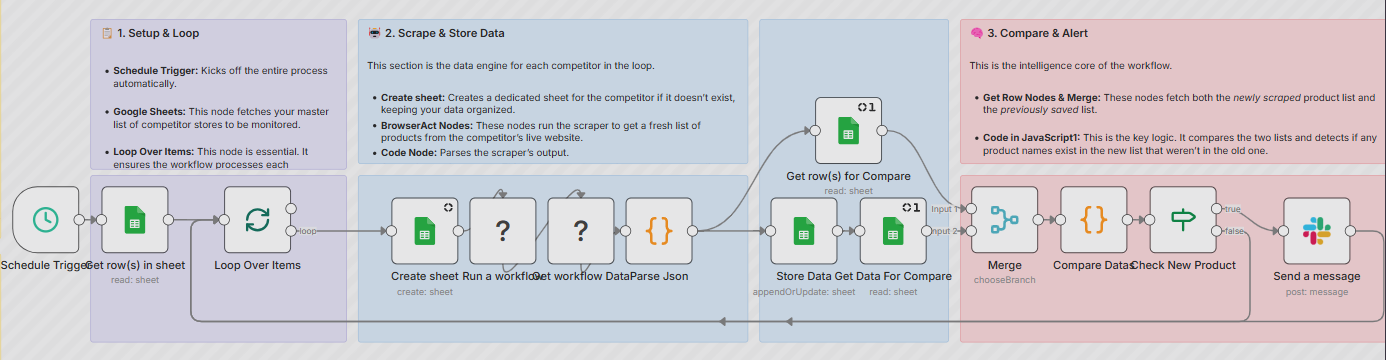
- Monitor Shopify Stores for New Products with Slack Alerts: Automatically tracks competitor product catalogs and sends instant notifications when new items are added. Perfect for staying ahead of product launches and identifying market trends before competitors gain traction.
- Real-Time Competitor Price Tracking and Violation Alerts: Continuously monitors competitor pricing across multiple platforms, detects changes within minutes, and triggers alerts when prices drop below your thresholds or violate MAP policies.
- Product Review Analysis with BrowserAct and Gemini-Powered Recommendations: Automatically scrapes and analyzes competitor product reviews using AI, identifying common customer complaints, praised features, and unmet needs that inform your competitive positioning.
How These Workflows Operate
These n8n templates run on scheduled triggers (typically hourly for high-priority competitors, daily for broader market monitoring). Each execution cycle:
- Retrieves current competitor data via web scraping or API connections
- Compares against historical baseline stored in a database or spreadsheet
- Calculates variance and trends using integrated formulas
- Evaluates changes against predefined significance thresholds
- Generates notifications via email, Slack, Telegram, or SMS for material changes
- Updates historical database for ongoing trend analysis
Organizations implementing these workflows typically monitor 10-50 competitors across 100-1000 SKUs, capturing competitive intelligence that would require multiple full-time analysts to replicate manually.
→ Browse competitor tracking n8n templates to deploy automated monitoring in under an hour!
Replacing Content Creators with AI Listing Writing Workflows
Traditional Role Responsibilities:
- Research competitors and industry best practices for each product
- Write optimized product titles following platform guidelines
- Craft compelling bullet points highlighting features and benefits
- Create detailed product descriptions with storytelling elements
- Conduct keyword research and incorporate SEO terms
- A/B test variations and iterate based on performance
Why This Role is Fully Automatable
Product listing creation requires 3-5 hours per SKU when done manually. The process is formulaic—research competitors, identify patterns, incorporate keywords, follow platform rules—making it ideal for AI automation. N8N workflow automation combined with language models reduces this to minutes while maintaining or improving quality.
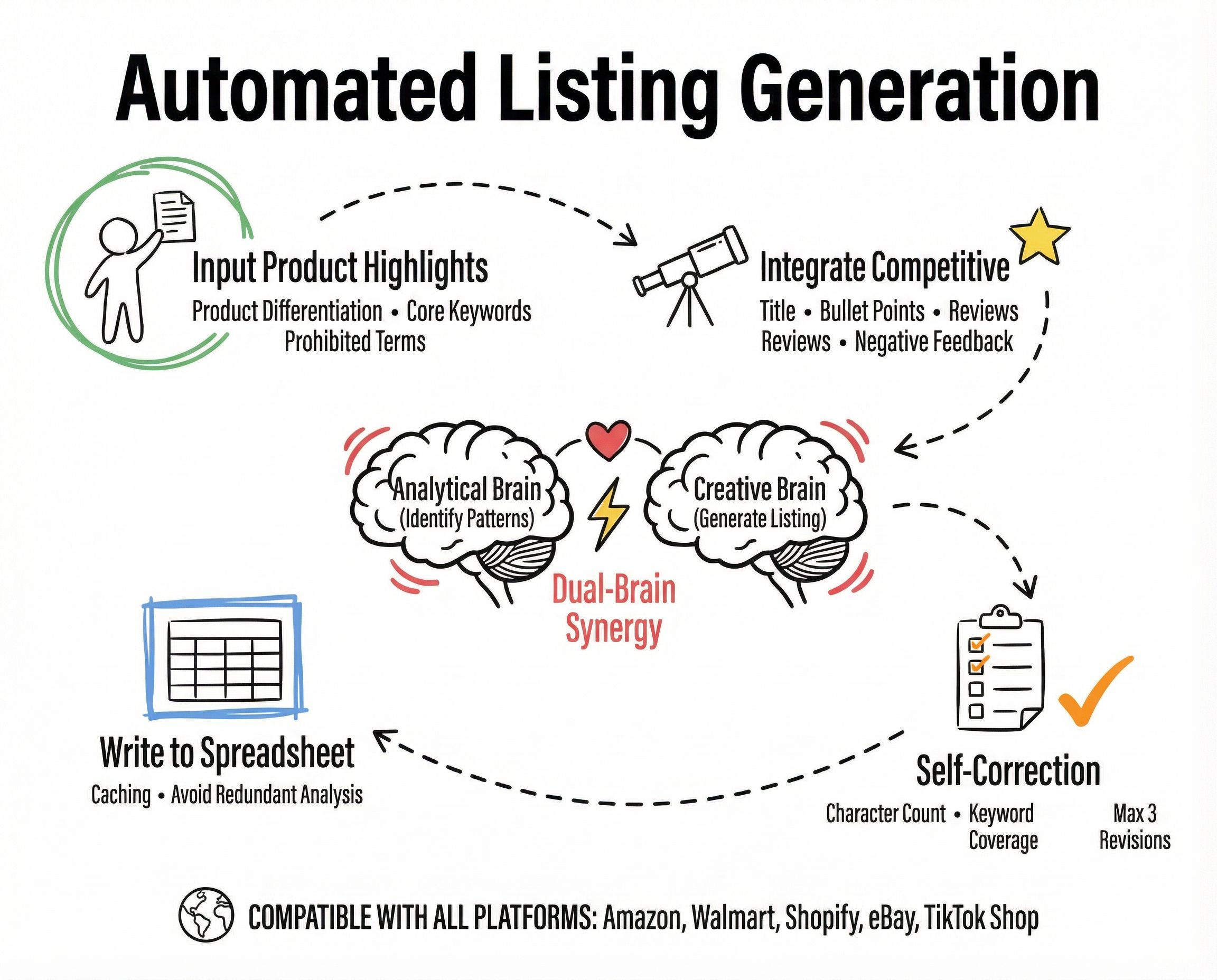
The Four-Stage Listing Creation Workflow
Stage 1: Data collection and preparation
The workflow begins by aggregating all necessary inputs:
- Internal product specifications and differentiators
- Brand voice guidelines and approved terminology
- Keyword research data from tools like Helium 10 or Jungle Scout
- Prohibited terms and compliance requirements
- Historical performance data from existing listings
This information feeds into a structured template that ensures consistency across all listings while providing the AI with comprehensive context.
Stage 2: Competitive intelligence integration
Rather than creating listings in isolation, effective n8n ecommerce automation incorporates competitive analysis:
The workflow automatically:
- Scrapes top-performing competitor listings in the category
- Extracts keywords, features, and benefits from high-ranking products
- Analyzes customer reviews to identify valued features and common complaints
- Synthesizes negative reviews to understand pain points competitors haven't addressed
This competitive data provides critical context that prevents generic, ineffective listing content.
Stage 3: AI-powered content generation with dual-brain architecture
The workflow implements a two-step AI process:
Analysis brain: A dedicated AI prompt analyzes the compiled data to identify:
- High-frequency keywords across top performers
- Benefits and features receiving consistent emphasis
- Unaddressed customer pain points creating differentiation opportunities
- Optimal content structure and emphasis based on successful patterns
Creation brain: Using insights from the analysis phase plus product specifications, a second AI prompt generates:
- Optimized product titles following platform-specific guidelines
- Compelling bullet points emphasizing key benefits and features
- Detailed product descriptions incorporating storytelling and emotion
- Backend search terms maximizing discoverability
Stage 4: Quality control and iteration
The workflow doesn't simply accept the first AI output. Instead, it implements automated quality checks:
- Validates character counts against platform requirements
- Verifies keyword inclusion and density targets
- Checks for prohibited terms and compliance violations
- Scores content quality using predefined rubrics
If quality thresholds aren't met, the workflow automatically regenerates content with adjusted parameters. Most implementations allow up to three iterations, ensuring high-quality output without manual intervention.
Performance optimization:
Advanced implementations include:
- Caching mechanisms preventing redundant analysis of the same ASINs
- Template variations for different product categories and brand positioning
- A/B testing integration automatically deploying listing variations and tracking performance
- Continuous improvement loops incorporating performance data to refine future generations
Organizations using this n8n workflow report 85-95% reduction in listing creation time with measurable improvements in conversion rates and search rankings.
Replacing Marketing Coordinators with Campaign Automation
Traditional Role Responsibilities:
- Plan and schedule marketing campaigns across multiple channels
- Create email campaigns with audience segmentation
- Manage social media posting calendars and engagement
- Coordinate paid advertising across platforms
- Monitor campaign performance and adjust tactics
- Generate marketing reports and analytics
Why This Role is Fully Automatable
Marketing operations generate enormous manual workload across channel management, content creation, audience segmentation, and performance optimization. The work follows predictable patterns and responds to measurable triggers—abandoned carts, purchase milestones, seasonal events—making it perfect for ecommerce marketing automation through n8n templates.
Multi-Channel Campaign Orchestration
Modern ecommerce brands operate across 5-10+ marketing channels simultaneously. Coordinating messaging, timing, and creative assets manually creates inconsistencies and delays. N8n templates solve this through centralized campaign management:
Campaign trigger and coordination:
- Product launches or inventory availability changes
- Seasonal events and promotional calendars
- Customer behavior signals (abandoned carts, purchase milestones)
- Competitive actions requiring response
When a trigger activates, the workflow:
- Generates channel-specific content variations using AI
- Schedules deployment across email, SMS, social media, and paid advertising
- Adjusts messaging based on audience segments and historical engagement
- Monitors early performance and optimizes in real-time
Email marketing automation:
- Dynamic segmentation continuously updating audience lists based on behavior, purchase history, and engagement patterns
- AI-powered send-time optimization deploying emails when individual recipients are most likely to engage
- Automated content personalization tailoring product recommendations, messaging, and offers
- Multi-variant testing simultaneously testing subject lines, content variations, and CTAs with automatic winner promotion
Social media management:
- Content calendar automation scheduling posts across platforms with optimal timing
- Engagement monitoring tracking mentions, comments, and messages with automated responses
- Trend analysis identifying viral content opportunities and competitive social strategies
- Influencer coordination managing outreach, content approval, and performance tracking
Recommended workflow: Aggregate Twitter/X Content to Telegram Channel with BrowserAct and Google Gemini - Automatically curates and distributes social media content across channels, perfect for maintaining consistent brand presence and identifying trending topics.
Paid advertising optimization:
- Budget allocation dynamically distributing spend across platforms based on performance
- Bid optimization adjusting keyword and product bids using real-time ROI data
- Creative testing rotating ad variations and consolidating budget behind winners
- Audience expansion identifying and testing new customer segments
Recommended workflow: Monitor Competitor Ad Activity via Telegram with BrowserAct and Gemini - Tracks competitor advertising strategies in real-time, enabling rapid response and informed budget allocation decisions.
Search visibility tracking:
- AI search ranking monitoring tracking product visibility in ChatGPT, Perplexity, and other AI assistants
- Brand mention analysis identifying how products appear in AI-generated recommendations
- Competitive positioning understanding which competitors dominate AI search results
- Trend detection spotting shifts in AI-recommended products before they impact sales
Recommended workflow: Track AI Search Rankings from Perplexity via BrowserAct to Google Sheets and Slack - Monitors your brand's visibility in AI search engines, providing early warning of ranking changes that traditional analytics miss.
Organizations implementing comprehensive ecommerce marketing automation typically manage 10-20+ simultaneous campaigns with the workload of a single traditional marketing coordinator.
→ Start with these BrowserAct-powered marketing workflows to automate competitor monitoring, content curation, and campaign tracking today.
Replacing Training Coordinator with Automated Employee Onboarding
Traditional Role Responsibilities:
- Conduct new employee orientation sessions
- Create and update training materials and documentation
- Answer repetitive questions from new hires
- Track onboarding progress and competency development
- Maintain knowledge base of company policies and procedures
Why This Role is Automatable
Traditional employee onboarding requires weeks of training, shadowing, and reference document review. AI-powered knowledge systems compress this timeline while improving consistency through RAG (Retrieval Augmented Generation) technology.
System architecture:
The knowledge base implementation uses RAG (Retrieval Augmented Generation) technology to create an intelligent Q&A system containing:
- Company policies, procedures, and organizational structure
- Product specifications, positioning, and differentiators
- Customer personas and market insights
- Performance metrics and KPIs
- Historical context and decision rationale
New employees interact with the system through natural language queries, receiving instant, accurate answers drawn from verified company information rather than generic AI knowledge.
Effectiveness metrics:
Organizations implementing AI knowledge bases report:
- 70% reduction in onboarding time to productivity
- 85% decrease in repetitive questions to management
- Improved consistency in customer-facing communications
- Better retention of institutional knowledge when employees depart
Evaluation methodology:
Rather than using the knowledge base indefinitely, it serves as an assessment tool. The first 7-14 days of employment focus on system interaction, with query patterns and comprehension tracked. Employees demonstrating rapid knowledge acquisition and appropriate question complexity advance faster; those struggling receive targeted support.
Replacing Customer Support Team with AI Knowledge Bases
Traditional Role Responsibilities:
- Answer customer questions via email, chat, and phone
- Provide product information and specifications
- Handle order inquiries and tracking requests
- Manage return and warranty claims
- Support influencers and business partners with resources
Why This Role is Partially Automatable
The same RAG technology that powers employee training can handle 60-80% of customer support inquiries, routing only complex issues to human agents. This dramatically reduces headcount requirements while improving response times.
Customer support applications:
- Instant answers to product questions, specifications, and compatibility
- Order tracking and account management guidance
- Return and warranty information
- Troubleshooting and setup assistance
Influencer and partnership management:
- Brand guidelines and approved messaging
- Product information and differentiators
- Commission structures and performance tracking
- Content templates and creative assets
WhatsApp and chat integration:
- 24/7 instant response to common questions
- Seamless handoff to human agents for complex issues
- Multi-language support for international customers
- Conversation history and context preservation
These systems dramatically reduce customer service workload while improving response times and satisfaction scores.
The Competitive Gap: Why Implementation Speed Matters
The market is approaching a critical inflection point. Organizations implementing comprehensive ecommerce automation in 2026 will establish advantages that become nearly impossible for competitors to overcome.
The Compounding Effect of Automation
Workflow automation doesn't simply provide linear efficiency gains. Each implemented system creates data, insights, and capabilities that enable more sophisticated automation:
- Data accumulation: Automated systems capture granular performance data that manual processes miss
- Pattern recognition: AI systems identify optimization opportunities invisible to human analysis
- Velocity advantage: Automated organizations iterate and adapt faster than manual competitors
- Resource multiplication: Time saved compounds as teams focus on strategic initiatives rather than operational tasks
Companies implementing automation early build 6-12 months of data advantages, proprietary workflow libraries, and organizational capabilities that create sustainable competitive moats.
The Individual Productivity Revolution
The gap isn't just between companies—it's between individuals. Professionals mastering n8n templates and ecommerce automation tools can accomplish what previously required entire teams:
- Solo ecommerce operators managing 100+ SKUs across multiple marketplaces
- Individual marketers running sophisticated multi-channel campaigns
- Single-person brands competing effectively against established companies
This "super-individual" phenomenon represents a fundamental shift in what's possible for small teams and entrepreneurs.
The Baseline Operator Displacement
Conventional wisdom suggests AI augments human workers rather than replacing them. In ecommerce operations, the reality is more nuanced. Basic operational roles—those involving data entry, routine monitoring, simple decision-making, and repetitive tasks—are becoming obsolete.
The market is bifurcating:
High-value roles (growing):
- Strategic automation designers
- AI prompt engineers and workflow architects
- Data analysts and insight translators
- Creative strategists and brand builders
Low-value roles (declining):
- Manual data entry and processing
- Routine monitoring and reporting
- Basic customer service and support
- Repetitive content creation
Organizations and individuals failing to transition toward automation-leveraged roles face increasingly limited opportunities.
Conclusion: The Automation Imperative
The ecommerce landscape of 2026 offers unprecedented opportunities for organizations willing to embrace comprehensive automation. N8n workflows, AI integration, and strategic implementation create productivity multipliers that were impossible even two years ago.
The window for comfortable transition is closing. Organizations implementing automation now build capabilities and data advantages that compound over time. Those waiting face an increasingly difficult competitive environment where manual processes cannot match automated competitors' speed, scale, and consistency.
The question isn't whether to automate—it's how quickly you can implement the systems that will define your competitive position for years to come.
Don't build from scratch what already exists. BrowserAct has created battle-tested n8n workflow templates covering the core automation needs outlined in this guide—from competitor tracking and listing optimization to multi-channel marketing and customer support.
Start with one workflow this week. Deploy your second next week. By month-end, you'll have automated systems replacing hours of manual work daily—and you'll wonder why you waited.
Further reading: Ecommerce workflows
Frequently Asked Questions
Q: Do I need programming skills to use n8n templates?
A: n8n has a learning curve—you'll need to understand workflow logic, data mapping, and basic technical concepts. However, pre-built templates like those from BrowserAct significantly reduce this barrier. These ready-to-deploy workflows require minimal customization, allowing you to start automating without building from scratch.
Q: How much does comprehensive ecommerce automation cost?
A: n8n Cloud pricing starts at $20/month (Starter plan with 2,500 executions) and scales to $50/month (Pro plan with 10,000 executions). For higher volumes, costs increase based on execution count. Alternatively, self-hosting the free Community Edition on infrastructure like AWS or DigitalOcean typically runs $20-40/month for VPS hosting with unlimited executions. BrowserAct-powered workflows run on either deployment option, making advanced ecommerce automation accessible at significantly lower cost than hiring equivalent staff.
Q: How long before automation delivers ROI?
A: Most organizations see positive ROI within 60-90 days. Simple workflows like competitor tracking or automated email campaigns often deliver value within weeks. More complex implementations may require 3-6 months to realize full benefits.
Q: Can automation really replace an entire team?
A: For operational tasks—yes. Strategic thinking, creative strategy, and relationship management still require human expertise. Automation excels at data processing, monitoring, routine communications, and repetitive tasks that traditionally consumed 60-80% of operational team time.
Q: What happens when workflows break or encounter errors?
A: Well-designed workflows include error handling, notifications, and fallback procedures. When issues occur, the system alerts relevant team members rather than failing silently. Most workflow failures result from external platform changes and can be quickly fixed with minor updates. BrowserAct-developed templates have undergone extensive testing and are regularly maintained to adapt to platform changes, significantly reducing the risk of unexpected failures.
Q: How do I choose which workflows to implement first?
A: Start with high-frequency, time-consuming tasks that follow predictable patterns. Competitor monitoring, listing creation, and email automation typically provide the best initial ROI. Avoid starting with highly complex, edge-case-heavy workflows. The BrowserAct workflow collection offers battle-tested templates specifically designed for common ecommerce use cases—these are ideal starting points since they've been refined through real-world usage and require minimal customization to deploy.
Q: Is my data safe with n8n and AI integrations?
A: N8n offers self-hosted options providing complete data control. For AI integrations, use business accounts with data protection agreements. Most AI providers now offer options that don't use customer data for model training. Review privacy policies and implement appropriate data handling for sensitive information.


