Clawdbot Viral: How to Deploy 24/7 AI Powerhouse in One-Click

Clawdbot (Moltbot) is a powerful open-source local AI agent. Learn step-by-step deployment guide (VPS setup, manual install, Discord) + gateway explained.
Clawdbot exploded overnight—from Silicon Valley discussions on X and Reddit to tech communities globally. Mac minis sold out rapidly, becoming essential hardware for 24/7 operation.
Many still ask: What is Clawdbot? What does it do? How does one set it up to create a reliable, always-on personal AI assistant?
This step-by-step guide covers everything.
Clawdbot functions as an early AGI-style AI agent with reasoning, permanent memory, and real-time interaction through apps like WhatsApp, Telegram, and Discord. The creator built it as a genuine life assistant—messages route to advanced models like Claude, with results returned seamlessly.
The real excitement stems from more than AI-generated code. Clawdbot runs in the user's own environment (local machine or server) and uses familiar chat interfaces, resembling communication with a capable colleague.
Full system access combined with long-term memory creates a dedicated personal AI agent. Capabilities expand significantly while data remains private, avoiding exposure to large corporations.
Clawdbot supports major messaging platforms like WhatsApp, Telegram, and Discord, making setup straightforward for U.S. users. The following sections provide a complete deployment walkthrough.
01 | Recommended Environments for Clawdbot
Clawdbot's popularity drove demand for Mac minis as always-on hardware, with community members purchasing multiples.
Experience shows high permissions require isolation. Running on a primary daily machine risks personal data. Preferred options include:
- An older Mac (macOS provides optimal compatibility)
- A dedicated mini PC
- A cloud VPS (Linux delivers strong isolation)
Cloud VPS deployment stands out for speed (minutes to launch), low cost (a few dollars monthly), true 24/7 availability, and no added electricity or hardware strain.
Reliable U.S.-based providers include DigitalOcean, Linode, Vultr, or AWS Lightsail—select nearby regions like Virginia or California for minimal latency.
02 | Quick Setup Methods
Providers offer pre-built images or marketplaces for faster starts.
Option A: Launch a New Instance
Access the dashboard (e.g., DigitalOcean Droplets or Vultr Compute) and create a server:
- OS: Ubuntu 24.04 LTS (strongly recommended) or macOS VM if applicable
- Specs: Minimum 2 vCPU / 2–4 GB RAM (4 GB+ preferred)
- Region: Closest U.S. location (e.g., New York, Virginia)
- Extras: Use Clawdbot template if available; otherwise start plain
SSH in after provisioning.
Option B: Reinstall on Idle Server
For existing underused VPS:
- Navigate to instance management
- Select "Rebuild" or "Reinstall OS"
- Choose Clawdbot-compatible image if present
- Back up data beforehand
Option C: Manual Installation
SSH into the server and execute:
Bash
curl -fsSL https://clawd.bot/install.sh | bash
This script detects the OS, installs Node.js if needed, and configures globally.
03 | Configuration and Onboarding
Post-install requires interactive setup. Run:
Bash
clawdbot onboardProceed through the wizard (arrow keys + Enter):
- Accept risks (high permissions noted)
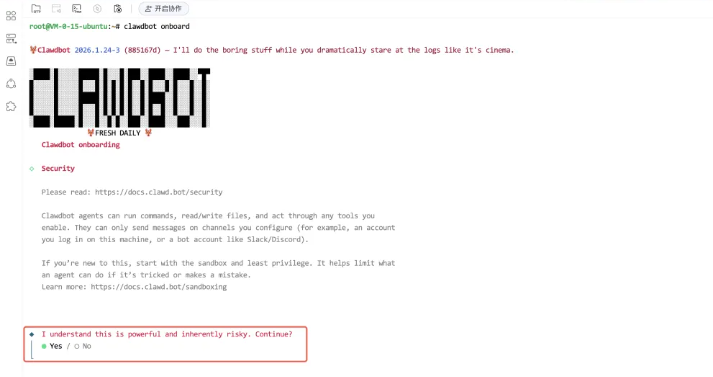
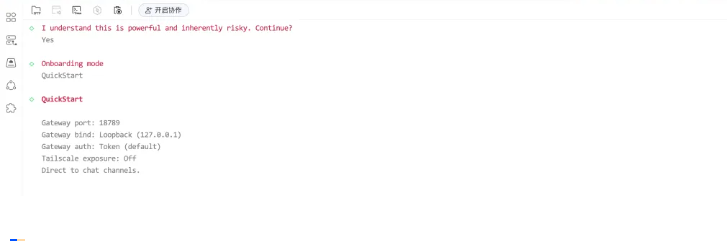
- Select Quick Start mode
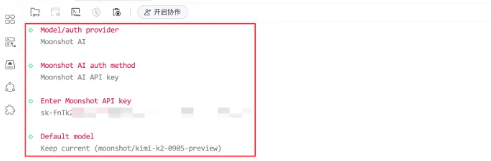
- Choose model provider (e.g., Anthropic Claude or OpenAI). Input API key
- Pick messaging channel (Discord recommended for ease)
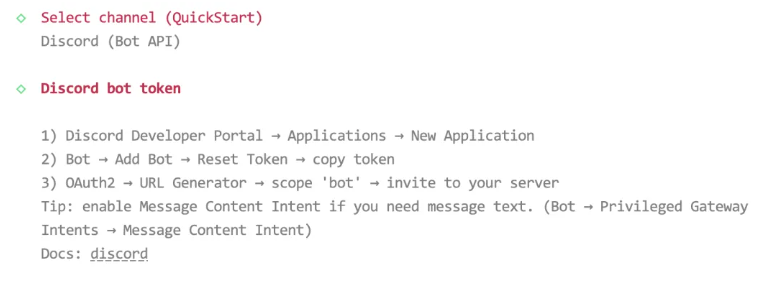
Discord setup example:
- Visit Discord Developer Portal → New Application → Bot → Add Bot → Reset Token → Copy
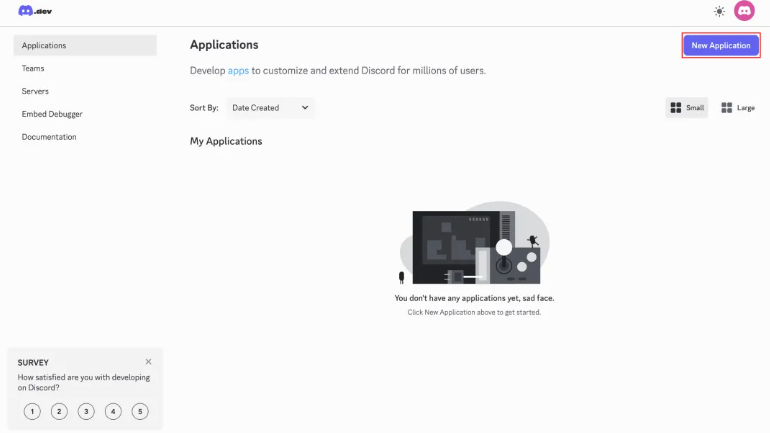
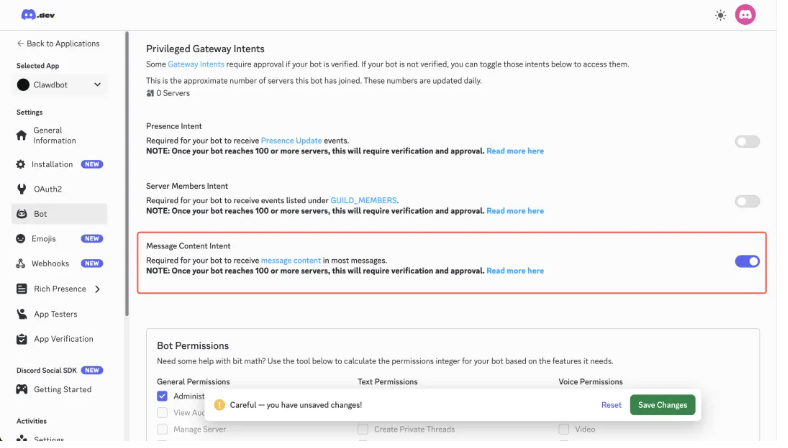
- Enable Message Content Intent

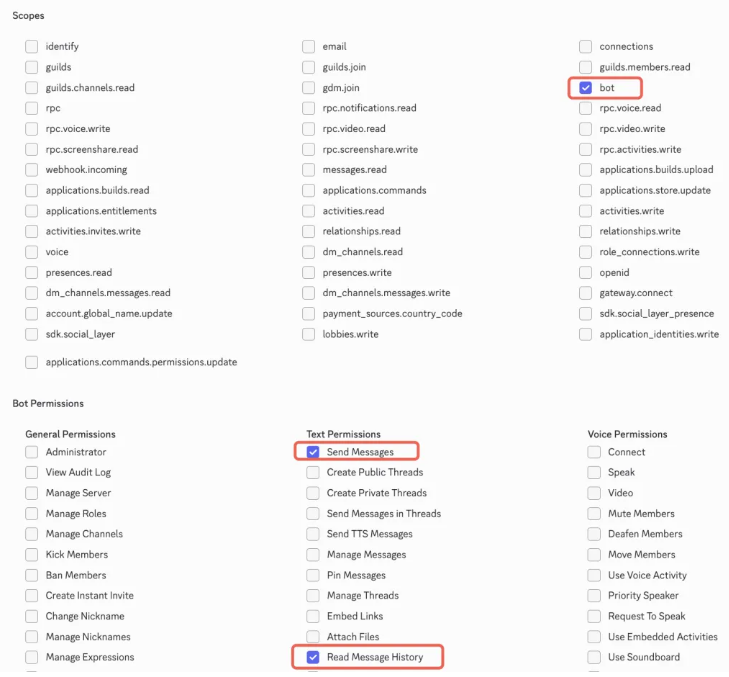
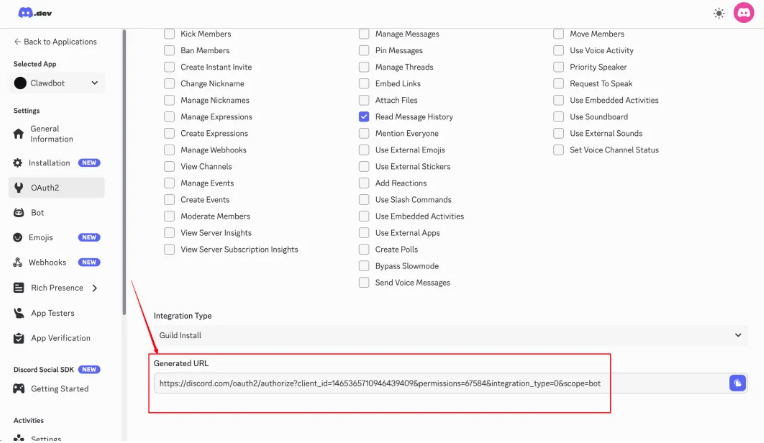
- Generate OAuth2 URL with bot permissions (Send Messages, Read Message History)
- Invite bot to server or DM
- Paste token in onboarding
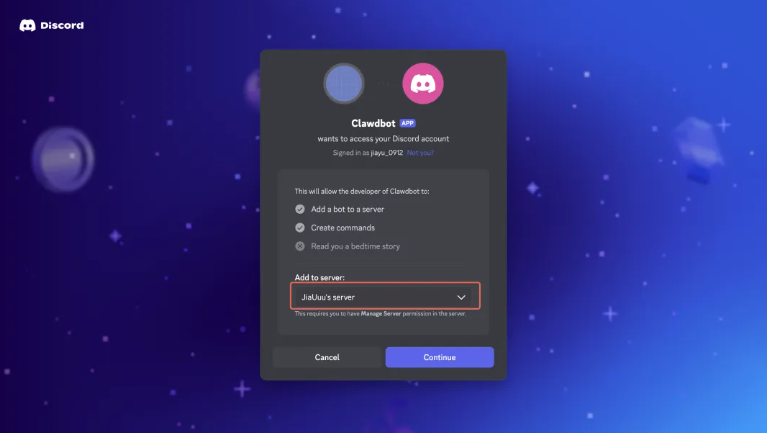
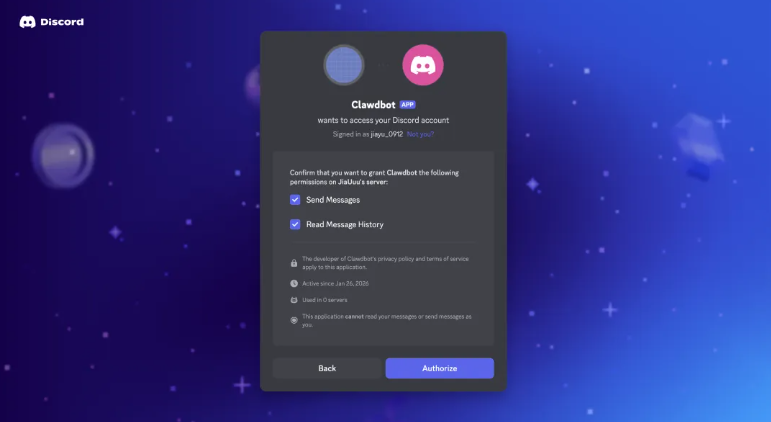
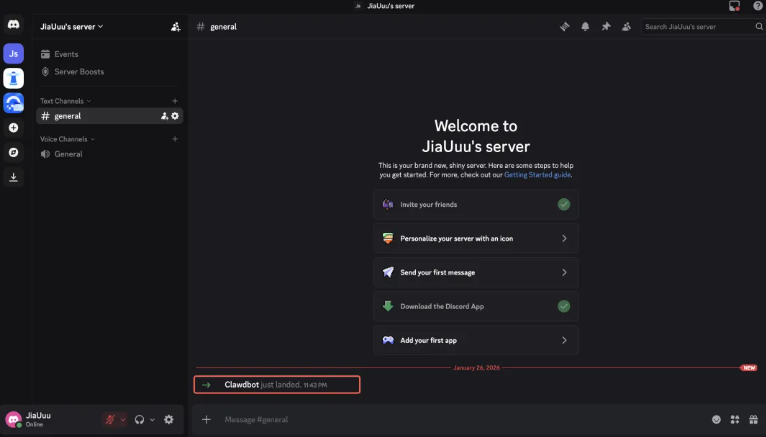
(The final bot effect is shown in the image above)
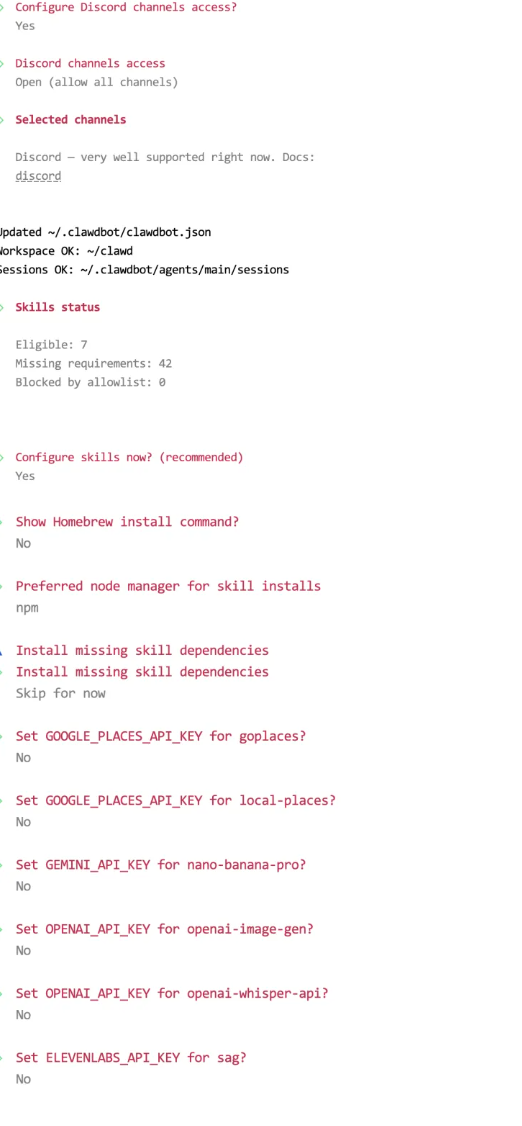
Note: For the "Enable hooks" option, select session-memory:
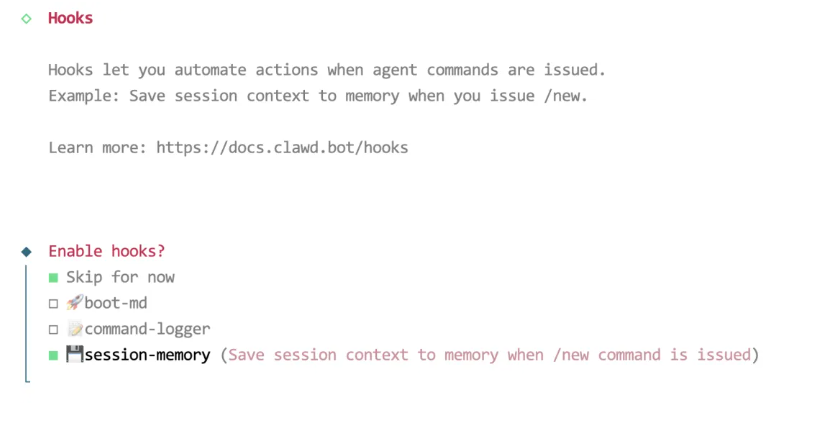
After a successful startup, return to Discord and engage in a conversation with the bot to obtain the pairing code.
Enable session-memory for context persistence.
Launch gateway:
Bash
clawdbot gateway --port 18789 --verbose
Message the bot in chat to receive pairing code, then approve:
Bash
clawdbot pairing approve discord <code>
Restart gateway and test conversation—successful replies confirm setup.
For web tasks like scraping, form filling, or CAPTCHA handling, pair with BrowserAct. It provides no-code web scraping, reliable bypass of human verifications (CAPTCHAs/Cloudflare), and global IP rotation for consistent access.
Conclusion: The AI Agent Revolution Is Here
Clawdbot (now rebranded as Moltbot) represents far more than a single viral project—it's a clear signal of the shift toward truly personal, autonomous AI agents becoming everyday tools.
Peter Steinberger built the initial version in days from his home setup, proving one skilled developer with modern models can move faster than traditional teams ever could. This moment marks a real inflection point in AI accessibility and capability.
Key Takeaways:
- Autonomous AI is here: Agents solve real problems beyond their initial programming through reasoning and tool use.
- Speed wins: A single person leveraging AI can outpace legacy development workflows.
- No-code accessibility rises: Powerful agents require minimal setup and no custom coding for core value.
- Big Tech takes notice: Self-hosted, private agents challenge closed platforms and data monopolies.
- Real results are happening now: everyday users already automate emails, calendars, research, and workflows with measurable impact.
The future isn't coming—it's already in GitHub repos and home servers. Tools like Clawdbot/Moltbot show what's possible when AI gains persistent memory, system access, and chat-native control.
Ready to Supercharge Your Clawdbot (Moltbot) AI Agent Workflows?
While Clawdbot/Moltbot delivers the autonomous brain, BrowserAct provides the web execution layer needed for real-world scale. BrowserAct pairs perfectly with agents like Moltbot, adding robust browser automation via a simple API.
Why BrowserAct + Clawdbot/Moltbot?
- Bypass Any Verification: Automatically handles CAPTCHAs and human checks with intelligent simulation.
- Global IP Network: Rotate residential IPs worldwide to access geo-blocked content effortlessly.
- Human-Like Browsing: Mimics real user behavior to evade anti-bot systems like Cloudflare and DataDome.
- Fingerprint Browser Technology: Advanced anti-detection ensures reliable, long-running sessions.
- No Coding Required: Natural language prompts build workflows; API integrates directly with agents.
- 24/7 Automation: Cloud-powered execution lets agents run non-stop with consistent web access.
Connect BrowserAct's API to Clawdbot/Moltbot and unlock end-to-end autonomy—from data gathering and research to task execution—without brittle scripts or manual intervention.


