Clawdbot Review: Why Everyone's Talking About This AI

Clawdbot went from 5K to 30K GitHub stars overnight. Learn what makes this self-hosted AI assistant different and why developers are obsessed with it.
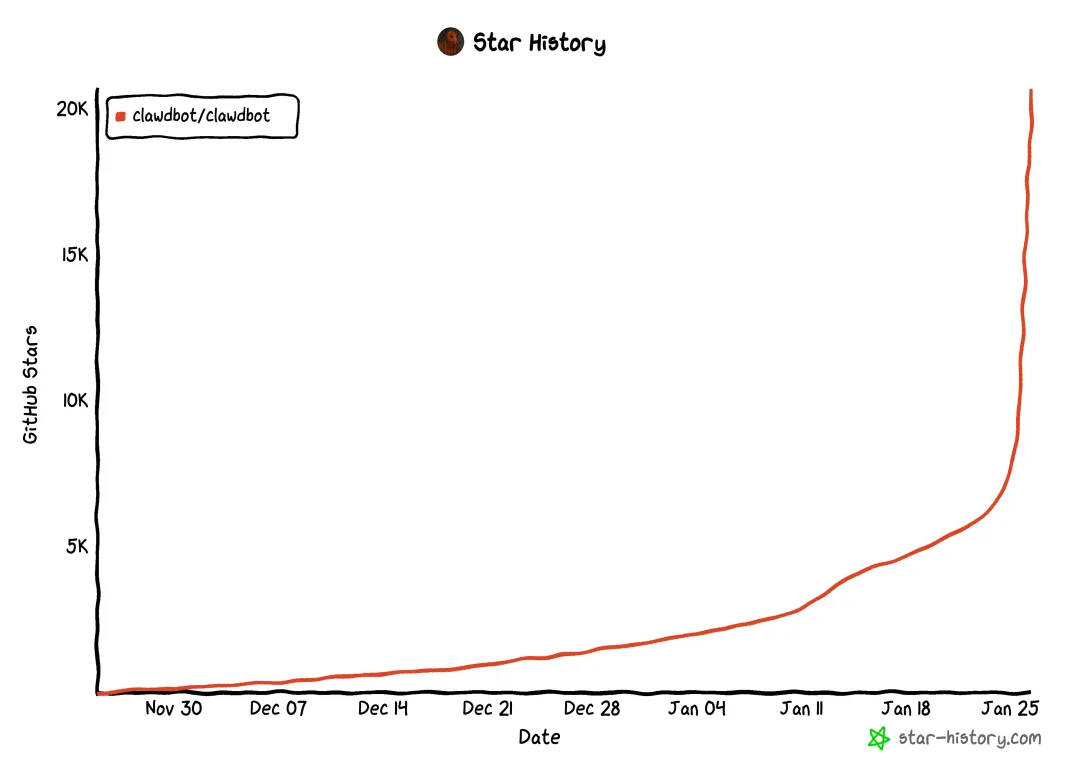
Overnight, Mac Minis started flying off the shelves, and even Apple's sales team seemed puzzled. No major product launch, no flashy Super Bowl ad—just an open-source project on GitHub that went from 5,000 to 30,000 stars in a matter of days. That project? Clawdbot.
Even Logan Kilpatrick, head of Google AI Studio, tweeted, "I've already ordered a Mac Mini." But here's the twist: the reason everyone's buying Mac Minis has nothing to do with Apple's marketing—it's all about deploying Clawdbot, a self-hosted AI assistant that's been dubbed "what Siri should have been."
What Is Clawdbot?
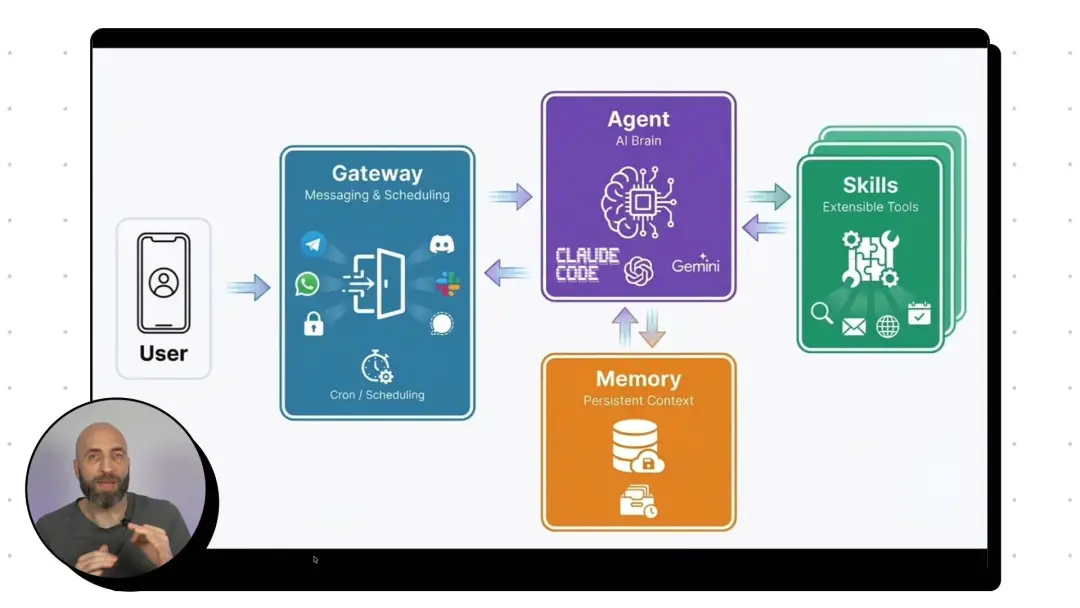
At its core, Clawdbot is a self-hosted AI assistant that lives where you already communicate—inside your messaging apps. Think of it as the personal assistant that Siri promised to be, but actually delivers.
Unlike traditional chatbots that are just glorified text boxes on a website, Clawdbot is built on a powerful "Gateway" architecture. It sits at the intersection of:
- Your messaging platforms (WhatsApp, Telegram, iMessage, Discord, Slack)
- Leading AI models (Claude, ChatGPT, DeepSeek, Gemini, local models)
- Your productivity tools (Notion, calendar, email, task managers)
- Specialized skills (web browsing, automation, data analysis)
Instead of downloading yet another app, Clawdbot becomes just another contact in your chat list. Message it like you'd message a colleague, and it handles the rest.
Official Clawdbot Resources:
- GitHub Repository: github.com/clawdbot/clawdbot
- Official Website: clawd.bot
- Skills Library: clawdhub.com/skills
How Clawdbot Works: The Architecture Behind the Magic
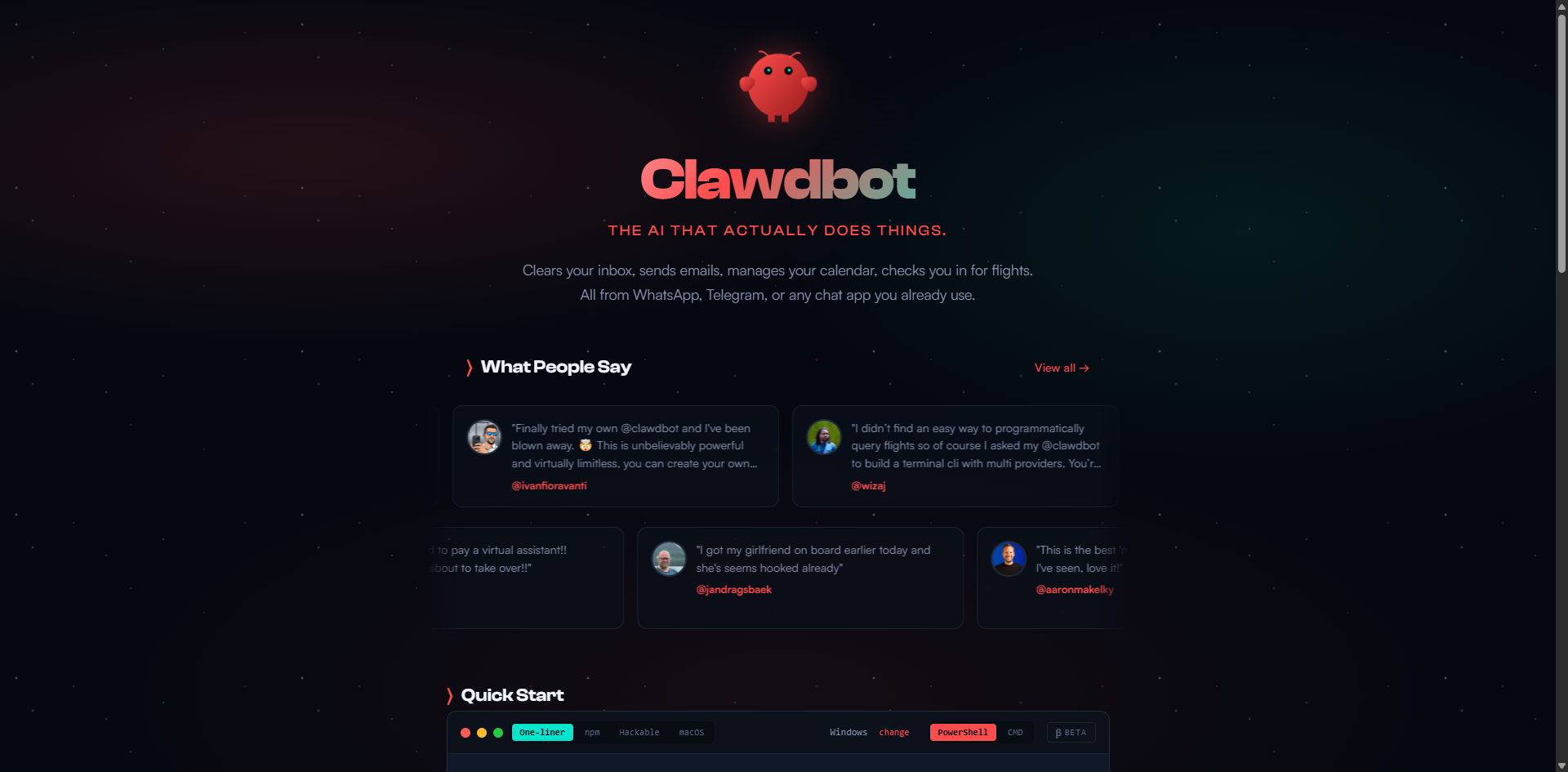
What sets Clawdbot apart from every other "AI assistant" you've tried isn't just what it can do—it's how it's built. The architecture consists of four core components:
1. Gateway: Your Universal Communication Hub
The Gateway is Clawdbot's central nervous system. It connects to multiple messaging platforms simultaneously using:
- Official APIs (where available)
- Command-line interfaces (like
steipete/imsgfor iMessage on macOS) - Web automation tools (for platforms without official APIs)
This means you can interact with Clawdbot from any device, any platform, and the conversation seamlessly continues across all of them.
2. Agent: The AI Brain You Choose
Unlike proprietary assistants locked into one model, Clawdbot lets you bring your own AI. Configure it to use:
- Anthropic's Claude (Opus, Sonnet, or Haiku)
- OpenAI's GPT-4 or GPT-4o
- Google's Gemini
- DeepSeek, MiniMax, or other providers
- Even local models running on your own hardware
You can switch models on the fly depending on the task—use GPT-4 for coding, Claude for writing, or a local model for sensitive data.
3. Memory: Persistent Context That Actually Remembers
This is where Clawdbot truly shines. Traditional AI assistants forget everything the moment you close the tab. Clawdbot's memory is:
- Persistent: Conversations and context are saved locally or on your chosen cloud provider
- Unlimited: Unlike token-limited chatbots, Clawdbot's memory capacity is only limited by your storage
- Model-independent: Switch AI providers without losing your conversation history
Tell it on Monday that you only drink oat milk lattes, and when you ask it to order coffee on Friday, it remembers—without you repeating yourself.
4. Skills: The Power Tools That Make It Useful
Skills are what transform Clawdbot from a chatbot into a digital workforce. The official skills library includes:
- Web Browsing: Using tools like BrowserAct to navigate websites, extract data, and monitor changes
- Productivity Integration: Connect to Notion, Obsidian, Things 3, Todoist
- Communication: Email management, calendar scheduling, meeting notes
- Entertainment: Spotify control, music identification with Shazam
- Smart Home: Home Assistant integration for IoT devices
- Development: Code execution, file management, API interactions
Why Clawdbot Is Different From Every Other AI Assistant
It Actually Has Memory
Most AI assistants suffer from digital amnesia. Clawdbot remembers your preferences, past conversations, and ongoing projects. It's like talking to a colleague who was paying attention all along, not starting fresh every time.
It's Proactive, Not Reactive
Traditional AI waits for you to ask questions. Clawdbot can be configured to:
- Send morning briefings with unread emails and calendar events
- Alert you when monitoring conditions are met (stock prices, server status, news mentions)
- Automatically summarize weekly accomplishments for reports
- Remind you about upcoming deadlines based on project tracking
You go from "human asking AI" to "AI proactively helping human"—a fundamental shift in how AI assistance works.
It Actually Does Work, Not Just Talk About Work
Here's where Clawdbot separates itself from chatbots that can only write poetry or answer trivia:
📊 Real Use Case: Automated Stock Trading
One user gave Clawdbot a $2,000 trading wallet and configured it to research markets every 4 hours using multiple APIs, propose new trading ideas, and reassess open positions. The AI handles the entire research-to-execution pipeline autonomously.
🚗 Real Use Case: Car Negotiation
A user tasked Clawdbot with buying a car. Using BrowserAct, it researched and scraped data like available models, loan rates, and dealer incentives. Then it contacted multiple dealerships, negotiated prices, and saved the buyer $4,200 compared to initial quotes.
☕ Real Use Case: Running a Tea Business
One entrepreneur deployed Clawdbot to manage their entire tea company—handling customer inquiries, inventory tracking, order processing, and supplier communications. One Mac Mini, one entire business operation.
🎮 Real Use Case: Vibe Coding
Developers are using Clawdbot for "vibe coding"—describing what they want in natural language and letting the AI build functional game interfaces, web apps, and prototypes without writing a single line of code themselves.
Do You Actually Need a Mac Mini for Clawdbot?
Social media is flooded with photos of desks stacked with multiple Mac Minis, captioned "building my private AI compute center." It looks cyberpunk and impressive, but here's the reality check:
Clawdbot's official stance: "Stop giving Apple your money. Any device that can run Node.js can host Clawdbot."
What Clawdbot Actually Needs
Clawdbot is essentially a routing system. The heavy AI computation happens in the cloud (OpenAI, Anthropic, etc.) or occasionally on your local machine. The device running Clawdbot only needs to:
- Receive and send messages
- Make API calls to AI providers
- Run simple scripts and automations
Budget-Friendly Alternatives to Mac Mini
- Cloud VPS: A $5/month DigitalOcean or Linode server runs Clawdbot perfectly
- Raspberry Pi: A $35 Pi 4 or Pi 5 is more than sufficient
- Old laptop: That 2015 MacBook collecting dust works great
- Home server: Any always-on computer you already own
The Mac Mini trend is more about aesthetics and the "always-on hardware" narrative than actual technical requirements. For 90% of users, a cheap cloud server is the smarter choice.
How to Set Up Clawdbot
Let's be honest: Clawdbot isn't a one-click install. It's an open-source project aimed at developers and tech-savvy users. Here's what setup involves:
Prerequisites
- Technical comfort level: Basic command line knowledge (copying/pasting terminal commands)
- API keys: Accounts with your chosen AI providers (OpenAI, Anthropic, etc.)
- Messaging platform: Most users start with Telegram (easiest to configure)
- Hosting: A server, cloud VPS, or always-on local machine
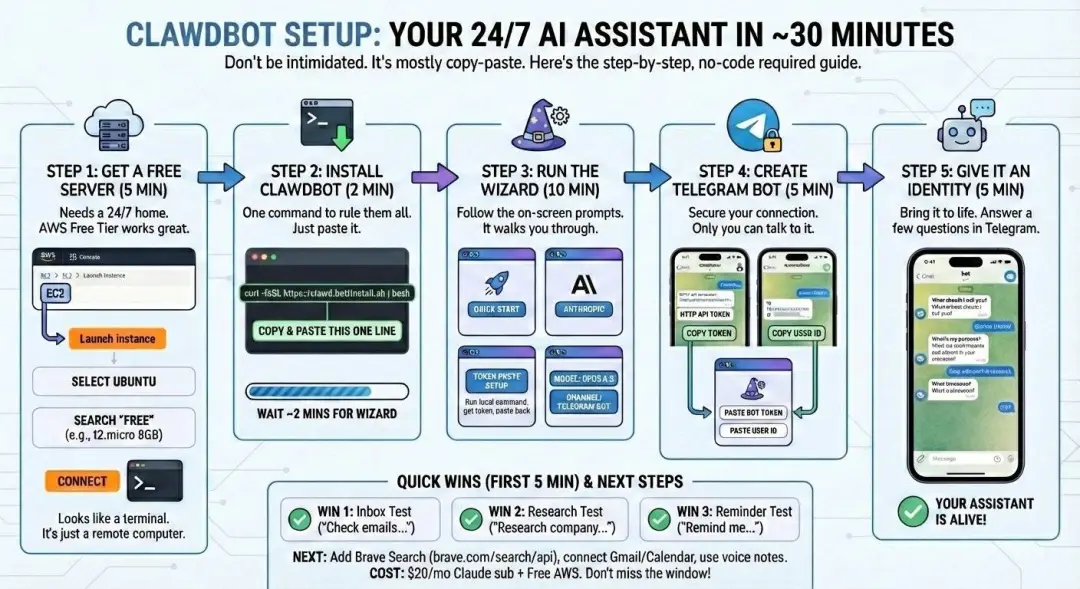
The Setup Process (Simplified)
- Clone the repository from GitHub
- Install dependencies (Node.js packages)
- Configure environment variables (API keys, messaging tokens)
- Connect your messaging platform (follow platform-specific guides)
- Add skills from the skills library
- Start the bot and begin chatting
Common Setup Challenges
- Configuration complexity: Each messaging platform has its own setup quirks
- Occasional errors: Open-source projects can have bugs or compatibility issues
- Skill dependencies: Some skills require additional API keys or tools
- Documentation: While improving, it assumes some technical knowledge
The payoff, however, is complete control over your AI assistant—privacy, customization, and capabilities that proprietary services can't match.
Clawdbot vs. Traditional AI Assistants
Modern productivity is fragmented. Notes in Notion. Communication in Slack or WhatsApp. Tasks in Things or Todoist. AI in a browser tab. Calendar in Google Calendar. We spend our days context-switching between apps, copy-pasting information, and losing momentum.
Clawdbot's "conversation-first" approach solves this fragmentation:
- Single interface: Everything happens in your messaging app
- Natural language: No learning new UI patterns or keyboard shortcuts
- Context preservation: The conversation itself becomes your workspace
- Cross-platform continuity: Start on desktop, continue on mobile seamlessly
Instead of opening a weather app to check conditions, a stocks app to check prices, and a notes app to write reminders, you just ask Clawdbot. It's the return to the most natural form of human-computer interaction: conversation.
Feature | Clawdbot | Siri/Google Assistant | ChatGPT/Claude Web |
Memory | Unlimited, persistent across sessions | Limited, resets frequently | Token-limited context window |
Model Choice | Any provider or local model | Locked to proprietary model | Single provider only |
Platform | Any messaging app you use | Native OS apps only | Web browser or mobile app |
Proactivity | Can initiate conversations | Limited to reminders | Reactive only |
Integration | Unlimited via Skills system | Curated integrations | Plugins (limited availability) |
Privacy | Self-hosted, you control data | Cloud-based, company controls data | Cloud-based, company controls data |
Cost | Infrastructure + API usage | Free or subscription | Free tier + subscriptions |
Setup Difficulty | High (technical setup required) | Easy (built-in) | Easy (account creation) |
The Future of AI Agents: What Clawdbot Signals
For years, we've heard "apps are dead" since the concept of AI agents emerged. But until projects like Clawdbot, it felt theoretical. Now we're seeing glimpses of that future:
From Apps to Conversations
We're moving away from:
- Opening a weather app → Asking "What's the weather?"
- Opening a finance app → Asking "What's my portfolio performance?"
- Opening a task manager → Saying "Add this to my to-do list"
Everything collapses into a single conversational interface.
From Cloud Lock-In to Personal Infrastructure
Clawdbot represents a shift toward personal AI infrastructure. Instead of being beholden to a single provider's capabilities, terms of service, and privacy policies, you own the system:
- Your data stays on your infrastructure
- You choose which AI models to use
- You decide what integrations make sense
- You control when and how it operates
The Cowork → Clawdbot Evolution
We've seen this progression:
- Claude Cowork: AI taking over desktop file management
- Claude Skills: Extending capabilities with modular tools
- Clawdbot: Bringing those capabilities to mobile and daily life
The pattern is clear: AI is moving from "tool you use" to "assistant that works for you." The next step? Hardware manufacturers (Apple, Google, Samsung) will need to catch up—or risk being left behind by open-source solutions.
Further reading: OpenClaw and Moltbot
Frequently Asked Questions About Clawdbot
Is Clawdbot free to use?
Clawdbot itself is open-source and free. However, you'll need to pay for hosting (cloud server or use your own hardware) and API access to AI providers like OpenAI or Anthropic. A basic setup can cost as little as $5-15/month depending on usage.
Do I need a Mac Mini to run Clawdbot?
No. Despite the viral Mac Mini trend, Clawdbot runs on any device that supports Node.js—including Linux servers, Raspberry Pis, old laptops, or cheap cloud VPS instances. A $5/month cloud server works perfectly for most users.
Is Clawdbot difficult to set up?
It requires basic technical knowledge—primarily comfort with command line operations and following setup guides. If you can copy/paste terminal commands and obtain API keys, you can set up Clawdbot. It's not one-click simple, but the documentation is improving rapidly.
Which messaging apps work with Clawdbot?
Clawdbot officially supports WhatsApp, Telegram, Discord, Slack, iMessage, and Microsoft Teams among others. Telegram is recommended for first-time users due to its straightforward API and bot-friendly policies.
How is Clawdbot different from ChatGPT or Claude?
Unlike web-based chatbots, Clawdbot has persistent memory, can proactively reach out to you, integrates with your actual productivity tools, and lets you choose any AI model. It's designed as a true personal assistant that lives where you already communicate, not just another website to visit.
Can Clawdbot access my private data securely?
Yes. Since Clawdbot is self-hosted, all data processing happens on your infrastructure (local server or private cloud). You control where data is stored and which services have access. This is significantly more private than cloud-based assistants where companies control all your data.
What are "Skills" in Clawdbot?
Skills are modular capabilities you can add to extend what Clawdbot can do—like connecting to Notion, browsing the web with tools like BrowserAct, managing calendars, controlling smart home devices, or executing code. The official skills library at clawdhub.com has dozens of pre-built skills you can install.
Final Thoughts: The Assistant Revolution Is Here
Clawdbot isn't perfect. It's still an open-source project that requires technical setup, occasionally throws errors, and doesn't have the polish of consumer products. But that's precisely why it matters.
For the first time, we're seeing what a real AI assistant looks like—one that remembers, takes initiative, actually completes tasks, and respects your privacy. It's the assistant Siri should have been a decade ago.
Two years ago, GPT-3.5 looked like a crude toy with obvious flaws. Today, we can barely keep up with AI capabilities. Clawdbot is currently a "geek toy" that needs command line setup. Give it a year, and this might be how everyone interacts with AI.
The future isn't about downloading more apps. It's about one conversation that connects to everything. And Clawdbot is showing us what that future looks like.
Whether you buy a Mac Mini (or don't), spin up a cloud server, or just keep watching from the sidelines, one thing is clear: the way we interact with technology is changing fast. And projects like Clawdbot are leading the charge.
Supercharge Clawdbot with BrowserAct
While Clawdbot can handle countless tasks through conversation, there's one area where precision matters most: data extraction and web automation. That's where BrowserAct comes in.
BrowserAct is a professional web scraper and automation tool that integrates seamlessly with Clawdbot through its API. When you need your AI assistant to gather accurate, reliable data from the web, BrowserAct delivers capabilities that take automation to the next level:
- No-code: Turn ideas into workflows with simple prompts. No code, no maintenance
- Always-on cloud: Your automations run 24/7 with zero downtime
- Crystal-clear data: Automatically removes ads and irrelevant content
- Global IP coverage: Bypass geo-restrictions with automatic IP rotation
- Human-like interaction: Intelligently bypasses CAPTCHAs and verification
- Business integration: Works with n8n, Make, and MCP standard for seamless Clawdbot integration
- Template marketplace: Access hundreds of ready-to-use automation workflows
- Creator community: Share and monetize your automation skills
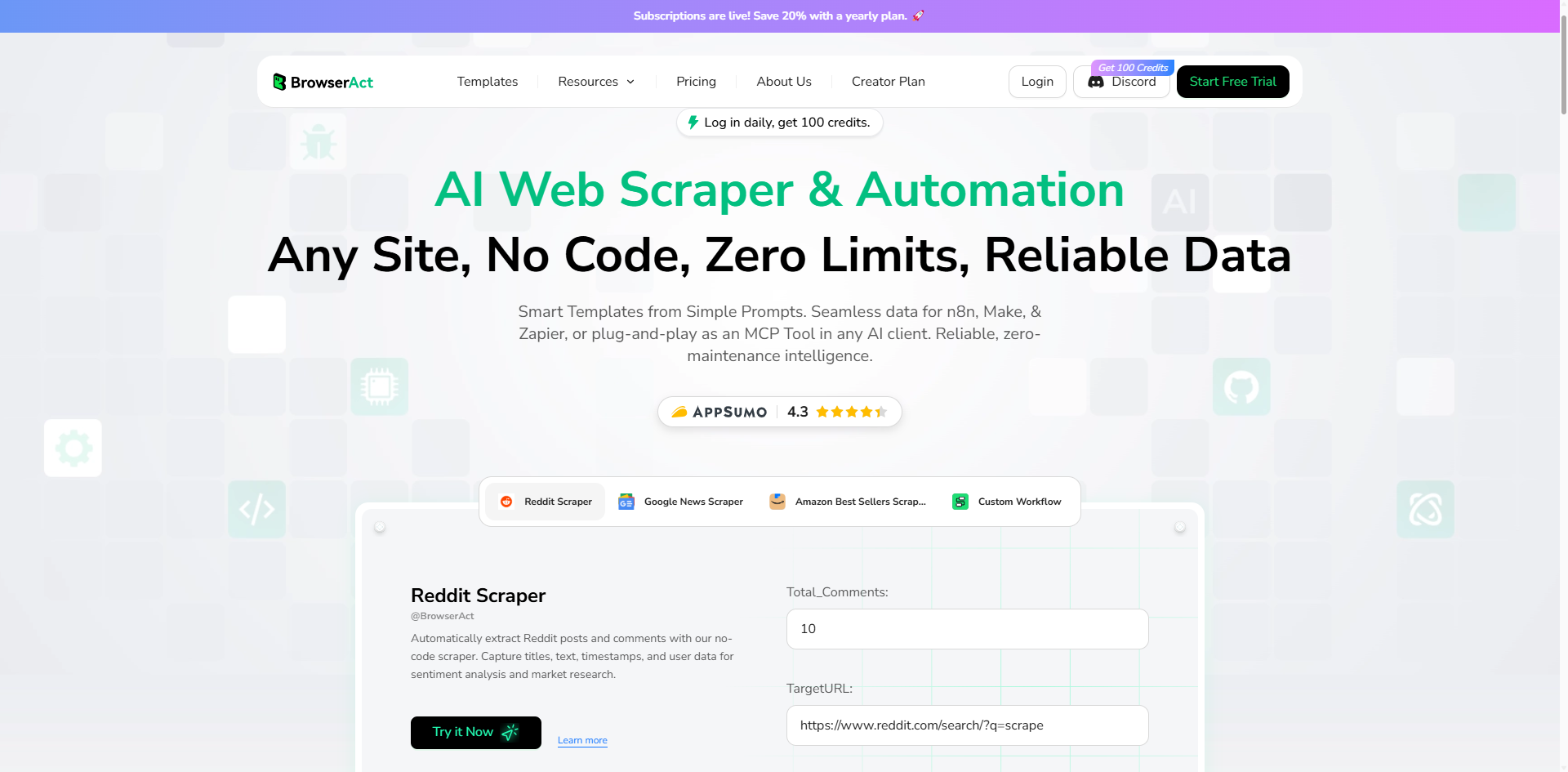
Whether you're using Clawdbot to research markets, negotiate deals, monitor competitors, or manage business operations, integrating BrowserAct's API gives you enterprise-grade web scraping and automation capabilities—controlled through natural conversation.
The combination is powerful: Clawdbot handles the conversation, memory, and coordination. BrowserAct handles the precise, reliable data extraction. Together, they create an AI assistant that truly works.
Ready to experience the future of AI automation? Combine Clawdbot with BrowserAct to build your ultimate AI assistant. Try BrowserAct now →


