What Is n8n and How to Use It: Automation Guide 2026

What is n8n and how to use it? Complete guide to n8n automation platform. Learn features, workflows, real use cases, pricing, and how to get started today.
If you've ever wished you could automate those tedious, repetitive tasks that span multiple apps—whether for business, IT operations, or personal productivity—without needing advanced coding skills, n8n might be exactly what you're looking for.
As a workflow automation platform, n8n lets you run scheduled tasks and seamlessly move data between all the different apps, tools, platforms, and services your team uses daily. Whether you're syncing your CRM with your project management software, automating invoice generation, or scraping competitor pricing data, n8n handles it all.
In this comprehensive guide, we'll break down what n8n is, how it works, and why so many teams choose it over other automation tools. We'll also explore real-world use cases, pricing options, and deployment methods to help you determine if n8n is the right fit for your projects or business needs.
What Is n8n?
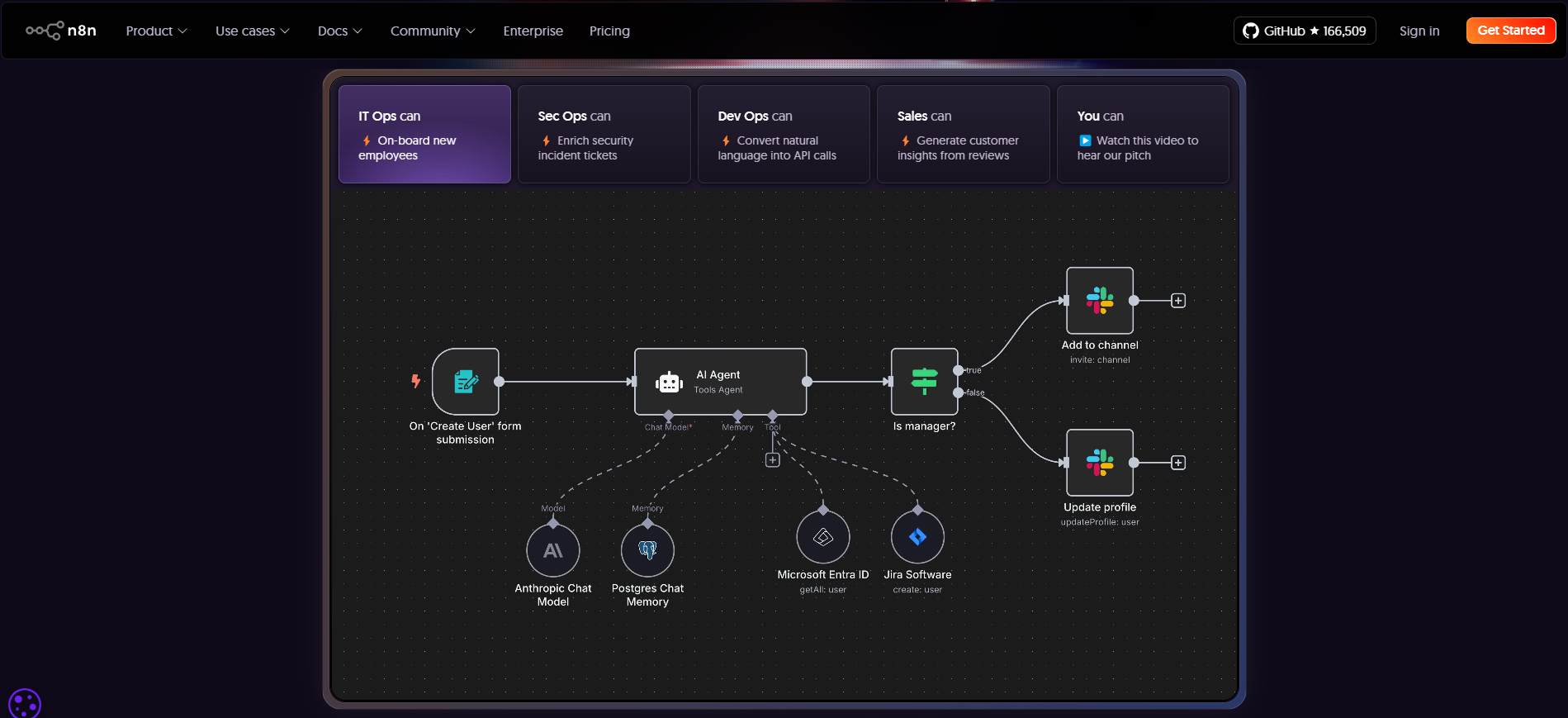
n8n (pronounced "en-eight-en" or sometimes called "nodemation") is an automation tool designed to help you create custom workflows. Think of it as your digital assistant that handles repetitive tasks for you—things like running scheduled operations, connecting systems that don't naturally talk to each other through n8n's integrations, and automatically transferring data between different applications.
Traditionally, building automation workflows required significant coding expertise. That's where n8n shines. It provides a visual interface along with ready-to-use workflow templates, allowing you to boost efficiency quickly without building custom automation tools from scratch.
What makes n8n particularly attractive is its flexibility. Unlike many automation tools that lock you into their cloud infrastructure, n8n can be self-hosted, giving you complete control over your data and workflows. This makes it especially popular among:
- Developers and technical teams
- Organizations with strict data privacy requirements
- Companies in regulated industries (healthcare, finance, legal)
- Businesses looking to reduce automation costs
- Teams that need advanced customization capabilities
How n8n Works and How to Use It
Imagine n8n as a puzzle made up of different applications, where each puzzle piece is called a node. Each node represents a specific action—like sending an email, updating a spreadsheet, or fetching data from an API.
When you connect these nodes together, they form a workflow—a series of automated actions that execute based on a triggering event. Because n8n is a no-code automation platform, these nodes are configured through a visual interface, eliminating the need to write custom code for basic workflows.
What sets n8n apart is its flexibility in handling everything from simple two-step automations to complex, multi-step processes. Industries across the board use it to automate countless workflows.
Understanding Node Types in n8n
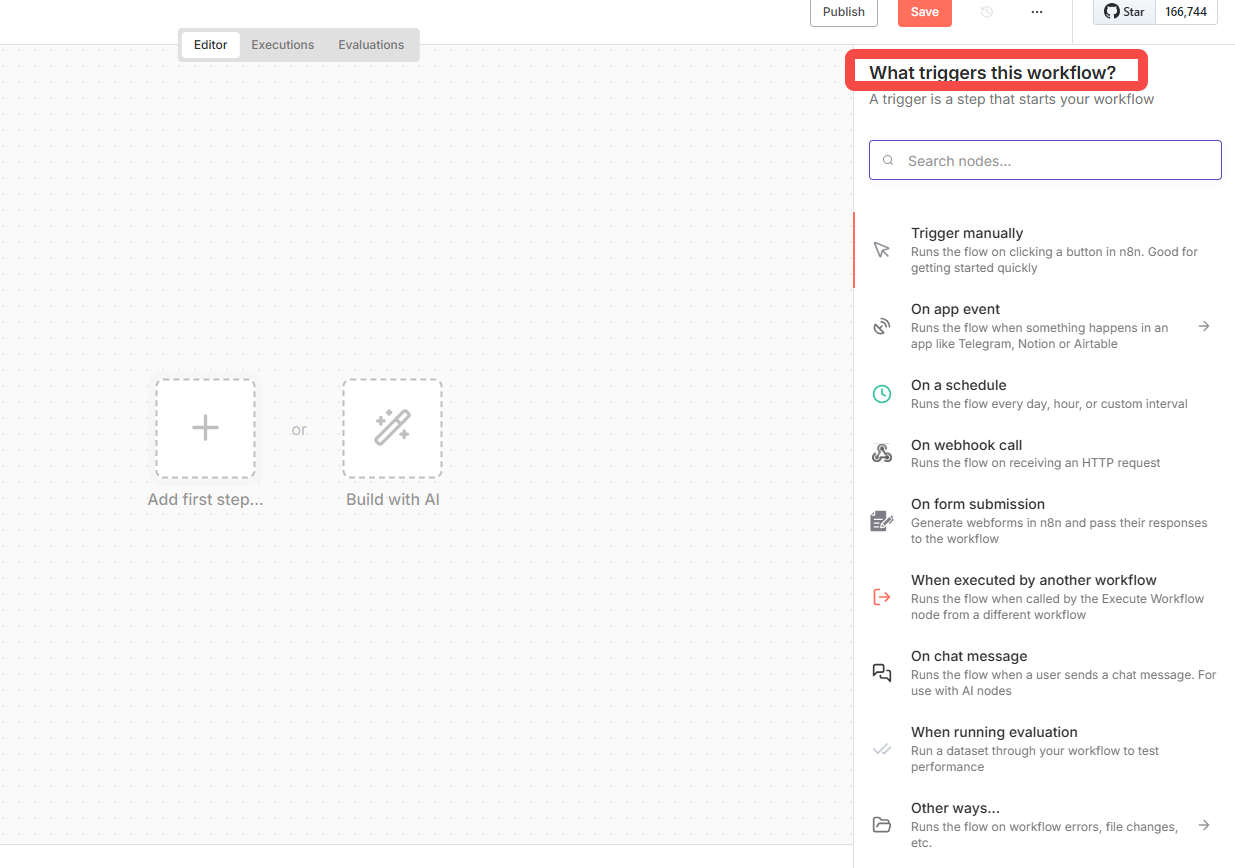
n8n workflows are built using different types of nodes, each serving a specific purpose:
Trigger Nodes:
These kickstart your workflow. A trigger could be:
- A new form submission on your website
- An incoming email to a specific inbox
- A scheduled time (e.g., every Monday at 9 AM)
- A webhook receiving data from another service
- A new row added to a Google Sheet
- An event from another application
Action Nodes:
These define the logic, applications, and specific actions within your workflow. Actions can be straightforward, like:
- Writing data to a database
- Sending a Slack notification or email
- Updating a task in Asana or Trello
- Creating a record in Salesforce or HubSpot
They can also be more sophisticated:
- Sending HTTP requests to custom APIs
- Executing custom Python or JavaScript code
- Processing data with conditional logic
- Combining your data with AI prompts to generate intelligent responses
- Transforming data formats (JSON, XML, CSV)
- Performing mathematical calculations or data analysis
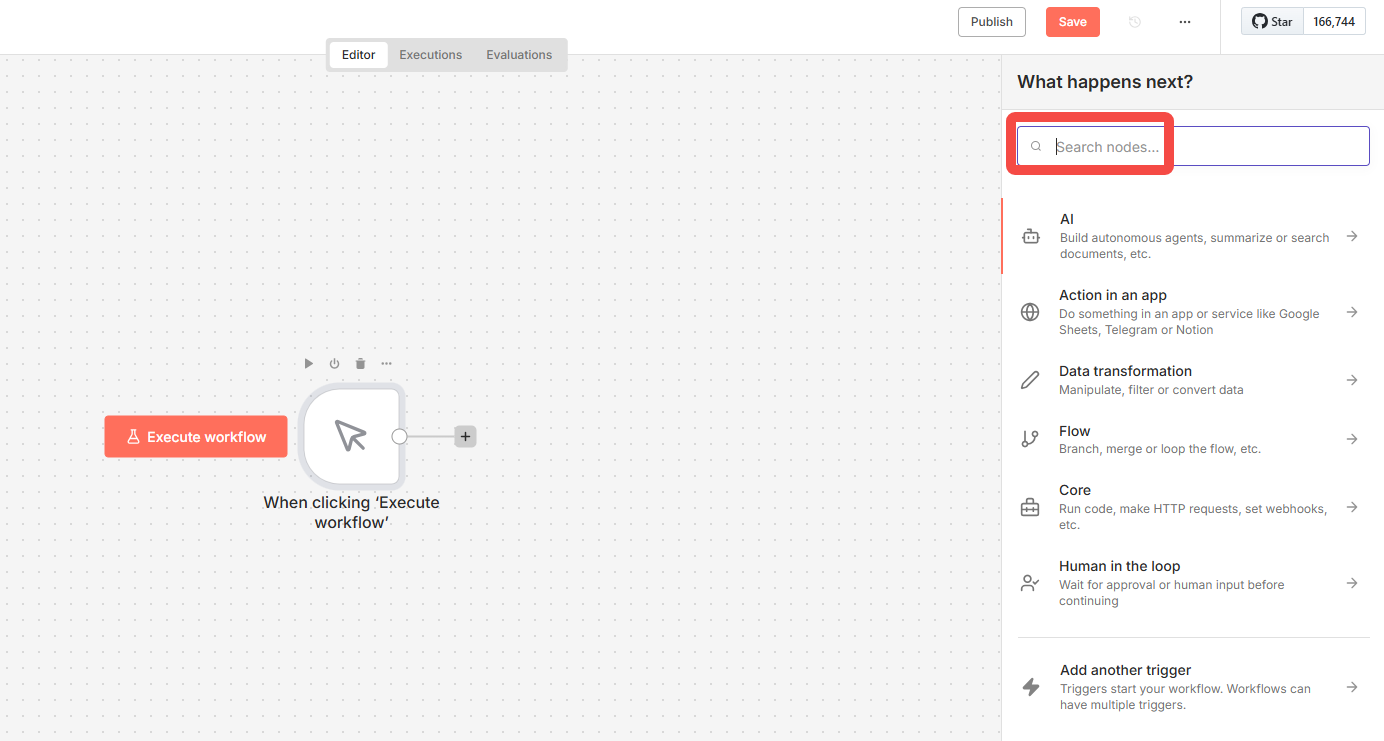
Once you've built your workflow, n8n automatically executes all the actions in the correct sequence whenever the trigger condition occurs, requiring no manual intervention.
Common n8n Use Cases
n8n's versatility makes it valuable across numerous scenarios. Here are some of the most popular ways teams are using it:
1. Notifications and Alerts
Notification workflows are among n8n's most common applications. Based on your trigger node type, workflows can automatically send alerts to any supported platform, essentially creating a "message bridge" between systems.
Example:
When a customer places an order on your e-commerce site, n8n automatically:
- Notifies your team via Slack in the #orders channel
- Sends a confirmation email to the customer
- Triggers SMS alerts to your fulfillment center
- Updates inventory levels in your database
- Creates a shipping label in ShipStation
2. Cross-Platform Data Synchronization
Keeping data consistent across different platforms is tedious, time-consuming, and error-prone. With n8n, you can set up bidirectional sync to solve this problem effortlessly, especially when combined with intelligent automation tools like BrowserAct.
Real-World Example: Automated WooCommerce Inventory Sync
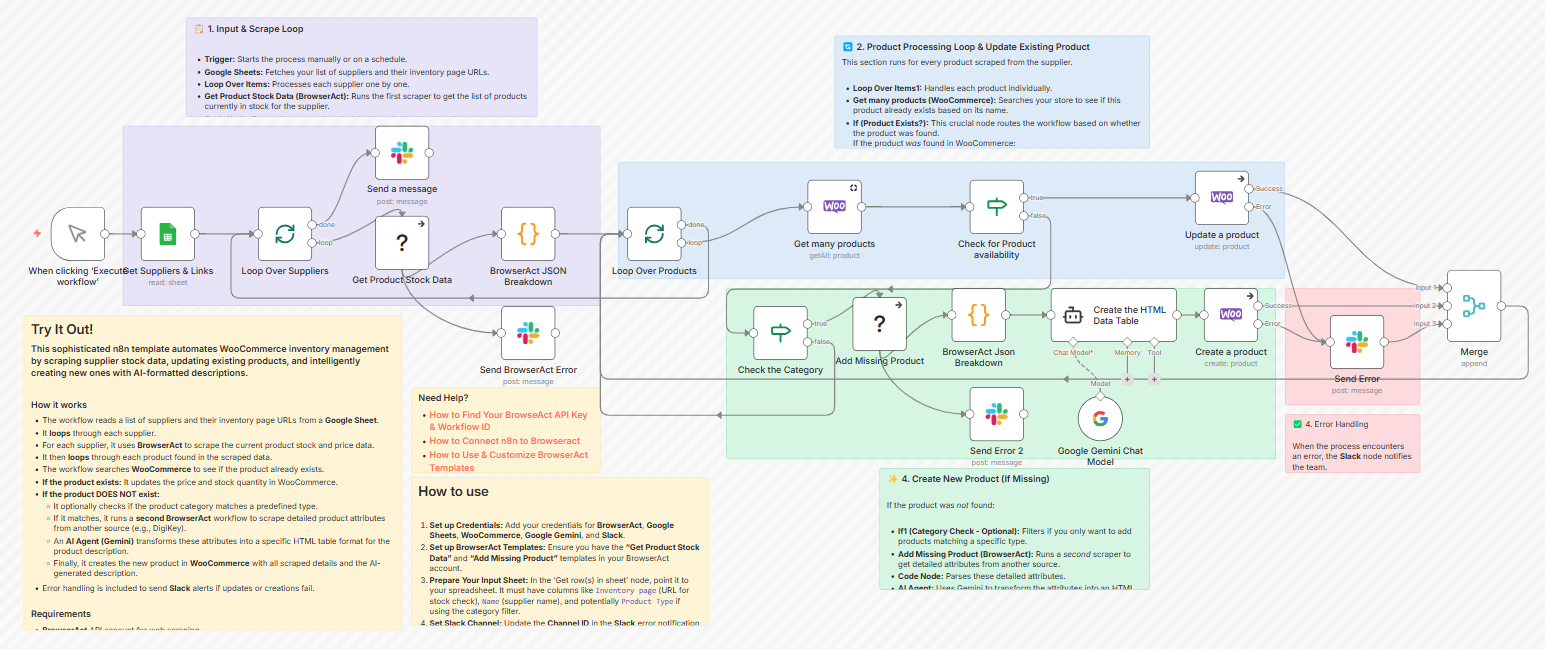
E-commerce businesses and dropshippers often struggle with keeping their online store inventory synchronized with supplier data. Using n8n with BrowserAct, you can automate the entire process:
The workflow works like this:
- A schedule trigger runs automatically (e.g., every 6 hours) to check stock levels
- It reads your supplier list and inventory page URLs from a Google Sheet
- BrowserAct node scrapes the current stock and pricing data from each supplier's website—even if they don't offer an API
- Google Gemini AI processes and structures the scraped data intelligently
- The workflow checks if products already exist in your WooCommerce store
- It automatically updates existing products or creates new ones with correct pricing and stock levels
This eliminates manual data entry, prevents overselling, and ensures your customers always see accurate inventory information. Check out this complete workflow template to see how it works.
Additional sync scenarios:
- Google Calendar ↔ Outlook Calendar for team scheduling
- Airtable ↔ Notion for project management
- Shopify ↔ QuickBooks for e-commerce accounting
- Mailchimp ↔ CRM for email marketing campaigns
3. Invoice and Payment Processing
For businesses running online stores or subscription services, n8n can dramatically streamline payment operations.
It can handle:
- Payment retries for failed transactions
- Managing recurring billing cycles
- Updating payment statuses across systems
- Integrating with fraud detection services (Stripe Radar, Sift)
- Logging payment records in accounting systems
- Automatically generating and emailing invoices to customers
Example:
When a Stripe payment succeeds, n8n automatically:
- Creates an invoice in QuickBooks
- Sends a receipt to the customer via email
- Updates the order status in Shopify to "Paid"
- Posts a notification to your company's finance Slack channel
- Triggers fulfillment workflow
- Updates customer lifetime value in your CRM
All without manual intervention.
4. Automated Report Generation
Preparing reports before weekly meetings often wastes valuable time. Let n8n handle it automatically.
You can configure workflows to:
- Pull data from multiple sources (Google Analytics, CRM, social media)
- Populate report templates automatically
- Add generated document links to meeting invitations
- Ensure reports are ready before every meeting
- Send different report versions to different stakeholders
Example:
Every Monday morning at 8 AM, n8n:
- Pulls website analytics from Google Analytics
- Fetches sales data from your CRM
- Retrieves social media metrics from Hootsuite
- Compiles everything into a weekly performance dashboard
- Generates charts and visualizations
- Emails the report to all stakeholders
- Posts a summary to the team Slack channel
5. Web Scraping and Data Collection
Need to gather information from multiple sources? This is where BrowserAct, an AI-powered web scraper and automation platform, truly shines as an n8n integration. BrowserAct functions as a powerful scraping node within n8n, allowing you to extract data from websites, systems, or applications without writing any code—then automatically structure it and store it wherever you need.
Real-World Use Cases with Ready-to-Use Workflows:
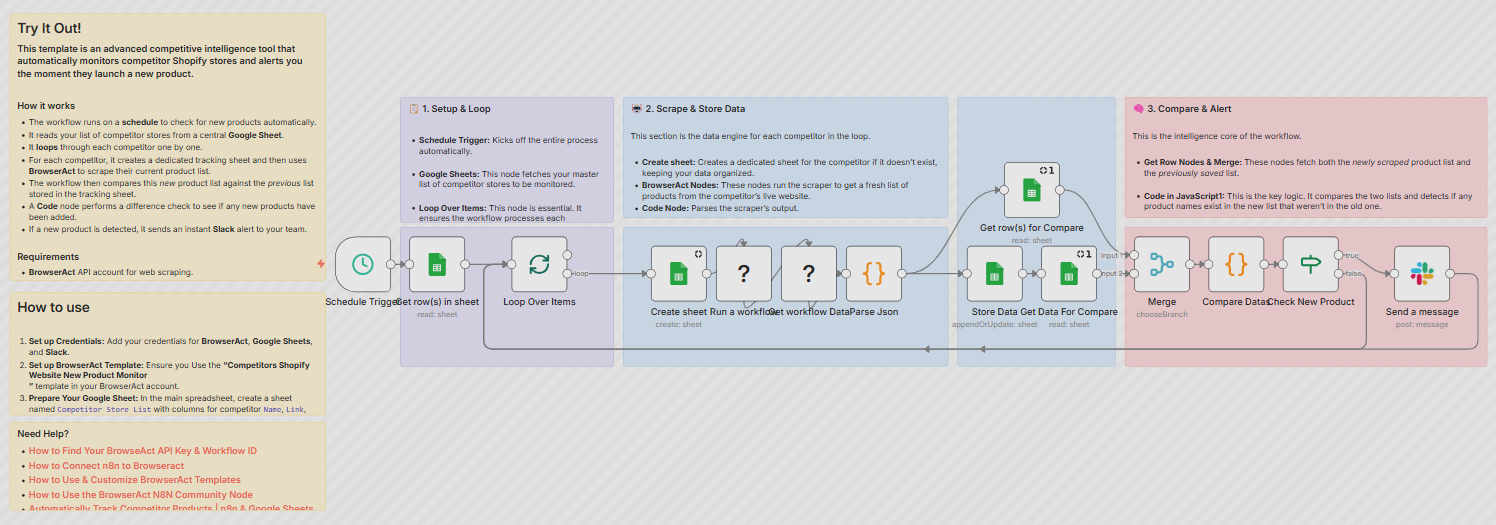
- Competitor & market monitoring: Track Shopify stores for new products and get instant Slack alerts when competitors launch items, change pricing, or update their catalog
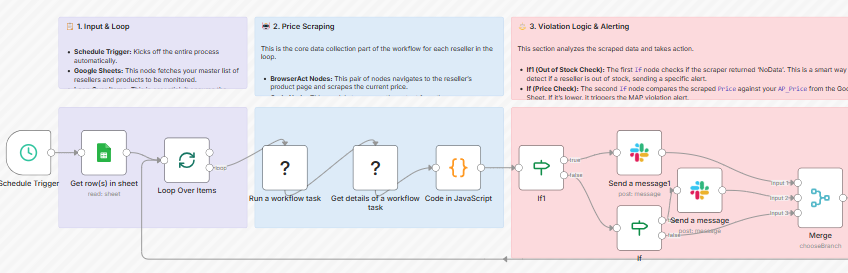
- Price tracking & MAP enforcement: Monitor real-time pricing violations across retailers with automated alerts when they violate your Minimum Advertised Price policy
- Job posting automation: Automate job posting across multiple boards like Indeed, LinkedIn, and ZipRecruiter from a single Google Sheet

- Product review analysis: Scrape and analyze reviews from Amazon or your own site, then use AI to generate insights on trends, sentiment, and customer complaints

Additional Use Cases:
- Industry trend analysis by monitoring news sites and trade publications
- Brand mention tracking across social media and news outlets
- Real estate listing monitoring for investment opportunities
- Stock market and financial data collection
- Lead generation by scraping business directories
- Academic research and data gathering
Why Use BrowserAct in n8n?
- Ready-to-use scraper library: Hundreds of pre-built scrapers for popular websites—call them directly from your n8n workflow with no configuration needed
- No-code scraper builder (free): Build custom scrapers yourself without writing any code using the visual workflow builder
- Always-on cloud infrastructure: Your automations run 24/7 with zero downtime or server management
- Crystal-clear data: Automatically removes ads and irrelevant content for clean, structured results
- Global residential IP coverage: Effortlessly bypass geo-restrictions from anywhere
- Human-like interactions: Intelligently bypasses CAPTCHAs and verification automatically
Getting Started with BrowserAct:
- In n8n: Simply search for "BrowserAct" in the node library and add it to your workflow. The node is verified and ready to use right away.
- Standalone Use: Visit browseract.com to try BrowserAct's web interface for free. Perfect if you need quick scraping without building a full workflow.


- Ready-to-Use Templates: Browse hundreds of pre-built scraping templates for common use cases, or use the visual workflow builder to create custom scrapers.
Ready to automate your data collection? BrowserAct offers a generous free tier to get started—no credit card required. Whether you need to monitor competitors, track prices, analyze reviews, or gather market intelligence, BrowserAct + n8n makes web scraping accessible, reliable, and powerful.
Start scraping for free today and transforming how you gather web data.
6. Smart Home Automation
n8n isn't limited to business applications—it can also power home automation systems, controlling smart devices and extending your home network capabilities.
Example scenarios:
- Leaving home: When you leave (detected by your phone's location), n8n automatically turns off smart lights, adjusts the thermostat to energy-saving mode, arms your security system, and locks smart locks
- Arriving home: When you return, it reverses these actions and even starts your coffee maker or turns on your favorite playlist
- Bedtime routine: At 10 PM, dim the lights, lock all doors, set the thermostat for sleeping temperature, and arm the security system
- Weather-based automation: When rain is forecasted, close smart blinds and adjust sprinkler schedules
n8n Pricing and Costs
Self-hosting n8n is completely free, so your costs depend entirely on your chosen hosting method.
n8n Cloud Pricing
If you opt for n8n's official cloud version:
- Starter Plan: $20 per month - Typically covers most basic project needs
- Pro Plan: $50 per month - For more complex projects or team collaboration requirements
- Enterprise: Custom pricing - For large organizations with advanced needs
Cloud plans include:
- Hosted infrastructure (no server management)
- Automatic updates and maintenance
- Built-in backups and reliability
- Technical support
- Workflow execution monitoring
Self-Hosted Options
VPS Hosting (Recommended):
If you prioritize customizability and complete control, consider installing the self-hosted version on a VPS (Virtual Private Server):
- Hostinger KVM 2: Starting at $5.99/month
- DigitalOcean Droplet: Starting at $6/month
- Linode: Starting at $5/month
- Vultr: Starting at $6/month
Through their control panels, you can install n8n on Ubuntu with just a few clicks.
Local Installation (Free):
For the more technically adventurous, you can run n8n for free on:
- Your local computer using Node.js or Docker
- A Raspberry Pi or other single-board computer
- An old laptop repurposed as a home server
While slightly more involved than using a VPS, it's a great option if you just want to test or explore n8n before committing to paid hosting.
How to Use n8n?
Starting with n8n is straightforward, regardless of which deployment method you choose:
Option 1 - n8n Cloud (Easiest)
Best for: Quick start, no technical setup required
Steps:
- Visit n8n.io and sign up for an account
- Choose your plan (free trial available)
- Access the workflow editor immediately
- Start building workflows from templates or scratch
- No installation, maintenance, or server management needed
Perfect for getting started quickly or if you don't want to manage infrastructure.
Option 2 - Self-Hosted on VPS (Most Popular)
Best for: Full control, data privacy, cost savings
Steps:
- Rent a VPS from providers like DigitalOcean, Linode, or Hostinger
- Install Docker on your server
- Run n8n using Docker:
docker run -d --name n8n -p 5678:5678 n8nio/n8n - Access n8n through your browser at your server's IP address
- Configure domain name and SSL certificate (optional but recommended)
Gives you full control over data and customization.
Option 3 - Local Installation (Free Testing)
Best for: Learning, development, testing
Using Docker Desktop:
docker run -d --name n8n -p 5678:5678 -v ~/.n8n:/home/node/.n8n n8nio/n8n
Using npm (Node.js):
npm install n8n -g
n8n start
Access at http://localhost:5678
Ideal for development, testing, or learning before deploying to production.
How to Bulid Your First n8n Workflow
Once installed, the n8n interface provides an intuitive visual workflow editor:
- Choose a trigger: Select how your workflow will start (webhook, schedule, email, etc.)
- Add action nodes: Drag and drop nodes to define what happens
- Connect nodes: Draw connections to create the workflow flow
- Configure each node: Set up credentials and parameters
- Test your workflow: Use the manual execution feature to verify it works
- Activate: Turn on your workflow to run automatically
Advanced n8n Features
As you become more comfortable with n8n, you can leverage advanced features:
Custom Code Execution
- Function nodes: Write JavaScript directly in your workflow
- Python nodes: Execute Python code for data processing
- Execute Command: Run shell scripts on your server
Conditional Logic and Branching
- IF nodes: Create conditional workflows based on data
- Switch nodes: Route data to different paths based on values
- Merge nodes: Combine data from multiple branches
Error Handling
- Error Trigger nodes: Handle failures gracefully
- Retry logic: Automatically retry failed operations
- Error notifications: Get alerted when workflows fail
Workflow Organization
- Tags and folders: Organize complex workflow libraries
- Workflow templates: Save and reuse workflow patterns
- Version control: Track changes to your workflows
- Subworkflows: Break complex automations into reusable components
Database Integration
- Direct connections to databases:
- PostgreSQL
- MySQL
- MongoDB
- Microsoft SQL Server
- Redis
- Elasticsearch
API and Webhook Capabilities
- Webhook triggers: Receive data from external services
- HTTP Request nodes: Call any REST API
- Authentication: Support for OAuth, API keys, basic auth
- Request/Response transformation: Manipulate data formats
AI Integration with Model Context Protocol (MCP)
- n8n MCP Server & Client nodes: Connect n8n with AI assistants like Claude, exposing workflows as tools that AI can call or consuming external MCP tools like BrowserAct MCP
- Bidirectional integration: Make n8n workflows accessible to AI agents, or let n8n agents use external AI-powered tools
- AI-powered workflow building: Use AI assistants to help design, build, and optimize your n8n workflows
- Context-aware automation: Enable AI to understand your workflow context and make intelligent decisions
Conclusion: Is n8n Right for You?
n8n is an exceptional automation platform that bridges the gap between no-code simplicity and developer-level power. It's particularly well-suited for teams needing complex automation, organizations with data privacy concerns, developers wanting flexibility, and businesses looking to reduce costs compared to cloud-only platforms. Whether you're automating customer onboarding, synchronizing data across your tech stack, generating reports, or building smart home integrations, n8n provides the tools and flexibility to make it happen.
Ready to supercharge your n8n workflows with intelligent web scraping? Add BrowserAct to your automation toolkit and unlock powerful data collection capabilities.
Try BrowserAct free and start building smarter automations today.


