How to Install BrowserAct's Agent Skills in OpenClaw

Learn how to install BrowserAct skills in OpenClaw. Get enterprise web scraping, CAPTCHA bypass, and automation working in 5 minutes—no coding needed.
OpenClaw is taking the AI agent world by storm. Developers and automation enthusiasts are flocking to this powerful framework for its flexibility and extensibility. But there's a catch—and if you've recently deployed OpenClaw, you've probably experienced it firsthand.
The OpenClaw Reality Check: Deployment is Just the Beginning
You've successfully installed OpenClaw. Congratulations! Now comes the hard part.
The Common Post-Deployment Struggles
- The CAPTCHA Wall: Your first attempt to scrape a website hits you with "Access Denied" or an endless loop of "Select all images with traffic lights." Modern websites have sophisticated anti-bot systems, and OpenClaw's raw requests often trigger them immediately.
- The Token Drain: Without optimized skills, OpenClaw can burn through API tokens at an alarming rate. A simple task that should cost pennies ends up consuming your monthly budget because the agent is making inefficient calls, retrying failed requests, and processing data suboptimally.
- The Configuration Maze: You want OpenClaw to summarize daily news. Simple enough, right? But now you're deep in documentation trying to figure out how to structure the prompt, handle rate limits, parse different news site formats, manage errors, and format the output. What should take 5 minutes has turned into a multi-day development project.
- The Anti-Scraping Gauntlet: Even when you get past CAPTCHAs, websites deploy IP blocking, browser fingerprinting, and behavioral analysis. Your requests get flagged as bot traffic, and you're locked out before you've collected any useful data.
The Skill Development Bottleneck: The real power of OpenClaw lies in custom skills—modular capabilities that extend what your agent can do. But creating these skills from scratch requires:
- Understanding OpenClaw's skill architecture
- Writing and testing custom code
- Handling edge cases and errors
- Maintaining skills as websites change
- Debugging when things inevitably break
For most users, this translates to weeks of development time before they can accomplish even basic automation tasks. The promise of AI-powered automation feels frustratingly out of reach.
Why Users Need Ready-Made Skills
The truth is, you don't want to be a skill developer—you want results. You need your AI agent to start working for you today, not after weeks of coding and troubleshooting. You want to focus on the insights and automations that drive value, not on the technical plumbing underneath.
This is where pre-built agent skills become essential. They're the difference between an OpenClaw installation that sits idle and one that actively transforms how you work.
What Are Agent Skills (and Why They Matter)
Before we dive into the solution, let's clarify what agent skills actually are and why they're the key to unlocking OpenClaw's potential.
Understanding Agent Skills
Skills are reusable capability packages designed specifically for AI agents to use. Think of them as professional handbooks that teach your agent how to perform specific tasks accurately and consistently.
When your agent needs to create a presentation, scrape competitor data, or generate reports, it references the relevant skill and follows its instructions to execute the work—just like a professional would reference a standard operating procedure.
Skills Are Folders, Not Just Prompts
Here's a crucial distinction many people miss: Skills aren't simple text prompts. They're complete capability packages organized as folders:
my-skill/
├── SKILL.md          # Core instructions (required)
├── reference.md      # Reference docs (optional)
├── examples.md       # Usage examples (optional)
├── scripts/          # Utility scripts (optional)
└── helper.py
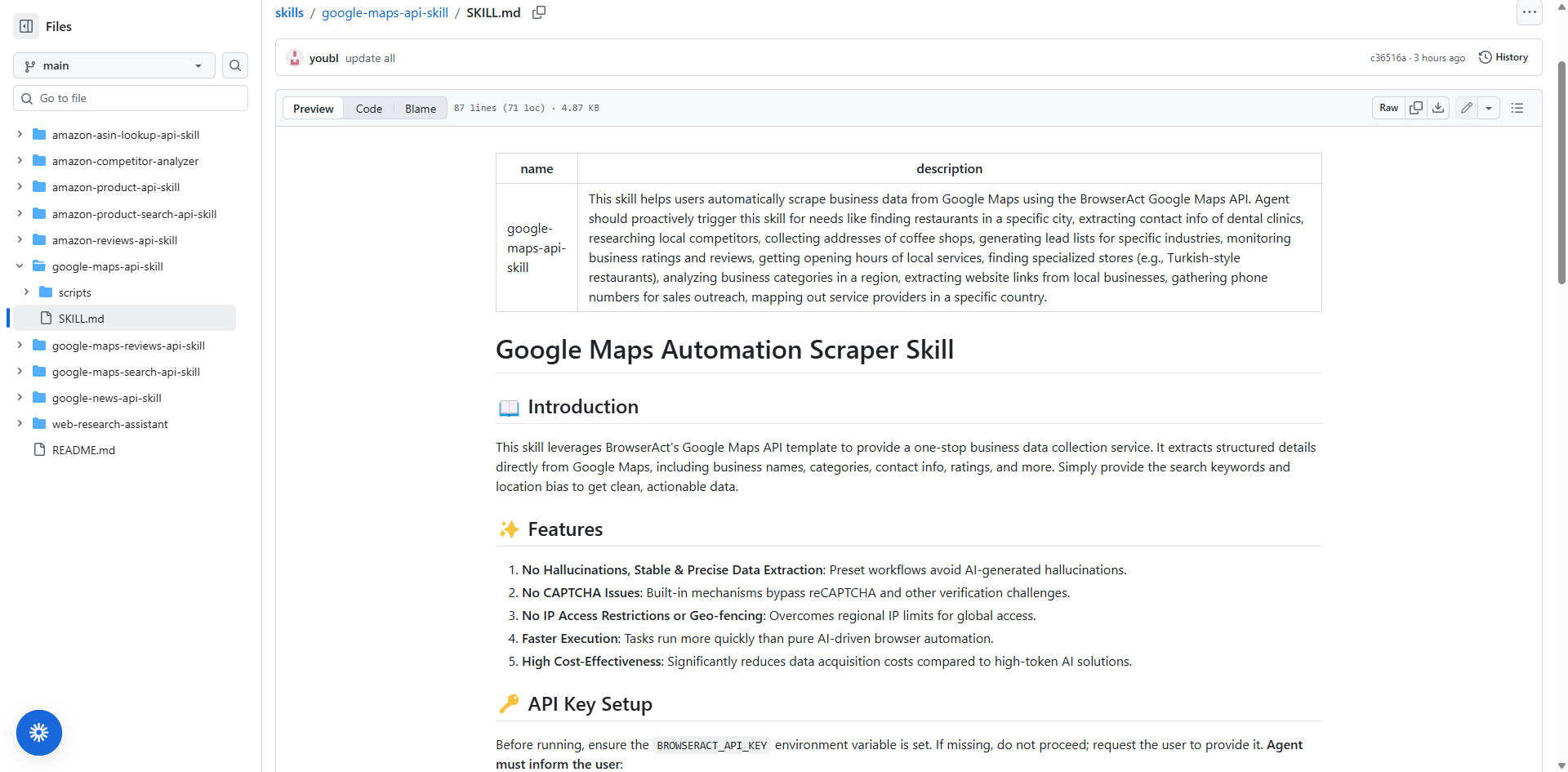
Skills Are Like Workflows—But Better
Agent + Skills can replicate almost any workflow-based AI task, but with a fundamental difference: skills offer more flexibility, adaptability, and natural language interaction compared to rigid workflow systems.
Traditional workflows lock you into predefined sequences. Skills enable intelligent agents that adapt based on context, learn from your feedback, and evolve with your needs—all controlled through conversation.
Why Skills Matter in 2026
The Agent Skills open standard represents a paradigm shift in how we work with AI:
- Portability Across AI Platforms: For the first time, a specialized workflow designed for a Claude-based agent can be seamlessly understood and executed by an OpenAI ChatGPT instance or a Microsoft Copilot. Skills follow an open standard that works with OpenClaw, Claude (Claude.ai and Claude Code), Cursor, VS Code, GitHub Copilot, OpenAI Codex, and more. This "write once, use everywhere" approach saves an enormous amount of time and effort—no vendor lock-in.
- Reusability Eliminates Repetitive Prompting: Instead of explaining the same task every time, install a skill once and your AI agent automatically knows how to handle similar requests. This saves hours of repetitive instruction-giving and reduces errors.
- Captures Organizational Knowledge: Skills allow teams and companies to package their unique, internal knowledge into "portable, version-controlled packages". Your team's best practices, workflows, and domain expertise become portable assets that new team members can leverage immediately.
- From Instruction to Deployment: The paradigm shift is clear—you're no longer a prompt engineer giving constant directions. You're a capability architect deploying reusable packages that make your AI agent progressively smarter and more specialized.
The Problem: Most Skills Still Require Development
Here's where reality hits: while the Skills standard is powerful, agents are increasingly capable, but often don't have the context they need to do real work reliably. Creating these skills from scratch still requires technical expertise, time, and understanding of the SKILL.md format.
Most OpenClaw users face a chicken-and-egg problem:
- They need skills to make OpenClaw productive
- But creating skills requires effort they don't have time for
- So OpenClaw sits underutilized
This is where BrowserAct's ready-to-use skills library becomes essential.
Why OpenClaw + BrowserAct Skills Make Perfect Sense
BrowserAct has solved the skill creation bottleneck by building a curated library of production-ready skills at github.com/browser-act/skills. These aren't starter templates—they're complete, tested skills you can install and use immediately.
Solving OpenClaw's Biggest Pain Points
Let's map BrowserAct skills directly to the problems we identified at the beginning:
1. CAPTCHA and Anti-Bot Systems? Solved.
BrowserAct's infrastructure handles them automatically. Your skills just work, even on heavily protected sites—no more "Access Denied" errors or CAPTCHA loops.
2. Token Drain? Eliminated.
Optimized skills with intelligent caching and retry logic minimize API calls, saving you money on every automation instead of burning through your monthly budget.
3. Web Scraping Failures? Gone.
BrowserAct runs real Chrome browsers with residential IPs, JavaScript rendering, and anti-fingerprinting—your scraping skills succeed where basic HTTP requests get blocked.
4. Automation Platform Complexity? Not Needed.
No more n8n, Zapier, or Make.com. Natural language instructions to your agent replace visual workflow builders entirely—closed-loop automation within OpenClaw.
5. Configuration Complexity? Pre-Solved.
Pre-configured templates mean you're using best practices from day one, no trial and error required. Install and run immediately.
6. IP Blocking? Bypassed.
Built-in residential proxy rotation across multiple countries ensures your requests look like legitimate traffic from real users, not datacenter bots.
7. Development Time? Zero.
Install with one command and start using. No SKILL.md format to learn, no debugging, no maintenance.
Why BrowserAct's Web Scraping Infrastructure Matters
1. Zero Development Required
Install with one command and start using immediately—no need to understand SKILL.md format, write instructions, or debug implementations. No learning curve, no trial and error.
2. Battle-Tested in Production
Used by real businesses for real automation tasks, with edge cases already handled, robust error logic built in, and proven reliability across thousands of executions.
3. Real Browser Automation
BrowserAct runs actual Chrome browser instances that execute JavaScript, handle cookies, and mimic human behavior to remain undetectable—not simple HTTP requests, but sophisticated browser automation that works where basic scrapers fail.
4. Advanced Anti-Detection Technology
Automatic CAPTCHA solving, residential IP rotation across multiple countries, intelligent request pacing, and adaptive fingerprinting that updates as websites change their defenses—all managed automatically.
5. 99% Success Rate
While basic scrapers get blocked, BrowserAct-powered skills just work—on heavily protected sites, JavaScript-heavy pages, geo-restricted content, and across different website types with consistent performance.
6. Zero Infrastructure Maintenance
No proxy management, no CAPTCHA subscriptions, no browser updates—BrowserAct's team handles everything, giving you enterprise capabilities without enterprise overhead.
7. Optimized for Cost Efficiency
Intelligent caching, smart retry logic, and efficient API call patterns minimize token waste and save money on every automation—lower total cost than building yourself.
8. Immediate Time to Value
From installation to productive automation in under 5 minutes, with no development time required and compound value as you add more skills.
Ready to Transform Your OpenClaw?
Stop letting your OpenClaw installation sit idle. Browse the BrowserAct skills repository, pick a skill that matches a task you're doing manually right now, and tell OpenClaw to install it.
In 5 minutes, you'll experience the difference between an AI agent and an AI agent with capabilities. Let's walk through exactly how to do it.
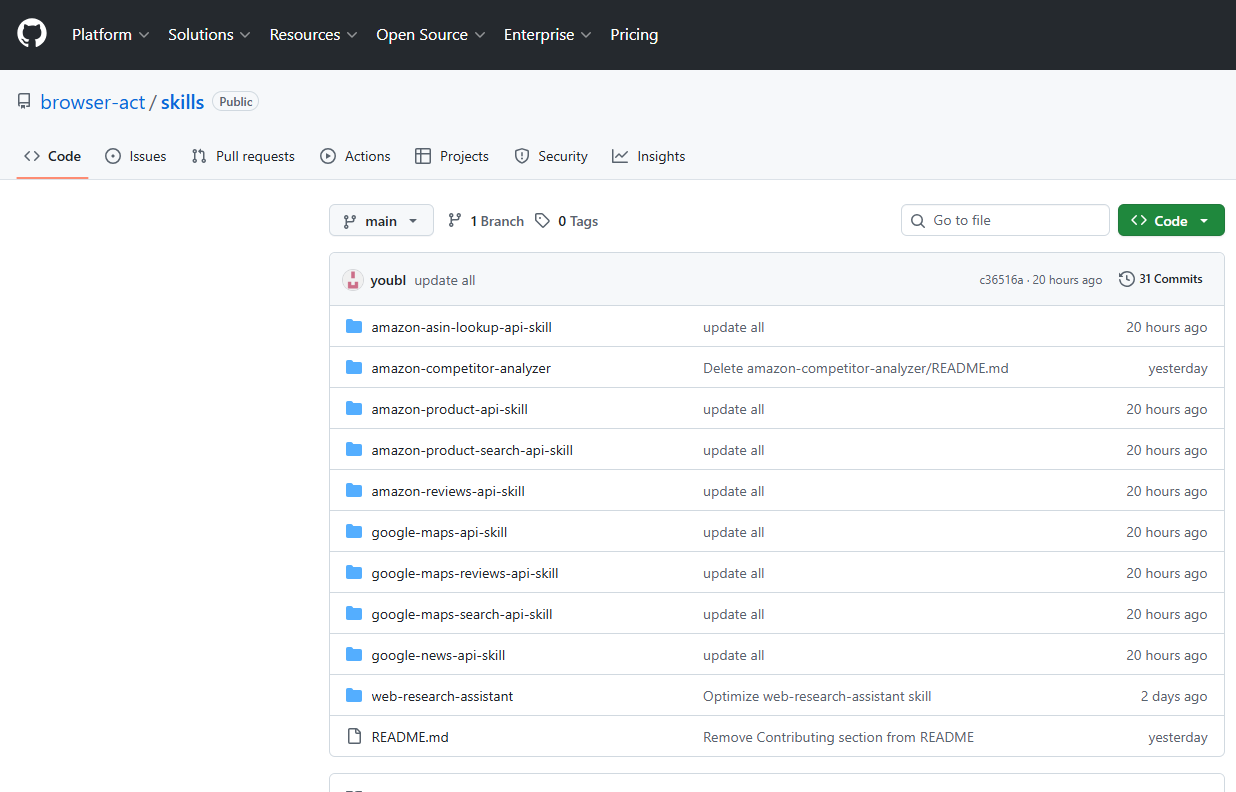
Step-by-Step: Installing Your First BrowserAct Skill in OpenClaw
Let's make this concrete with a practical walkthrough. We'll use Discord as our example platform, but the process is similar regardless of how you've integrated OpenClaw.
Prerequisites (5 Minutes to Get Ready)
- OpenClaw deployed and running: You've completed the installation process
- Platform integration configured: For this example, we're using Discord, but OpenClaw works with Slack, web interfaces, and other platforms
- A specific task in mind: We'll use news aggregation, but the process is identical for any skill
Step 1: Access Your OpenClaw Interface
Open Discord (or your chosen platform) and navigate to the channel where OpenClaw is active. You should see the OpenClaw bot online and ready to receive commands.
Step 2: Install a Skill with One Simple Command
Here's where the magic happens. To install the Google News API skill, simply send this message:
@openclaw help me install this skill: https://github.com/browser-act/skills/blob/main/google-news-api-skill/SKILL.md
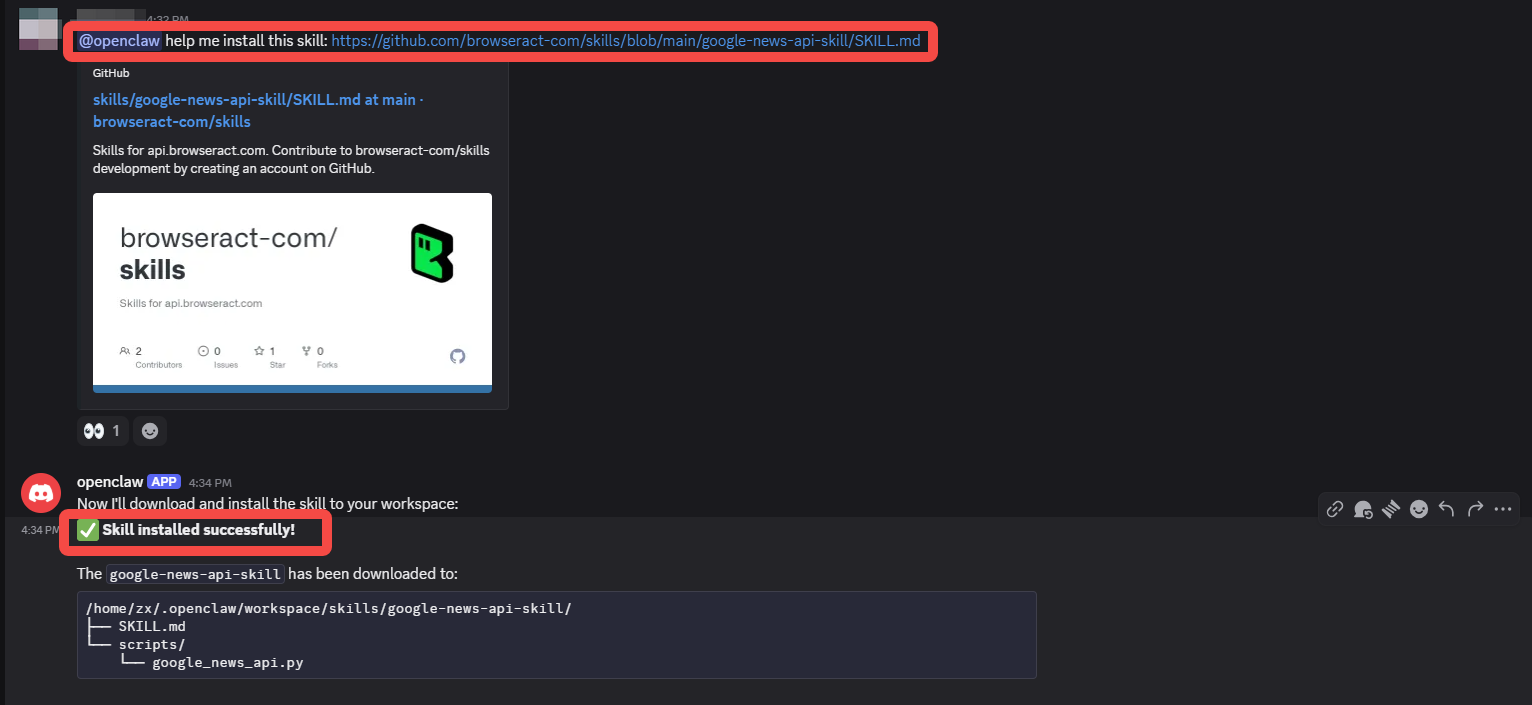
That's it. One line. OpenClaw will:
- Fetch the skill definition from GitHub
- Parse the requirements and capabilities
- Install all necessary components
- Prepare the skill for immediate use
You'll receive a confirmation message when installation completes—usually within seconds. The message will confirm the skill name and available commands.
What just happened? You gave OpenClaw a new capability without writing any code, configuring any workflows, or connecting to external platforms. This skill is now part of OpenClaw's toolset, ready to be invoked through natural language whenever you need it.
Step 3: Activate Your New Capability
Now you can start using natural language to interact with your newly installed skill. Try this command:
Give me the latest 10 news, and give me the daily report about today's news. @openclaw
Notice the conversational tone? You're not writing code or using technical syntax. You're not configuring triggers and actions in a workflow builder. You're simply telling OpenClaw what you need in plain English. The skill translates your intent into the technical operations required to fulfill your request.
This is the closed-loop in action. From your instruction to the result, everything happens within the agent environment. No data passed to external platforms. No workflow nodes to configure. Just natural conversation leading to automated execution.
Step 4: Connect Your BrowserAct API Key (The Secret Sauce)
At this point, OpenClaw will prompt you to provide your BrowserAct API key. This is a one-time setup step that unlocks the enterprise-grade scraping infrastructure we discussed earlier.
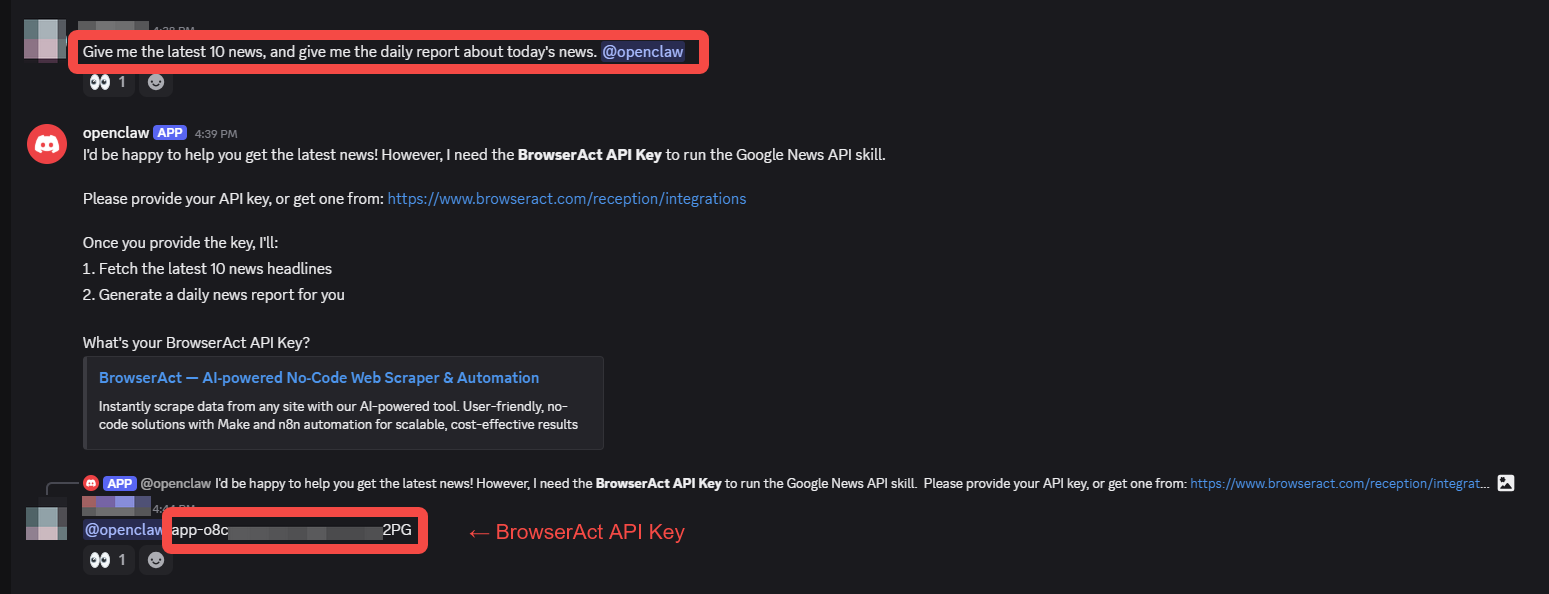
How to Get Your API Key:
- Visit https://www.browseract.com/reception/integrations
- Sign in or create a free account (BrowserAct offers generous free tier limits for getting started)
- Navigate to the Integrations section
- Copy your unique API key
- Paste it when OpenClaw prompts for authentication
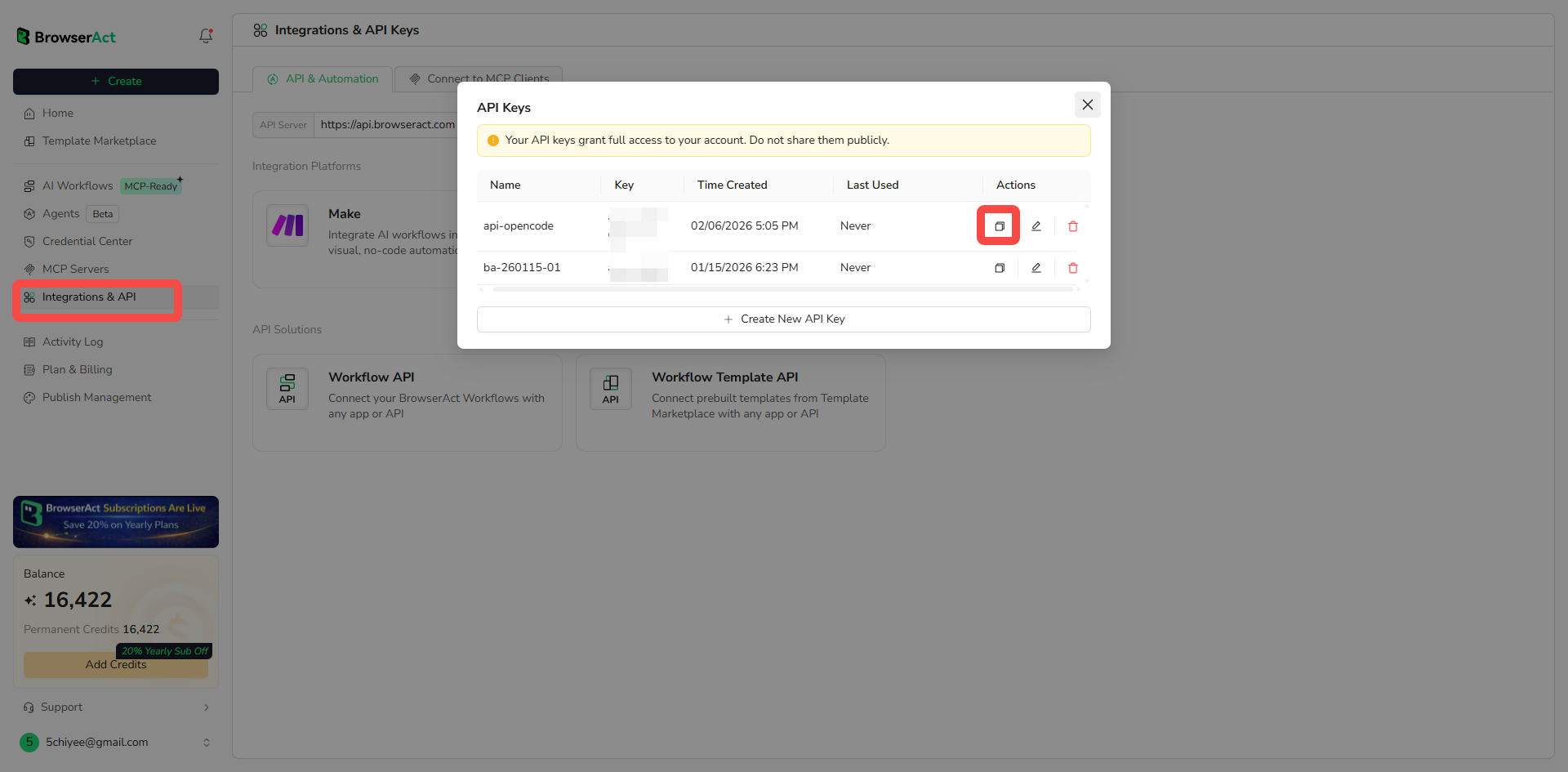
This key is reusable across all BrowserAct-powered skills. You configure it once and forget about it—every skill that needs web scraping capabilities will automatically leverage the same infrastructure.
Step 5: Watch Results Arrive
After providing your API key, OpenClaw gets to work. Here's what happens behind the scenes:
- Skill Activation: OpenClaw passes your natural language request to the installed skill
- BrowserAct Processing: The skill uses BrowserAct's infrastructure to fetch news from Google News, bypassing any anti-bot measures
- Data Extraction: Relevant articles are identified and extracted
- AI Processing: OpenClaw's LLM processes the raw data, summarizing key points and generating your daily report
- Formatted Delivery: You receive a clean, readable summary directly in Discord
The entire process typically takes 10-30 seconds, depending on the complexity of your request. And most importantly—it just works. No errors about being blocked, no CAPTCHA screens, no troubleshooting required.
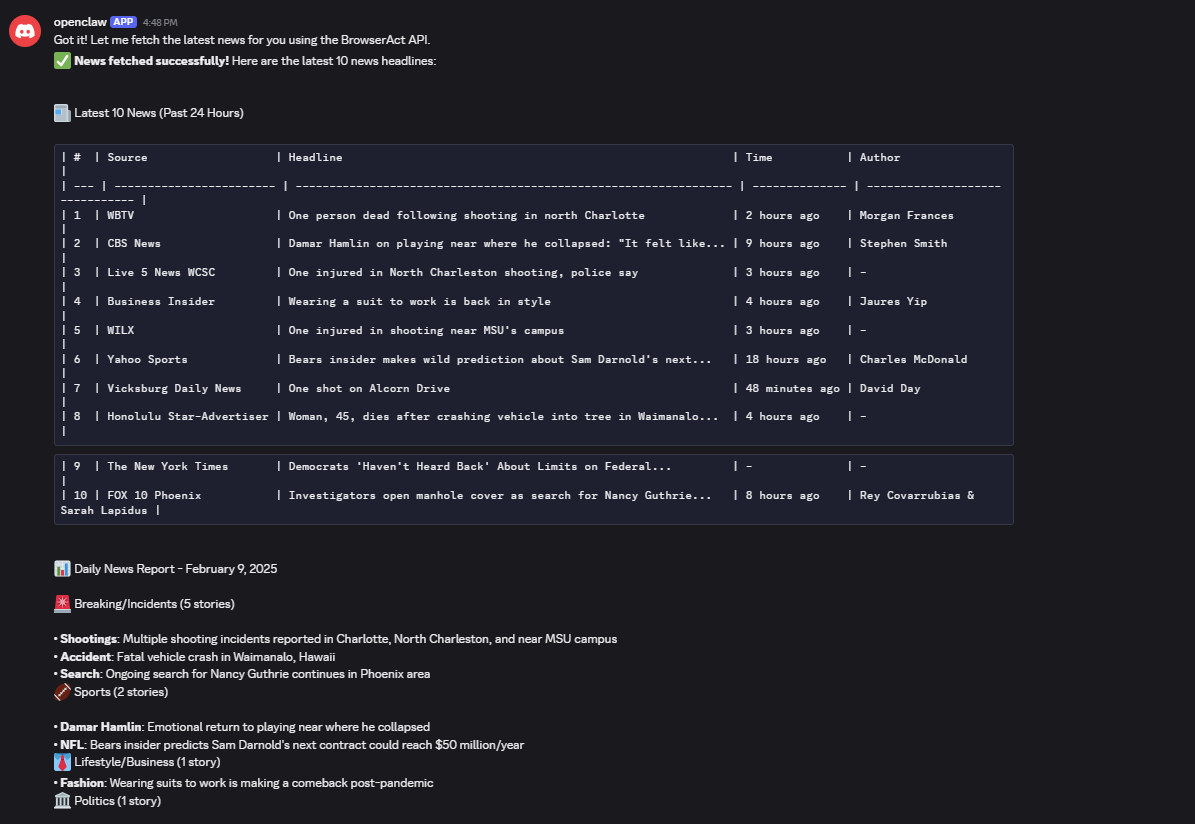
And here's the beautiful part: If you want to modify this automation, you don't open a workflow builder and reconfigure nodes. You just talk to OpenClaw differently:
"Actually, give me the top 15 news items instead of 10, and focus on AI-related stories."Or:
"Do this every morning at 8 AM and post the summary to our #team-updates channel."Natural language adjustments to natural language automations. The agent understands your intent and modifies its behavior accordingly. This is what closed-loop automation looks like—entirely self-contained, conversationally controlled, infinitely flexible.
You now have a working automation that you can refine, schedule, or combine with other skills—all through conversation, no platforms required.
Your Turn: Install Your Next Skill
The Google News skill is just one example. Browse the BrowserAct skills repository, find a skill for competitor monitoring, data extraction, or market research, and tell your agent: @openclaw install this skill: [paste skill URL]
Each skill takes 5 minutes to install. The power emerges through accumulation—don't stop at one.
The Bottom Line
OpenClaw is powerful, but power without usability is just potential. BrowserAct skills transform that potential into practical automation working today.
You deployed OpenClaw for AI-powered automation. BrowserAct skills deliver. No more fighting CAPTCHAs, burning tokens, or building workflows that break.
The future of automation isn't in workflow builders. It's in agents that understand natural language and execute intelligently.
Ready to Start?
- Browse skills now: github.com/browseract-com/skills
- Get your API key: browseract.com/reception/integrations
Install your first skill in the next 5 minutes. Pick one that automates something you're doing manually right now. Tell OpenClaw to install it. Watch it work.
Then install your second. Then your third. Each one takes 5 minutes. Each one compounds the value.
Stop configuring platforms. Start delegating to your agent.
Related reading: After installing the browser skill, compare it with six OpenClaw tools developers are using in 2026 to round out the agent toolchain.


