Instagram Competitor Analysis: Automate Public Profile, Post, and Comment Research

Instagram competitor analysis is not just “look at rival accounts and copy their best Reel.” The useful version is quieter and more disciplined: choose the right competitor set, collect public evidence consistently, compare posting cadence and engagement, read the comments, and turn patterns into experiments your own team can actually run. That is also where most teams get stuck. The first spreadsheet is easy. The fifth weekly update is where rows go stale, formulas drift, screenshots disappear,
- 1Instagram competitor analysis should answer a business question: which competitors are gaining attention, which formats work, what their audience reacts to, and what experiments your team should run next.
- 2This guide uses a five-part research map: competitor set, public profile snapshots, post and Reels performance, comment themes, and recurring reporting.
- 3A spreadsheet is fine for a small one-off audit; a prompt-based BrowserAct Agent workflow fits better when the targets, fields, screenshots, and stop rules need review before automation.
- 4Use official APIs for owned or authorized account insights. For public competitor evidence, keep source URLs, screenshots, and partial-data notes instead of pretending the dataset is complete.
- 5The safest workflow is read-only: no follows, likes, comments, DMs, private content, or hidden analytics.
What people actually mean by Instagram competitor analysis
The phrase sounds simple, but it usually hides five different jobs. A founder might want to know why a smaller rival gets better engagement. A social media manager might need a weekly view of top Reels. A creator marketer might want to shortlist accounts that repeatedly trigger relevant comments. A brand team might be watching for sentiment shifts after a competitor campaign.
Those jobs should not share the same data table.
User job | Question to answer | Useful data shape |
Content benchmarking | What formats and hooks work in this niche? | Recent posts/Reels, captions, media type, engagement, source URL |
Cadence monitoring | How often do competitors post, and when? | Weekly profile snapshots and post timestamps |
Engagement analysis | Which accounts get real interaction, not just follower count? | Likes, comments, views when visible, engagement-to-follower ratio |
Comment intelligence | What objections, compliments, and requests show up in replies? | Comment samples, theme labels, sentiment notes, post URL |
Campaign watchlist | Did a product launch, sale, or creator collab change traction? | Before/after snapshots, top posts, comment themes, screenshot evidence |
The user evidence points in the same direction. In a Reddit thread titled “How are you doing competitor analysis on Instagram?”, the original question focuses on posting cadence, engagement rate, content themes, comment sentiment, and the fatigue of maintaining spreadsheets by hand. Another Reddit discussion, “Struggling to Analyze What’s Actually Working on IG”, describes manually checking competitor pages, top Reels, formats, and engagement patterns as painful and time-consuming.
That is the real search intent: not “scrape Instagram because scraping is cool,” but “help me stop guessing what works.”
The data you should collect before choosing a tool
Start with the report, not the scraper. If the final report has no decision attached, the data will sprawl.
1. Competitor set
Choose competitors by audience overlap, not just product category. A direct product rival matters, but so does a creator, media brand, marketplace, or community account that competes for the same attention.
For most teams, start with 5 to 15 accounts:
- 3 to 5 direct competitors
- 2 to 4 aspirational brands
- 2 to 4 niche creators or educators
- 1 to 2 category media pages
Dash Social’s competitive analysis guide makes a similar point: direct competitors are not the only useful comparison set, and too many competitors can dilute the signal. Sotrender’s 2026 Instagram competitor analysis guide also recommends comparing a relevant rival set over a 30–90 day window instead of reacting to one viral post.
2. Public profile snapshot
This is your baseline. Capture the public values that are visible at the time of the run:
Field | Why it matters |
| Source identity and review link |
| Stable row label, with caveat that handles can change |
| Brand or creator recognition |
| Positioning, CTA, campaign language |
| Funnel destination, if visible |
| Scale proxy, not a quality score |
| Context for audience behavior |
| Rough content volume |
| Brand or public figure signal |
| Required for trend comparison |
| Complete, partial, login required, private, blocked, unavailable |
3. Recent posts and Reels
For each competitor, sample recent public posts and Reels. The exact number depends on cadence, but 30–50 recent items per competitor is often enough for a first audit.
Collect:
- post or Reel URL
- date or visible timestamp
- media type
- caption
- hashtags and mentions
- likes, comments, and views when visible
- whether the post appears pinned
- visible CTA or offer
- content theme label
- hook style
- source status
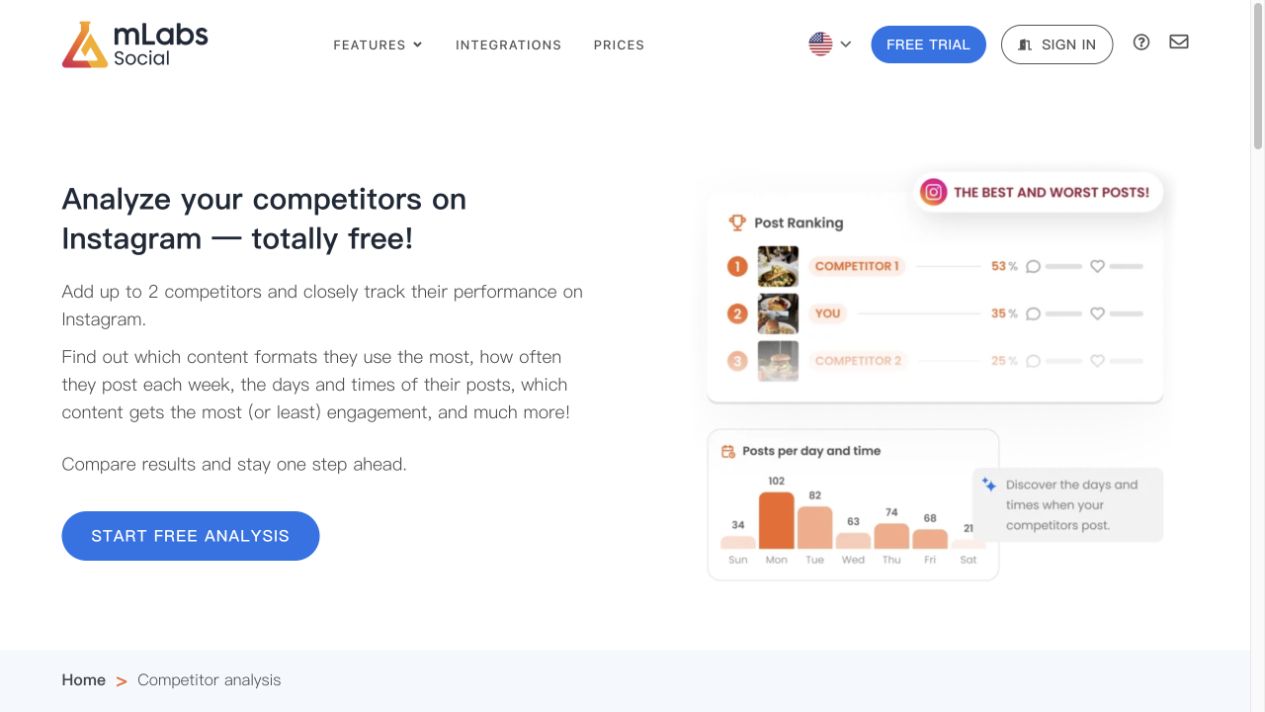
This is the level where tools differ. Social Status says its competitor analytics can sort competitor content by engagement rate, interactions, likes, comments, sentiment, or time. mLabs’ Instagram competitor analysis page highlights formats, posting frequency, days and times, and best/worst posts. Those are useful dimensions because they map to decisions a social team can actually make: what to post, how often, when, and what to stop repeating.
4. Comment themes
Comments are where competitor analysis stops being a vanity-metric exercise. Likes and views tell you what received attention. Comments can tell you why people cared, what they objected to, and what language they use.
For a practical first pass, do not try to summarize every comment on every post. Instead:
- Pick the top 10% performing posts by engagement or views.
- Sample visible comments from those posts.
- Label comments by theme: praise, objection, product question, price concern, comparison, complaint, purchase intent, spam, unrelated.
- Keep representative source URLs.
- Separate “high emotion” comments from “high intent” comments.
If comment analysis is the main job, connect this article to the more focused Instagram comment scraper workflow, where the schema and export rules are narrower.
5. Reporting cadence
A one-time audit can answer “what is happening now?” It cannot answer “what changed?”
Use a cadence that matches your decision cycle:
Cadence | Best for | Output |
Weekly | Fast-moving creator, ecommerce, and campaign niches | top posts, new themes, follower delta, comment shifts |
Monthly | Brand content strategy and agency reporting | performance trends, cadence, format mix, campaign watchlist |
Quarterly | Positioning and category research | competitor set refresh, creative direction, message gaps |
Official API, analytics platforms, or browser workflows?
Do not choose a tool before you know the access model.
Meta’s Instagram Platform Insights documentation frames insights around media owned by Instagram professional accounts. That makes official API paths important for owned or authorized account reporting, but it does not automatically solve arbitrary competitor research for public profiles you do not control.
For competitor analysis, the practical choice is usually one of these routes:
Route | Best fit | Limits to watch |
Instagram / Meta official APIs | Owned, client-authorized, or professional account insights | Permissions, account type, App Review, owned-media scope |
Social analytics platforms | Dashboards, benchmarking, scheduled reports, polished stakeholder output | Pricing, supported fields, black-box collection, export limits |
Scraper APIs | Standardized public data feeds when the schema fits exactly | Coverage, rate limits, reliability, policy review, source evidence |
BrowserAct Agent | Custom public evidence collection, source URLs, screenshots, prompt-first schema testing | Needs human review before scheduling |
BrowserAct Workflow | Repeat runs after the path is validated | Should inherit reviewed stop rules and field definitions |
BrowserAct CLI | Controlled internal pipelines, scheduled reports, QA logs | Needs engineering ownership and retention policy |
Build a prompt-first Instagram competitor analysis workflow with BrowserAct
Use this workflow when the team needs a custom competitor report, not just a generic analytics dashboard. BrowserAct should not be introduced as “scrape everything.” It should be introduced as a controlled way to test a public-data research brief in a real browser, review the evidence, and only then repeat the stable path.
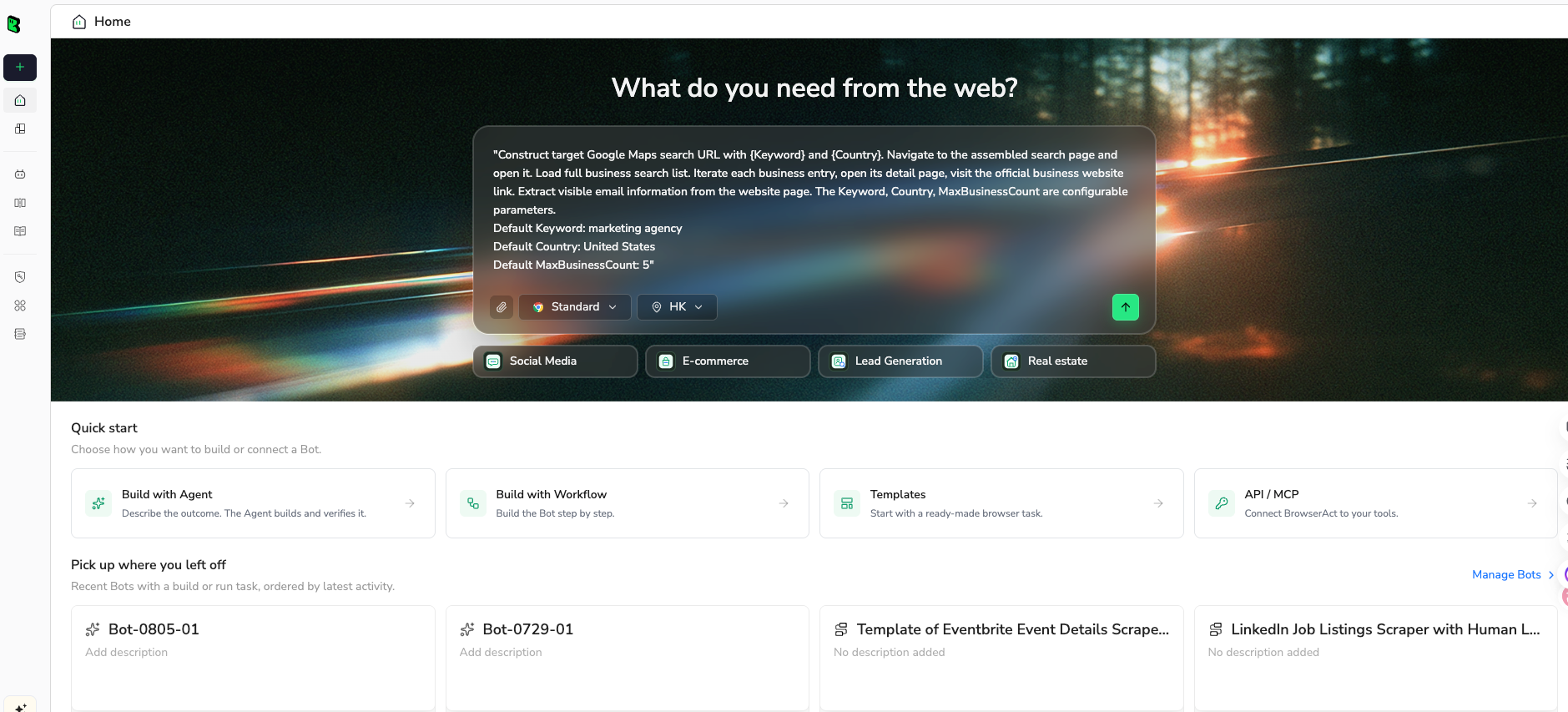
1. Open BrowserAct Dashboard
Click the left-side + button to create your own Bot, start from Quick start, or paste the prompt directly into the center Agent input to begin building.
2. Copy the complete prompt
Edit the competitor list, result limits, and fields before running. Keep the first run small enough to review.
Go to Instagram and build a public competitor analysis sample for these accounts:

COMPETITOR PROFILES:
- https://www.instagram.com/REPLACE_COMPETITOR_1/
- https://www.instagram.com/REPLACE_COMPETITOR_2/
- https://www.instagram.com/REPLACE_COMPETITOR_3/

DATA TO COLLECT:
For each public profile, capture:
- profile_url
- username
- display_name
- bio
- external_link if visible
- followers_count if visible
- following_count if visible
- post_count if visible
- is_verified if visible
- snapshot_date
- source_status

For each profile, inspect up to 30 recent visible posts or Reels and capture:
- profile_url
- post_url
- media_type: post, reel, carousel, image, video, unknown
- visible_timestamp or date
- caption
- hashtags
- mentions
- like_count if visible
- comment_count if visible
- view_count if visible
- is_pinned if visible
- content_theme: education, product, creator, meme, offer, announcement, behind_the_scenes, testimonial, other
- hook_pattern: question, list, claim, before_after, controversy, tutorial, story, other
- source_status

For the top 5 posts per profile by visible engagement, sample visible comments and return:
- post_url
- comment_text
- commenter_username if visible
- comment_theme: praise, objection, product_question, price_concern, comparison, complaint, purchase_intent, spam, unrelated
- sentiment_label: positive, neutral, negative, mixed

RULES:
- Use public or authorized data only.
- Keep the task read-only.
- Do not follow, like, comment, message, save, edit, or change any account setting.
- Do not try to access private accounts, hidden analytics, DMs, or restricted content.
- If Instagram asks for login, CAPTCHA, 2FA, membership approval, private access, or anything unclear, pause and report the stop reason.
- Deduplicate by post_url for posts and by post_url + comment_text for comments.
- Keep partial results and mark source_status instead of deleting failures.

OUTPUT:
Return three clean tables: profile_snapshots, post_sample, comment_themes.
Include source URLs in every row and make the output ready for CSV or Google Sheets.
Scrape data from any website.
Describe the data you need. Get a Bot — a reliable, reusable scraper.
Prompt preview: collect public Instagram competitor profiles, posts, Reels, comments, source URLs, and stop states. Private session · Choose your region before you run
Get your Bot — Free3. Handle login only when asked
If Instagram asks for login, CAPTCHA, 2FA, account confirmation, private access, or restricted content, BrowserAct should pause. A human can decide whether the run is authorized to continue. If it is not, keep the partial dataset and mark the stop reason.
4. Review, dedupe, and export
Before scheduling anything, review the first run:
- Are the profile rows complete enough?
- Did post URLs dedupe correctly?
- Are Reels and carousels labeled consistently?
- Are comment themes useful, or too vague?
- Are stop states visible instead of hidden?
- Can a stakeholder trace every insight back to a source URL?
Then export CSV, JSON, Markdown, or a Google Sheets-ready table. If the same report needs to refresh weekly, convert the reviewed Agent run into a BrowserAct Workflow. If your data team owns the cadence, run the approved workflow through BrowserAct CLI with logging and retention rules.
A practical report structure
The report should not dump every row on the reader. Put the raw data in a tab, and lead with decisions.
Executive summary
Keep this to five bullets:
- Which competitor gained the most visible attention?
- Which format performed best this period?
- Which content theme appears repeatedly in top posts?
- Which comment theme is a threat or opportunity?
- What should your team test next?
Competitor scorecard
Competitor | Posting cadence | Best format | Strongest theme | Comment signal | Action |
Competitor A | 5 posts/week | Reels | product demos | purchase questions | test demo-led Reels |
Competitor B | 2 posts/week | carousels | education | positive saves/comments | test checklist carousel |
Competitor C | 9 posts/week | mixed | creator collabs | low-intent praise | monitor but do not copy cadence |
Content pattern notes
Use short, evidence-backed observations:
- Competitor A’s top Reels tend to start with a pain-point claim in the first line.
- Competitor B’s carousels perform better when the caption includes a checklist.
- Competitor C posts more often, but the comment-to-follower signal is weaker.
Do not call this “strategy” unless it points to a test. A good insight becomes an experiment: change one format, one hook, one posting window, or one CTA, then review the next snapshot.
Common mistakes that make competitor analysis useless
Tracking too many accounts
If the competitor set is too broad, every pattern looks like noise. Start with a narrow set and expand only when the report produces decisions.
Treating follower count as the ranking metric
Follower count is scale context, not proof that a competitor is winning. A smaller account with stronger engagement-to-follower ratios and sharper comments may be more useful to study.
Mixing owned analytics with public competitor evidence
Owned-account insights and public competitor evidence are different data classes. Keep them in separate tabs and label the access model.
Hiding partial data
Partial data is not a failure if it is labeled. It becomes a failure when the report pretends the sample is complete.
Automating before the schema is reviewed
Do not schedule a weekly workflow from a prompt you have not reviewed. Run BrowserAct Agent first, inspect the rows, then decide whether Workflow or CLI makes sense.
Safety and compliance boundaries
Instagram competitor analysis can touch personal data and platform rules. Keep the workflow boring and defensible:
- Use public or authorized data only.
- Do not target private accounts or hidden content.
- Do not automate following, liking, commenting, messaging, saving, profile edits, or account changes.
- Stop on login, CAPTCHA, 2FA, blocked sessions, private content, or unclear permission.
- Keep source URLs and stop states.
- Limit retention for personal data.
- Avoid spam outreach from scraped lists.
- Do not claim legal certainty; rules vary by jurisdiction and use case.
If your project needs owned-account metrics, start with official Meta/Instagram paths. If your project needs public competitor evidence, design the workflow around reviewability: source URLs, screenshots, partial-row notes, and human approval before scheduling.
Conclusion
Instagram competitor analysis works when it stays close to the decision. Do not start with “scrape Instagram.” Start with the question: which competitors matter, which public signals are visible, what changed, and what experiment should we run next?
Use manual spreadsheets for small audits. Use analytics platforms when you need packaged dashboards. Use BrowserAct Agent when you need a prompt-first public research workflow with custom fields, stop states, screenshots, and source URLs. Once the first run is trusted, move it into BrowserAct Workflow for repeat refreshes or BrowserAct CLI for governed reporting.
Further reading: Instagram data collection
Frequently Asked Questions
What is Instagram competitor analysis?
Instagram competitor analysis is the process of comparing relevant accounts by public profile signals, post cadence, content formats, engagement, comments, and recurring patterns to guide your own content experiments.
What metrics should I track for Instagram competitors?
Track posting cadence, media type, captions, hashtags, visible likes, comments, views when available, engagement-to-follower ratio, top content themes, comment themes, and source URLs.
Can I use the Instagram API for competitor analysis?
Official Instagram APIs are best for owned or authorized professional account workflows. Public competitor research often needs a separate evidence workflow with clear source URLs and access boundaries.
How often should I run Instagram competitor analysis?
Run weekly for fast campaigns, monthly for content strategy, and quarterly for broader positioning. The cadence should match the decisions your team actually makes.
Is scraping Instagram competitors safe?
Keep the workflow read-only, use public or authorized data, stop on login or restricted access, and avoid private content, DMs, automated engagement, or spam outreach.
When should I use BrowserAct for Instagram competitor analysis?
Use BrowserAct when you need a custom prompt-based workflow, source URLs, screenshots, stop states, human review, and a repeatable path that can become a Workflow or CLI job after validation.


