10 n8n Templates That Automate 90% of Video Production 2026

Discover 10 n8n templates that automate TikTok and e-commerce video production. Generate, optimize, and distribute product videos with just a few clicks.
Cross-border e-commerce video production has reached a tipping point where n8n workflow automation can handle up to 90% of the production process. The economics are staggering—Sora 2 and Veo 3.1 generate videos for pennies each, meaning you can produce 100 finished videos for less than the cost of lunch. This isn't theoretical: new TikTok accounts are hitting millions of views with entirely AI-generated content, and their videos maintain consistent quality that would traditionally require full production teams.
By 2026, AI video will fundamentally reshape e-commerce marketing across every platform—from TikTok Shop to Amazon listings to Shopify stores. The competitive advantage is shifting from who has the biggest production budget to who has the smartest automation workflows running 24/7.
This guide breaks down 10 production-ready n8n templates that handle everything from maintaining character consistency across videos to automated multi-platform distribution. Whether you're scaling a TikTok presence, upgrading Amazon listings, or running an independent store, these workflows create a video factory that never stops producing. The question isn't whether to automate—it's which template to deploy first.
How Every n8n Video Automation Workflow Actually Works
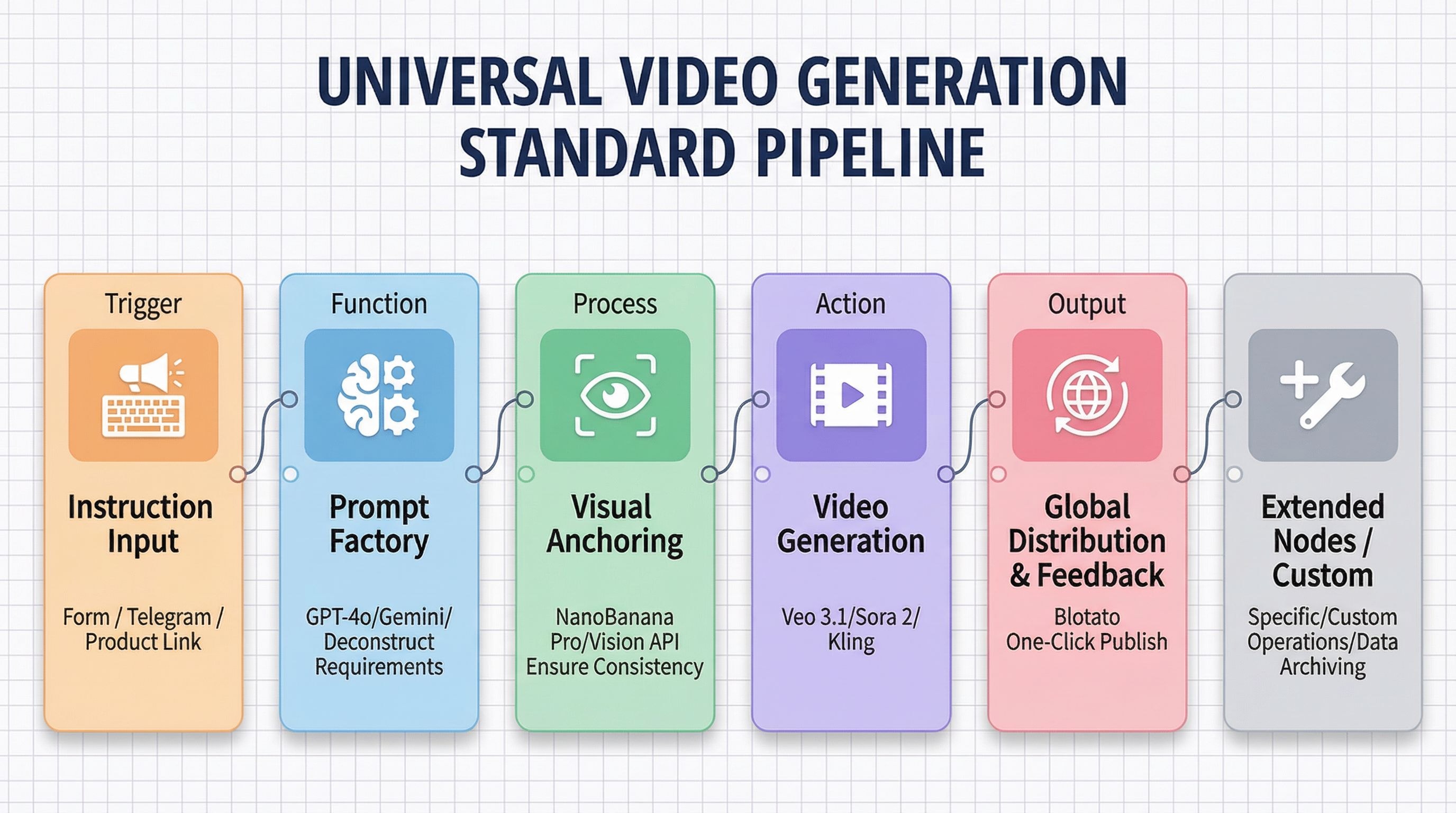
Before diving into specific templates, understanding this foundational architecture will transform how you approach automation. Every n8n workflow template in this guide—regardless of whether it's generating TikTok content, Amazon product videos, or UGC-style ads—uses the same underlying six-step pipeline. The tools may change, but this logic stays constant.
Master this framework once, and you'll be able to customize any template for your exact needs or even build your own from scratch.
Step 1: Trigger Input (How the Workflow Starts)
This is how your system receives commands. The trigger can be:
- Form submissions - A structured input form on your website or internal dashboard
- Telegram messages - Drop a product photo and caption from your phone
- Product URLs - Paste an Amazon or Shopify link to auto-extract product data
- Spreadsheet rows - Add a new row in Google Sheets with video requirements
The key is choosing a trigger that matches your team's workflow. Mobile-first teams prefer Telegram; operations managers prefer spreadsheets.
Step 2: Prompt Factory (The Brain)
AI doesn't lack execution capability—it lacks good instructions. This step transforms vague human requests into precise technical specifications.
GPT-4o or Gemini takes your basic input ("make a video for this phone case") and generates:
- Detailed shot lists with camera angles
- Lighting and atmosphere parameters
- Scene-by-scene storyboards
- Style references and mood descriptions
Think of this as translating "make it look good" into language that video generation models actually understand.
Step 3: Visual Consistency Control (The Anchor)
Historically, this was AI video's biggest weakness: generate five videos, get five different faces. Products would morph. Brand colors would shift.
Modern solutions like Nano Banana Pro or Vision API solve this by forcing the AI to "reference this exact image" throughout generation. You provide:
- A reference photo of your brand spokesperson
- Your product from a specific angle
- Brand style guidelines
The system then ensures every frame maintains that visual identity—same person, same product, same aesthetic across 100 videos.
Step 4: Video Rendering Core (The Engine)
This is where pixels actually get generated. Your choice depends on budget and creative priorities:
- Veo 3.1 (Google's latest) - Superior lighting and photorealism, best for product showcases
- Sora 2 (OpenAI) - Strongest narrative logic and scene coherence, ideal for storytelling ads
- Kling (Kwaivgi) - Exceptional motion range and dynamic camera work, perfect for action-focused content
Most advanced workflows run prompts through multiple engines simultaneously (see Template #8) to compare outputs and select the best result.
Step 5: Enhancement & Post-Processing
Raw AI-generated footage often needs finishing touches:
- Lip-sync - Tools like WaveSpeed synchronize mouth movements to voiceovers
- Captions - Auto-generated subtitles for sound-off viewing
- Platform formatting - Automatic cropping and aspect ratio adjustment for TikTok (9:16) vs. YouTube (16:9)
- Brand overlays - Logos, CTAs, and end screens
This step transforms "AI output" into "polished publishable content."
Step 6: Distribution & Feedback Loop (The Closer)
Creating videos is meaningless without publishing. This final step handles:
- Automated uploads - Blotato or similar tools push content to TikTok, Instagram Reels, YouTube Shorts simultaneously
- Scheduling - Queue videos for optimal posting times across time zones
- Performance tracking - Views, engagement, and conversion data flows back to Google Sheets or your CRM
- Iteration signals - Top-performing videos trigger the creation of similar variants
The best workflows make this completely hands-off—the system publishes, tracks, learns, and adapts without human intervention.
Why This Framework Matters
Here's the critical insight: tools will change, but this logic won't.
In six months, there might be newer video models or different distribution platforms. But the underlying structure—trigger → prompt → consistency → render → enhance → distribute—remains the same.
When you understand this pipeline, every n8n template becomes a variation on a theme. Template #2 simplifies the trigger (just Telegram). Template #6 adds heavy post-processing (lip-sync). Template #7 makes distribution the centerpiece (multi-platform publishing from a spreadsheet).
Now let's look at how these 10 specific n8n templates implement this framework for different e-commerce scenarios.
n8n Workflow Templates for Visual Consistency
AI video generation has one glaring weakness that's plagued e-commerce creators since day one: inconsistency. Generate five product videos, and your brand spokesperson morphs into five different people. Your hero product shifts colors. The aesthetic drifts from video to video.
For e-commerce brands trying to build recognizable visual identities, this has been a dealbreaker. These three n8n workflow templates specifically tackle the consistency problem—ensuring your people, products, and brand style remain locked in across unlimited content.
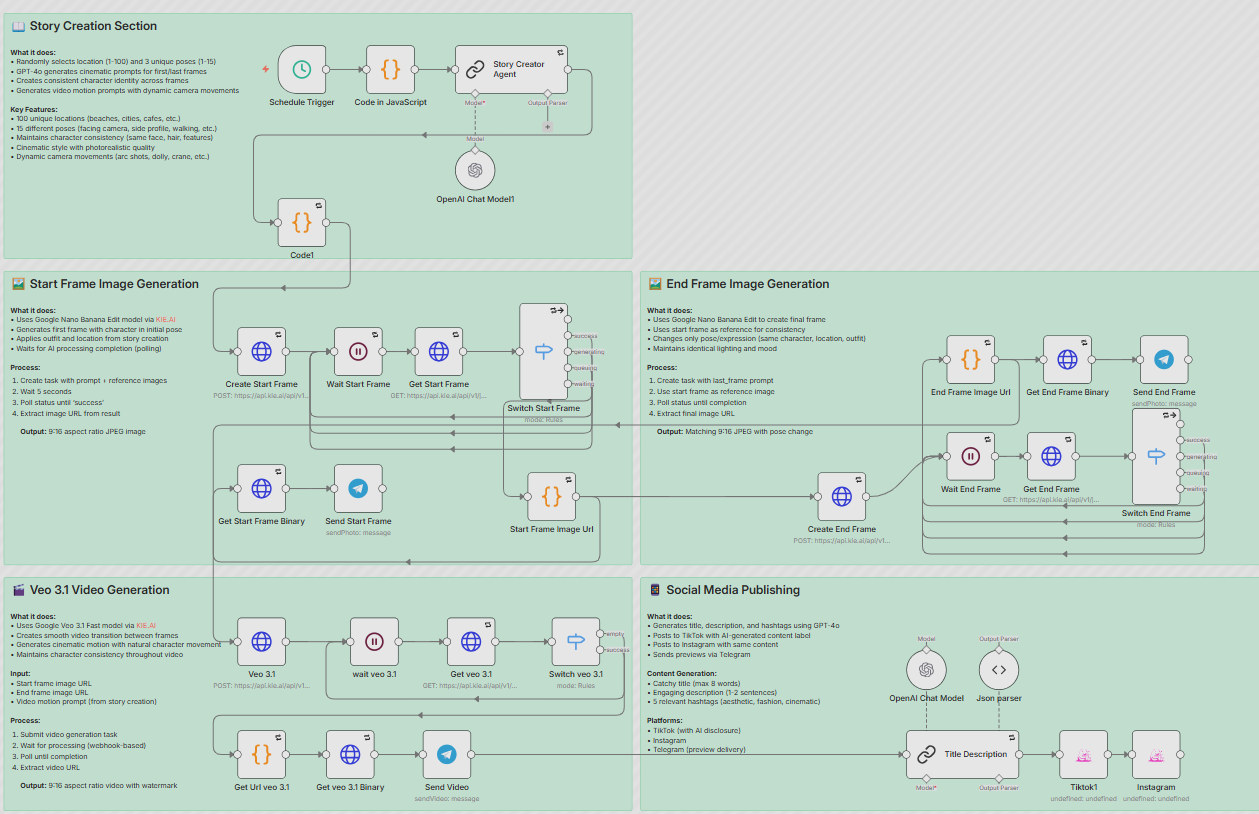
Template #1: Cinematic Character-Consistent Video Generation
- Template name: Creating Consistent Character Videos with Veo 3.1, GPT-4o, and Google NanoBanana
- What makes it different: This template supercharges Step 3 of the pipeline (Visual Consistency Control) by creating a three-stage generation process. GPT-4o writes the narrative script, NanoBanana generates precise keyframes showing your character at the beginning and end of each scene, then Veo 3.1 fills in the motion between those locked reference points.
- Why it matters for e-commerce: Build a dedicated brand spokesperson who can appear in 100+ different scenarios—beach shoots, urban environments, studio setups—without her face ever changing. This is particularly powerful for DTC brands creating personality-driven content where the face is the brand.
- Core integrations: Veo 3.1 + GPT-4o + NanoBanana
- Link: https://n8n.io/workflows/11594-creating-consistent-character-videos-with-veo-31-gpt-4o-and-google-nanobanana/
Template #2: Telegram-Triggered Viral Video Assembly Line
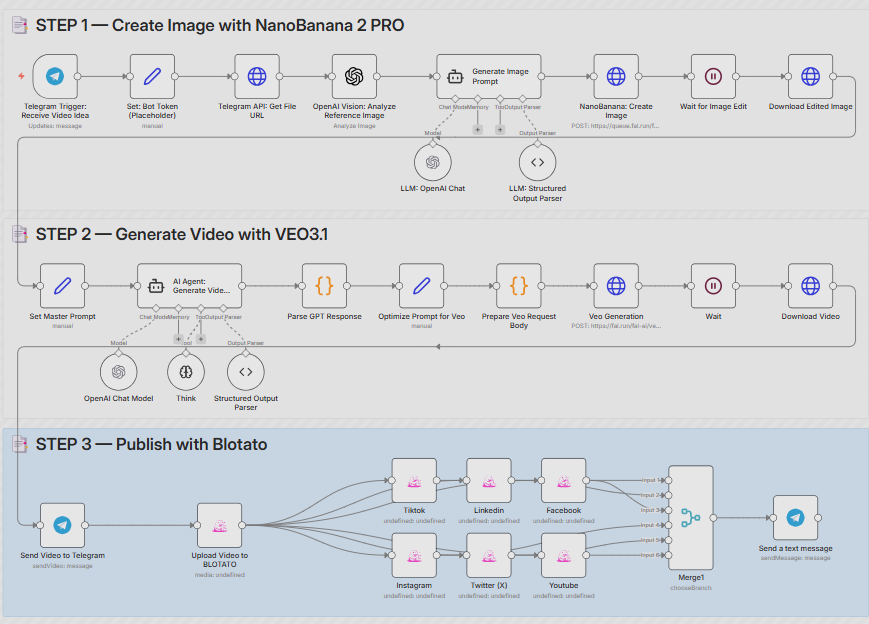
- Template name: Create AI Viral Videos using NanoBanana 2 PRO & VEO3.1 and Publish via Blotato
- What makes it different: This template radically simplifies Step 1 (Trigger Input) to make video production mobile-first. The entire workflow—from image enhancement to video generation to multi-platform distribution—launches from a single Telegram message. Drop a product photo and a caption from your phone. The system handles the rest: NanoBanana 2 PRO enhances the image composition, Veo 3.1 generates a polished video, and Blotato automatically publishes to your connected platforms.
- Why it matters for e-commerce: Decision-makers can command video production from anywhere without logging into dashboards or complex interfaces. This is ideal for rapid product testing scenarios—you're at a trade show, you photograph a new sample, and by the time you're back at your hotel, test videos are already live and collecting data. Operations teams particularly love this because it eliminates the bottleneck of "waiting for the creative team to have time."
- Core integrations: Telegram + Nano Banana PRO + Veo 3.1 + Blotato
- Links: https://n8n.io/workflows/11204-create-ai-viral-videos-using-nanobanana-2-pro-and-veo31-and-publish-via-blotato/
Template #3: Rapid Product Image-to-Video Converter

- Template name: Product Video Creator with Nano Banana & Veo 3.1 via Telegram
- What makes it different: This is the lightweight, high-speed version designed for volume. It strips away complexity and focuses on one task: transforming static white-background product photography into dynamic 8-second vertical videos with professional lighting and camera movement.
- Why it matters for e-commerce: High-volume sellers (dropshippers, Amazon FBA operations, print-on-demand stores) can turn their entire product catalog into video content without any editing skills. Every static listing becomes a video listing, and the conversion rate lift is immediate. This template is built for scale: process 50 products in the time it would take to manually edit one.
- Core integrations: Nano Banana + Veo 3.1 + Telegram
- Links: https://n8n.io/workflows/9896-product-video-creator-with-nano-banana-and-veo-31-via-telegram/
What these three templates share is a focus on visual reliability. While other AI video tools might produce flashier individual results, these n8n workflows prioritize the ability to generate hundreds of videos that look like they came from the same brand—which is exactly what e-commerce businesses need to build trust and recognition.
n8n Workflows for Volume-Focused E-Commerce Sellers
The previous templates solved consistency. These three best n8n workflows solve scale.
High-volume e-commerce operations—whether you're running 50 Amazon listings, testing 20 new products monthly, or managing multiple brand accounts—don't need perfect videos. They need enough good videos, fast enough to keep up with inventory turnover and platform algorithm demands.
These n8n automation templates are built for sellers who measure success in videos-per-hour, not artistic perfection.
Template #4: Amazon/Shopify Product Page Video Generator
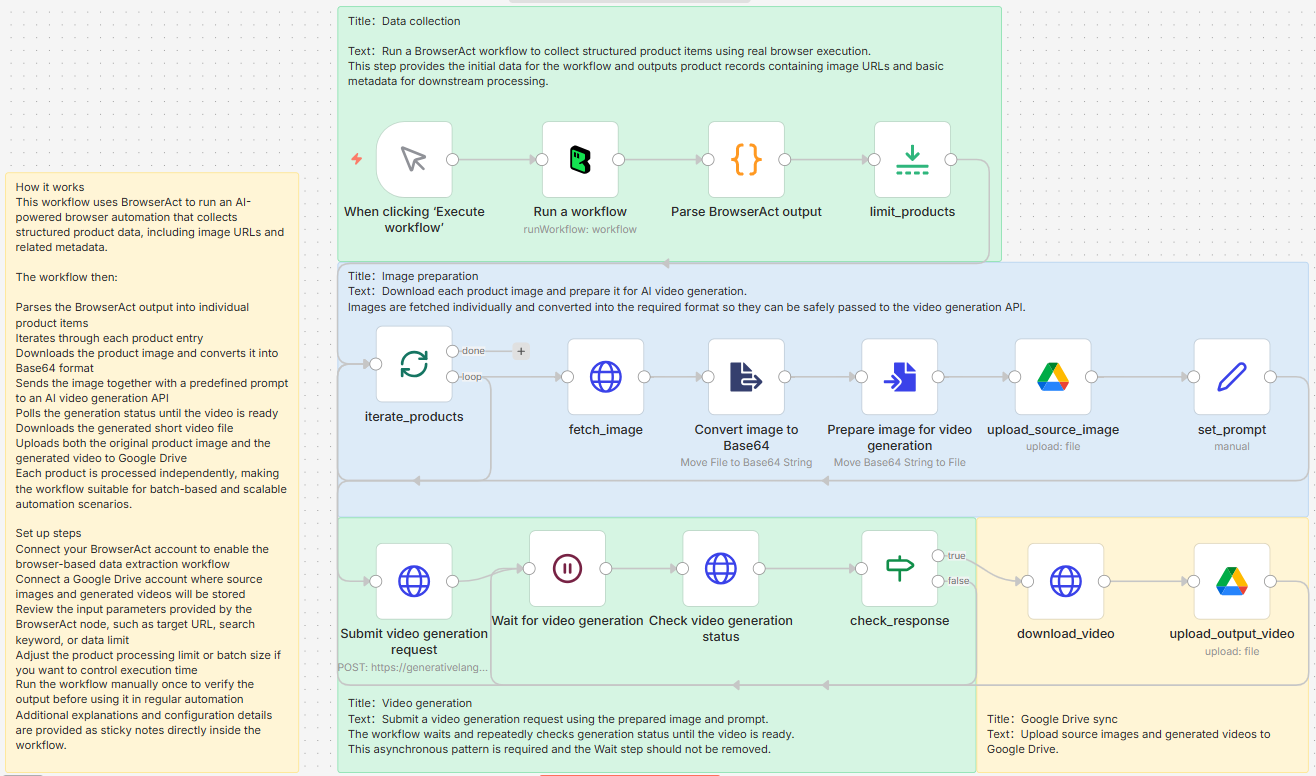
- Template name: BrowserAct – AI Product Image to Short Video Automation (Google Drive Sync)
- What makes it different: This template delivers a fully automated, end-to-end pipeline that turns product images into short AI-generated showcase videos—then syncs everything to Google Drive. It uses BrowserAct to run real browser workflows and collect product image URLs from web pages, processes images inside n8n (download + Base64 conversion), submits them to an AI video generation API, and handles long-running jobs via asynchronous wait-and-poll loops until the final videos are ready. Both the source images and generated videos are automatically uploaded to Google Drive with structured naming—no manual downloading, uploading, or folder organization required.
- Why it matters for e-commerce: Transform your entire product catalog from static to video in hours, not weeks. The conversion rate difference between image-only and video listings is well-documented—this template captures that lift at a fraction of traditional video production costs. Particularly powerful for sellers with 50+ SKUs who can't justify custom video shoots for each product.
- Core integrations: BrowserAct (web scraper) + AI Video Generation API + Google Drive
- Link: https://n8n.io/workflows/12704-generate-product-videos-from-images-with-browseract-and-google-drive/
- How to use (instant import): You can click to download the JSON workflow file from the template page and import it directly into n8n to use it immediately (after connecting the required credentials).
Template #5: Sora 2-Powered UGC-Style Marketing Videos
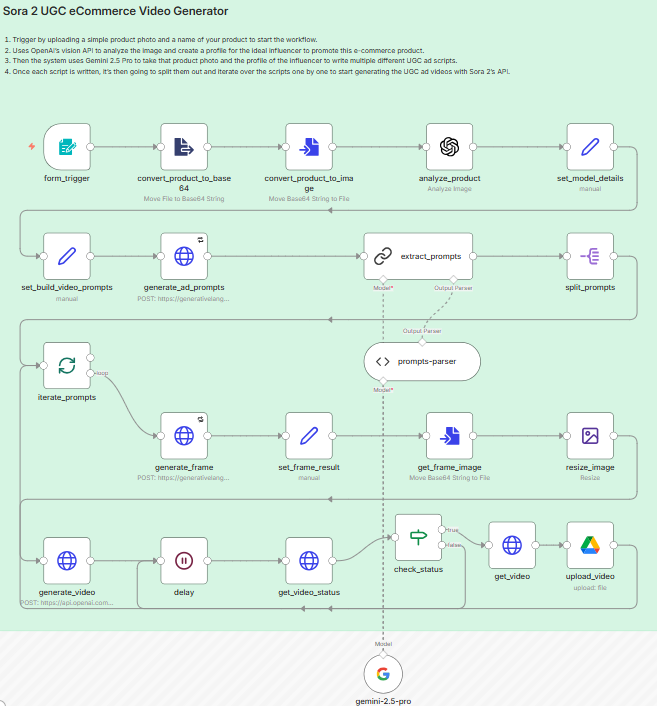
- Template name: Generate UGC Marketing Videos for E-commerce with Sora 2 and Gemini
- What makes it different: This template supercharges Step 2 (Prompt Factory) with advanced persona generation. Gemini analyzes your product images and generates detailed creator profiles—demographics, personality traits, speaking style. Sora 2 then produces videos that look like authentic user-generated reviews from real influencers, complete with natural environments and casual presentation styles.
- Why it matters for e-commerce: Eliminate the entire influencer outreach process—no more sending samples, negotiating contracts, or waiting weeks for content that might not match your brand guidelines. This is especially valuable during product launch phases when you need 10+ test creatives for A/B testing before investing in paid influencer partnerships. The videos won't fool forensic analysis, but they're authentic enough for scroll-stopping ad performance.
- Core integrations: Sora 2 + Gemini
- Link: https://n8n.io/workflows/9432-generate-ugc-marketing-videos-for-ecommerce-with-sora-2-and-gemini/
Template #6: Authentic Lip-Synced Video Ads
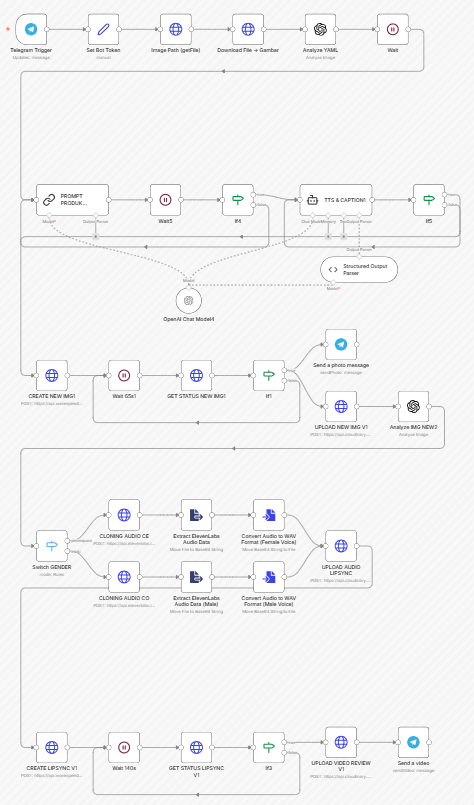
- Template name: Create Authentic UGC Video Ads with GPT-4o, ElevenLabs, and WaveSpeed Lip-Sync
- What makes it different: This template adds sophisticated Step 5 (Enhancement & Post-Processing) to solve AI video's biggest credibility gap: the "talking head" problem. After generating the spokesperson visuals, ElevenLabs creates natural-sounding voiceover, then WaveSpeed performs frame-by-frame lip synchronization so mouth movements match the audio perfectly. The result passes the "uncanny valley" test that kills most AI spokesperson videos.
- Why it matters for e-commerce: Direct-response video ads need to explain product benefits with voice narration—but AI videos with mismatched or frozen mouths destroy trust instantly. This template produces spokesperson videos that can actually drive conversions in paid social campaigns. It's particularly effective for supplement brands, tech products, and anything requiring feature explanations where showing without telling isn't enough.
- Core integrations: GPT-4o + ElevenLabs + WaveSpeed
- Link: https://n8n.io/workflows/10070-create-authentic-ugc-video-ads-with-gpt-4o-elevenlabs-and-wavespeed-lip-sync/
These three templates share a focus on throughput over perfection. Template #4 processes entire catalogs from URLs. Template #5 generates multiple creator personas for rapid testing. Template #6 adds the production polish that makes high-volume content actually convert. Together, they represent the shift from "hire a videographer" to "run the workflow."
Multi-Platform Distribution with n8n Automation Templates
Most creators obsess over production quality while ignoring the distribution bottleneck. You've generated 50 videos—now what? Manually uploading to TikTok, then Instagram, then YouTube Shorts, then logging performance data is soul-crushing grunt work that kills momentum.
These three n8n workflow templates treat distribution as seriously as generation. They automate the entire publishing workflow, multi-platform coordination, and performance tracking that separates hobbyists from operations that actually scale.
Template #7: Spreadsheet-Driven Content Operations Center
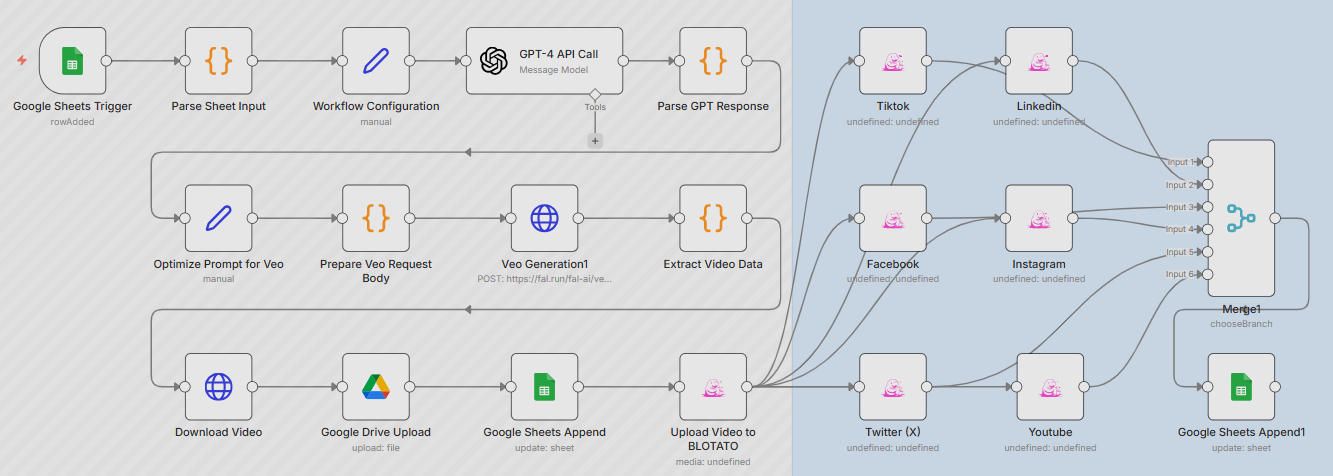
- Template name: Automate AI Video Creation and Multi-Platform Publishing with GPT-4, Veo 3.1, and Blotato
- What makes it different: This template transforms Google Sheets into mission control for your entire video operation. Operations teams input creative concepts as spreadsheet rows (product name, target platform, style preferences), and the backend orchestrates everything: GPT-4 generates prompts, Veo 3.1 renders videos, files auto-upload to cloud storage, Blotato distributes to 6 platforms simultaneously, then the workflow writes publish status, links, and timestamps back into the original sheet.
- Why it matters for e-commerce: Maximum SOP standardization. One spreadsheet becomes the single source of truth for hundreds of videos across multiple brands, platforms, and campaigns. Marketing managers who've never touched n8n can queue video production by filling cells. This is how agencies manage 20+ client accounts without hiring proportionally more staff—the system scales horizontally while headcount stays flat.
- Core integrations: GPT-4 + Veo 3.1 + Blotato + Google Sheets
- Link: https://n8n.io/workflows/10358-automate-ai-video-creation-and-multi-platform-publishing-with-gpt-4-veo-31-and-blotato/
Template #8: Dual-Engine Comparison: Sora vs. Veo
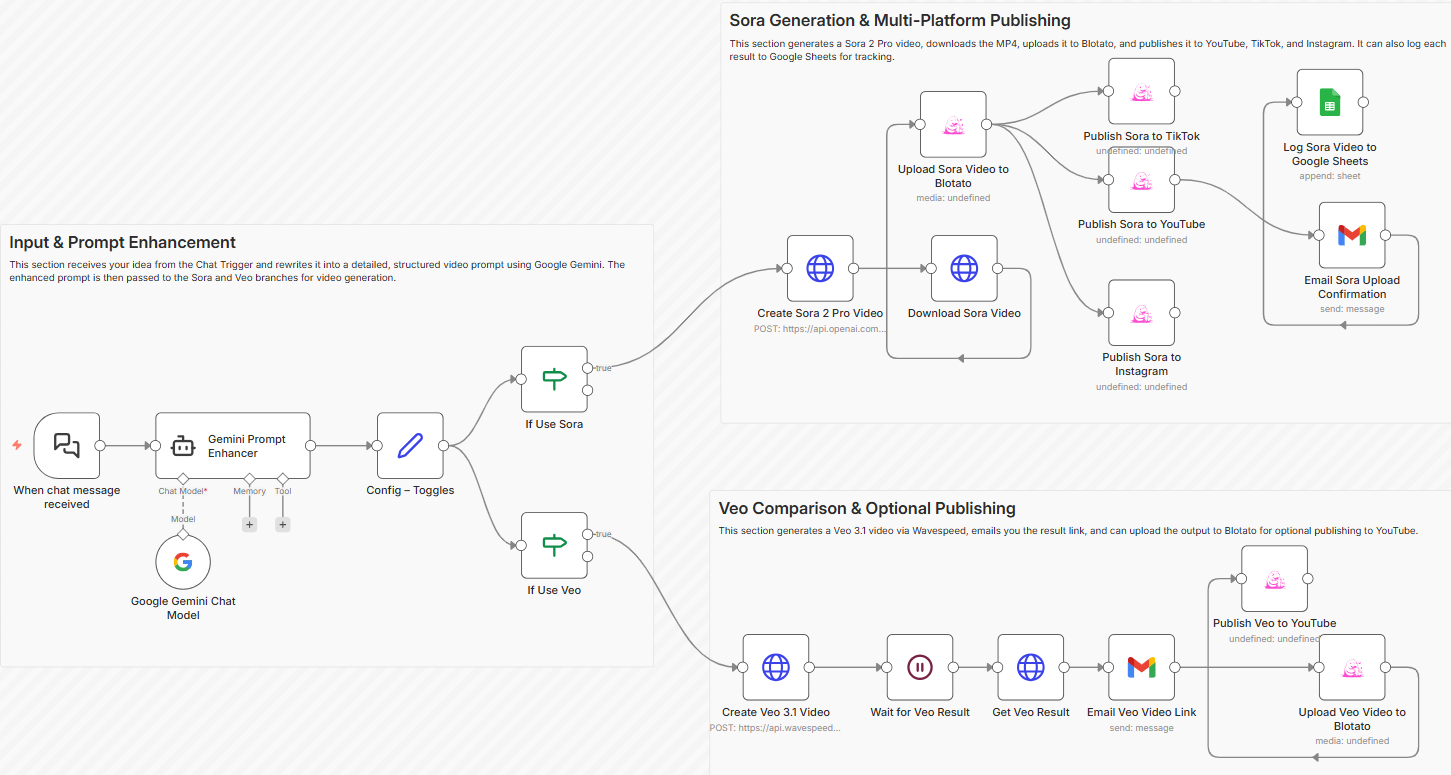
- Template name: Generate and Publish AI Videos with Sora 2, Veo 3.1, Gemini, and Blotato
- What makes it different: This template eliminates guesswork by running identical prompts through both Sora 2 and Veo 3.1 simultaneously. Gemini handles the initial prompt enhancement, then both engines generate their interpretations in parallel. You receive two versions of every video, side-by-side, for instant quality comparison before selecting which to publish via Blotato.
- Why it matters for e-commerce: Different AI models excel at different creative tasks—Sora handles narrative storytelling better, Veo produces superior lighting and photorealism. But predicting which model will nail your specific product or concept is impossible without testing. This workflow makes testing effortless: one input, two outputs, data-driven selection. Particularly valuable for paid advertising where creative performance variance directly impacts profitability.
- Core integrations: Sora 2 + Veo 3.1 + Gemini + Blotato
- Link: https://n8n.io/workflows/11276-generate-and-publish-ai-videos-with-sora-2-veo-31-gemini-and-blotato/
Template #9: Viral Video Remix & Expansion Engine
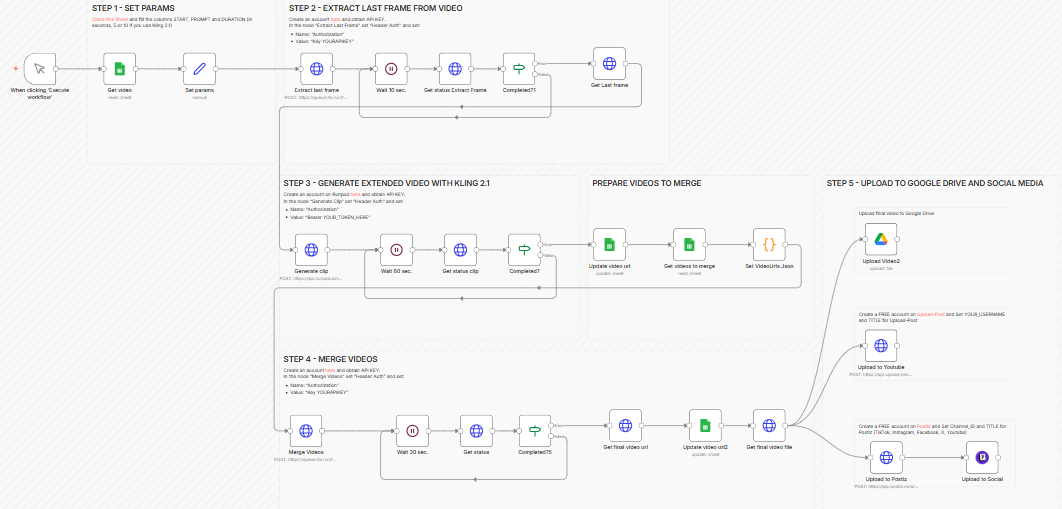
- Template name: Extend and Merge UGC Viral Videos Using Kling 2.1, Then Publish on Social Media
- What makes it different: This template completely reimagines Step 1 (Trigger Input)—instead of text prompts or product images, it accepts existing short video clips as raw material. Kling 2.1's outpainting capabilities extend scenes beyond their original frames, while its merging functions stitch multiple clips into cohesive longer content. The result gets automatically published via Postiz.
- Why it matters for e-commerce: This isn't just generation—it's intelligent content recycling. Take a 3-second hero product shot and extend it into a 15-second story. Take 5 customer testimonial clips and merge them into a compilation video. Most powerfully: take trending viral content and create compliant derivative works that ride algorithmic momentum without copyright violations. High-performing content gets squeezed for maximum value instead of gathering dust after one post.
- Core integrations: Kling 2.1 + Fal.ai + Postiz
- Link: https://n8n.io/workflows/11710-extend-and-merge-ugc-viral-videos-using-kling-21-then-publish-on-social-media/
These three workflow automation recognize that modern e-commerce video marketing isn't about creating one perfect video—it's about systematically producing, publishing, measuring, and iterating across platforms. Template #7 centralizes control. Template #8 eliminates quality uncertainty. Template #9 maximizes content ROI. Together, they automate the "last mile" that determines whether your video factory actually drives business results.
Long Video Clipping and Distribution with the n8n Workflow
Long-form content—webinars, product demos, livestreams, podcast episodes—represents massive production investment that most brands waste. They publish once to YouTube, get modest views, then move on. Meanwhile, that 60-minute video contains 10+ short-form clips that could drive significantly more total reach on TikTok, Reels, and Shorts.
This n8n template automates tasks that solve the repurposing bottleneck by intelligently extracting, formatting, and distributing highlight moments from long content without manual editing.
Template #10: YouTube-to-TikTok Auto-Clipper
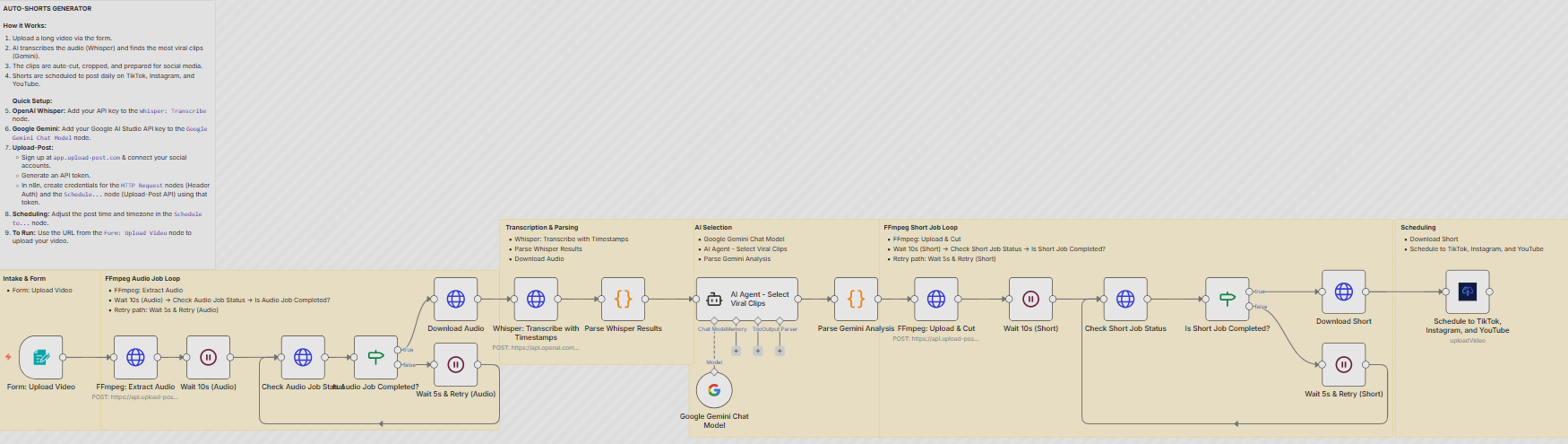
- Template name: Transform Long Videos into Viral Shorts with AI and Schedule to Social Media Using Whisper and Gemini
- What makes it different: This template reverses the typical input—instead of generating from scratch, it processes existing long-form videos as raw material. Whisper transcribes the entire video with timestamps, Gemini analyzes the transcript to identify highlight moments based on engagement signals (questions answered, value statements, emotional peaks), then FFmpeg auto-crops those segments into vertical format with proper framing.
- Why it matters for e-commerce: Extract maximum ROI from high-production-value content. One product launch livestream becomes 8 TikTok clips. A 45-minute tutorial becomes 12 Instagram Reels. A podcast interview with your founder becomes 15 LinkedIn shorts. This is particularly powerful for brands investing in thought leadership content or influencer partnerships—every minute of source material gets algorithmically multiplied across platforms instead of living as a single upload.
- Core integrations: Whisper + Gemini + FFmpeg
- Link: https://n8n.io/workflows/9867-transform-long-videos-into-viral-shorts-with-ai-and-schedule-to-social-media-using-whisper-and-gemini/
While the previous nine templates focus on generating new content, Template #10 recognizes that many e-commerce brands already produce valuable long-form material—it just needs intelligent redistribution. This workflow turns content creation from a one-time expense into a recurring asset that continues generating reach long after the original publish date.
Supercharge Your n8n Workflows with BrowserAct Web Scraping
The n8n templates in this guide automate video generation, but they rely on manual data entry. For truly intelligent automation, workflows need continuous data collection that feeds market intelligence automatically.
BrowserAct is a no-code web scraping platform that integrates seamlessly with n8n as a verified node. Extract product information, pricing, reviews, social metrics, and competitor content from any website—without writing code. The platform handles CAPTCHA challenges, IP blocks, and anti-scraping protections automatically, ensuring reliable 24/7 data collection.
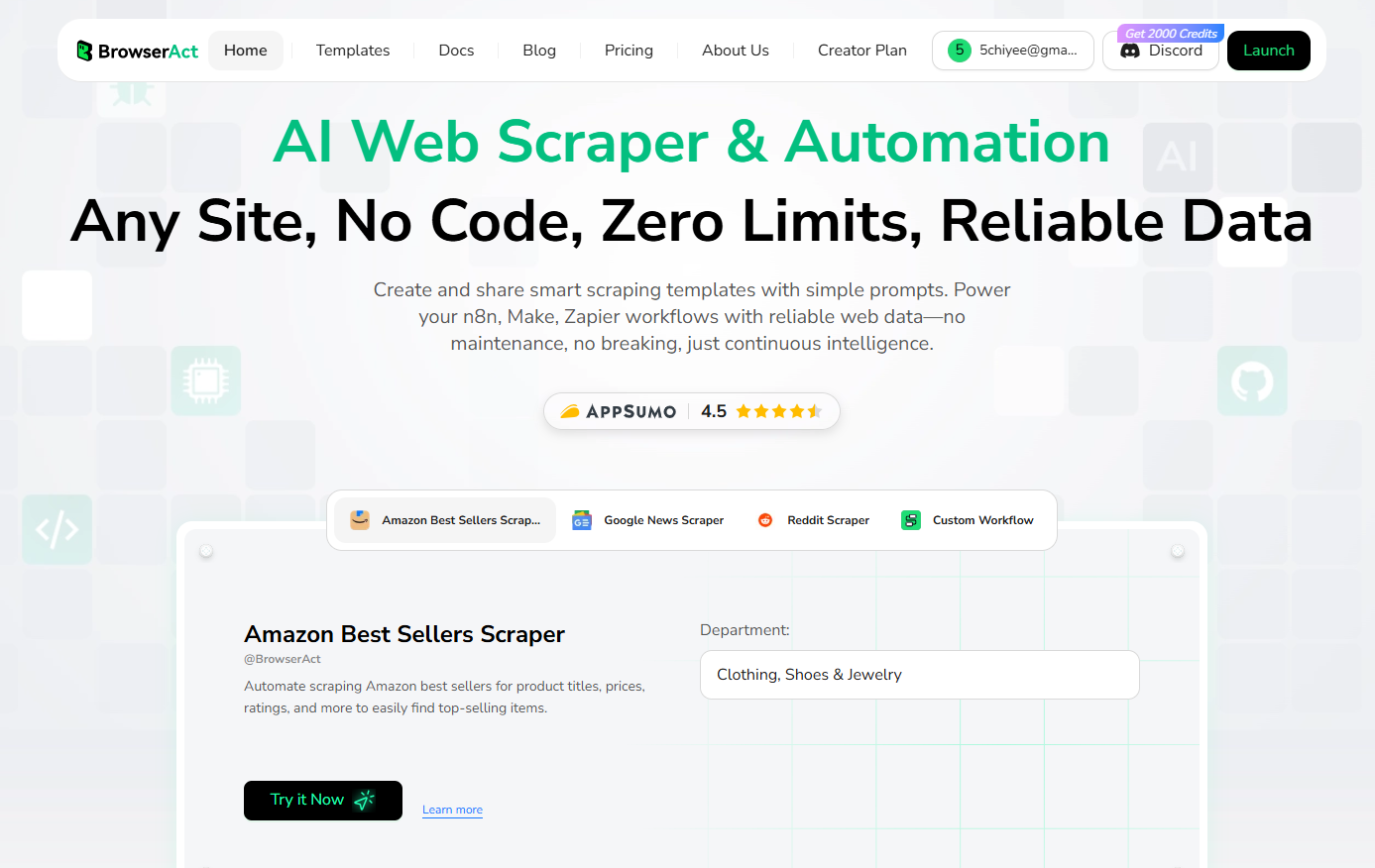 Drop BrowserAct into any n8n workflow to create intelligent automation loops. Scrape Amazon bestseller lists every morning and automatically feed trending products into video generation workflows. Track viral TikTok content and queue similar video production. All running continuously without manual intervention, with 100+ pre-built templates for Amazon, TikTok, Instagram, and YouTube.
Get 100 free daily credits—no credit card required. Search for "BrowserAct" in your n8n node library and start building intelligent automation today.
Conclusion: From Manual Video Production to Intelligent Automation
These n8n templates eliminate the manual effort that traditionally slows down video production for e-commerce businesses. Workflow automation handles the repetitive tasks—data extraction, video generation, format conversion, and multi-platform distribution—that would otherwise require dedicated teams and significant time investment.
The setup process is straightforward. Most templates can be deployed with just a few clicks in your n8n instance, requiring only API credentials and basic configuration. Once activated, each workflow automates a specific stage of your content pipeline without ongoing maintenance.
The advantage is scalability. Whether you're processing 10 products or 10,000, these workflows handle the volume without additional resources. Combine multiple templates to create an end-to-end system: scrape product data, generate videos, test AI model outputs, and publish across platforms—all running automatically in the background.
Start with one template that addresses your biggest bottleneck. Add more as your needs grow. The technical barrier is low, and the time savings are immediate.
Ready to automate your video workflow? Try BrowserAct for free and start building your first n8n template today. Extract product data, trigger video generation, and scale your content production—all with just a few clicks.


