Moltbot (Clawdbot) Security Guide for Self-Hosted AI Setup

Complete security guide for Moltbot (formerly Clawdbot). Best practices for isolation, permissions, credential management, and safe AI automation.
Just yesterday, Clawdbot officially rebranded to Moltbot. What started as an open-source success story—with over 70,000 GitHub stars and users worldwide showcasing their automated workflows—took an unexpected turn when a trademark-related email forced the project to change its name.
The rebrand itself wasn't unusual. What happened next was: In approximately 10 seconds between releasing the old name and securing the new one, cryptocurrency scammers hijacked the account. A fake token immediately appeared, reaching a peak market cap of around $16 million. Security researchers also discovered that searching "Clawdbot Control" on Shodan revealed exposed control panels with full credentials accessible on the public internet.
When you connect these incidents, they all point to the same critical issue: Once self-hosted AI assistants gain the ability to read, write, and execute commands, the weakest link isn't the model itself—it's the access points, permissions, and default behaviors you configure.
TL;DR - Key Takeaways
- The Incident: Never release old entry points before securing new ones; declare "trusted entry points only" and treat everything else as potentially fraudulent
- Risk Assessment: The danger isn't whether your AI can write code—it's what it can read, send, and execute
- Security First: Isolate machines, accounts, network access, and credentials before granting permissions
- Network Security: Never expose control panels to the public internet; use private networks, whitelists, or trusted tunnels for remote access
- Getting Started: Begin with one small task, build confidence with a win, then gradually increase complexity
- Tool Categories: Out-of-the-box solutions vs. systems requiring custom configuration of skills, permissions, and workflows
- Practical Skills: Learning CLI operations and restart procedures is more valuable than memorizing tips and tricks
- No Model Recommendations: This guide focuses exclusively on security and operational best practices
Why This Incident Escalated So Quickly
Let's strip away the details and focus on the mechanism that allowed this situation to spiral:
1. Trademark Pressure Triggers Rebranding
When a project name sounds similar to a major corporation's product, increased visibility triggers legal action. For open-source maintainers, this isn't emotional—it's risk management.
2. The 10-Second Window Creates Account Vulnerability
Account hijacking isn't always about being "hacked." More often, it's a process design failure. Creating a time gap between releasing the old name and securing the new one essentially invites bad actors to claim the account.
3. Scam Tokens Target Existing Followers, Not Code
The scammers' objective was crystal clear: leverage the old account's existing follower base to publish "official-looking" announcements, then convert information asymmetry into cash flow.
⚠️ Critical Rule: When a project explicitly states "we're not launching a token," any token bearing that name should be treated as a scam by default.
4. The One-Sentence Lesson for Technical Teams
Treat rebranding like a product launch, accounts as assets, and trusted entry points as fixed infrastructure that must be secured in advance.
What Exactly Is Moltbot?
Before diving into implementation, let's clarify what we're working with. Moltbot is a self-hosted AI assistant system that operates as follows:
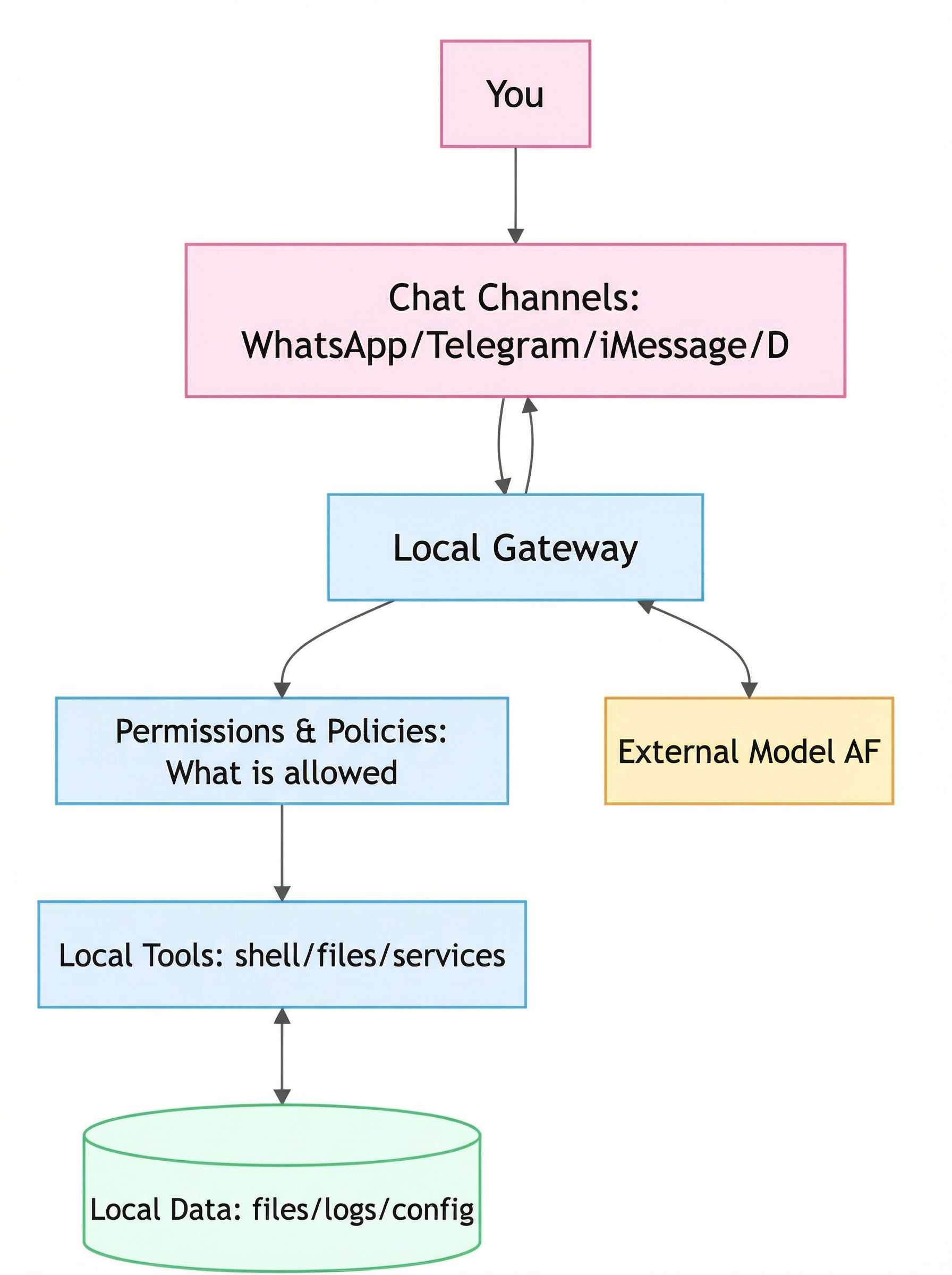
- You send messages through channels like WhatsApp, Telegram, iMessage, Discord, or Slack
- These messages enter your local gateway
- The gateway breaks tasks into actions: reading files, executing commands, calling tools, and returning results
The critical difference between Moltbot and standard chatbots isn't intelligence—it's execution capability. This assistant can take action on your behalf.
Understanding the Message-to-Action Pipeline
From a security perspective, risk concentrates in two areas:
Permissions and Policies
What capabilities have you actually granted the assistant?
Gateway and Control Panel
Where have you exposed entry points?
Architecture Overview:
Layer | Components |
User Interface Layer | WhatsApp, Telegram, iMessage, Discord, Slack, SMS |
Gateway Layer | Message routing, authentication, task parsing |
Execution Layer | File operations, command execution, API calls, tool integration |
Storage Layer | Conversation history, configurations, credentials, logs |
Setup Difficulty: Realistic Expectations
Community feedback consistently shows that technical users typically need 30 minutes to 2 hours for initial setup, while non-technical users may require longer and will likely encounter troubleshooting challenges.
Prerequisites You'll Need
Runtime Environment
A machine capable of continuous operation, or at minimum, a dedicated user environment
Communication Channels
At least one messaging platform you regularly use
Permission Configuration
Clear decisions about what data the assistant can access and what actions it can perform
The real barrier isn't installation—it's deciding which permissions you're comfortable delegating.
Two Tiers of Complexity
User experiences vary significantly based on complexity level. Here's a practical breakdown:
Tier | Time Investment | Use Cases |
Tier 1: Quick Wins | Minutes to see results | File organization, simple queries and summaries, basic text processing, straightforward scripted tasks |
Tier 2: Advanced Automation | Hours to days | Complex email workflows, monitoring systems, cross-platform integrations, long-running automated processes |
⚠️ Critical Recommendation: Master Tier 1 before attempting Tier 2. Don't try to "automate everything" on day one. Over-granting permissions without understanding your exposure creates significant security risks.
Security Fundamentals: Isolate First, Expand Later
This section contains the most critical takeaways for technical readers. These are non-negotiable security practices:
1. Machine and Account Isolation
Don't Use Your Primary Machine
Especially avoid running the assistant on systems that access your primary email, cryptocurrency wallets, or main SSH environments.
Don't Use Primary Accounts
For email, messaging, and password-related integrations, prioritize dedicated accounts.
2. Entry Point and Control Panel Isolation
Never Expose Control Panels to Public Internet
For remote access, use private networks, IP whitelists, or trusted tunneling solutions like Tailscale or WireGuard.
Maintain a Trusted Entry Point Whitelist
Document which domains and accounts represent "trusted entry points only." Maintain this list actively.
3. Principle of Least Privilege
Start Read-Only
Initially, allow the assistant to view files, read logs, and generate summaries—nothing more.
Gate Sensitive Operations
For actions like sending emails, forwarding attachments, or executing commands, require the assistant to first present its plan and impact assessment, then wait for your explicit confirmation.
4. Credential Management
Assume Authorization Can Be Compromised
Minimize scope wherever possible, revoke when necessary, and rotate credentials regularly.
Centralize Secret Management
Never scatter API keys, tokens, and passwords across configuration files, chat logs, or hastily copied notes. Use a dedicated secret management solution.
5. Secure Interaction Patterns
When using private chat modes with pairing functionality, you establish a more clearly defined conversation boundary, reducing the risk of accidental triggers and unauthorized actions.
Actionable Security Checklist
This checklist synthesizes the most reusable practices from real-world deployments, focusing exclusively on engineering implementation:
1. Start with a Quick Win
Choose a low-risk, high-visibility task like organizing your Downloads folder or generating a standardized report summary. Success builds confidence and establishes clear boundaries for future expansion.
2. Let It Plan and Monitor, Not Write Code Directly
The safer approach is to have your AI agent create plans, break down tasks, and supervise execution while delegating final implementation to controlled toolchains and processes you manage.
4. Use Sub-Agents, But Separate Permissions
Parallel execution speeds up workflows but also multiplies your attack surface. Configure different permission levels for different sub-tasks to prevent any single sub-agent from obtaining full system access.
5. Codify Hard Rules as Recognizable Instruction Formats
One effective pattern: Define a specific marker that means "must write to memory before executing." This makes corrective instructions more reliably effective.
6. When Using Multiple Channels, Establish a Primary Entry Point
Multi-channel access is convenient but creates confusion about "which entry point is legitimate." Solution: Designate one primary entry point and maintain your trusted entry point list in an easily accessible location.
7. Permission Levels Depend on Your Comfort, But Exercise Restraint with Critical Accounts
Many "aha moments" come from granting broader data access, but critical accounts deserve more conservative treatment. Start with minimal necessary permissions, then expand gradually.
8. Master CLI Operations and Restart Procedures
These tools will inevitably encounter configuration, connection, permission, or network issues during early deployment. Understanding basic CLI operations and restart procedures is more valuable than memorizing tips and tricks.
9. Regularly Convert Experience into Skills
Before ending each session, ask: "What should you permanently remember from this conversation? Write it as a skill." This transforms your rules and preferences into reusable assets rather than one-time interactions.
10. Treat External Input as Untrusted
Emails, web pages, and group messages can all carry prompt injection attacks. For any action involving forwarding, execution, or external communication, always require "plan + manual confirmation" first.
Essential Guidance for Open-Source Maintainers
If you're developing similar tools, these five points deserve special attention:
- Naming and Trademarks: Conduct basic trademark searches before your project goes viral, not after
- Accounts and Domains: Secure critical accounts early, enable 2FA, and prepare recovery channels
- Rebranding Process: Execute step-by-step with verification at each stage. Never perform concurrent operations. Never release old entry points before securing new ones
- Secure Defaults: Default control panels to private network access. Public exposure requires strong authentication and robust alerting
- Crisis Preparedness: When fake information appears, immediately publish a "trusted entry points only" list
More Powerful or More Stable?
Self-hosted AI agents don't just provide "a smarter chat window"—they represent an execution environment with system-level account privileges.
How well we can leverage these capabilities depends entirely on how thoroughly we handle permissions, boundaries, and operational maintenance.
Use this incident as a learning opportunity. Take the checklist above with you. We'll all avoid many pitfalls by learning from these lessons.
Supercharge Your Self-Hosted AI with Professional Web Automation
Building secure AI automation workflows? BrowserAct integrates seamlessly with Moltbot and other self-hosted AI assistants to provide enterprise-grade web scraping and browser automation capabilities.
Why BrowserAct + Moltbot?
🛡️ Bypass CAPTCHA & Bot Detection Advanced fingerprinting and human-like browsing behavior to access any website
🌍 Global IP Network Access geo-restricted content with residential IPs from any location
⚡ No-Code Integration Connect to Moltbot via API in minutes—no programming required
🤖 AI-Powered Scraping Combine Moltbot's intelligence with BrowserAct's extraction capabilities
Perfect Use Cases:
- Automated competitive intelligence gathering
- Real-time price monitoring and alerts
- Lead generation from business directories
- Social media data collection and analysis
- Product review aggregation and sentiment tracking
- Market research automation
Connect your self-hosted AI to the web—securely, reliably, and at scale.
 👉 Start Free Trial at BrowserAct!
🔗 API documentation included | 💳 No credit card required for trial | 🚀 Scale from prototype to production
Further reading: OpenClaw and Moltbot
Frequently Asked Questions
Is Moltbot safe to use for business automation?
Moltbot can be safe for business use when properly configured with the security practices outlined above. Start with non-critical workflows, implement proper isolation, maintain least-privilege access, and gradually expand permissions as you verify security controls. Never expose control panels to public internet and always use dedicated accounts for sensitive operations.
What's the difference between Clawdbot and Moltbot?
Moltbot is simply the rebranded version of Clawdbot following the trademark-related name change. The core functionality, architecture, and codebase remain the same. Users should update their configurations to use the new official repositories and entry points to avoid security risks from fake accounts or tokens.
Can I integrate BrowserAct with Moltbot without coding?
Yes. BrowserAct provides a REST API that Moltbot can call without requiring custom code. You configure BrowserAct scraping tasks through its web interface, then have Moltbot trigger these tasks via API calls. This enables powerful web automation workflows like competitive monitoring, lead generation, and data collection without writing scraper code.
How do I prevent my AI assistant from being hacked?
Follow these key practices: (1) Never expose control panels to public internet, (2) Use dedicated machines and accounts separate from your primary systems, (3) Implement strict permission boundaries starting with read-only access, (4) Treat all external input as potentially malicious, (5) Store credentials in dedicated secret management systems, and (6) Enable 2FA on all connected accounts.
What are the main security risks of self-hosted AI assistants?
The primary risks include: unauthorized access to sensitive data if permissions are too broad, prompt injection attacks through external inputs like emails or web pages, credential exposure if not properly managed, unintended command execution without confirmation gates, and network exposure if control panels are publicly accessible. All of these can be mitigated with proper security configuration.


