Instagram Comment Scraper: Export Comments, Replies and Sentiment to CSV

An Instagram comment scraper is useful when the comments under a public post or Reel are more valuable than the post itself. Launch teams want launch feedback. Creator teams want recurring objections. Brand teams want to spot complaints, praise, spam, and questions before the comment section turns into a messy manual research job. The hard part is not just “getting comments.” The hard part is getting the right fields, keeping source URLs, handling replies, deduping repeated rows, and knowing whe
- 1An Instagram comment scraper should solve a specific research job: export comments, replies, timestamps, usernames, engagement signals, source URLs, and review status—not just dump raw text.
- 2The core keyword is “Instagram comment scraper,” but the real buying intent usually appears as “export Instagram comments,” “Instagram comments to Excel,” “scrape all Instagram comments,” or “Instagram comment sentiment analysis.”
- 3Use BrowserAct Agent when the comment workflow needs custom instructions, visual browser validation, screenshots, source URLs, and changing field logic; use BrowserAct Workflow or CLI once the schema is proven.
- 4Treat completeness as a QA problem: record public visibility, login/CAPTCHA stops, pagination limits, duplicate rules, and whether replies were included.
When do teams actually need Instagram comment data?
Instagram comments become useful when the export maps to a decision. A table of 5,000 comments is noise if nobody knows what to do with it. A table of 500 comments with campaign, post URL, commenter handle, comment text, timestamp, sentiment label, issue tag, and reply count can change a marketing review in one meeting.
Common use cases include:
Use case | What the team wants to know | Useful output fields |
Campaign feedback | What did people like, question, or complain about after launch? | comment text, sentiment, issue tag, timestamp, likes, source URL |
Creator vetting | Does a creator’s audience respond with real conversation or low-quality engagement? | commenter username, comment text, replies, likes, repeated phrases |
Competitor monitoring | Which objections, feature requests, or customer complaints appear under competitor posts? | post URL, brand mention, topic label, complaint type, timestamp |
Social listening | Are customers reporting bugs, delivery issues, scams, or support problems in comments? | urgency tag, issue category, source URL, screenshot status |
Content research | Which hooks, formats, and questions get the richest audience response? | post caption, comment themes, reply count, engagement signal |
What fields should an Instagram comment scraper export?
A useful export starts with a schema. If you are building a research workflow, ask for fewer fields at first, then add enrichment only after the first run looks trustworthy.
Field | Why it matters |
| Keeps every row tied to the original evidence. |
| Helps dedupe comments and join replies when available. |
| The primary input for manual review, tagging, and sentiment analysis. |
| Useful for creator research, community analysis, and reply tracking. |
| Helps reviewers inspect public profile context when needed. |
| Supports launch windows, event timelines, and trend analysis. |
| A rough signal of which comments resonated with other viewers. |
| Separates isolated reactions from active threads. |
| Needed if you export nested replies. |
| Helps route multilingual comments to the right reviewer or model. |
| Turns raw comments into product, shipping, pricing, quality, or support buckets. |
| Useful for summaries, but it should not replace manual evidence. |
| Marks complete, partial, login required, blocked, deleted, private, or failed rows. |
BrowserAct workflow: scrape Instagram comments from a prompt
Use this workflow when your Instagram comment scraping job changes from project to project: different posts, different review tags, different stop rules, or different spreadsheet columns. The point is to test the data path in a real browser before you turn it into repeatable automation.
Build an Instagram comment scraper with BrowserAct Agent
- Open BrowserAct Dashboard: Start a new Agent run and choose the browser profile that has the access you are allowed to use for this research task.
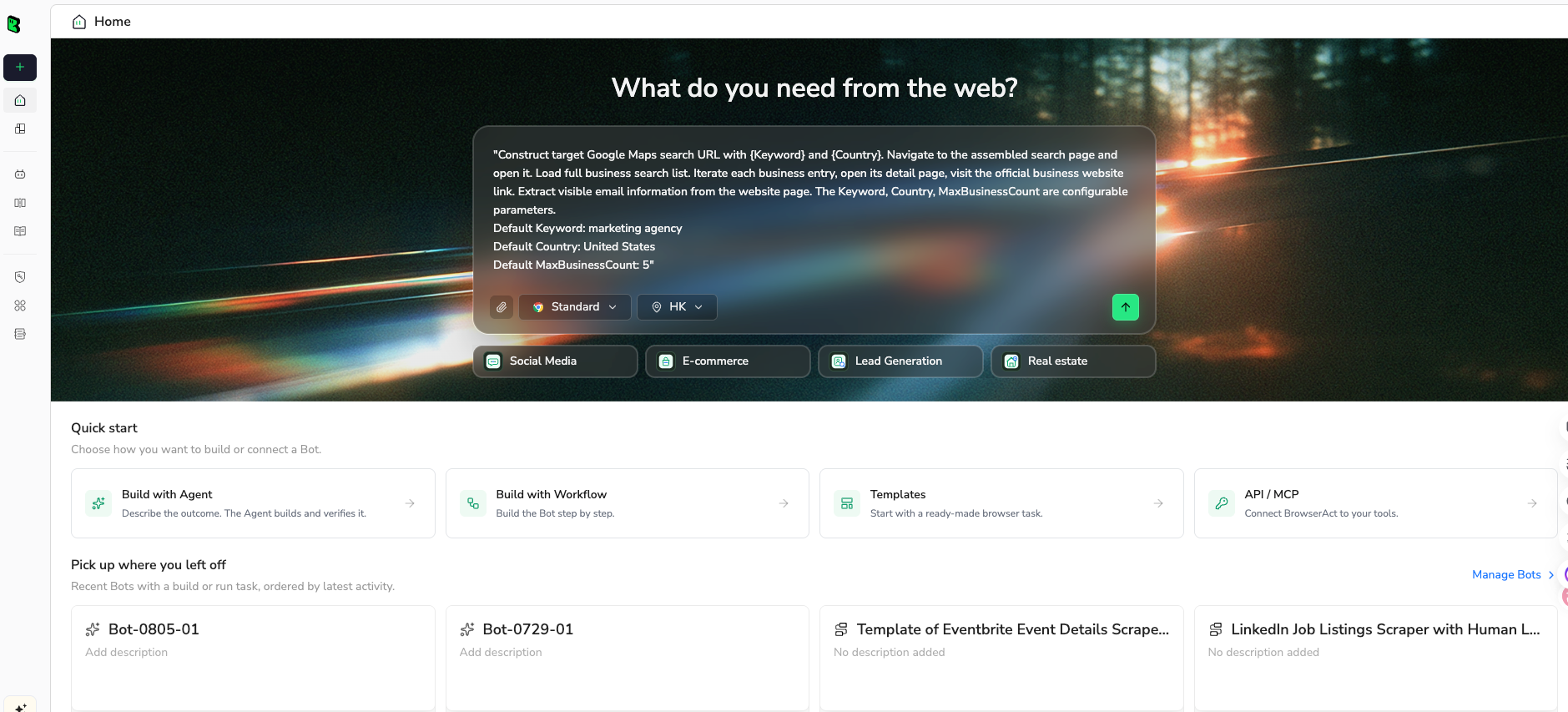
- Copy complete prompt: Review the post URL, result limit, fields, stop rules, and export format before pasting it into the Agent input.
Go to the Instagram post URL below and collect publicly visible comments:

TARGET:
https://www.instagram.com/p/REPLACE_WITH_PUBLIC_POST_URL/

Return up to 300 comments and replies that are visible in the browser.

For each row, extract:
- post_url
- comment_id if visible or inferable from the page
- parent_comment_id for replies when available
- commenter_username
- commenter_profile_url
- comment_text
- timestamp or visible relative time
- like_count if visible
- reply_count if visible
- language if obvious
- topic_label: product feedback, pricing, support issue, shipping, quality, creator praise, spam, or other
- sentiment_label: positive, neutral, negative, mixed, or unclear
- source_status: complete, partial, login_required, captcha_required, deleted, private, or unavailable

Keep the run read-only. Do not like, follow, comment, message, or change account settings.
If Instagram asks for login, CAPTCHA, 2FA, private access, or permission you do not have, pause and report the stop reason instead of bypassing it.

Export the final result as a clean table suitable for CSV and Google Sheets.
- Handle login only when asked: If Instagram shows login, CAPTCHA, 2FA, account confirmation, or private content, BrowserAct pauses so a human can decide whether the task is allowed to continue.
- Review, dedupe, export: Check the output table for repeated comments, missing source URLs, partial threads, and bad sentiment labels before exporting CSV, JSON, Markdown, or a Google Sheets-ready table.
Scrape data from any website.
Describe the data you need. Get a Bot — a reliable, reusable scraper.
Get your Bot — FreeThe Agent is the right starting point because comment workflows are rarely stable on the first run. One post may expose replies clearly. Another may show only a small public preview. A third may require login for older comments. The browser run gives you the evidence before you schedule anything.
Once the schema is stable, move the same task into BrowserAct Workflow for repeat runs such as weekly competitor monitoring or campaign review. If the approved workflow needs to run from a scheduler, internal tool, or backend job, use BrowserAct CLI so the browser task fits your engineering control layer.
How to check whether the export is complete
“All comments” is the most dangerous phrase in Instagram scraping. A page can show a total comment count while only exposing part of the thread to a public or logged-out browser. A scraper can also stop early when a “load more” action disappears, when a modal changes, or when the platform asks for verification.
Use these QA checks before trusting the export:
- Compare the visible comment count with exported row count. If they differ, mark the export as partial.
- Sort by timestamp and check whether the oldest and newest visible comments are represented.
- Sample comments from the beginning, middle, and end of the visible thread.
- Check whether replies are separate rows or nested under parent comments.
- Keep
source_statusfor every row instead of dropping failures. - Deduplicate by
comment_idwhen available; otherwise dedupe by normalizedpost_url + commenter_username + comment_text + timestamp. - Preserve the source post URL and, when useful, screenshot evidence for manual audit.
This is also where BrowserAct’s three modes should be separated. Use Agent to discover how the page behaves. Use Workflow when the same URL pattern and output schema work repeatedly. Use CLI when the run has to be triggered, logged, and monitored by your own automation stack.
BrowserAct vs fixed Instagram comment scraper tools
You do not need BrowserAct for every Instagram comment export. A dedicated actor or API-style tool can be faster when the job is narrow: paste public post URLs, export standard fields, and accept the tool’s schema.
Choose a fixed comment scraper when:
- You already have the exact public post or Reel URLs.
- The standard fields are enough: text, username, timestamp, likes, replies, and source URL.
- You prefer a ready-made dataset and do not need visual browser review.
- You are comfortable with the tool’s public-visibility limits and pricing model.
Choose BrowserAct when:
- The target changes by campaign, hashtag, creator, competitor, or post type.
- You need custom labels such as objection type, product issue, spam signal, or support urgency.
- You need a human-readable browser trace before trusting the output.
- You want to stop safely on login, CAPTCHA, private content, deleted posts, or unclear permission.
- You plan to turn a proven one-off run into a reusable Workflow or CLI-triggered process.
That distinction keeps the recommendation honest. BrowserAct is strongest when the research path needs judgment and iteration. Fixed tools are strongest when the extraction target is simple and stable.
Can you use the official Instagram API instead?
Sometimes, yes—but the official route has a different purpose. Meta’s Instagram Platform documentation is built around authorized business and creator account workflows such as managing media, comments, mentions, messaging, and insights within supported access rules. The Instagram Graph API comment reference covers comment objects and operations in that governed API context.
That is not the same as exporting arbitrary public comments from any Instagram post on the web. If you own the account, manage the business asset, and have the right permissions, check the official API first. If you are researching public competitor posts, creator campaigns, or public comment sections where the API does not fit, a browser-based workflow may be the more practical research route—but it should still stay read-only, respect access boundaries, and record stop states clearly.
A clean Google Sheets layout for Instagram comments
If the export is going to a marketer, analyst, or support lead, do not send raw JSON first. Send a sheet that makes the review decision obvious.
Column | Example |
| Spring launch |
|
|
|
|
| “Does this ship internationally?” |
|
|
|
|
|
|
| shipping |
| neutral |
| needs response |
| complete |
| ask support for region list |
Prompt variations for common Instagram comment scraping jobs
Use these variants after the first BrowserAct Agent run works.
Campaign feedback review
Ask BrowserAct Agent to group comments by objection, praise, confusion, spam, creator mention, and support request. Add a priority column so the team can sort by “needs response” instead of reading every row in chronological order.
Competitor post monitoring
Give BrowserAct a list of competitor post URLs and ask for recurring fields: complaint category, product mention, price concern, availability question, and repeated feature request. Save the successful path as a BrowserAct Workflow if the same competitor set is reviewed weekly.
Creator audience quality check
Ask for comments, repeated phrases, reply depth, visible spam patterns, and whether the audience is asking real questions. This is often more useful than follower count when vetting creators.
Support issue detection
Ask for urgent categories such as payment, delivery, bug, scam, account access, safety, or refund. Use BrowserAct CLI only after the schema is approved and the team has a clear escalation process.
Risks and boundaries to document
Instagram comment scraping sits close to privacy, platform policy, and data quality issues. A serious workflow should document:
- Only collect data you are allowed to access.
- Do not scrape private accounts, private groups, DMs, or content behind permissions you do not have.
- Do not automate likes, follows, comments, messages, or account-setting changes.
- Do not promise complete coverage when the page only exposes partial comments.
- Do not store personal data without a valid business reason and retention policy.
- Do not use sentiment labels as the only basis for decisions about individuals.
Instagram’s own Terms link automated data collection to additional rules and permissions. Even when a tool can technically collect public data, the business workflow still needs legal, privacy, and platform-policy review.
Recommended workflow
Start small:
- Pick 3–5 public post URLs that match the real business question.
- Run BrowserAct Agent with a strict result limit and the schema above.
- Review the output manually: completeness, duplicates, replies, source URLs, and labels.
- Adjust the prompt until the sheet is useful.
- Save the stable version as a BrowserAct Workflow.
- Use BrowserAct CLI only when the workflow has a clear owner, schedule, stop-state policy, and data-retention rule.
That sequence avoids the usual trap: automating a bad scrape faster. The goal is not to scrape the biggest possible comment table. The goal is to produce a comment dataset that a team can verify, sort, and act on.
Further reading: Instagram data collection
Frequently Asked Questions
What is an Instagram comment scraper?
An Instagram comment scraper extracts publicly visible comments and related fields from Instagram posts or Reels, usually into CSV, Excel, JSON, or Google Sheets. Useful fields include comment text, username, timestamp, likes, replies, source URL, and review status.
Can I scrape all comments from an Instagram post?
Sometimes you can collect many visible comments, but you should not assume every post exposes every comment to a browser session. Track exported row count, visible count, replies, login stops, and source_status so partial exports are not mistaken for complete data.
What is the best way to export Instagram comments to Excel?
For known public post URLs and standard fields, a fixed comment scraper may be fastest. For custom research fields, browser validation, screenshots, source URLs, and repeatable workflows, use BrowserAct Agent first, then save the approved path as a Workflow.
Can BrowserAct scrape Instagram comments without code?
Yes. BrowserAct Agent lets you describe the target URL, fields, limits, and stop rules in plain language. After the first run is validated, the same process can become a reusable BrowserAct Workflow or a CLI-triggered run.
Is scraping Instagram comments legal?
It depends on what you collect, why you collect it, where users are located, and whether your workflow respects platform rules and privacy laws. Keep the workflow read-only, avoid private data, document the business purpose, and consult legal counsel for regulated or high-risk use cases.


