OpenCode Browser Automation: Run Multi-Model Web Tasks with BrowserAct

OpenCode gives developers something most coding Agents do not: freedom to switch models, create specialized agents, control permissions, and run several tasks at once. That sounds perfect for web automation. Give one model search, another model social media, and a third model e-commerce. Let them work in parallel and merge the result. Then the browsers start fighting. One task changes the search filter used by another. Two models share the same login. A product job triggers verification and bloc
- 1OpenCode can change models and agents, while BrowserAct keeps the browser identities, sessions, and evidence conditions stable.
- 2Assign every search, social, e-commerce, or SaaS task its own named BrowserAct session and output path.
- 3Route public pages through extraction, interactive pages through isolated browsers, and authenticated pages through authorized Chrome identities.
- 4Compare models against the same target, starting state, retry budget, and required output instead of comparing the quality of their explanations.
- 5Solidify a successful browser journey into a portable Skill so another model can rerun it without re-exploring the website.
OpenCode's biggest advantage also creates its browser problem
OpenCode can define primary agents and subagents, choose different models for them, and configure what each agent may read, edit, execute, or load. It also supports Agent Skills stored in native, Claude-compatible, and cross-agent locations.
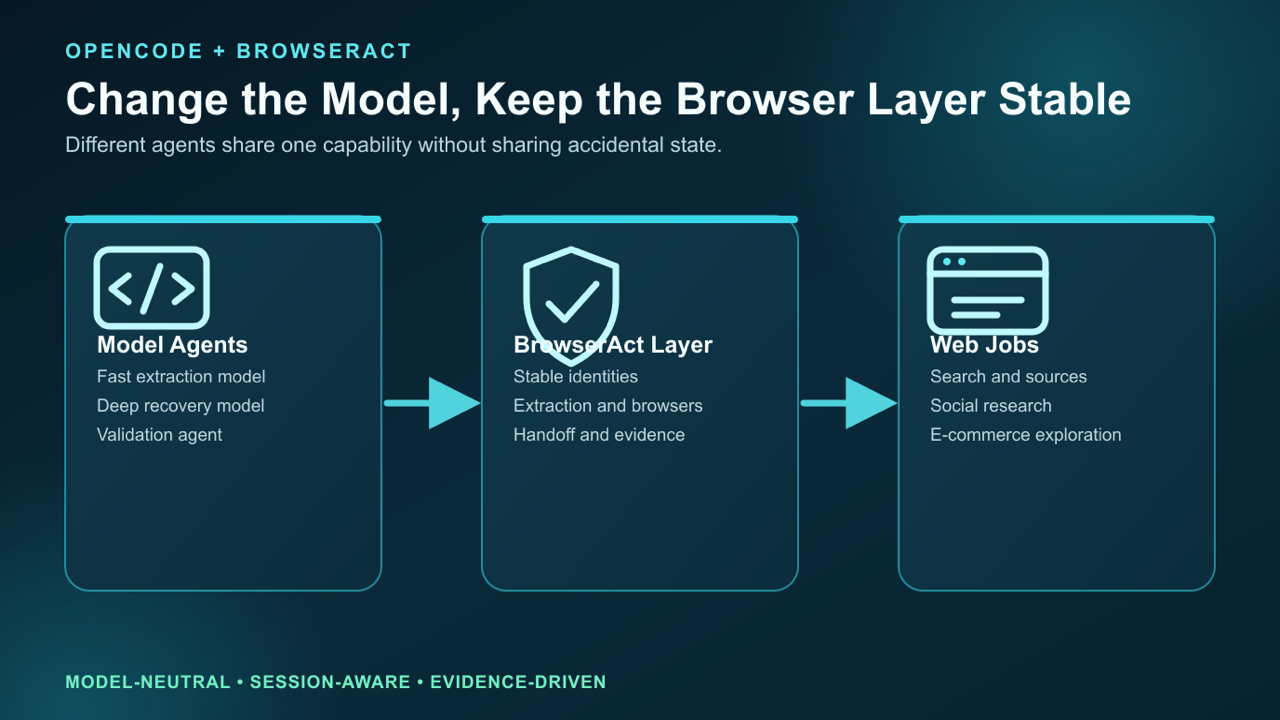
OpenCode can change the model while BrowserAct keeps the browser identity, session, and execution conditions explicit.
This makes OpenCode a strong orchestrator. A lightweight model can extract routine fields. A stronger model can investigate a changed page. A specialized agent can validate the final output.
But none of those features guarantee a stable browser.
Without BrowserAct, OpenCode agents often depend on:
- whichever tab happens to be open;
- an untracked login or cookie state;
- generic fetch that misses rendered content;
- brittle selectors written before the Agent sees the page;
- one shared browser that cannot safely support concurrency;
- a manual restart when CAPTCHA, 2FA, or another block appears.
The models are flexible, but the web workflow is fragile.
Install BrowserAct as a portable Skill:
Install browser-act. Skill source:
https://github.com/browser-act/skills/tree/main/browser-act
Verify it works after installation.
OpenCode discovers project Skills from .opencode/skills/, .claude/skills/, and .agents/skills/. For a browser workflow meant to travel between Agents, .agents/skills/ is a natural home.
Give every OpenCode model the same browser capability: follow How to Install BrowserAct, then keep the first verification task read-only.
The three-job test
Instead of discussing model-neutral execution in the abstract, give OpenCode three real jobs.
Job 1: search and verify public information
Find current official documentation for five developer tools. Return pricing, API limits, last update date, and source URL. Some pages are static; others use JavaScript tabs or protected content.
Job 2: research a social-media topic
Use an authorized login to search public posts about an AI product. Collect text, author, date, visible engagement, and URL. Do not like, follow, repost, or message.
Job 3: explore e-commerce listings
Search several stores for a product category. Collect price, stock, seller, delivery promise, rating count, and URL. Preserve the search terms, filters, and region used.
All three jobs are “browser automation,” but they need different methods and different identities.
Step 1: give every job its own browser lane
Do not tell the workers to “use the browser.” Assign ownership.
Job | OpenCode agent | BrowserAct session | Identity | Output |
Search/docs |
|
| fresh public |
|
Social media |
|
|
|
|
E-commerce |
|
| isolated stealth |
|
This solves a surprisingly large class of failures:
- the social worker cannot navigate the commerce worker's page;
- the store's location selector cannot change the documentation job;
- cookies from one account do not silently appear in another;
- screenshots and result files have a clear owner;
- a blocked job can pause without stopping the other two.
BrowserAct session isolation is not just a scaling feature. It is what makes parallel browser work understandable.
For more detail, read Concurrent Browser Automation.
Step 2: route each page to the right BrowserAct capability
A common Agent mistake is opening a full browser for every URL. Another is trying to fetch every page as text. BrowserAct gives OpenCode a ladder.
First level: direct source or protected-page extraction
The search worker should begin with official pages. If the required fields are present, it returns them. If normal fetch receives incomplete or protected content, it escalates to BrowserAct extraction.
This is useful for SaaS documentation, pricing pages, government notices, news pages, and public financial material where interaction is not yet necessary.
Second level: isolated browser operation
The e-commerce worker needs search, filters, scrolling, and rendered page state. It opens its assigned stealth browser and keeps the region and search conditions attached to every result.
The social worker needs an existing authorized login. It uses only the named local Chrome identity and keeps every write action prohibited.
Third level: verification recovery and human handoff
If CAPTCHA, 2FA, account selection, or another trust boundary appears, the worker does not invent a workaround. BrowserAct preserves that session and requests the smallest human action needed. Other sessions continue.
This routing is one of BrowserAct's largest advantages: extraction, stealth browsing, logged-in Chrome, session isolation, verification handling, and human takeover belong to the same browser system.
One workflow, several levels of access: try BrowserAct when OpenCode must move from a public page to interactive or authenticated web state without losing the task.
Give your agent a real browser, then turn the workflow into a Skill.
- 1. Use browser-act when an agent needs to open, click, scroll, extract, or inspect a live site.
- 2. Use browser-act-skill-forge when the workflow should become reusable across runs and agents.
- 3. Keep the operational boundary simple: automate what the user can already do in the browser.
Step 3: let different models work without changing the test
OpenCode users often want to compare models: which one completes the task faster, recovers from a changed page, or uses fewer expensive reasoning steps?
The comparison is meaningless when the browser conditions differ.
For a fair rerun, keep these fixed:
- target URLs and search terms;
- browser identity and region;
- starting login state;
- BrowserAct session type;
- required output fields;
- maximum retries;
- actions that require approval.
Then measure observable outcomes:
{
  "job": "commerce-research",
  "model": "provider/model-name",
  "records_requested": 30,
  "records_verified": 27,
  "records_blocked": 3,
  "browser_method": "isolated-stealth",
  "retries": 1,
  "human_handoffs": 0,
  "artifacts": ["commerce.csv", "blocked.json"]
}
The numbers above are a result schema, not a benchmark claim. The actual run should fill them.
Now a model wins because it completed more of the required web task with valid evidence—not because its explanation sounded more convincing.
Step 4: automate an internal SaaS workflow safely
The same pattern works beyond public scraping.
Consider an operations team that uses an internal dashboard to review failed customer jobs. The Agent must search an account, open a failure, collect the error code, compare it with the runbook, and prepare a suggested action. Retrying the job or changing the account remains a human decision.
An OpenCode agent definition can separate the work:
incident-reader: may load BrowserAct, read the dashboard, and write a report;runbook-researcher: may read documentation but not access the customer browser;incident-approver: receives the report but cannot execute browser actions automatically.
OpenCode permissions control which Skills and shell operations each agent may use. BrowserAct controls the browser identity and action boundary.
{
  "$schema": "https://opencode.ai/config.json",
  "permission": {
    "skill": {
      "browser-act": "ask",
      "*": "ask"
    },
    "bash": "ask",
    "edit": "ask",
    "external_directory": "ask"
  }
}
This is useful for internal tools, finance review, medical verification, support consoles, analytics platforms, and any workflow where reading and acting have different risk.
Step 5: scale from one website to recurring collection
The first run explores the site. The next run should reuse what OpenCode learned.
Suppose the commerce worker successfully discovers how to:
- search a store;
- select the product category;
- set the shipping region;
- scroll until 30 valid listings appear;
- open each result and collect the required fields;
- recover when one page triggers verification.
Use BrowserAct Skill Forge to turn that successful path into a focused scraper Skill.
The solidified package can contain the exploration result, scripts, field rules, recovery path, and validation checks. OpenCode then loads it on demand like any other Skill.
The recurring prompt becomes:
Run the saved store-monitor Skill for the products in watchlist.csv.
Use one isolated session per store.
Return price and stock changes, blocked items, and source URLs.
That is much more reliable than asking a different model to rediscover the website every morning.
Turn exploration into infrastructure: use the BrowserAct Skill for the first live run, then Skill Forge to make the successful scraper reusable across OpenCode models.
Where OpenCode and BrowserAct fit best
This combination is strongest when several agents or models must work with live websites:
- parallel search and source verification;
- social-media collection with isolated accounts;
- e-commerce discovery, price, stock, and seller monitoring;
- SaaS and developer-tool research;
- government and public-record collection;
- finance and medical source verification;
- authorized internal-dashboard automation;
- multi-model evaluation against the same browser state.
Across these scenarios, BrowserAct supplies the stable professional arm: protected-page extraction, stealth browsing, real Chrome login reuse, sessions, profiles, parallelism, CAPTCHA and verification recovery, remote handoff, evidence, and workflow solidification.
OpenCode remains free to change the brain without rebuilding the arm.
Two Skills, One Repeatable Browser Workflow
Start with live browser execution when the agent needs to understand a page. Move to Skill Forge when the same scraper should run again without re-exploring the site.
Run once with browser-act
Give Codex, Claude Code, Cursor, Windsurf, or another agent a real browser for rendered pages, clicks, scrolling, screenshots, DOM extraction, and network inspection.
Open browser-act SkillPackage with Skill Forge
Explore the site once, verify the extraction path, then generate a callable Skill package that other agents can reuse for batch jobs or scheduled workflows.
Open Skill ForgeFurther reading: Coding agent integrations
Frequently Asked Questions
Does OpenCode support Agent Skills?
Yes. OpenCode discovers Skills from .opencode/skills/, .claude/skills/, .agents/skills/, and their supported global locations. Skills are loaded on demand through the native Skill tool.
Why use separate BrowserAct sessions?
Each task may have different cookies, login state, region, filters, and navigation. Isolation prevents one worker from silently changing another worker's evidence.
Can different OpenCode models use the same BrowserAct Skill?
Yes. That is the point of separating the browser capability from the model. Each run should still receive its own named session and fixed starting conditions.
Can BrowserAct work with logged-in websites?
Yes, through an authorized browser identity or local Chrome session. Login, 2FA, and sensitive actions can remain human-controlled.
Is this only for scraping?
No. BrowserAct can also operate forms, filters, dashboards, documentation sites, internal tools, and post-deploy application checks. The allowed actions should be explicit.
What happens when a page changes?
An OpenCode agent can inspect the current indexed page state and recover. Once the new route succeeds, update the reusable Skill instead of relying on a one-off chat memory.


