Claude Code's 510,000 Lines of Leaked Code Reveal AI's Biggest Blind Spot

You've done it before. You're in the middle of a workflow, you ask your AI assistant something perfectly reasonable:
"Pull the top-selling products on Amazon right now."
And it hits you with:
"I'm sorry, I can't browse Amazon in real time. If you could paste the product listings here, I'd be happy to help analyze them."
Paste them yourself. Manually. In 2026.
Or maybe you tried this one:
"Summarize this YouTube video for me."
"I can't access YouTube videos directly. I can help if you paste the transcript here..."
At that point, why even bother asking?
Every major AI — ChatGPT, Claude, Gemini — hits this exact same wall. And yesterday, we got proof of just how deep the problem goes. Claude Code, Anthropic's flagship AI coding agent, had its entire source code accidentally leaked through an npm packaging mistake. 510,000 lines of code. 1,906 source files. 40+ tools. Everything exposed.
People dug through the code and found hidden pet systems, secret "undercover modes," unreleased long-term memory features, and an always-on background agent codenamed KAIROS. Fascinating stuff. But the most telling discovery? Even the most advanced AI coding agent on the market still can't actually browse the web.
Not really. Not the way you do.
What the Leak Actually Revealed — 40 Tools, Zero Real Browsing
Here's what happened: on March 31, 2026, a security researcher named Chaofan Shou noticed that Anthropic's npm package for Claude Code version 2.1.88 shipped with a source map file — a 57MB file called cli.js.map that contained the complete, unobfuscated TypeScript source code. Source maps are debugging tools. They're supposed to help developers trace minified code back to the original. They are absolutely, categorically not supposed to be published in a production release.
But there it was. And within hours, the code had been forked over 40,000 times on GitHub before Anthropic could issue a DMCA takedown. The cat was out, the bag was empty, and the entire AI engineering community was reading Claude Code's source like an open book.
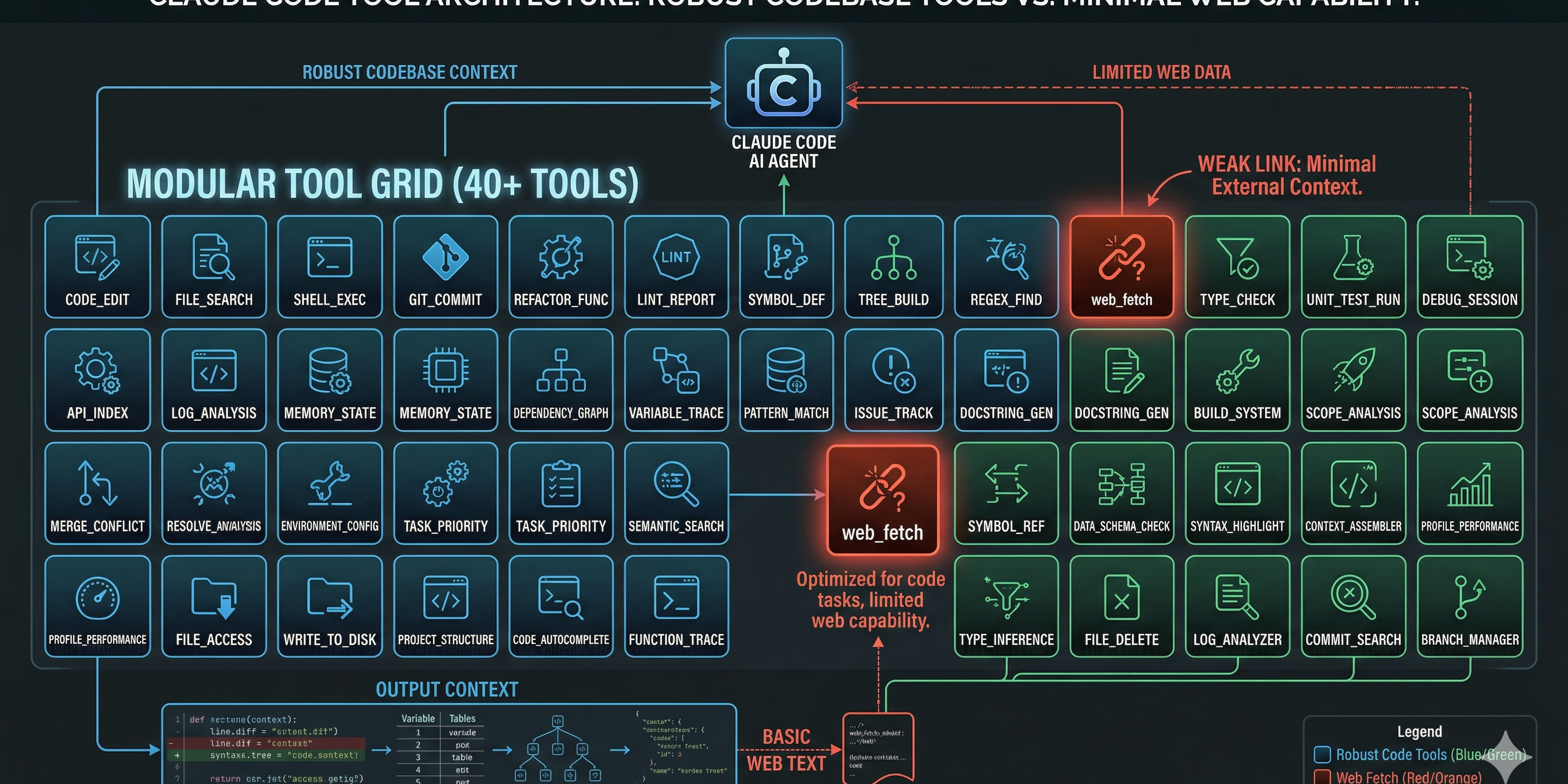
What they found inside was genuinely impressive engineering. Claude Code isn't a thin wrapper around an API — it's a full-blown agent harness with a sophisticated tool system. Around 40 discrete tools, each one a modular capability: file reading, bash command execution, code editing, git operations, LSP integration, multi-agent spawning.
Every single tool call passes through a six-layer permission verification system. After that, a four-stage decision pipeline checks authorization and runs execution analysis before anything actually fires. It's production-grade security engineering. The kind of thing that makes you nod with respect.
But here's the thing that nobody's really talking about.
Scroll through all 40 tools. Read every line. The web browsing capability is almost nonexistent.
There's a basic web_fetch tool. That's it. It sends an HTTP request and gets back whatever the server returns. No JavaScript rendering. No handling of dynamically loaded content. No anti-bot bypass. No CAPTCHA solving. No session management. No cookie handling. No proxy rotation.
It's like giving someone a phone that can only send text messages. Sure, it technically "communicates" — but try ordering food with it.
The "Brain Without a Browser" Problem
The leak confirmed something that every power user has felt for years: your AI assistant is a genius locked in a room with no windows.
It can refactor your entire codebase. It can write SQL queries, debug race conditions, architect microservices. But ask it to check a price on Amazon, and it shrugs.
This isn't a Claude problem. This isn't a ChatGPT problem. It's an industry-wide consensus failure — a gap so universal that every major AI assistant fails in the exact same way.
Try it yourself:
🛒 "Scrape the top 10 Amazon bestsellers in electronics" → "I'm unable to access Amazon's website in real time. You could use a web scraping tool or check the page manually."
🗺️ "Find all Thai restaurants within 2 miles of my office and compare their ratings" → "I don't have access to Google Maps. I'd suggest searching directly on the platform."
📱 "What are people saying about our product launch on Reddit?" → "I can't access Reddit threads directly. If you paste the relevant comments here, I can analyze the sentiment."
📺 "Get me the comment sentiment on this YouTube video" → "I'm unable to fetch YouTube comments. You might try using a third-party tool."
Notice the pattern? Every response is some version of: "I can't do that. You do it for me, and then I'll help."
That's not an assistant. That's a consultant who refuses to open their laptop.
Why This Happens — No Magic, Just Missing Plumbing
The technical explanation is straightforward, but it's worth understanding because it reveals why the problem is so hard to fix with a simple fetch call.
Problem 1: "I got the page but it's completely blank." Most modern websites don't serve their content in raw HTML anymore. They load everything through JavaScript after the page opens. Amazon's bestseller list, Google Maps results, YouTube comments — none of that exists in the initial HTML. A basic HTTP request gets you the skeleton. The content fills in later, when a real browser runs the JavaScript. The AI's web_fetch tool never sees it.
Think of it like opening a book and finding only the table of contents. The chapters show up later — but only if you have a browser to load them.
Problem 2: "403 Forbidden / Access Denied" Websites actively fight automated access. They check browser fingerprints, analyze request patterns, look for headless browser signatures. When your AI sends a vanilla HTTP request, most sites immediately recognize it as a bot and slam the door shut.
Problem 3: "I got the data but it's a mess" Even when a fetch succeeds, the returned HTML is often an unstructured soup. Product names mixed with tracking pixels, prices buried in nested divs, review text tangled with ad scripts. Turning that into usable data requires page-specific parsing logic that general-purpose AI tools don't have.
Problem 4: "You need to sign in" Many valuable data sources — social media feeds, dashboard analytics, competitor pricing tools — sit behind login walls. Maintaining authenticated sessions, handling multi-factor auth, managing cookies across requests — this is browser territory, not HTTP territory.
What Claude Code's Architecture Tells Us About Where AI Agents Are Heading
The leak wasn't just gossip material. For anyone building AI-powered products or workflows, the exposed code contains three insights worth paying attention to.
The Tool System Is the Real Competitive Advantage
Claude Code's moat isn't the model. Anthropic said as much in their response to the leak — the model weights, training data, and user data weren't exposed. The CLI is "just" a client.
But "just a client" with 40 tools, a six-layer permission system, and a multi-agent orchestration framework is a serious piece of engineering. It proves something that the AI industry is slowly figuring out: the tool layer is where the real product differentiation lives.
A model without tools is an oracle that can only speak. Tools are what let it act. And the sophistication of your tool system — how many things your agent can actually do in the real world — determines how useful your product is.
KAIROS — The Always-On Agent Is Coming
One of the most discussed discoveries in the leaked code is KAIROS, a daemon mode that lets Claude Code run as an always-on background agent. The name comes from ancient Greek — "the right moment."
KAIROS can subscribe to GitHub webhooks, so it starts fixing bugs the moment they're reported. It has a background memory consolidation system called autoDream that organizes and compresses the agent's long-term memory while the user is away. When you come back, the agent's context is clean, organized, and ready.
This is where AI agents are clearly headed: from reactive tools you poke when you need them, to persistent assistants that work alongside you continuously.
But here's the question nobody in the thread was asking: what good is an always-on agent that can't go online?
If KAIROS can watch your GitHub repo 24/7 but can't check whether your competitor just changed their pricing page — what's the point of "always-on"? If it can auto-organize your project notes but can't pull the latest industry data from a live webpage — is it really autonomous?
The always-on future makes the browser gap even more critical.
The Missing Layer: Real Web Interaction
40 tools cover code editing, file management, git operations, terminal commands, multi-agent coordination. But the one thing that 99% of real-world workflows require — interacting with live web pages the way a human does — is barely represented.
This isn't an oversight. It's an architectural boundary. Building a reliable, scalable web browsing capability is a different engineering challenge than building a code editor or a file system tool. It requires headless browsers, residential proxies, CAPTCHA bypass, fingerprint management, session persistence, JavaScript rendering engines — an entire parallel infrastructure.
No wonder it's missing from Claude Code. It's not their core competency. But it is somebody's.
Bridging the Gap — What AI Agents Look Like With a Real Browser
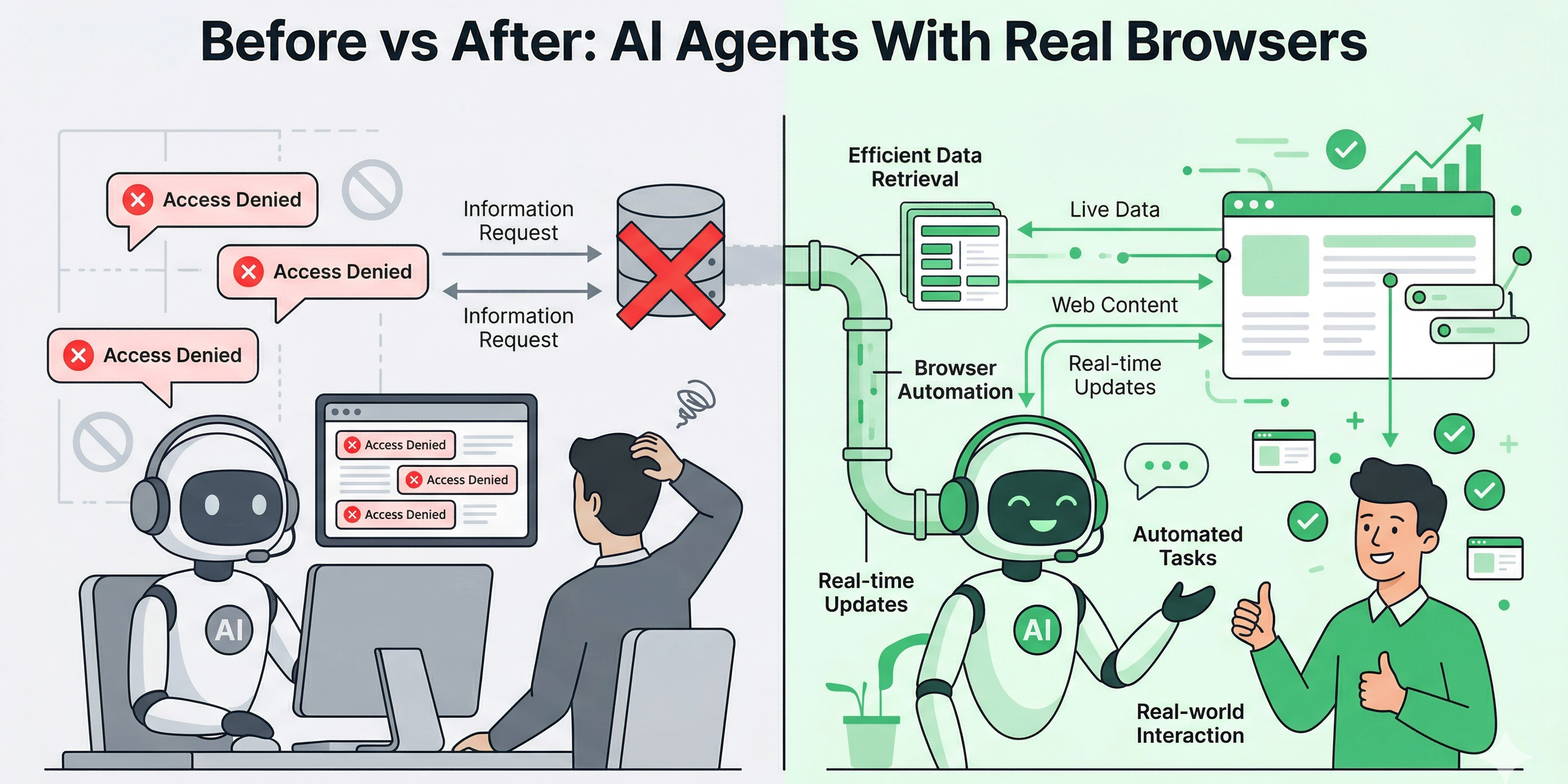
Let's replay those same frustrating scenarios from earlier. Same requests. Different outcome.
🛒 "Pull the top Amazon bestsellers in electronics" → The agent connects to BrowserAct's Amazon Bestsellers template, which opens a real browser session, navigates to Amazon's bestseller page, waits for dynamic content to fully render, handles any anti-bot challenges, and returns clean, structured data — product titles, prices, ratings, ASINs, review counts. Ready for your spreadsheet or database.
🗺️ "Find all Thai restaurants near my office and compare ratings" → Through the Google Maps Scraper, a browser session searches Google Maps with your criteria, scrolls through results, extracts business names, ratings, review counts, addresses, and phone numbers. Structured JSON. No manual copy-pasting.
📱 "What are people saying about our product on Reddit?" → The Reddit Posts & Comments Scraper navigates to relevant subreddits, expands comment threads, captures post content, upvote counts, timestamps, and nested replies. Feed it into your sentiment analysis pipeline and you've got a real-time pulse on community opinion.
📺 "Analyze the engagement on this YouTube video" → A YouTube Comments API skill pulls video metadata, comment threads, like counts, and reply chains. Combine it with a YouTube Video API skill for view counts, engagement rates, and publishing analytics — all without asking anyone to "paste the transcript."
The point isn't the individual tools. It's the pattern: the exact same AI request goes from "I can't do that" to "here's your data" when you give the agent a real browser.
Workflow | AI Agent Alone | AI Agent + Browser Automation |
|---|---|---|
Amazon product research | ❌ "Can't access Amazon" | ✅ Structured product data with prices, ratings, ASINs |
Google Maps competitor analysis | ❌ "Can't browse Maps" | ✅ Business listings with ratings, reviews, contact info |
Reddit sentiment monitoring | ❌ "Paste the content" | ✅ Real-time post and comment extraction |
YouTube audience analysis | ❌ "Can't fetch video data" | ✅ Comments, engagement metrics, channel analytics |
Social media lead generation | ❌ "I don't have access" | ✅ Automated profile discovery via Social Media Finder |
Competitor price tracking | ❌ "Check manually" | ✅ Scheduled scraping with change detection |
What Builders Should Take Away from This Leak
Whether you're a developer, a founder, or someone building AI-powered workflows, the Claude Code leak has a few practical lessons embedded in it.
Your build pipeline is a liability. A single misconfigured .npmignore file exposed 510,000 lines of proprietary code to the world. Run npm pack --dry-run before every publish. Audit your build outputs. This is especially critical in the age of AI-assisted development — when your agent is writing and pushing code, the surface area for these kinds of mistakes expands fast.
The tool layer matters more than the model. Claude Code's value isn't in the model behind it — it's in the 40 tools, the permission system, the orchestration logic, the context management. If you're building an AI product, invest in your tool infrastructure. A smarter model with fewer capabilities loses to a slightly dumber model that can actually do things.
Web browsing is table stakes. The leaked KAIROS mode, the multi-agent coordination, the background memory system — all of it points to a future where AI agents are persistent, proactive, and autonomous. None of that matters if the agent can't interact with the live web. Building or integrating real browser automation — the kind that handles JavaScript rendering, anti-detection, CAPTCHAs, proxies — isn't optional anymore. It's the foundation.
API-first integrations are the right architecture. Platforms like BrowserAct expose browser automation as an API, with ready-made integrations for n8n, Make, and Zapier. That's the pattern: your AI agent calls an API, the API controls a real browser, structured data comes back. Clean separation of concerns. No hacking around limitations.
Key Takeaways
- Claude Code's leaked source code exposed 40+ tools and 510,000 lines of production-grade agent engineering — but real web browsing capability was nearly absent, confirming this as an industry-wide gap.
- Every major AI assistant (ChatGPT, Claude, Gemini) fails identically when asked to access live web data — this is a consensus problem, not a single product's bug.
- The leaked KAIROS daemon mode signals that always-on AI agents are coming, making real-time web access even more critical for meaningful autonomy.
- Tool orchestration architecture — not model intelligence — is emerging as the true competitive moat for AI agent products.
- Browser automation platforms that handle JavaScript rendering, anti-detection, and CAPTCHA bypass are the missing infrastructure layer that completes the AI agent stack.
Conclusion
The Claude Code leak didn't just expose a company's source code. It held up a mirror to the entire AI agent ecosystem and showed us what's missing. 40 tools for editing code, managing files, and orchestrating multi-agent workflows — but when it comes to something as basic as checking a price on Amazon or reading a Reddit thread, even the industry's most sophisticated agent comes up empty.
That gap between what AI agents can reason about and what they can actually access online isn't something users should have to work around with copy-paste. Tools like BrowserAct already close this gap — providing no-code browser automation with built-in anti-detection, CAPTCHA bypass, and global residential proxies that give any AI workflow the real web access it's been missing.
The next generation of AI agents won't just think. They'll browse, click, scroll, and extract — like a human would, but at scale.
Stop telling your AI to "paste the content here." Give it a real browser. Try BrowserAct free and see what your automation workflows look like when the entire web is finally accessible.


