Claude Code + BrowserAct: One Sentence Lets Your AI Agent Actually Drive a Browser

How do you get an AI Coding agent to do real work on a real web page? Not just summarize a URL you pasted — but open the page, sign in, click around, fill out a form, the way a human would. I tried two open-source Agent Skills from BrowserAct on three real tasks inside Claude Code over the past few days. Here is what stuck, where the boundary sits, and why it now lives in my daily loop.
Why this matters for AI Coding workflows
Anytime an agent task contains the line "go check that page," you usually hit a wall.
A static page might be fine — curl brings back the HTML and the agent reads it. But that is not most of the modern web. Pages render client-side; the data lives behind XHR or fetch calls; lists need a "Load more" click or a paginated request. Those are still the easy problems.
The real trouble is login state and anti-automation detection. Plenty of pages only show anything useful after sign-in, and some need 2FA. The moment your session lapses, the workflow restarts from scratch. And these days half the production sites you would want to read sit behind Cloudflare Challenge, DataDome, PerimeterX, or reCAPTCHA — the second a vanilla headless browser shows up, you do not get the page, you get a verification screen, a block, or a blank document.
That is the gap an agent-browser layer is supposed to close: open the page like a person, click like a person, reuse the login the user already has, ride out the bot checks, and bring back something usable. BrowserAct's pitch: stealth fingerprints, residential routing, real-Chrome takeover, and a built-in skill format so the agent can call it without you re-describing the workflow each time.
The official demo on their site scrapes the top 80 Amazon Electronics Bestsellers — title, price, rank, reviews — and exports bestsellers.csv in 2 minutes 14 seconds from a single prompt. That gives you a sense of the surface area: scrape, parse, export, and not get blocked.
What the two skills actually do
The release is two installable Agent Skills, not a SaaS dashboard.
browser-act is the execution layer for one-off tasks. Open a page, click, type, screenshot, read the rendered DOM after auth, pull data out of an XHR/fetch/HAR capture, or eyeball the visual layout. It exposes two browser modes:
- Stealth Browser for sites that aggressively flag automation. This is what survives Cloudflare and friends.
- Real Chrome Control that takes over your local Chrome — the same instance you are already signed in to. Cookies, profile, extensions all come along for the ride.
That second mode is where it diverges from the typical headless library. A lot of agent tasks fail not because Playwright is broken, but because Playwright spawns a fresh browser with no login, and you do not want to script credentials into the agent. Real Chrome takeover sidesteps that whole problem.
The other piece worth flagging: browser-act does not dump a full page of HTML at the model. Real pages carry navigation, ads, scripts, hidden nodes, inline styles. The model reading that raw is noise plus context burn. The browser layer waits, filters, screenshots, captures requests, and does structured extraction first — the cleaner artifact is what reaches the LLM.
browser-act-skill-forge is the second skill, and the more interesting one. It turns a repeated web task into a reusable Skill. You hand it a goal and sample inputs; it explores the target site, prefers an API endpoint when there is one, falls back to DOM extraction otherwise, validates the workflow, and emits a SKILL.md plus a script.
The split: browser-act is "get this one task done now"; skill-forge is "remember how, so the next ten runs are free."
Installing it inside Claude Code, Cursor, or Codex
Inside Claude Code, Cursor, or Codex CLI, the path of least resistance is to ask the agent to install it for you. Something like:
Please install the BrowserAct Skill and verify the runtime is set up.
Once installed, run browser-act get-skills core --skill-version 2.0.0.
When the agent finishes, you can ask it to add the second skill the same way:
Now install browser-act-skill-forge and confirm it can read the Skill manifest.
In practice the agent ends up running roughly:
npx skills add browser-act/skills --skill browser-act
npx skills add browser-act/skills --skill browser-act-skill-forge
browser-act get-skills core --skill-version 2.0.0
The reason this is worth handing to the agent rather than copy-pasting is that BrowserAct is not just a CLI. There are decisions along the way — which browser mode to pick, how to handle login, when to stop and ask the user for confirmation. The Skill manifest spells those out, and the agent reads it before doing anything.
The repo also ships ready-made workflows you can call straight from Claude Code: Amazon ASIN lookup, Amazon Best Selling Products, Google News scraping, Google Maps lookup, YouTube transcript extraction. If your task already matches one of those, you do not write anything — you just call the skill.
Workflow 1: Read your own logged-in GitHub issues
The first thing I tried was a daily-maintenance task. I wanted the agent to walk into one of my own GitHub repos, read the open issues — including the discussion threads — and hand back a categorized triage list.
The prompt was roughly:
Use browser-act to enter my logged-in GitHub repo, read the latest 10 open issues, classify them as bug / feature / question, and for each one return:
1. Title
2. Key context
3. Likely affected modules
4. Suggested priority
5. Whether you need me to clarify anything
This is the kind of task that sounds simple until you try it without auth. A search tool cannot do this — it does not have my session, and it cannot see what I would see. The exact failure mode browser-act is built to fix.
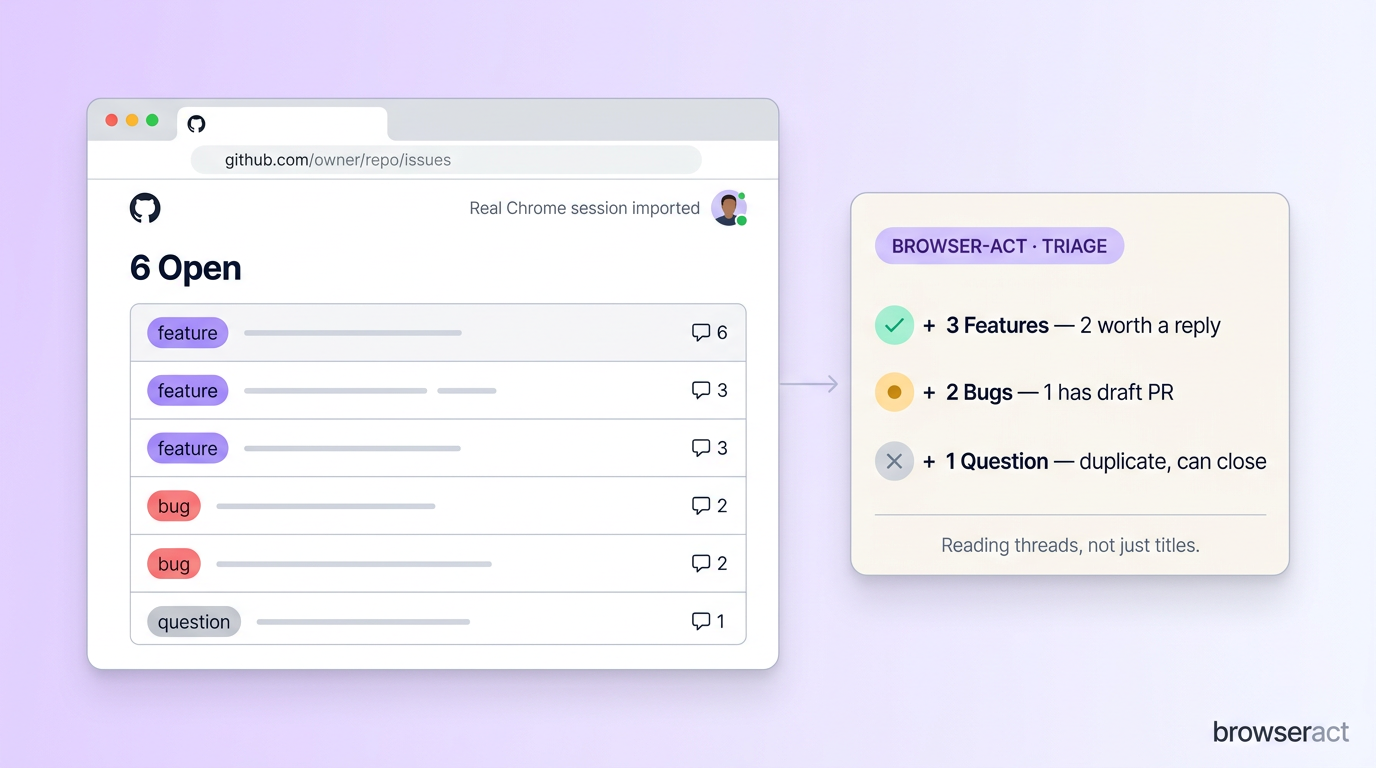
What it actually did: enumerated my local Chrome profiles, told me which one it was about to import, and asked for confirmation. After confirming, it spun up a Chrome browser session, imported cookies and localStorage from the chosen profile, and navigated straight to the Issues page. It found 6 open issues at the time, opened each detail page in turn, read the full discussion (including team-only labels), and wrote back a categorized report:
3 Features  — 2 with discussion threads worth a reply
2 Bugs      — 1 already has a draft PR open, 1 looks like a freshness regression
1 Question  — duplicate of an older issue, can be closed with a link
The work the agent saved is not visible from the issues list alone. Which issue already has a PR worth reviewing? Which is fixed and can be closed? Which complaints all trace back to the same self-hosted-config error message? You cannot see those from titles — you have to read the threads. That is exactly the part the agent absorbed.
The boundary worth being explicit about: reading, sorting, and categorizing are things you can hand to the agent. Closing issues, merging PRs, deleting comments, approving anything — those have to stay behind explicit user confirmation. The skill stops at any irreversible state change. That default is correct.
Give your agent a real browser, then turn the workflow into a Skill.
- 1. Use browser-act when an agent needs to open, click, scroll, extract, or inspect a live site.
- 2. Use browser-act-skill-forge when the workflow should become reusable across runs and agents.
- 3. Keep the operational boundary simple: automate what the user can already do in the browser.
Workflow 2: Smoke-test the UI right after the agent edits it
The second test was closer to my day-to-day AI Coding loop.
A lot of us are using Claude Code, Cursor, or Codex to edit frontend pages now. The trouble is that when the agent says "done," you still have no real evidence the page works. Does the button actually do anything when clicked? Are the dropdown options sensible? Is the default value usable? Are the error messages written in plain English? Does submitting the form actually persist?
You do not get answers to those just by reading the diff.
So I pointed browser-act at a local alerts dashboard and asked it to run through the new-alert flow:
Open http://localhost:3000/alerts.
Create a new price alert:
ticker: NVDA
name: NVIDIA
condition: price below 140
>
Note any issues you encounter — field validation, enum copy, button states, error messages, and screenshots.
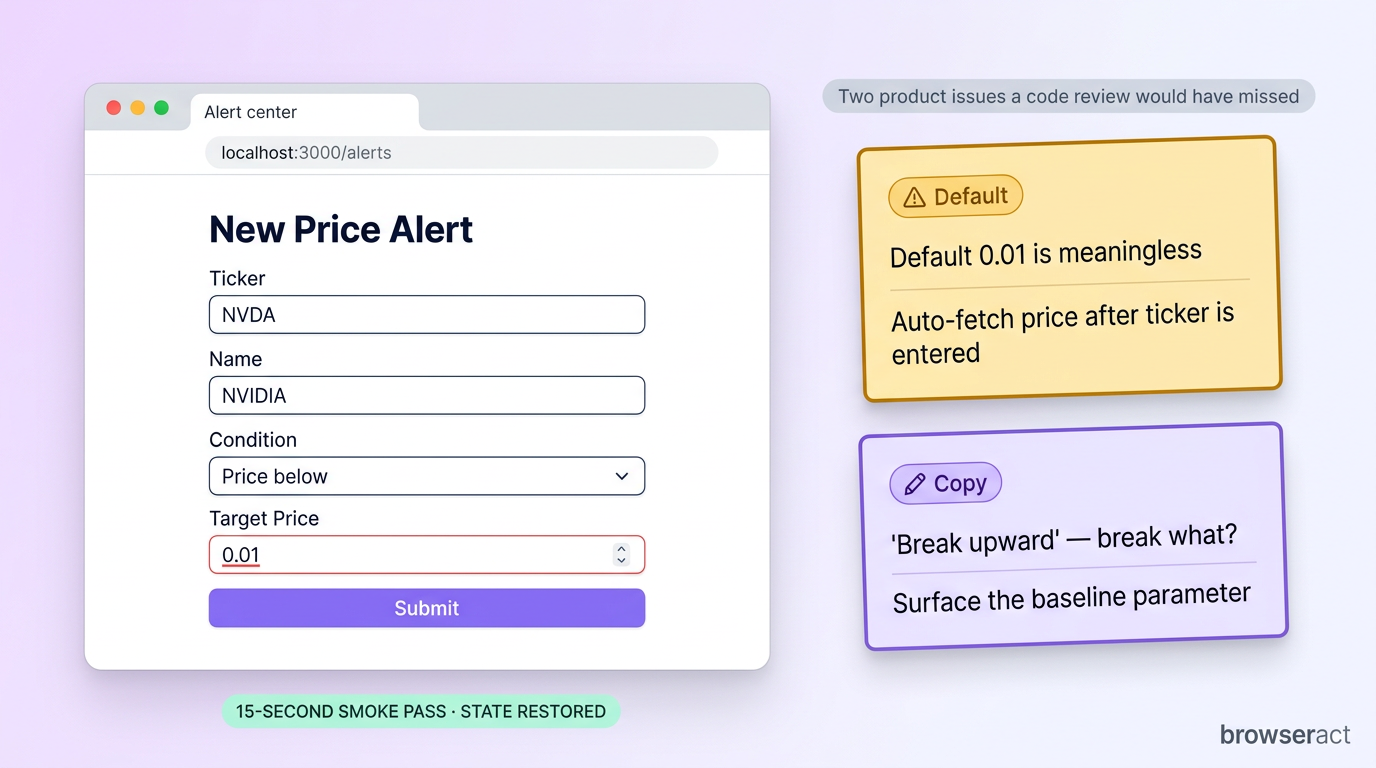
It opened the page, recognized the alert center, clicked "New Alert," typed the ticker, switched the condition selector to "below target," and entered 140 as the target. It captured screenshots at each step — empty form, filled form, submitted state.
It also flagged two real product issues a code review would have missed:
- The default target price was
0.01, which is nonsense for a stock priced in three digits. Better would be: leave it blank, or auto-fetch the current price as the seed once the ticker is entered. - The trigger-condition copy lacks reference points. "Break upward," "Break downward," "Volume spike" — break what? Volume spike relative to what? After picking one of these, the form should surface what parameter or baseline applies.
Then it deleted the test alert and restored the original state.
That is not a replacement for end-to-end tests, and it does not cover every branch. What it gives you is a fifteen-second smoke pass — open the page, walk the happy path, screenshot the rough edges, clean up. The class of bugs it catches (sensible defaults, copy that does not help users, button state, success-toast timing) is exactly the class static analysis cannot see.
Workflow 3: Forge a one-off scrape into a reusable Skill
The third experiment used the second skill — browser-act-skill-forge — for the kind of task I do a lot of: surveying GitHub repositories before writing about them.
Before any AI agent / MCP / Skill roundup, I usually need to evaluate a batch of repos: stars, forks, last-update date, license, README install instructions, whether examples ship with the repo, whether they mention Skill / MCP / CLI, and whether they are actually usable from Claude Code. One or two repos by hand is fine. Ten or twenty becomes a chore — and worse, the agent ends up re-exploring GitHub from scratch each time.
So I forged a skill. Install:
npx skills add browser-act/skills --skill browser-act-skill-forge
Then a precise Forge prompt:
Use browser-act-skill-forge to create a GitHub project research Skill.
>
Skill name: github-repo-research
>
Input: a list of GitHub repo URLs, e.g. browser-act/skills, microsoft/playwright, modelcontextprotocol/servers
>
Output fields per repo:
1. Project name
2. GitHub URL
3. Star count
4. Fork count
5. Last update date
6. License
7. README install method
8. Has examples / demos
9. Mentions Skill / MCP / CLI
10. Suitable for Claude Code / Cursor / Codex usage
11. Notable angle worth covering
12. Any field that needs human confirmation
>
Constraints:
- Prefer stable data sources; use APIs over scraping when possible
- If README does not say something, mark "unconfirmed" — do not guess
- Output a Markdown table plus JSON
- Run end-to-end on the three sample repos first, then generalize
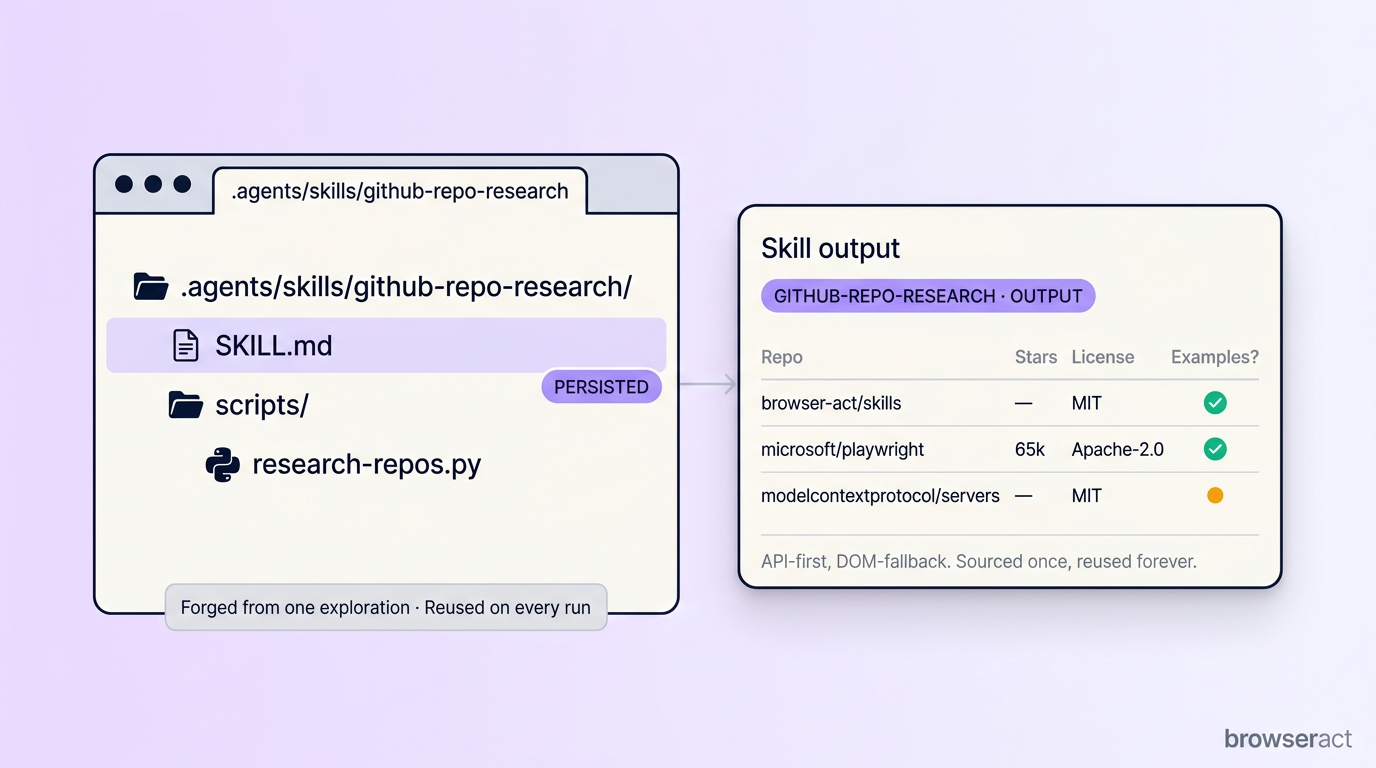
What stood out: Forge did not force a browser walk-through. GitHub already exposes a clean REST API for almost every field I asked for. So the skill picked that path, validated it on the three sample repos, and emitted a local skill:
.agents/skills/github-repo-research/
├── SKILL.md
└── scripts/
    └── research-repos.py
The next call does not re-explore — I just list more repo URLs and the skill runs through them in seconds:
Use the github-repo-research Skill to research the following repos and output Markdown + JSON: …
What is actually valuable is not the Python script in isolation — it is that the skill records how the data was sourced. Next time I swap the input list, I do not have to re-derive anything; if a field starts misbehaving, SKILL.md shows me which endpoint to debug.
browser-act-skill-forge is not the only way to write a skill. If you already know a target's API, write the script and a SKILL.md yourself and you are done. Forge earns its place when the data source is uncertain — first run finds the endpoint or DOM pattern, validates it, persists it. The compression is in that first exploration; everything after is a normal script call.
Choose how Claude Code should use BrowserAct
Use the CLI for the first live run, browse Skills when the procedure already exists, and move a validated workflow into a managed Bot when it needs reliable repetition.
Give your agent a browser
Install BrowserAct CLI so Claude Code can open, inspect, and interact with real pages.
Install BrowserAct CLI →Build with BrowserAct
Run a proven Claude Code browser workflow as a managed Bot with reviewable output.
Build your Bot →Start from a reusable workflow
Browse reusable agent Skills for common browser workflows and extraction patterns.
Browse BrowserAct Skills →What the API key actually solves
The local skills run without a key. Real Chrome takeover, single-page extraction, one-off Skill Forge runs — all free. So what does paying for an API key buy?
Four specific failure modes that the local layer cannot solve on its own:
- Bot-protection on aggressive sites. Cloudflare Turnstile, DataDome, PerimeterX, and reCAPTCHA v3 score your browser on ~200 signals before any challenge renders. A vanilla headless browser fails the score; even a real Chrome can be flagged on a residential IP that has been used for automation. The API key gives you stealth fingerprints rotated on the server side and residential routing in 195+ countries — the score gets recomputed against a clean profile every run.
- Throughput across many pages or domains. Real Chrome takeover is one browser, your browser. If you need to extract 10,000 product pages or run a search-style workflow that spans 50 sites in parallel, you cannot serialize that through the laptop you are also using to read email. The hosted layer runs it on infrastructure built for it.
- Long-running monitoring jobs. "Check this competitor's pricing page every hour and notify me when it changes" cannot live on your laptop — it sleeps, it disconnects from Wi-Fi, it reboots for OS updates. The hosted layer holds the session and pages you on change.
- Workflows that should not depend on your local Chrome staying signed in. When the workflow needs to keep running while you are not at the keyboard, pinning it to your local profile is the wrong shape. The API key gives you a managed session with explicit expiry and re-auth handling.
You can grab a free key on the BrowserAct site:
A key does not grant a license to ignore a site's rules. Sensitive actions still pass through user confirmation — that is a feature, not a limitation.
Key Takeaways
- Real Chrome takeover drives the Chrome you are already signed in to — cookies, profile, extensions inherited. No credentials in the agent script, no fresh-profile auth dance.
- Stealth Browser ships with the fingerprints + residential routing that survive Cloudflare, DataDome, PerimeterX, and reCAPTCHA — replacing the playwright-stealth maintenance treadmill.
- Skill Forge persists the first exploration (API endpoint or DOM pattern) into a
SKILL.md+ script, so the next thousand runs cost a normal script call. - Safe by default: irreversible state changes (closing issues, merging PRs, deleting data, submitting forms with consequences) pause for explicit confirmation.
- Two-command install inside Claude Code / Cursor / Codex CLI — local use is free; the API key is for production volume and aggressively bot-protected sites.
Conclusion
A few days of using it, what BrowserAct's skills do reduces to one sentence: they turn browser operation into a tool an agent can call. Open the page, fill the form, reuse login state, capture the network, screenshot — and hand the result to the layer above.
It is not free-form clicking. Creating browsers, importing local Chrome login state, submitting forms, and deleting data all stop and ask first. That distinction matters: the agent can drive the page, but the decision to actually commit an action stays with you.
The repo is at github.com/browser-act/skills. The free API key is at browseract.ai/guide. If your AI Coding workflow has been quietly failing on anything that requires a real browser, two install commands are a low-cost way to find out whether it is the missing piece.
Teach your coding agent one reliable browser workflow.
Connect Claude Code to a real browser task, review the run, and package the proven sequence only after it handles page changes and stop rules.
Further reading: Agent skills
Frequently Asked Questions
What problem does browser-act actually solve compared to Playwright MCP?
It handles login state via Real Chrome takeover and survives anti-bot detection via the Stealth Browser — two layers Playwright MCP leaves to you.
Do I need a BrowserAct API key to try it?
No. Local Real Chrome control runs without a key. The key is for stealth mode, residential routing, and high-volume or long-running jobs.
Does browser-act-skill-forge always use a real browser?
No. It probes for a stable API endpoint first and only falls back to DOM extraction when no API exists for the data you asked for.
Will it close GitHub issues or delete data without asking me?
No. Any irreversible state change pauses for explicit user confirmation by default.
Is it open source?
Yes — both skills are MIT-licensed at github.com/browser-act/skills. The hosted stealth + proxy infrastructure behind the API key is the only paid layer.
Which AI Coding agents does it work with?
Claude Code, Cursor, and Codex CLI. Any agent runtime that supports the Skill format will pick it up after install.
Can I use it to scrape sites the user would not normally have access to?
No — it operates inside what the user can manually do in their own browser. It does not bypass authentication or terms of service.


