
SEC Scraper
BrowserAct SEC Scraper is a no-code tool that automates scraping SEC filings, company reports, financial data, and disclosures, enabling effortless corporate insight analysis without manual effort.
Published by
Ch
Chiyee
December 22, 2025
Approx.Credits
25-50 Credits
Categories
BA
Content CollectionSEC
Template ID
51162600643325018

Brief
BrowserAct SEC Scraper is a powerful, no-code tool that automates scraping SEC for filings, company reports, financial data, disclosures, and more to easily analyze corporate insights, allowing you to scrape SEC effortlessly without manual effort. It solves the exhaustion of manually compiling data from countless documents, enabling investors, analysts, researchers, and compliance teams to uncover financial trends, assess risks, and gain a competitive edge through automated SEC data extraction.
(Note: SEC filings are official documents that publicly traded companies submit to the U.S. Securities and Exchange Commission, such as S-1 for initial public offerings (IPOs)—which is a registration statement required for companies going public, detailing financials, business operations, and risks—10-K annual reports, 10-Q quarterly updates, and 8-K event disclosures, providing essential transparency on financial health, operations, and risks—making them invaluable for investment analysis and regulatory compliance.)
Purpose of SEC Scraper
Key Benefits of Using SEC Scraper
This SEC data scraper helps you automate data collection to make smarter decisions. Here's what it delivers:
- Streamline Tracking: Streamline tracking of SEC filings, financial statements, and disclosures without manual work, saving hours of effort.
- Uncover Insights: Uncover financial trends and risk assessments by extracting structured data like report dates and key metrics.
- Gain Competitive Edge: Gain a competitive edge through AI-driven insights, including field suggestions for forms like S-1 or 8-K not available in other tools.
- Enable Analysis: Enable precise investment analysis and compliance checks with customizable data extraction.
- Boost Efficiency: Boost research and decision-making by turning raw SEC data into actionable reports and strategies.
Who Should Use This SEC Scraper?
- Investors: Perfect for monitoring company reports, financials, and risks to inform investment decisions.
- Financial Analysts: Ideal for tracking quarterly updates, disclosures, and metrics to support market research.
- Researchers: Great for analyzing trends in SEC filings across industries for academic or competitive intelligence.
- Compliance Teams: Useful for bulk extraction of regulatory documents to ensure adherence and reporting.
- Skill Requirements: No coding needed – just basic knowledge of web browsing to set up and run.
- Usage Scenarios: Use it for daily filing checks, financial reports, risk assessments, or generating insights for business growth.
SEC Scraper Outputs and Capabilitiesthe
Output Data from Scraping the SEC
Explanation of the workflow's output data format and content:
Data fields include:
- Form: Identifies the filing type as shown for quick categorization.
- Company Name: Records the text from the Description column for company identification.
- Company & Files Info: Captures the link labeled [html] in the “Formats” column for document access.
- Filing Date: Records the submission date in YYYY-MM-DD format.
- Filing Accepted Date/Time: Includes the acceptance timestamp in YYYY-MM-DD HH:MM:SS format if shown.
- File/Film No.: Extracts the number as digits only for reference.
If you want more output data (e.g., additional metrics or excerpts), you can customize the workflow to include them.
Output supported formats: JSON, CSV, Excel, XML, ideal for easy download and integration after you scrape SEC.
Scope and Limitations of the SEC Scraper
- Supported Websites/Platforms: Specifically designed for SEC EDGAR database, supporting company searches, filing lists, and document pages to scrape SEC.
- Data Types: Structured filing data, including types, dates, company info, and URLs via an SEC data scraper.
- Geographic Restrictions: Focused on U.S. SEC data; browser IP can be set for global access.
- Data Scale: Suitable for small-scale (hundreds of filings) to large-scale (thousands) SEC scraping, depending on credit usage.
How to Build Your SEC Scraper Workflow: Step-by-Step
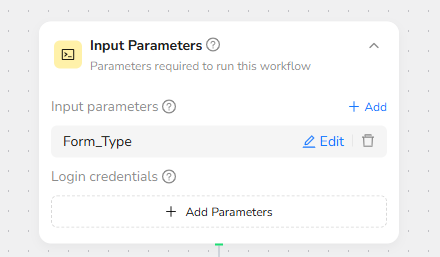
Step 1: Parameter Setup
- Form_Type: The filing type to search for (default: "S-1", which is the registration statement companies file for initial public offerings (IPOs) to disclose financial details, business operations, and risks; you can change it to other types like "10-K" for annual reports or "8-K" for material events).
Use default values for quick runs, such as keeping Form_Type as "S-1" for testing without manual changes.
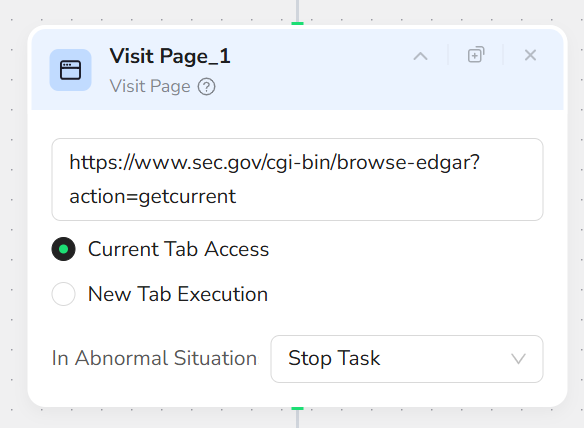
Step 2: Add Visit Page Node
Add a "Visit Page" node and input the URL “https://www.sec.gov/cgi-bin/browse-edgar?action=getcurrent”. This will navigate to the Latest EDGAR Filings page.
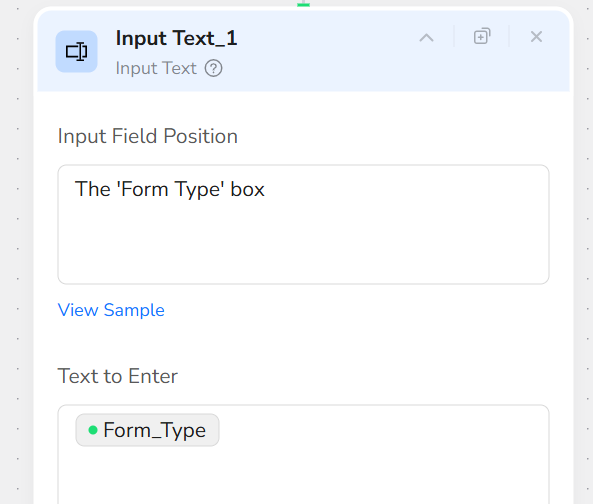
Step 3: Add Input Text Node
Add an "Input Text" node. In the Input Field Position, input “The 'Form Type' box”. In the Text to Enter, input “/Form_Type”.
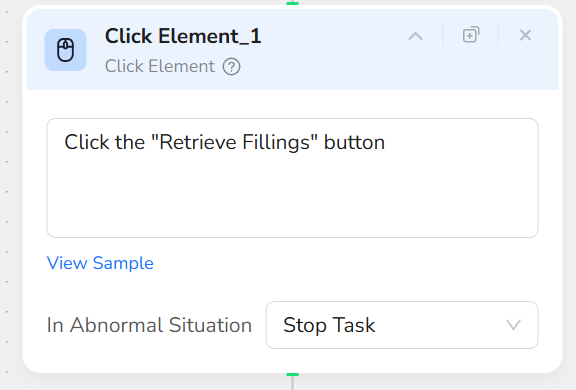
Step 4: Add Click Element Node
Add a "Click Element" node and input the prompt: “Click the "Retrieve Fillings" button”. This retrieves the filings based on the specified form type.
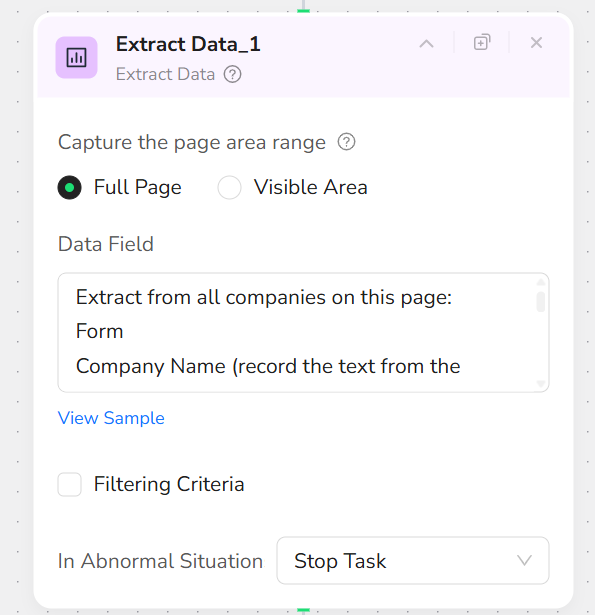
Step 5: Add Extract Data Node
Add an "Extract Data" node and input the prompt: “Extract from all companies on this page: Form, Company Name (record the text from the Description column), Company & Files Info (record the link labeled [html] in the “Formats” column), Filing Date, Filing Accepted Date/Time, File/Film No.
Format: Dates as YYYY-MM-DD (time as HH:MM:SS if shown), URLs as absolute links if possible, Filing No as digits only (numbers only), missing data as "N/A".”.
Step 6: Add Finish: Output Data Node
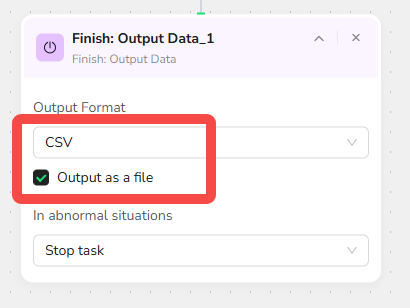
Add a "Finish: Output Data" node. Select "CSV" as the output format and check "Output as a file" for easy downloading. You can also choose to export in JSON, XML, or Markdown (MD) formats.
Quick Start Guide: How to Use SEC Scraper in One Click
If you don't want to build the workflow from scratch, simply use our pre-built "SEC Scraper" template for instant setup and start scraping SEC effortlessly.
Step 1: Register Account
Create a free BrowserAct account using your email.
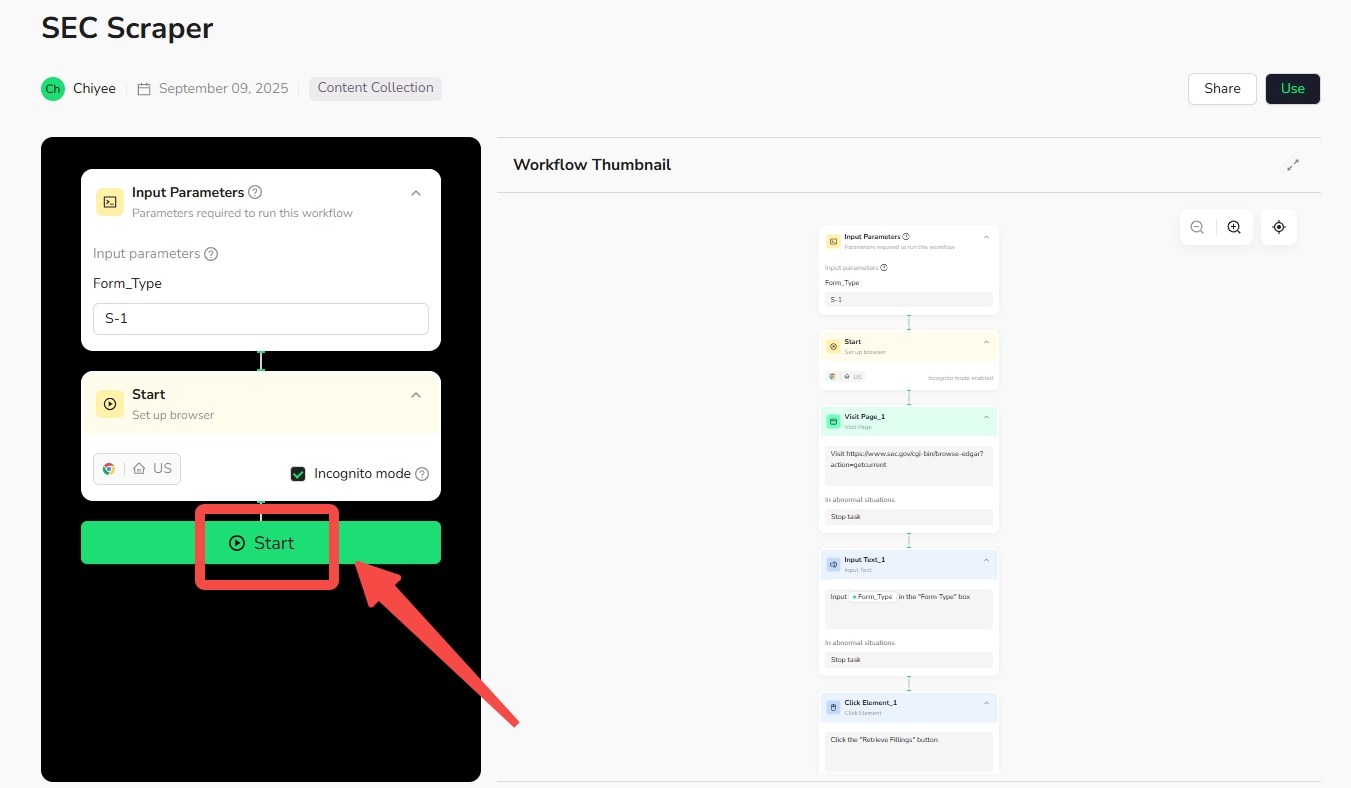
Step 2: Configure Parameters
Fill in necessary inputs like Form_Type (e.g., "S-1") – or use defaults to learn how to scrape SEC quickly.
Step 3: Start Execution
Click "Start" to run the workflow.
Step 4: Download Data
Once complete, download the results file from scraping SEC.
Common Scenarios for Using SEC Scraper
Business Use Cases for Scraping SEC Data
- Investment Analysis: Use the SEC scraper to monitor financial reports and risks for informed decisions.
- Competitor Research: Scrape SEC for competitors' disclosures to refine strategies.
- Compliance Monitoring: Extract data to ensure regulatory adherence and track updates.
- Market Insights: Analyze trends in filings across companies for broader economic understanding.
Technical Integrations for Advanced SEC Scraping
- API Calls: Integrate via API into third-party automation platforms like Make or n8n for seamless SEC scraping.
- Scheduled Tasks: Set up regular runs to automate reports on how to scrape SEC.
- Data Pipelines: Connect with analysis tools (e.g., Google Sheets or BI software) for ongoing data flow.
Get Started with Scraping SEC Now
🚀 Start using it today!
- Create Free Account - 30-second quick registration
- Try This Workflow - Free trial
Custom SEC Scraper Solutions
💡 Need a customized workflow?
If the existing SEC scraper doesn't fully meet your needs, we offer custom development services:
- 📧 Email Contact: service@browseract.com
- 💬 Discord Community: Join our Discord
 What can we do for you