
Phone Number Extractor
Scrape precise telephone numbers from fastpeoplesearch.com for bulk tasks. Ideal for lead generation and contact extraction.
Published by
Ch
Chiyee
September 11, 2026
Approx.Credits
50-100 Credits
Categories
BA
Contact ExtractionFast People Search
Template ID
68880434666299883

Brief
What Does Phone Number Extractor Do?
Automatically extract phone numbers and related details from fastpeoplesearch.com with our powerful, no-code phone number extractor tool. Capture telephone numbers, associated names, locations, and other metadata from search results or listings on the site. Enjoy flexible filtering, human verification handling, and output options for comprehensive contact analysis—perfect for lead generation without manual effort.
Our Phone Number Extractor is built for seamless integration with automation platforms like Make and n8n, making it ideal for ongoing monitoring, data extraction, and bulk telephone number extractor tasks.
Key Features of Phone Number Extractor
- No-Code & Free to Use: Runs directly in your browser with a simple setup; no installation or coding required.
- Batch Export Capability: Extract and export all phone numbers for every person matching the given name in bulk, ideal for comprehensive telephone number extractor tasks.
- Accurate & Comprehensive Data Extraction: Pulls complete, high-quality phone numbers with precision.
- Automatic Human Verification Handling: Seamlessly pass CAPTCHA challenges with built-in automation, ensuring uninterrupted extraction.
- Built-in IP Management: Avoid blocks with intelligent IP rotation and rate limiting for reliable, uninterrupted data collection.
- Automation Integration: Connects with Make AI and n8n to schedule runs, automate workflows, and export data to tools like Google Sheets.
- Customizable Parameters: Set limits like Data_Limit to control how many numbers to extract (e.g., 5, 10, or more).
- Flexible Filtering: Exclude irrelevant sections and focus on valid telephone numbers for clean, analysis-ready outputs.
- Reliable & Ethical Scraping: Designed to respect site policies while providing fast phone number extractor capabilities.
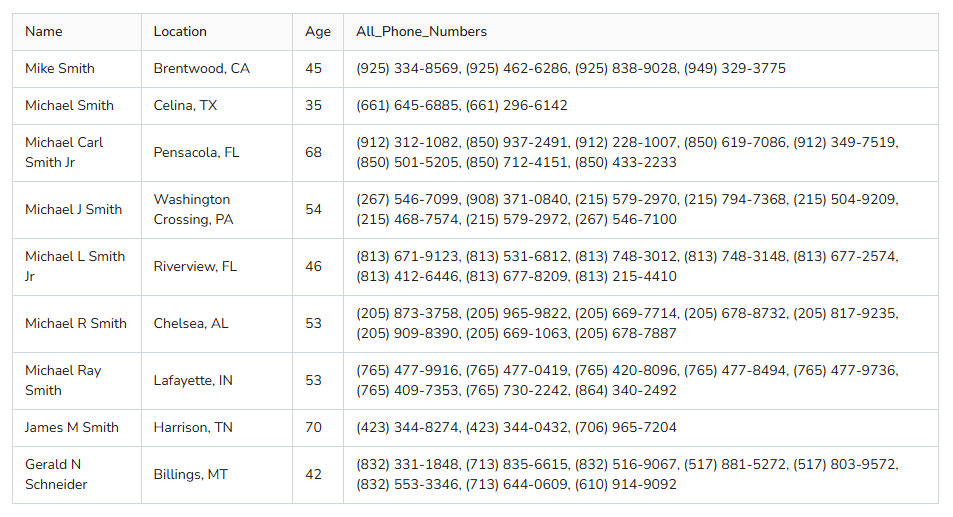 What Data Can You Scrape with Phone Number Extractor?
With BrowserAct's Phone Number Extractor, you can pull a wide range of publicly available contact data from Fast People Search free for analysis. The core focus is on extracting all phone numbers, with supporting details to help identify and locate the right person (e.g., distinguishing between individuals with the same name). Here's a breakdown:
- All Phone Numbers
- Name
- Location (e.g., Northborough, MA)
- Age
This tool enables phone extractor, telephone number extractor, and number extractor functions, using the additional info to pinpoint accurate telephone numbers.
How to Use Phone Number Extractor in One Click
If you want to quickly start experiencing phone number extraction, simply use our pre-built "Phone Number Extractor" template for instant setup and begin extracting data effortlessly.
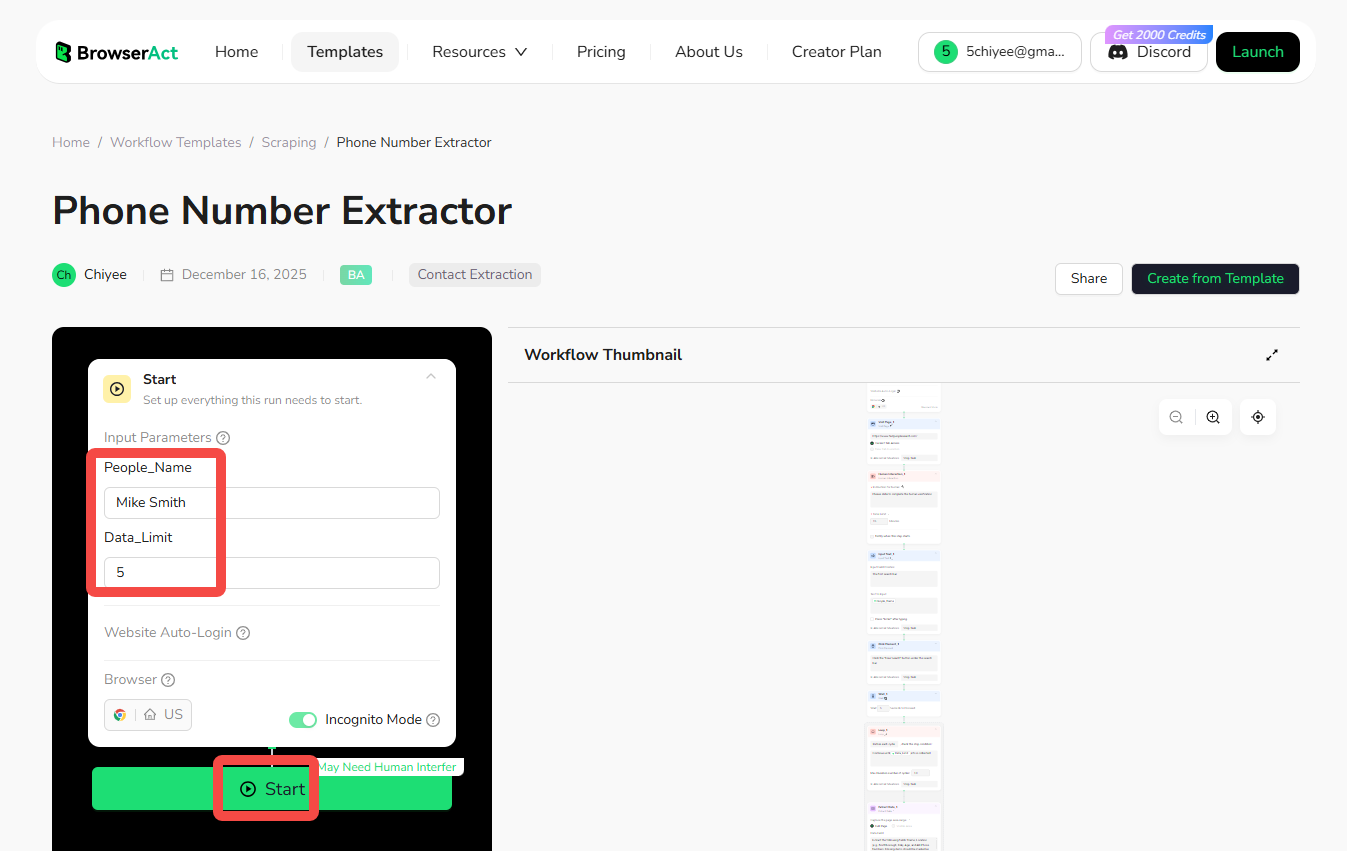
- Register Account: Create a free BrowserAct account using your email.
- Configure Input Parameters: Fill in necessary inputs like People_Name (e.g., "John Doe") and Data_Limit (e.g., 5) – or use defaults to learn how to perform telephone number extraction quickly.
- Start Execution: Click "Start" to run the workflow.
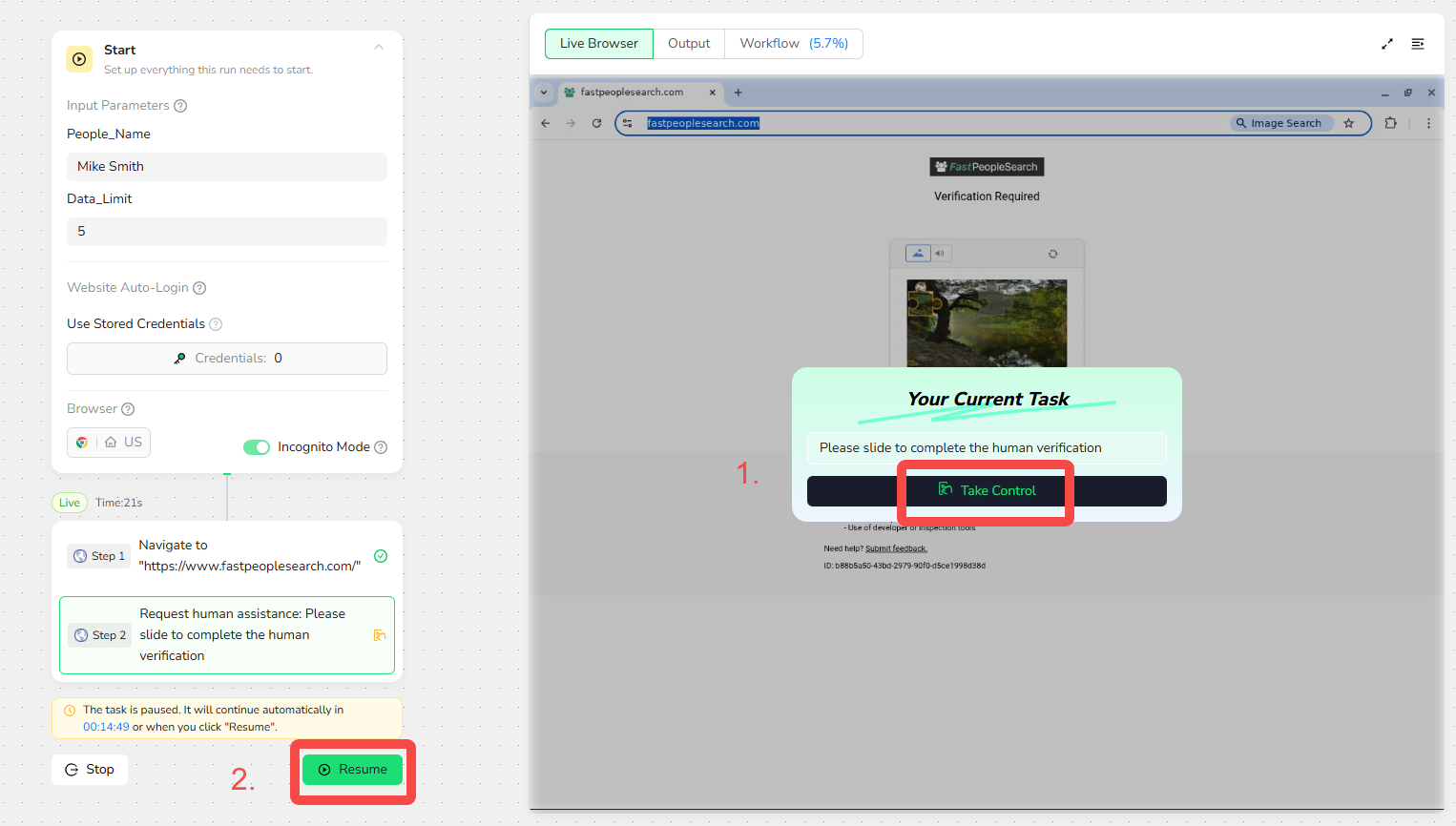
- Handle Verification: When the "Your Current Task" popup appears (if CAPTCHA is triggered), click "Take Control" to slide and complete the human verification. Once done, click "Resume" to let the automated extractor continue—no further intervention needed.
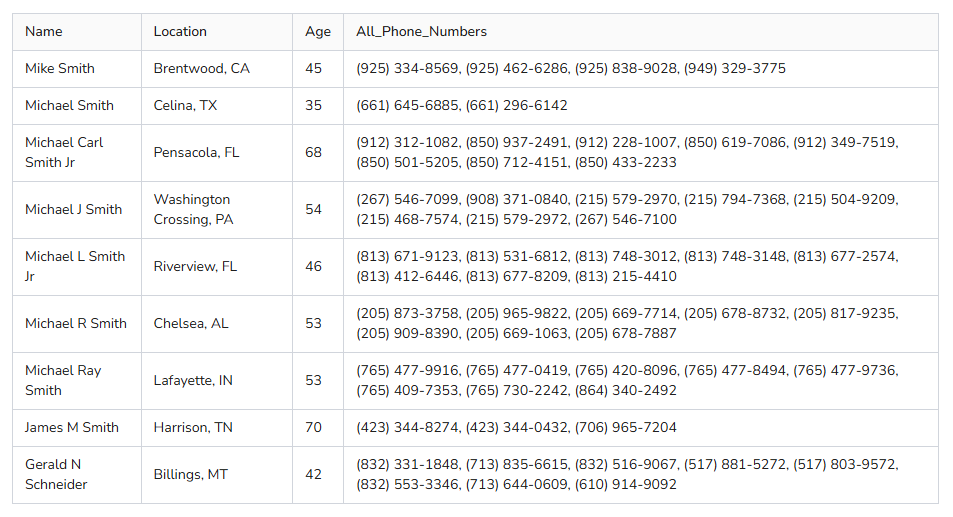
- Download Data: Once complete, download the results file in CSV or JSON format for your phone number extractor needs.
Why Use Phone Number Extractor?
Using a phone number extractor allows you to systematically collect and analyze public contact data. This process is valuable for gathering specific information that can be used for business, research, and outreach. Here are the primary reasons to use a telephone number extractor:
- Generate Leads: Extract phone numbers and names to build contact lists for sales, marketing, or networking.
- Market Research: Collect telephone numbers from search results to identify potential customers or partners.
- Track Contacts: Monitor listings in real-time to detect new numbers or updates for CRM management.
- Build Databases: Create structured datasets from public sources for machine learning, analysis, or outreach campaigns.
- Verify Information: Use number extractor tools to cross-check phone details for accuracy in research or verification tasks.
Extraction automates the data collection process, enabling you to efficiently gather large volumes of telephone numbers for structured analysis, all while keeping it free and easy.
How to Build a Phone Number Extractor Workflow: Step by Step
Building a Phone Number Extractor workflow with BrowserAct requires no coding skills—it's automation-ready and easy to set up. Follow these step-by-step instructions to get started.
Step 1: Set Parameters
- People_Name: Enter the name to search (e.g., "John Doe").
- Data_Limit: Set the number of results to extract (e.g., 5).

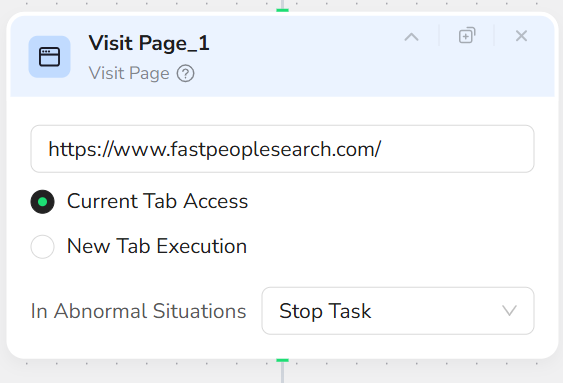
Step 2: Add Visit Page Node
In the prompt box, enter "https://www.fastpeoplesearch.com/" – this will navigate to the target URL.
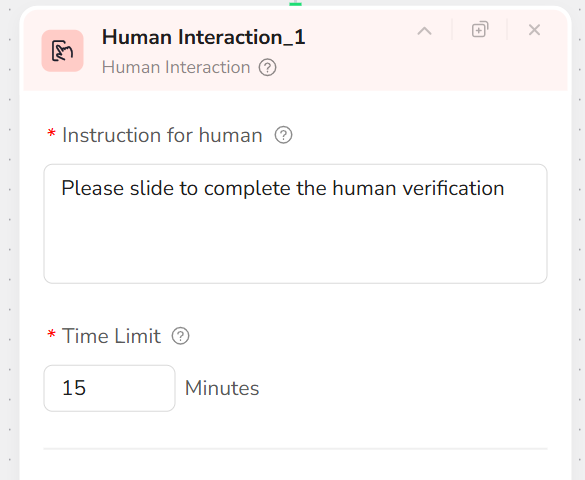
Step 3: Add Human Interaction Node
In the prompt box, enter "Please slide to complete the human verification." This allows you to take control and handle any CAPTCHA manually.
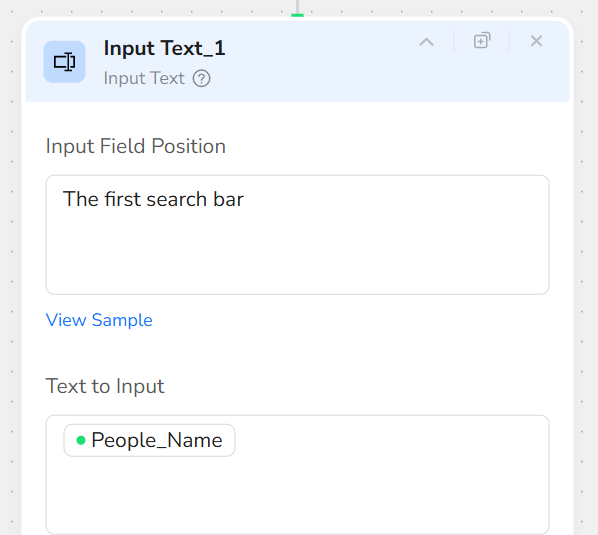
Step 4: Add Input Text Node
- In the Input Field Position prompt box, enter "The first search bar."
- In the Text to Input prompt box, enter "/People_Name".
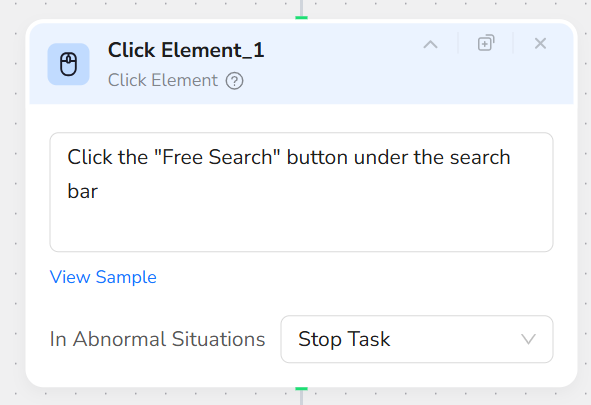
Step 5: Add Click Element Node
In the prompt box, enter "Click the 'Free Search' button under the search bar".
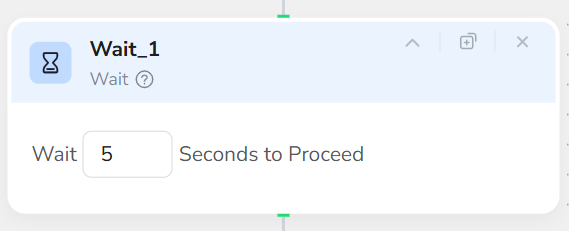
Step 6: Add Wait Node
Set to wait 5 seconds for the page to load.
Step 7: Add Loop Node
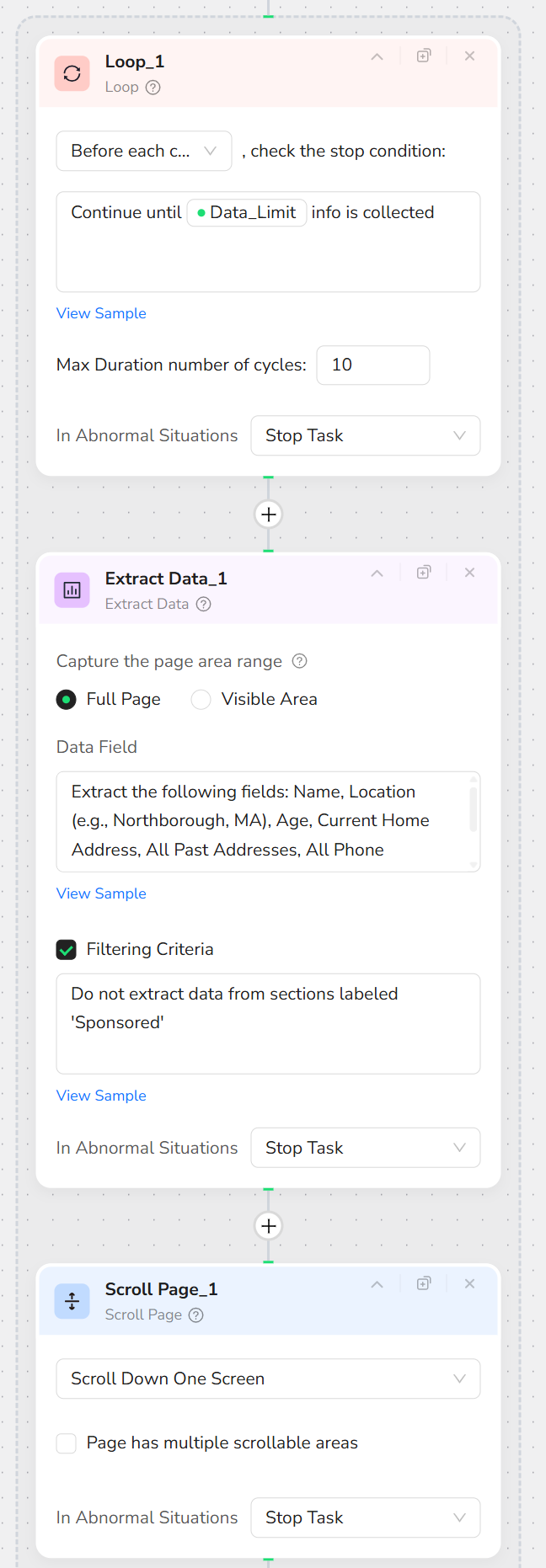
In the prompt box, enter "Continue until /Data_Limit info is collected". This loops through results up to your specified limit.
Step 8: Inside the Loop, Add Extract Data Node
- In the Data Field prompt box, enter "Extract the following fields: Name, Location (e.g., Northborough, MA), Age, and All Phone Numbers. Missing items should be marked as N/A."
- Check the Filtering Criteria box and enter "Extract only valid phone numbers; ignore ads or sponsored sections".
Step 9: Still Inside the Loop, Add Scroll Page Node
Select "Scroll down one screen" to load more results.
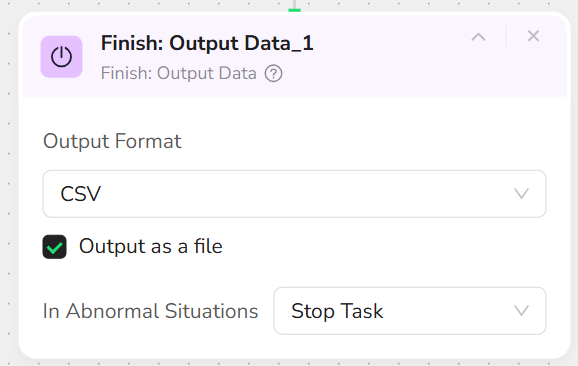
Step 10: Add Finish: Output Data Node
Export in CSV file format (or choose JSON, XML, or Markdown).
Who Can Use Phone Number Extractor?
Phone Number Extractor is designed for anyone needing quick, reliable access to public contact data from Fast People Search. It's ideal for a variety of users, including:
- Marketers and Sales Teams: Extract telephone numbers for lead generation and outreach using phone extractor tools.
- Researchers and Analysts: Gather number data for studies, demographics, or verification with telephone number extractor.
- Small Businesses and Startups: Perform affordable contact scraping without technical skills for number extractor tasks.
- Journalists and Content Creators: Collect phone details for stories, reports, or fact-checking.
- Everyday Users: Use for personal phone number lookups, like finding business contacts or verifying numbers.
No matter your background, if you're looking to extract phone numbers without hassle, this tool is accessible and effective for both individuals and teams.
Is It Legal to Use a Phone Number Extractor?
Yes, extracting publicly available phone numbers from fastpeoplesearch.com is generally considered legal, provided it is done ethically and respects the platform's rules. This means only accessing information that is visible to any public visitor, never attempting to access private data, and adhering to Terms of Service to avoid excessive requests. The way you use the data is also critical; it should not be used to violate privacy laws like GDPR or CCPA. Our Phone Number Extractor is designed to operate within these responsible guidelines, focusing on ethical extraction. Please note that this information does not constitute legal advice, and we recommend consulting with a legal professional to ensure full compliance for your specific project.
How Many Results Can You Extract?
Our Phone Number Extractor offers complete flexibility, giving you full control over the scale of your data extraction. By default, it is set to capture up to 5 results, which is ideal for quick sampling and testing. However, these numbers are fully customizable in the settings via Data_Limit, allowing you to extract dozens or even hundreds of phone numbers. Ultimately, there are no hard limits—the tool is built to scale with your needs.
Just keep in mind that extracting a larger volume of data will naturally require more time to run and may consume more of your platform credits.
Need help? Contact us at
- 📧 Discord: [Discord Community]
- 💬 E-mail: service@browseract.com
 What can we do for you