What Is a CAPTCHA Solver? (And Why Your AI Agent Keeps Getting Stuck on Them)

"Go to this page and pull the top 10 results for me."
A minute later, your AI agent comes back with:
"I encountered a 'Verify you are human' challenge page and was unable to proceed. You may need to complete the CAPTCHA manually and paste the content here."
If you've ever tried to make an AI agent do real work on the web, you've met this wall. The page looks fine in your browser. You can click the checkbox. The agent can't. And now you're sitting there, manually solving CAPTCHAs for a machine that was supposed to save you time.
This is the problem a CAPTCHA solver is meant to fix — and in 2026, most of them don't.
Quick definition: A CAPTCHA solver is a tool or service that automatically completes CAPTCHA challenges (the "I'm not a robot" checks, image puzzles, and invisible scoring systems) so that automated software — scrapers, bots, AI agents — can continue past the verification gate.
That's the short answer. The longer answer is that "CAPTCHA solver" now covers five very different things, most of which stopped working when Cloudflare Turnstile and reCAPTCHA v3 took over the web. This piece breaks down what's actually on the market, which ones still work, and why the fastest-growing approach in 2026 isn't really a "solver" at all.
- 1A CAPTCHA solver is a tool that automates passing "I'm not a robot" checks — but in 2026, what counts as a "CAPTCHA solver" spans five different categories with wildly different success rates.
- 2Modern CAPTCHAs (reCAPTCHA v3, Cloudflare Turnstile, DataDome) aren't puzzles — they're verdicts based on browser fingerprinting, device signals, and behavioral scoring. There's no puzzle to solve.
- 3Human-powered services like 2Captcha still work on legacy image CAPTCHAs but can't touch the modern invisible-scoring stack.
- 4Stealth plugins for Playwright/Puppeteer break constantly as detection systems update; the maintenance cost usually exceeds the value.
- 5The approach that actually works in 2026 isn't solving CAPTCHAs — it's running automation inside a real browser that the detection systems already trust.
Why CAPTCHAs Stop Your AI Agent Cold
Every AI agent developer hits the same three screens:
Screen 1 — The checkbox.
"I'm not a robot." Your agent sees it, your agent clicks it, nothing happens. Or worse, it expands into the 9-grid image puzzle and the agent starts picking traffic lights for twenty minutes.
Screen 2 — The Cloudflare holding page.
"Checking your browser before accessing the site..." The spinner spins, the countdown ticks down, and then you get "Sorry, you have been blocked." No puzzle to solve, no second chance.
Screen 3 — The silent fail.
The page loads. Your agent pulls the HTML. You parse it. The content you wanted isn't there. What looked like a successful request was actually a CAPTCHA challenge the agent never noticed, returning a fake "OK" page to an obvious bot.
Ask Claude or ChatGPT about any of these and you get the same shrug:
"I'm not able to solve CAPTCHAs or bypass bot protection. You'll need to complete the verification manually."
"I cannot interact with CAPTCHA challenges as this would violate terms of service."
Neither answer is useful. The question isn't whether the model will solve a CAPTCHA. The question is how the rest of your automation is supposed to keep running when 40% of the sites you care about are sitting behind one.
The Scope of the Problem
CAPTCHAs are no longer a rare obstacle. By early 2026:
Where You Meet Them | Why They're There |
Login pages | Credential stuffing defense |
Checkout flows | Card testing defense |
Search results | Anti-scraping (Google, Amazon, LinkedIn) |
Sign-up forms | Fake account prevention |
Comment boxes | Spam prevention |
Pricing pages | Competitor scraping blocks |
Any page behind Cloudflare | Default on — you opt out, not in |
The more valuable the page, the more likely it's gated. If your AI agent can't get past these checks, it can't do price monitoring, lead generation, competitor research, or most of the "real work" a browser agent is supposed to handle.
The Five Things People Call a "CAPTCHA Solver"
Search "CAPTCHA solver" in 2026 and you'll find five very different tools lumped together. They work differently, cost differently, and fail differently. Knowing which is which is the whole game.
1. Human-Powered Services (2Captcha, Anti-Captcha, CapSolver)
The original CAPTCHA solvers. You send the CAPTCHA image to a service, a real person in a low-wage labor market solves it, and you get the answer back in ~10-30 seconds.
How they charge: $0.50–$3 per 1,000 CAPTCHAs solved.
What they handle well: Classic image-grid reCAPTCHA v2, text distortion CAPTCHAs, hCaptcha image puzzles.
What they can't handle: reCAPTCHA v3 (invisible scoring — there's nothing visible to hand to a human), Cloudflare Turnstile (bound to the browser's device signals), DataDome and PerimeterX (behavioral — no image to send).
When they still work: Legacy forms, older sign-up pages, specific workflows where the CAPTCHA is still image-based.
2. AI-Based CAPTCHA Solvers (CV + ML Models)
Computer-vision models trained to recognize "which squares contain a bus." Open-source options include Buster, anti-captcha Python libraries, and YOLO-based image classifiers.
How they charge: Usually free or one-time license.
What they handle well: Image-grid CAPTCHAs with classic object categories (cars, traffic lights, crosswalks).
What they can't handle: reCAPTCHA v3's behavioral scoring, Turnstile's device attestation, any "is this a real browser" check that doesn't depend on an image at all.
Fun fact: Google has been actively training reCAPTCHA to catch AI-based solvers. The harder you train your model, the harder Google makes the puzzles. It's an arms race you can't win at individual-developer scale.
3. Browser Extensions (Buster, Nopecha, CAPTCHA Solver extensions)
Consumer-facing CAPTCHA solvers that sit in your browser and auto-complete challenges for you.
How they charge: Freemium; paid plans ~$7–$20/month.
What they handle well: reCAPTCHA v2 audio challenge (they use speech-to-text to solve the "listen and type" version).
What they can't handle: Invisible CAPTCHAs, corporate detection systems, any CAPTCHA on a site that also runs a bot detection layer — LinkedIn sees the extension installed and blocks you anyway.
Reality check: LinkedIn, Amazon, and most banking sites actively scan for 6,000+ known automation extensions. Install one of these and you've already failed.
4. Headless Browser Stealth Plugins (playwright-extra, puppeteer-stealth, undetected-chromedriver)
Not "solvers" strictly — more like "CAPTCHA avoiders." They patch your headless browser to look less like a headless browser. No automation flag in navigator.webdriver, realistic TLS fingerprint, normal plugin list.
How they charge: Free, open-source.
What they handle well: Older anti-bot systems that check shallow signals.
What they can't handle: Modern systems that use 200+ signals across TLS fingerprints, canvas rendering, WebGL hashes, audio context, font enumeration, and behavioral timing. Maintaining a stealth plugin is a full-time job — when Cloudflare changes detection rules, stealth plugins break overnight.
The honest take from r/webscraping: "I spent three days patching my stealth config. It worked for two weeks. Now I'm getting blocked again and I can't figure out why." This is the default experience.
5. Real-Browser Takeover (BrowserAct, Bardeen, the new generation)
The newest category — and the one that genuinely changes the picture in 2026. Instead of trying to solve the CAPTCHA, you run your automation inside a real browser you already use, with real device signals, real browsing history, and real cookies. The CAPTCHA either doesn't fire at all, or passes silently.
How they charge: Local-browser mode is free; managed cloud mode varies.
What they handle well: Cloudflare Turnstile, reCAPTCHA v3, DataDome, PerimeterX — all the modern stuff.
What they can't handle: Sites where you don't already have a valid session (need to log in first). Extreme targeting where the site tracks you by user ID specifically.
Why this works when the others don't: The detection systems of 2026 aren't asking "is this a human?" They're asking "is this a real browser with a real history?" A real browser — one you use daily, logged into your Google account, with normal bookmarks and cookies — passes by default. A headless Chrome instance with a freshly-generated fingerprint, no matter how well patched, raises the risk score.
Why Most "Solvers" Don't Solve 2026 CAPTCHAs
If you've tried a CAPTCHA solver in the last year and it didn't work, here's what probably happened.
Because CAPTCHAs Stopped Being Puzzles
In 2018, a CAPTCHA was a puzzle. You show me an image, I tell you what's in it. A solver just needed to answer the puzzle.
In 2026, a CAPTCHA is a verdict. The site runs 200+ invisible checks — your TLS handshake, your browser's rendering quirks, your mouse movements, your typing rhythm, your session history — and outputs a score. If the score is bad, you get blocked. If it's good, you never see a puzzle at all.
You can't "solve" a verdict. There's no puzzle to solve. The browser was judged before it ever saw a challenge page.
This is why 2Captcha doesn't work on Turnstile. It's why stealth plugins keep breaking. It's why your AI agent fails silently on pages that load fine in your regular Chrome.
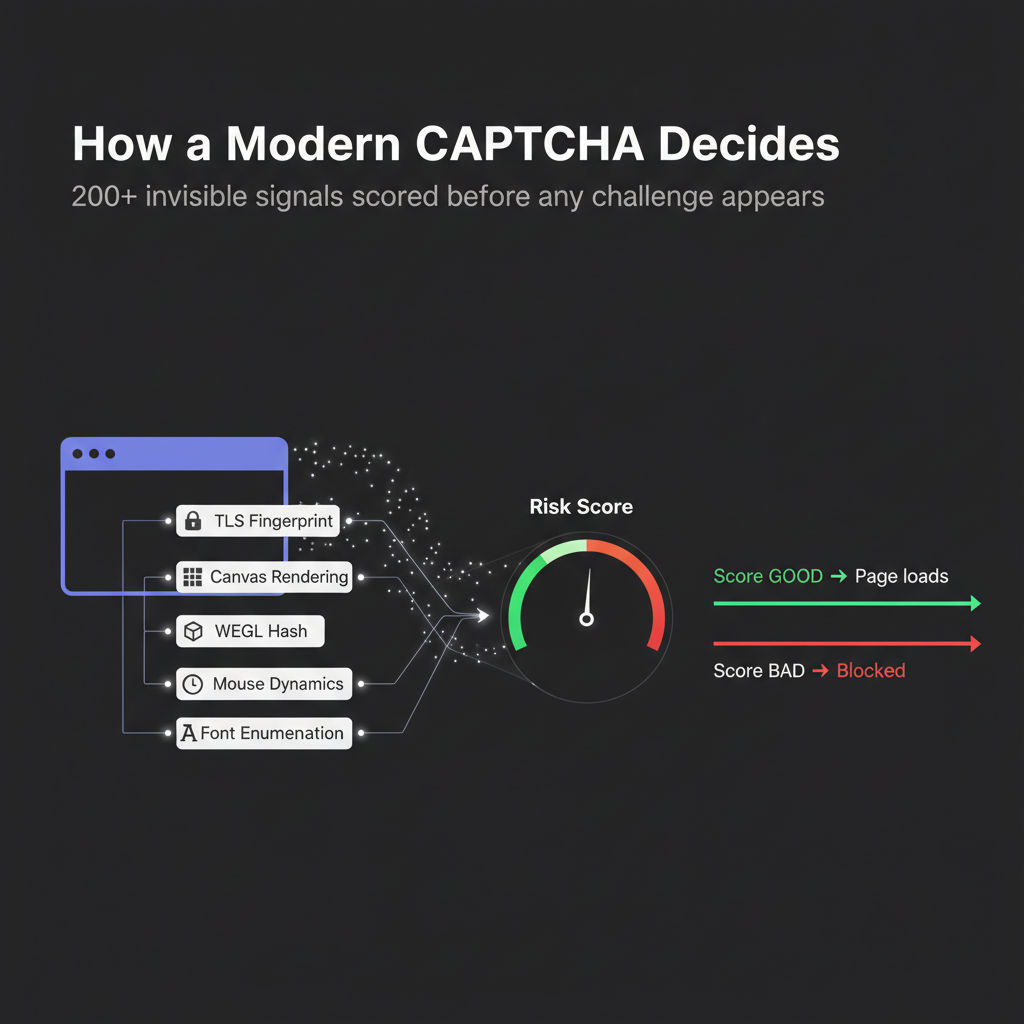
Because the Challenge Is the Browser, Not the Human
Here's the uncomfortable truth: the same human, sitting in the same chair, in the same room, can pass a CAPTCHA in one browser and fail it in another. The check has nothing to do with being human. It has everything to do with whether the browser looks like a real one.
A real browser:
- Has been open for days, not seconds
- Has hundreds of cached resources
- Has a consistent device fingerprint across sessions
- Has normal navigation patterns (you scrolled, you hovered, you misclicked)
- Has a TLS fingerprint that matches a known Chrome version exactly
A headless browser spun up by your scraper:
- Just opened
- Has no cache
- Has a generic fingerprint
- Has machine-perfect mouse paths (straight lines, exact timings)
- Has TLS quirks that don't match Chrome exactly
Solving the visible CAPTCHA doesn't fix any of that. The invisible score is already bad.
Because the Arms Race Favors the Defender
Cloudflare, Google, and DataDome are billion-dollar companies with 24/7 detection engineering teams. The person maintaining your open-source stealth plugin does it as a hobby. That asymmetry shows up in the quality of detection.
Detection systems change daily. They add new signals, retire old ones, and run A/B tests on suspicious behavior. A stealth plugin that was perfect last Tuesday can be useless this Thursday. The open-source community updates the plugin. Cloudflare updates their detection. Round and round.
The only way out of this treadmill is to stop pretending to be a real browser and just use a real browser. That's the shift behind real-browser takeover tools — and why they're winning the CAPTCHA war without ever solving a CAPTCHA.
Stop getting blocked. Start getting data.
- ✓ Stealth browser fingerprints — bypass Cloudflare, DataDome, PerimeterX
- ✓ Automatic CAPTCHA solving — reCAPTCHA, hCaptcha, Turnstile
- ✓ Residential proxies from 195+ countries
- ✓ 5,000+ pre-built Skills on ClawHub
CAPTCHA Solver Comparison: What Actually Works in 2026
Solver Type | reCAPTCHA v2 | reCAPTCHA v3 | Turnstile | DataDome | Monthly Cost | Maintenance |
2Captcha / Anti-Captcha | ✅ Works | ❌ No puzzle to solve | ❌ Blocked | ❌ Blocked | $0.50–$3 / 1,000 | Low |
AI image solvers (Buster) | ⚠️ Partial | ❌ No | ❌ No | ❌ No | Free | High |
Browser extensions | ⚠️ Partial | ❌ No | ❌ No | ❌ No | $7–$20/mo | Medium |
Stealth plugins | ⚠️ Sometimes | ⚠️ Sometimes | ❌ Usually blocked | ❌ Blocked | Free | Very high |
Real-browser takeover | ✅ Rarely fires | ✅ Rarely fires | ✅ Passes silently | ✅ Passes silently | Free (local) | Very low |
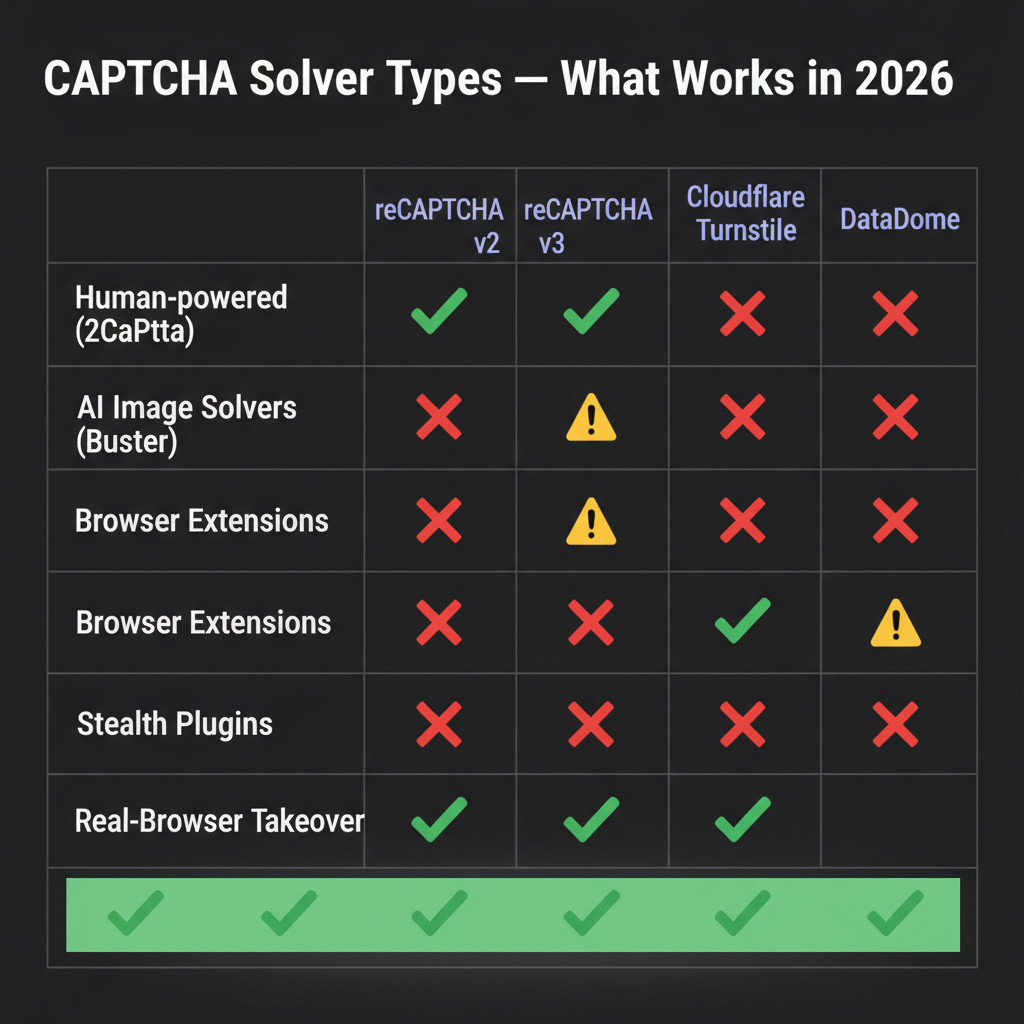
The pattern isn't subtle. Anything older than 2024 in the "solver" category handles reCAPTCHA v2 and nothing past it. The only approach that clears the modern stack — Turnstile, reCAPTCHA v3, DataDome — is the one that doesn't try to solve anything.
The Real Fix: Use a Real Browser
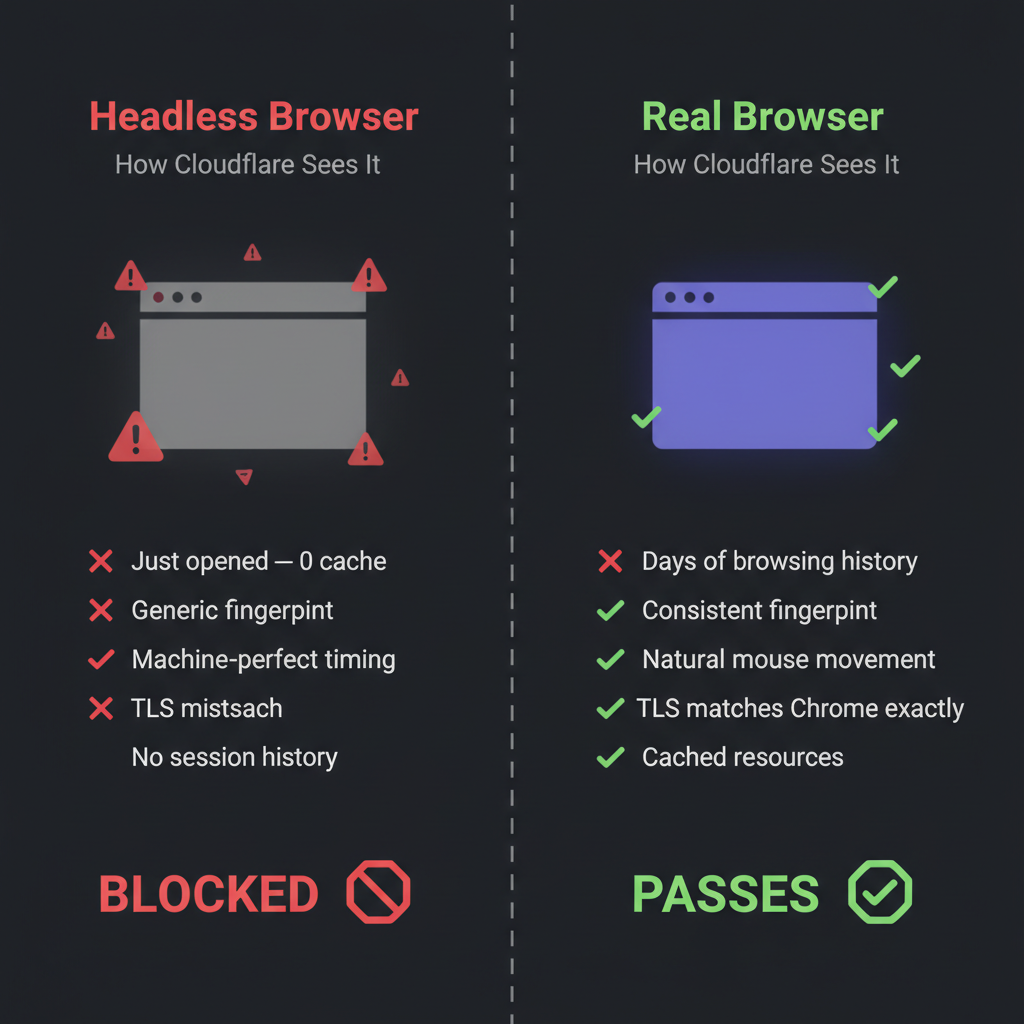
If you've been fighting CAPTCHAs for more than a week, the answer is almost always to stop fighting them.
The shift looks like this:
Old way (fails):
``
AI agent → headless Chrome → Cloudflare sees a bot → CAPTCHA fires →
solver service → 30-second delay → score still bad → blocked anyway
New way (works):
`
AI agent → your real Chrome → Cloudflare sees your real browser →
no CAPTCHA fires → task completes
This is the core of what BrowserAct does. Instead of running automation in a disposable headless browser, it hands control of your browser — the one you use daily, with your real device fingerprint and session cookies — to an AI agent. To Cloudflare and DataDome, the AI agent looks identical to you. Because it is you, technically.
For specific workflows — tracking prices, scraping Amazon, pulling Google Maps data, monitoring Reddit — the Amazon Product Search API, the Google Maps API, and the Reddit Posts & Comments Scraper template handle the whole pipeline without ever triggering a CAPTCHA, because the requests go through real browser sessions that the target sites already trust.
The ugly realization for anyone who's spent a year building stealth automation: you didn't need a better CAPTCHA solver. You needed a real browser.
When a Traditional CAPTCHA Solver Still Makes Sense
This piece has been rough on old-school solvers, but there are still cases where they're the right tool:
- Legacy forms: Government sites, university portals, older B2B software often still use reCAPTCHA v2 image puzzles. 2Captcha still handles these fine.
- One-off manual tasks: If you're solving five CAPTCHAs a month for an internal workflow, paying $0.01 per solve is cheaper than building anything.
- Accessibility tooling: Buster's audio-to-text approach is the same thing blind users rely on to get past CAPTCHAs. It's useful, ethical, and legal.
- No browser state needed: If your task doesn't involve a real session — just filling out a form once and leaving — the overhead of real-browser takeover isn't worth it.
The mistake is using a solver service for scale. At scale, every request goes through a solver, every solver call costs money and time, and the score from the invisible CAPTCHA layer is still bad. You're paying to keep losing.
Conclusion
"What is a CAPTCHA solver?" turns out to be a trickier question than it looks. Five years ago, it was one kind of tool — a service that answered image puzzles for you. Today, it's a category label slapped on anything from image classifiers to stealth plugins to full real-browser takeover systems, and most of them don't work on the CAPTCHAs that actually matter.
If you're building automation in 2026 and you're spending your days debugging CAPTCHA failures, the move isn't a better solver. It's a different architecture. Run the agent in a real browser — your browser — and most CAPTCHAs stop firing in the first place. Tools like BrowserAct make that switch trivial, and ClawHub skills cover the specific scraping workflows where CAPTCHAs used to be the daily blocker.
The CAPTCHA wasn't there to stop you. It was there to stop bots pretending to be you. Stop pretending, and the wall isn't there anymore.
Automate Any Website with BrowserAct Skills
Pre-built automation patterns for the sites your agent needs most. Install in one click.
Frequently Asked Questions
What is a CAPTCHA solver in simple terms?
A tool that automatically gets past "I'm not a robot" checks so bots, scrapers, or AI agents can continue past the verification page.
Do CAPTCHA solvers still work in 2026?
Older ones (2Captcha, Buster) still solve classic image CAPTCHAs. They fail on modern invisible systems like reCAPTCHA v3, Cloudflare Turnstile, and DataDome.
Are CAPTCHA solvers legal?
Using a solver for sites you own or have permission to automate is legal. Using one to violate a site's terms of service or access restricted data is typically not.
What's the best free CAPTCHA solver?
Buster (browser extension) for audio CAPTCHAs; local-browser automation tools like BrowserAct for skipping CAPTCHAs entirely by using your real browser session.
How much does a CAPTCHA solver cost?
Human-powered services run $0.50–$3 per 1,000 solves. Browser extensions are $7–$20/month. Real-browser takeover tools are free in local mode.
Why does my AI agent keep failing on CAPTCHAs?
Modern CAPTCHA systems score your browser's fingerprint, not your ability to click a checkbox. A headless or automated browser looks suspicious regardless of how you solve the visible challenge.
Can Cloudflare Turnstile be bypassed?
Not through traditional solving — there's no puzzle. The only reliable approach is running automation inside a real browser with real device signals, so Turnstile scores the session as safe. --- ## Image Suggestions


