The best automation tools for small business

Discover the 5 best automation tools for small teams in 2026. Our expert comparison covers Zapier, Make, n8n, BrowserAct & Automate.io with real testing results, pricing, and use cases. Save up to 30% of team hours with the right workflow automation platform for your business needs.
If you’ve ever found yourself copying data from one app into another late at night, or manually updating reports that should update themselves, you’re not alone. For small teams, manual workflows don’t just waste time—they drain energy that should be spent on growth.
This is where automation tools come in. Think of them as superpowers for small teams: software that connects your apps, gathers your data, and moves it into action automatically. According to a Forrester study, workplace automation can save up to 30% of team hours, freeing teams to focus on strategy, not repetitive clicks.
Unlike generic lists, this guide isn’t copy-paste. We’ve tested dozens of tools firsthand, and we’ll show you exactly which ones shine depending on your needs—budget, team size, and use case. By the end, you’ll know exactly which automation tool fits you best.
The best automation tools for small teams
- Zapier for beginners
- Make for power users & complex flows
- N8n for open-source & self-hosting
- BrowserAct for data-driven activation
- Automate.io for simple app connections
What makes the best automation tools for small business?
Our Review Process: How We Choose the Best
We started with 15+ widely used automation platforms and narrowed it down to 5 that consistently impressed us during real testing.
Here’s how we evaluated each tool:
- Ease of Use: Is it beginner-friendly, or does it demand technical knowledge?
- Power & Scalability: Can it handle complex workflows or just simple tasks?
- Integrations & Automation: Does it connect well with popular tools like Slack, Airtable, Notion, and CRMs?
- Pricing Transparency: Are costs clear and affordable for small teams?
- Customer Support: When something breaks (and it will!), how quickly can you get help?
- This transparent scoring system ensures you get balanced, unbiased recommendations: not just the most well-known names.
The best automation tools at a glance
Tool | Best For… | User Experience (1–5) | Pricing | Key Integrations & Automation |
|---|---|---|---|---|
Zapier | Easiest start for beginners | ⭐⭐⭐⭐⭐ (Very intuitive) | From $19/mo | 6,000+ ready‑made app connections |
Make | Power users with complex workflows | ⭐⭐⭐ (Moderate UX) | From $9/mo | Visual multi‑step flow builder |
n8n | Open‑source + full control | ⭐⭐ (Developer‑focused) | Free / $20+ | Flexible, developer‑driven customization |
BrowserAct | Data‑to‑action automation | ⭐⭐⭐⭐ (Smooth & powerful) | From $25/mo | Built‑in data scraping + smart triggers |
Automate.io | Simple business app connections | ⭐⭐⭐⭐ (Clean interface) | From $9/mo | Core productivity + CRM apps |
Zapier — The Easiest Start for Beginners
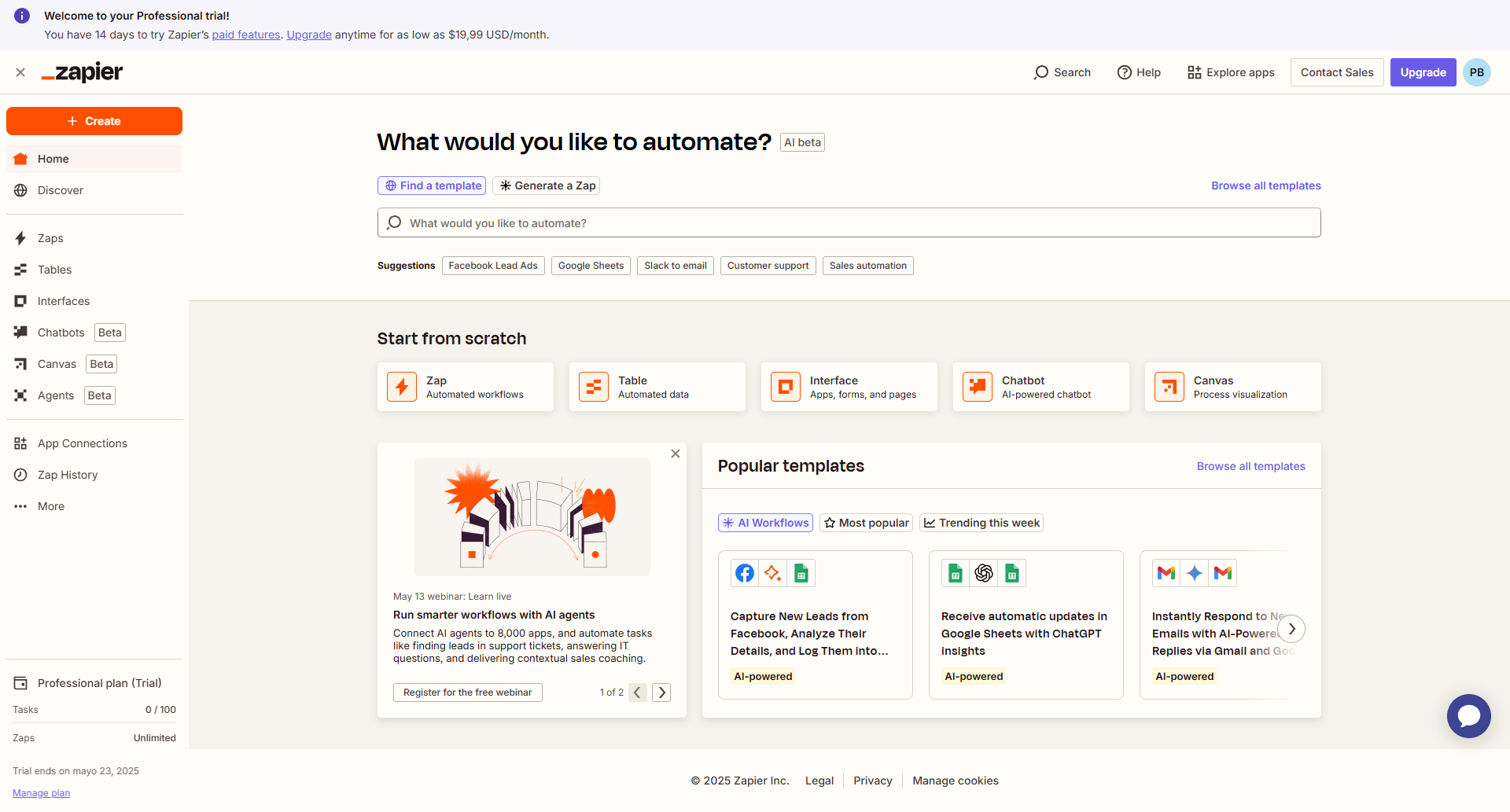
If you’re just getting started with automation, Zapier is the friendliest place to begin. Its clean interface and draganddrop actions make it super simple—even if you’ve never touched automation before. It’s designed for people who want maximum value with minimal setup, so you can focus on your work instead of learning complicated systems. Whether you’re a solo entrepreneur, a small team, or just curious about automation, Zapier makes the entry point painless and approachable. That’s why it’s often recommended as the easiest starting tool for anyone exploring workflow automation.
What makes Zapier shine:
- 6,000+ app integrations: You’ll rarely find a tool it doesn’t connect with.
- Beginnerfriendly interface: Guided setup makes workflow creation painless.
- High reliability: In our tests, runs were smooth with minimal failures.
Things to consider:
- Pricing climbs quickly as your task volume grows.
- It’s not built for highly complex, multibranch workflows.
Tip: Zapier is perfect if you just want to pass data from Google Forms to Slack. But if you need those data points to do something useful—like updating your Airtable dashboard in real time—you’ll want something more robust, such as BrowserAct.
Make — The Most Powerful Visual Workflow Builder
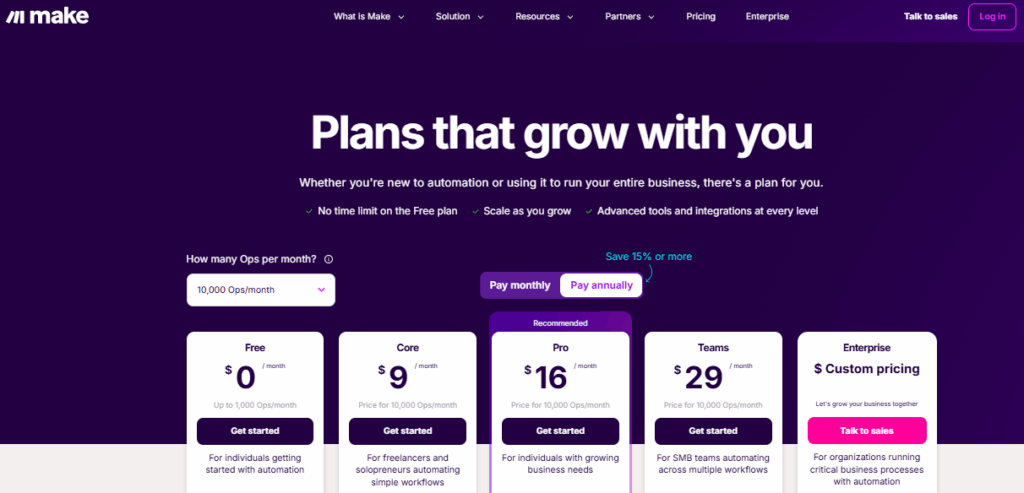
Where Zapier focuses on simplicity, Make (formerly Integromat) gives you serious flexibility. It’s like building Lego for your workflows: you can see every connection and branch visually. This powerful visual approach makes it much easier to understand how data flows between tools, which is especially useful when you’re dealing with multiple steps or conditions. Instead of hiding the logic behind menus, Make puts everything in front of you like a flowchart, so you have full control over your automation. For teams that want transparency and precision, this design is a huge advantage. It also means you can spot errors faster and fine‑tune your processes with confidence, making it a preferred choice for advanced users and technical teams.
Why teams love Make:
- Visual editor: Drag and connect apps like a flowchart—great for understanding complex processes.
- Advanced logic: Add conditions, loops, and router branches.
- Pricing value: Competitive plans for teams managing larger volumes.
Watch out for:
- Steeper learning curve: Beginners may need extra time to figure things out.
- Some integrations aren’t as polished as Zapier’s.
Bottom line: Make is ideal if you want to go deeper and create complex flows. But if your priority is getting data from multiple sources and activating it instantly across your apps, you’ll find that BrowserAct goes further.
n8n — The Most Flexible OpenSource Option
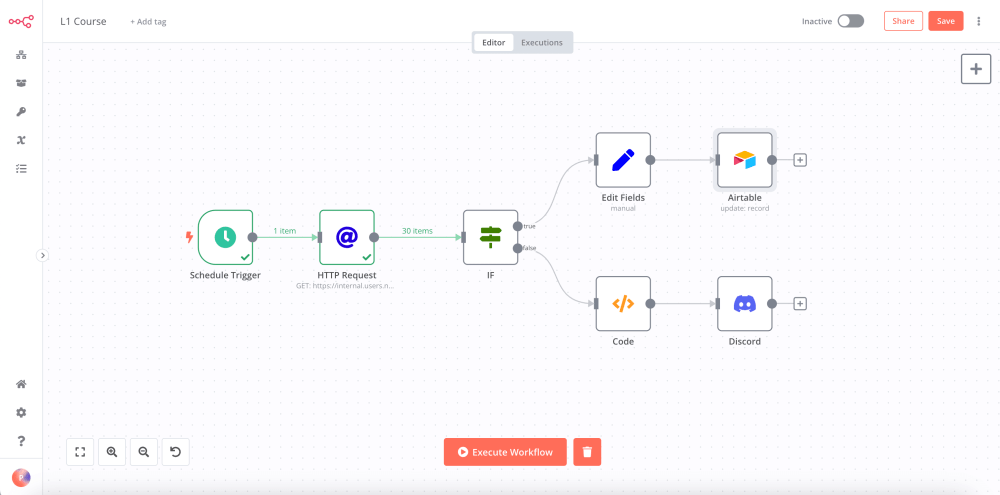
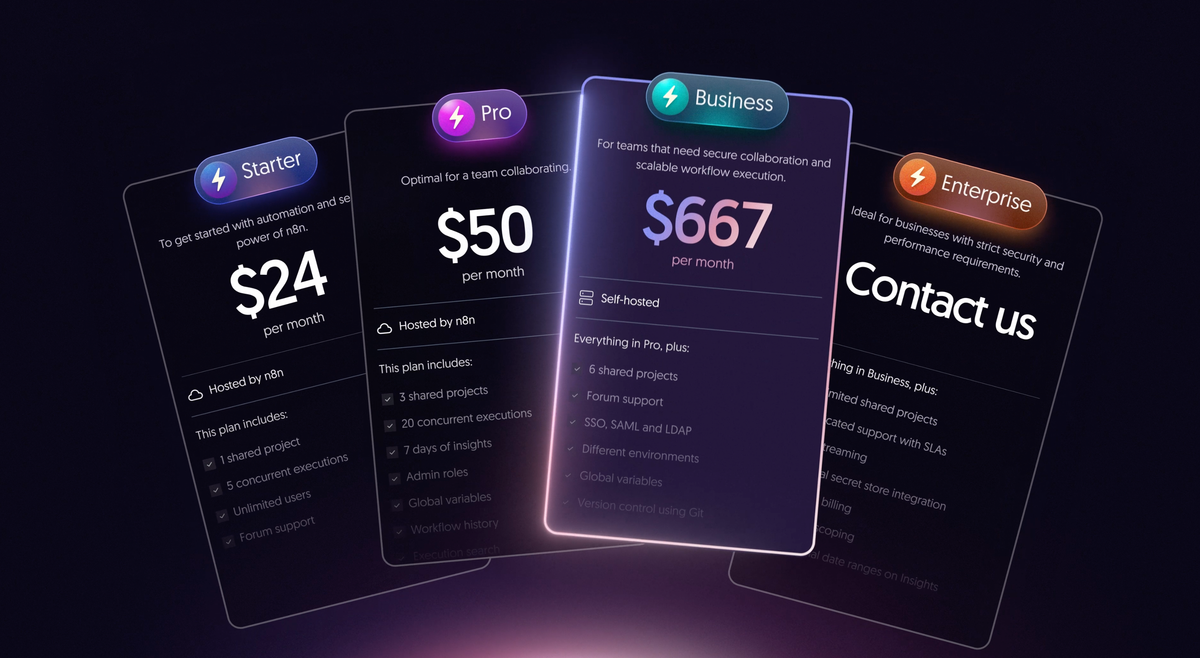
For teams that value ownership, control, and transparency, n8n brings you the power of open source. It’s free to selfhost and offers nearendless customization. Unlike closed platforms, you’re not locked into fixed rules or forced to pay more as your workflows grow. Instead, you can shape automations exactly the way you want, with the flexibility to dive into the code when needed. This makes it especially attractive for developer teams or organizations that care deeply about data privacy and independence. With n8n, you’re essentially building an automation platform that fits your unique environment, rather than adapting your processes around someone else’s limitations.
Why n8n stands out:
- Selfhostable: Maximum control over your data and setup.
- Unlimited executions: No artificial caps on tasks or workflows.
- Strong community support: Constant plugins and extensions from developers worldwide.
The drawbacks:
- Requires more setup and tech knowhow than SaaS solutions.
- Outofbox integrations are fewer compared to Zapier or Make.
If you have developer capacity, n8n gives you unmatched freedom. But if your team is small with limited IT resources, plugandplay tools like BrowserAct may get you results much faster.
BrowserAct — Best for Turning Data Into Action
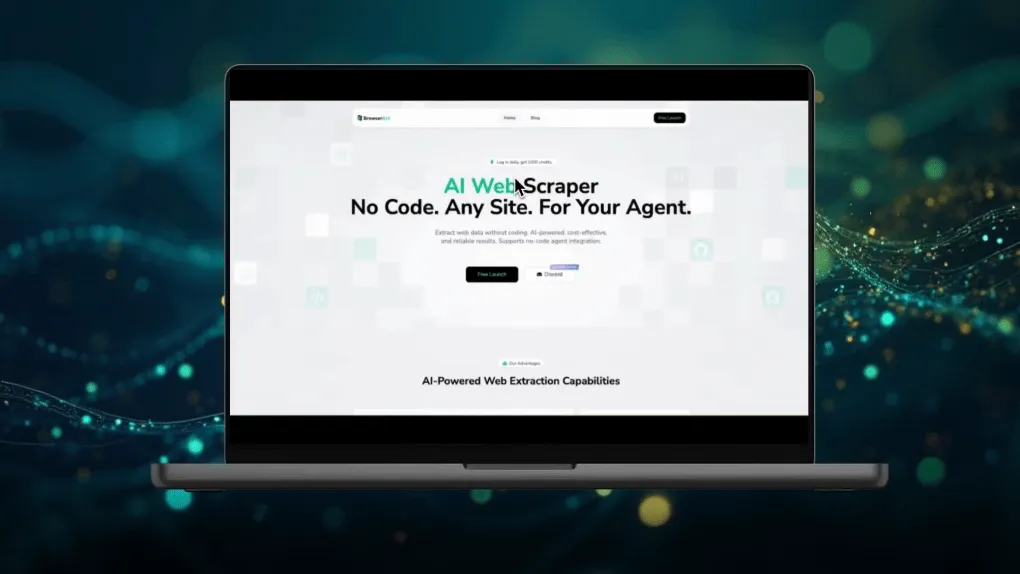
BrowserAct is the tool designed to not just move your data—but to make it work for you. It combines data collection, transformation, and automation into a single platform. Unlike many automation tools that only pass information from one app to another, BrowserAct focuses on turning raw data into meaningful outputs you can act on immediately. It bridges the gap between scraping, processing, and delivering insights, which saves teams from stitching together multiple tools. For businesses that rely heavily on real‑time information, this means faster decision‑making and fewer manual touchpoints. With BrowserAct, automation is not just about efficiency—it’s also about unlocking new possibilities for data‑driven growth.
What makes BrowserAct unique:
- Native data scraping: Collect live web data without needing a separate crawler.
- Direct integrations: Send structured data to Airtable, Notion, Slack, CRMs, and more.
- Smart triggers: Automations fire based on any data change, not just app events.
- Beginnerfriendly recipes: Prebuilt automations for sales, marketing, and ops.
Where it’s still growing:
- Marketplace of prebuilt integrations is expanding but smaller than Zapier’s.
- May be too powerful if you just need very simple “if this then that” automations.
BrowserAct is our pick for teams that want more than apptoapp automation. It’s the ultimate bridge between data gathering and data doing—turning information into direct business outcomes.
Learn how BrowserAct automates data collection without code »
Automate.io (by Notion) — Best for Simple App Connections
Automate.io is the lightweight option that sits somewhere between Zapier and Make. It focuses on simplicity, with strong support for marketing and CRM apps. Designed with small businesses and non‑technical users in mind, it makes connecting apps and automating tasks straightforward without overwhelming you with advanced options. Its clean interface helps you set up workflows in minutes, making it especially appealing for startups or solo operators who need quick wins. While not as feature‑heavy as some competitors, its balance of ease and functionality makes it an excellent choice for teams that want reliable app connections without a steep learning curve.
Strengths:
- Easy workflow builder: Quick to set up and run.
- Affordable entry point: Cheaper than some rivals.
- Solid app support: Especially for sales and marketing stacks.
Weaknesses:
- Not built for highly advanced workflows.
- Since its acquisition by Notion, its roadmap remains a bit unclear.
Automate.io is a safe starting point for basic business automations. But if you want automation that scales alongside your growth—and integrates data with decisions—BrowserAct is the better longterm bet.
Further reading: Business automation
Frequently Asked Questions (FAQ)
Q1: What’s the first task small teams should automate?
Usually repetitive data tasks—like copying leads from forms into a CRM or updating Slack when a task is completed. Start small, gain confidence, then expand.
Q2: Are free automation tools good enough for small teams?
Free plans are fine for testing, but most teams outgrow them quickly. Paid tiers unlock reliability, support, and scale.
Q3: Will automation put my data at risk?
Security varies by platform. Open-source tools like n8n allow full control, while trusted platforms like BrowserAct and Zapier offer enterprise-grade encryption.
Q4: Zapier vs Make vs BrowserAct—how should I choose?
- Zapier = Simple workflows, easy for beginners.
- Make = Complex workflows, visual editor.
- BrowserAct = Best for teams who want automated data workflows that go beyond app-to-app connections.


