Forethought AI by Zendesk: Acquisition and Company Guide

Zendesk completed its acquisition of Forethought on March 26, 2026. A later product announcement made Forethought AI agents by Zendesk available to purchase on June 4. The company’s agreement announcement, transaction completion and product rollout are three different milestones.
Verified October 7, 2026. Company status, acquisition timeline and official product/contact entry points after Zendesk acquisition.
Is Forethought part of Zendesk?
Yes. The Zendesk completion release confirms the March 26 acquisition and refers back to the agreement announcement on March 11. Agreement-stage wording on an older Forethought page should be read in that sequence.
The reviewed evidence does not disclose the acquisition price. It also does not establish a complete current leadership roster or an independent-company headcount after the transaction.
Forethought acquisition and rollout timeline
These dates establish what had happened at each stage. Purchase availability is a product milestone; it is not another acquisition closing.
| Date | Milestone | What was announced |
|---|---|---|
| 2026-03-11 | Acquisition agreement announced | Zendesk announced its intention to acquire Forethought. |
| 2026-03-26 | Acquisition completed | Zendesk completed the acquisition of Forethought. |
| 2026-06-04 | Product purchase availability | Forethought AI agents became available to purchase; Zendesk and non-Zendesk customers have different purchase/integration routes. |
Where to find product and purchase information
The June 4 Zendesk support announcement explains Forethought AI agents availability. Zendesk and non-Zendesk customers have different purchase and integration routes, so a company-name search alone is not enough to choose the right path.
Use the announcement’s official sales and support links for the relevant account. Availability in that release does not guarantee every channel, integration or account-specific entitlement.
Company contact information versus office addresses
The workbook includes five official entry points covering announcements, product guidance, sales and support. The Zendesk contact page is one of those routes.
An office address published for Zendesk should not automatically be relabeled as a Forethought office. This source set does not establish a current Forethought street-address directory. Similarly, a historical article author’s title is not proof of a current post-acquisition management role.
Download the Forethought research spreadsheet
Company status, acquisition timeline and official product/contact entry points after Zendesk acquisition. The worksheets retain source URLs, source dates, verification dates and specific evidence gaps. Blank amounts, dates or addresses mean the reviewed source did not establish them.
Download Forethought research Excel
Update Forethought research with BrowserAct
Start a custom Bot with the official sources below. Keep each fact connected to its source and date, then review the structured output before adding it to your company-research file.
Use Agent Built for a custom source and field list. A relevant BrowserAct template can provide a starting point when its target and output match your task. The cloud Bot is the main workflow here; CLI access is optional for developers connecting their own Agent.
- 1Open BrowserAct Dashboard
Click the left-side + to create a Bot, choose Build with Agent or an available Quick start entry, or paste your request into the center Agent input.
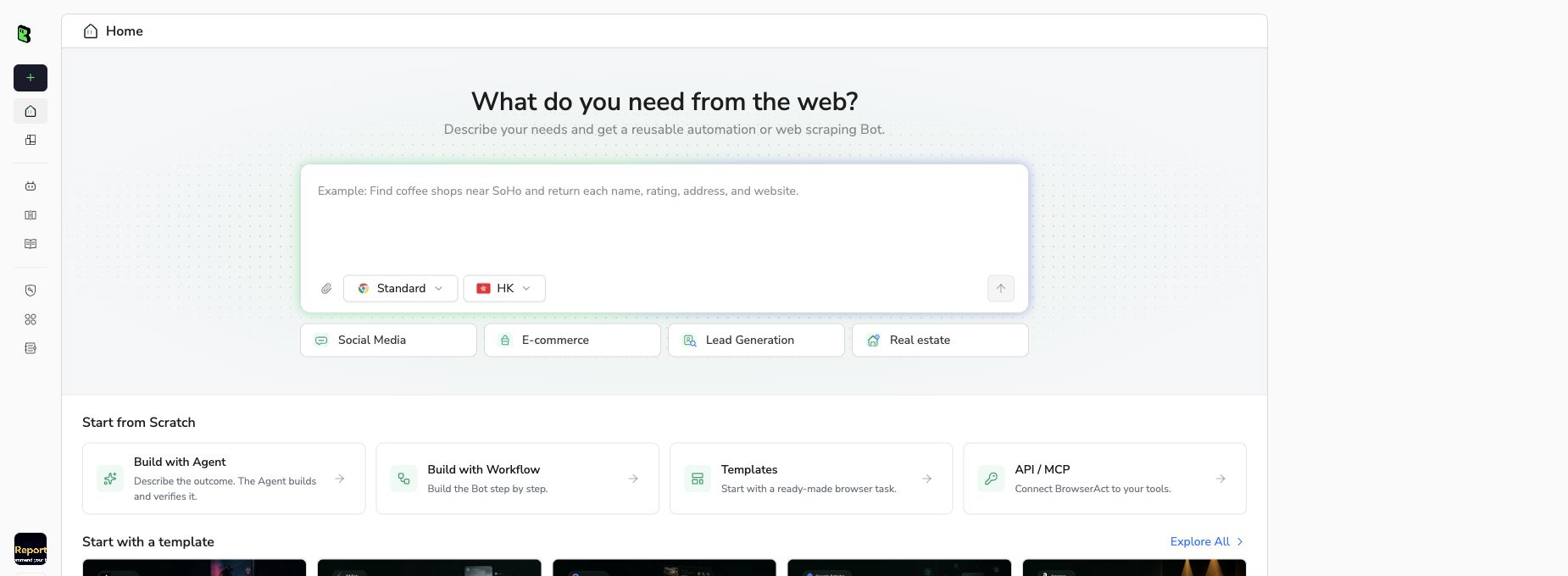
BrowserAct Bot creation screen, captured September 10, 2026. Interface labels may change.
- 2Copy the complete prompt
Review the exact target, result limit, and fields before running the Bot.
Scrape data from any website.
Describe the data you need. Get a Bot — a reliable, reusable scraper.
- 3Handle login only when asked
If the site requests login, CAPTCHA, 2FA or account confirmation, pause and complete the required step manually. Do not bypass restricted access.
- 4Review, dedupe, and export
Compare each row with its source, remove duplicates, and keep missing fields blank. Export CSV or JSON, then open the data in Excel or Google Sheets. Review changes before replacing your previous snapshot.
FAQ
Did Zendesk acquire Forethought?
Yes. Zendesk confirmed completion on March 26, 2026.
When was the agreement announced?
The completion release refers to the March 11, 2026 announcement.
When did Forethought AI agents become available to buy?
The reviewed Zendesk announcement gives June 4, 2026.
What was the acquisition price?
A verified consideration amount was not established in this source set.
Does the file include Forethought office addresses?
No. It includes company milestones and official contact entry points.
Can older executive titles be treated as current?
No. Pre-acquisition biographies require fresh confirmation before use as current leadership evidence.


