Build an Amazon Best Seller Price Tracker with AI Agent (100+ Products in 60 Seconds)

"Track the prices of the top 20 best-selling portable blenders on Amazon. Alert me when any of them drops below $30."
Here's Claude's response:
"I'm unable to browse Amazon or access real-time pricing data. I can help you set up a spreadsheet to track prices manually, or suggest tools like Keepa or CamelCamelCamel for price monitoring."
And ChatGPT:
"I can't access Amazon.com directly to check current prices. However, based on my training data, popular portable blenders typically range from $25-$50. For real-time tracking, I'd recommend using Keepa, a browser extension that..."
Based on training data. For a price tracking question. That's like asking your GPS for directions and getting "based on roads that existed when this map was printed."
The AI can analyze pricing trends, detect patterns, build comparison matrices, and generate strategic recommendations. But it can't look at a product page. The most basic step — "what does this cost right now?" — and it falls flat.
- 1Amazon actively fights price scrapers with CAPTCHAs, IP blocking, layout changes, and behavioral detection. Traditional scraping tools require constant maintenance that eats the value they create.
- 2Local browser mode bypasses all detection by using your real Chrome session. To Amazon, the AI agent is just another shopper browsing products.
- 3The cost comparison is dramatic: ~$5/month in LLM tokens versus $20-49/month for dedicated tools — with deeper analysis capabilities included.
- 4AI-powered analysis goes beyond price tracking into competitive intelligence: rating-to-review ratios, market positioning, new entrant detection, and pricing strategy recommendations.
- 5Cross-platform price comparison (Amazon vs Walmart vs Target) is uniquely possible with browser-based agents — no tool covers all three.
Why Amazon Price Tracking Is Still a Pain in 2026
You'd think this problem was solved. Amazon has been around for 30 years. Price tracking tools have existed for a decade. And yet:
Keepa: Good Data, Painful Pricing
Keepa is the gold standard for Amazon price history. But here's the catch:
- Free tier: View price history charts (no API, no alerts, no bulk tracking)
- Paid tier ($20/month): 5,000 products tracked, API access, alerts
- Enterprise: Custom pricing that starts conversations with "what's your budget?"
For a small ecommerce seller tracking their own products plus 50 competitors across 3 categories? That's 200+ ASINs minimum. Keepa handles it — for $20/month. But scale to 1,000 products across multiple categories (standard for a serious seller) and you're looking at enterprise pricing.
CamelCamelCamel: Free but Limited
CamelCamelCamel is free. Great. But:
- One product at a time (no bulk tracking)
- No competitor grouping or category-level views
- Alerts only — no structured data export
- No AI analysis of pricing trends
It's a consumer tool pretending to be a business solution.
The API Route: Amazon's Walled Garden
Amazon's Product Advertising API (PA-API 5.0) requires an Amazon Associates account with qualifying revenue. No revenue? No API access. And even with access:
- Rate limit: 1 request per second (base), scaling with revenue
- Data returned: Limited pricing data, no historical prices
- Requirements: Must generate sales through the API within 30 days or lose access
- TOS enforcement: Aggressive — they shut down accounts that scrape without generating sales
Building a price tracker on Amazon's API is building on quicksand. They can revoke access anytime, and the rate limits make bulk monitoring painfully slow.
The Scraping Problem: Amazon Fights Back
Direct scraping hits the Amazon wall:
Challenge | What Happens |
CAPTCHA triggers | After 50-100 requests, Amazon serves CAPTCHAs |
IP blocking | Datacenter IPs are blocked within minutes |
Dynamic pricing | Prices change based on location, login status, browsing history |
Layout changes | Amazon A/B tests layouts constantly, breaking scrapers weekly |
Anti-bot detection | Fingerprinting, rate analysis, behavioral tracking |
A developer on Reddit summed it up: "I built an Amazon scraper in Puppeteer. It worked for 3 weeks. Then Amazon changed the DOM structure and I spent 2 days fixing selectors. Then they did it again 10 days later. I gave up."
Amazon doesn't just block scrapers. They make scraping a maintenance nightmare.
Build Your Amazon Price Tracker with BrowserAct
Instead of fighting Amazon's anti-scraping measures with proxies, CAPTCHA solvers, and selector maintenance — what if you just... used a browser? The way a human would?
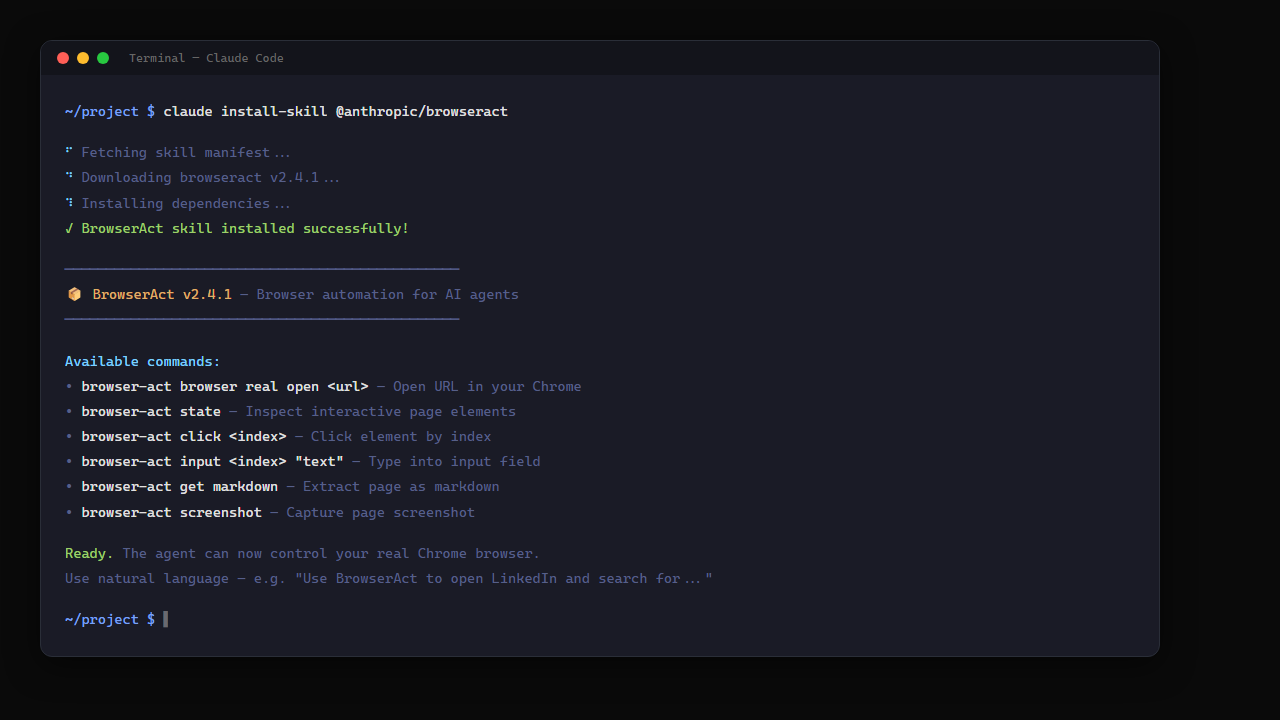
Step 0: Install BrowserAct Skill
Add the BrowserAct skill to your AI agent CLI. In Claude Code:
Step 1: Open Amazon Best Sellers
Step 3: Competitor Price Matrix
Now the analysis — just keep talking to the agent:
"Compare the top 10 portable blenders by price, rating, and review count. Which products are priced below the category average? Which have the highest rating-to-review ratio?"
Here's where the AI shines. It doesn't just extract data — it analyzes it:
Product | Price | Avg Rating | Reviews | Price vs Category Avg | Rating/Review Ratio |
BlendJet 2 | $29.99 | 4.4 | 127,843 | -15% | Low (saturated) |
PopBabies | $23.99 | 4.3 | 42,567 | -32% | Medium |
Hamilton Beach | $14.99 | 4.3 | 89,234 | -57% | Low (saturated) |
Ninja Blast | $39.99 | 4.6 | 23,456 | +14% | High (growing) |
KOIOS | $25.99 | 4.5 | 18,234 | -26% | Highest (opportunity) |
The AI identifies that KOIOS has the best rating-to-review ratio — high satisfaction with relatively fewer reviews — suggesting a growth opportunity. That's analysis that no price tracker provides out of the box.
Step 4: Cross-Platform Price Check
Here's something Keepa can't do. Without switching tools:
"Now use BrowserAct to check the prices for these same 5 products on Walmart.com and Target.com. Flag any product where the price difference is more than 20%."
The agent opens new tabs, navigates Walmart and Target, finds matching products, and compares. One conversation, three platforms, zero additional setup.
Step 5: Set Up Daily Monitoring
"Check these 20 products every morning at 8 AM. If any price drops more than 15% from yesterday, alert me with the product name, old price, new price, and percentage change."
The agent runs the same browser routine daily, compares today's prices against stored data, and flags significant changes. No subscription. No API limits. Just a browser checking prices like a human would.
Scaling Up: 24/7 Automated Price Intelligence
The walkthrough above is interactive — great for daily checks and ad-hoc research. But if you need always-on monitoring across thousands of ASINs, BrowserAct's cloud APIs handle the heavy lifting:
- Amazon Product API — structured JSON for any product, running 24/7
- Amazon Competitor Analyzer — automated market positioning across categories
- Amazon Reviews API — sentiment analysis at scale on competitor products
Use cloud APIs when: Monitoring 1,000+ ASINs, running hourly price sweeps, or building automated alerting pipelines that run independently.
Speed Test: 100 Products in 60 Seconds
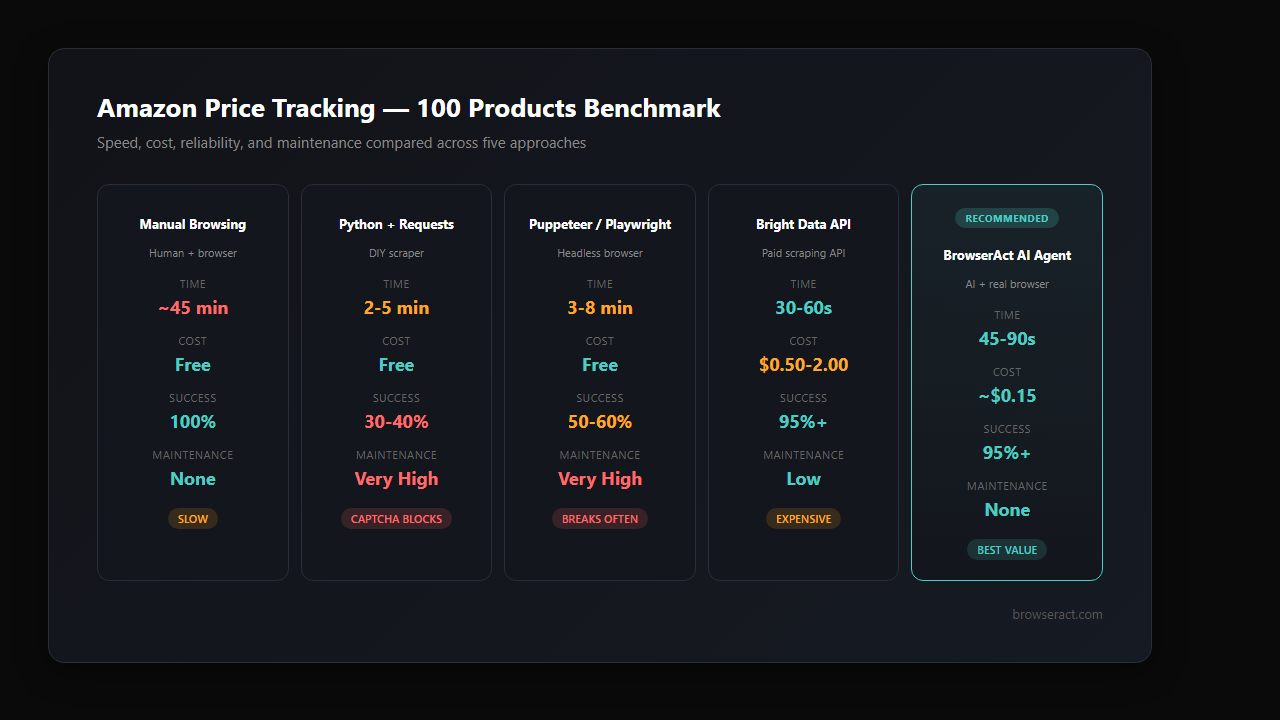
We ran a benchmark: extract name, price, rating, and review count for 100 Amazon products.
Method | Time | Cost | Success Rate | Maintenance |
Manual (human browsing) | ~45 min | Free (but your time) | 100% | None |
Python + requests | 2-5 min | Free | 30-40% (CAPTCHA blocks) | High (selectors break) |
Puppeteer/Playwright | 3-8 min | Free | 50-60% | Very high |
Bright Data API | 30-60 sec | $0.50-2.00 | 95%+ | Low |
BrowserAct AI Agent | 45-90 sec | ~$0.15 (tokens) | 95%+ | None |
The AI agent approach is competitive with paid APIs on speed and reliability — but with zero maintenance and dramatically lower cost. No selectors to update when Amazon changes layouts. No proxy rotation to manage. No CAPTCHA solving services to pay for.
The "100+ products in 60 seconds" claim comes with a caveat: it depends on page load times and how much detail you extract per product. Best sellers list pages load 20 products per scroll, and the agent reads them in bulk. Individual product page deep-dives take longer — roughly 3-5 seconds per product. For a category sweep (names, prices, ratings from the list view), 100 products in 60-90 seconds is realistic.
Stop getting blocked. Start getting data.
- ✓ Stealth browser fingerprints — bypass Cloudflare, DataDome, PerimeterX
- ✓ Automatic CAPTCHA solving — reCAPTCHA, hCaptcha, Turnstile
- ✓ Residential proxies from 195+ countries
- ✓ 5,000+ pre-built Skills on ClawHub
Real Use Cases: Who Tracks Amazon Prices?
Private Label Sellers
You sell a portable blender on Amazon. You need to know:
- When your top 5 competitors drop prices (so you can match or undercut)
- When a new competitor enters the category at an aggressive price point
- Seasonal pricing patterns (Black Friday, Prime Day ramp-up)
- Whether your competitors are running Lightning Deals or Coupons
"Track the top 10 competitors in the Portable Blender category. Alert me within 2 hours if any competitor drops their price more than 10% or activates a coupon."
Arbitrage Sellers
Price arbitrage depends on speed. A product at $15 on Amazon selling for $35 on Walmart is a $20 margin — but only if you catch it before other sellers do.
"Compare prices for these 50 ASINs across Amazon, Walmart, and Target. Flag any product where the cross-platform price difference exceeds 30%."
With local browser mode, the agent checks all three platforms using your real browser — no API access needed for any of them.
Dropshippers
Dropshippers need to track supplier prices on Amazon or AliExpress against their storefront prices. If the supplier raises prices, the margin disappears.
"Monitor supplier prices for my top 30 products on Amazon. If any supplier price increases more than $2, alert me to adjust my storefront pricing."
Market Researchers
Brand managers and market analysts tracking category trends:
"Track the Portable Blender best sellers weekly. Generate a monthly report showing: new entrants, price trend by brand, average review sentiment, and market share shifts based on best seller rank movement."
The AI agent doesn't just track prices — it generates the analysis that typically requires a dedicated analyst.
Amazon Price Tracking: Safety and Limits
Amazon's ToS
Amazon's Terms of Service prohibit automated data collection. However:
- Browser-based browsing falls in a gray area similar to using browser extensions
- Local browser mode uses your real Chrome session — indistinguishable from manual browsing
- Rate matters: Checking 100 products once per day is normal shopping behavior. Scraping 10,000 products every hour is not.
Recommended Limits
Frequency | Products | Risk Level |
1x/day | Up to 500 | Low |
2x/day | Up to 200 | Low |
Hourly | Up to 50 | Medium |
Real-time | Up to 10 | Medium-High |
The golden rule: if a human could reasonably browse that many products in the same timeframe, you're fine.
Avoiding Detection
- Use local browser mode — your real Chrome, your real IP, your real cookies
- Randomize timing — don't check at exactly 8:00:00 AM every day
- Mix in organic behavior — the agent can browse other content between product checks
- Respect rate limits — 3-5 second pauses between product page loads
- Stay logged in — Amazon Prime members get different (often better) prices, and being logged in signals "real shopper"
BrowserAct vs Amazon Price Tracking Tools
Feature | Keepa ($20/mo) | CamelCamelCamel (Free) | Jungle Scout ($49/mo) | BrowserAct AI Agent |
Products tracked | 5,000 | Unlimited (one at a time) | 500 (with limits) | Unlimited |
Historical data | ✅ Years | ✅ Years | ✅ 2 years | ⚠️ From first scan |
Price drop alerts | ✅ | ✅ | ✅ | ✅ |
Competitor analysis | ❌ | ❌ | ✅ Basic | ✅ AI-powered |
Review sentiment | ❌ | ❌ | ⚠️ Basic | ✅ Deep LLM analysis |
Cross-platform pricing | ❌ | ❌ | ❌ | ✅ Any website |
AI-powered insights | ❌ | ❌ | ⚠️ Limited | ✅ Full LLM analysis |
API / data export | ✅ | ❌ | ✅ | ✅ JSON/CSV |
Monthly cost | $20 | Free | $49 | ~$5 (tokens) |
Setup time | Minutes | Minutes | Minutes | 15 minutes |
The gap: existing tools track prices. BrowserAct's AI agent tracks and analyzes prices — with competitor intelligence, review sentiment, and cross-platform comparison included. It's the difference between a spreadsheet and an analyst.
Conclusion
Amazon price tracking shouldn't require a $49/month subscription or a Python script that breaks every two weeks. The core task — open Amazon, read prices, compare products, flag changes — is exactly what a browser does. The analysis — trend detection, competitor positioning, market opportunity identification — is exactly what an AI does.
Put them together with BrowserAct and you get an Amazon intelligence system that's cheaper than Keepa, smarter than Jungle Scout, and more reliable than any DIY scraper. Local browser mode means your real Chrome, your real session, zero CAPTCHA blocks.
For ecommerce sellers spending hours manually checking competitor prices — or paying tools that give you data without insight — it's worth 15 minutes to test whether an AI agent can replace both.
Automate Any Website with BrowserAct Skills
Pre-built automation patterns for the sites your agent needs most. Install in one click.
Further reading: Amazon product research
Frequently Asked Questions
How many Amazon products can I track with BrowserAct?
There's no hard limit. Practically, tracking 200-500 products daily with one check per day stays well within safe browsing patterns.
Does this work for Amazon marketplaces outside the US?
Yes. The AI agent can navigate Amazon.co.uk, Amazon.de, Amazon.co.jp, or any Amazon marketplace — same browser, same approach.
Can the AI agent track Amazon Lightning Deals and Coupons?
Yes. The agent reads the full product page including deal badges, coupon offers, and Subscribe & Save pricing — data that API-based tools often miss.
How accurate is the pricing data compared to Keepa?
Real-time accuracy is identical since both read Amazon's displayed price. For historical trends, Keepa has years of data; BrowserAct starts tracking from your first scan.
Will Amazon ban my account for using this?
Local browser mode uses your real Chrome session with normal browsing patterns. Checking 100-200 products per day at human-like speeds is indistinguishable from manual shopping.
Can I track prices on Walmart, Target, or AliExpress too?
Yes. The AI agent can navigate any website through your browser. Cross-platform price comparison is built in — no separate tool needed for each platform.
Does this integrate with my ecommerce tools (Shopify, Seller Central)?
The agent exports data as structured JSON or CSV. For direct integration, BrowserAct's API can feed into n8n, Make, or Zapier workflows connected to your ecommerce stack. ---


