Social Media Monitoring: A Practical, Reliable Workflow

Your monitoring report says there were no new mentions overnight. But did nobody mention your brand, or did the collector stop at a login screen? Those two situations need completely different responses. Reliable social media monitoring tracks relevant conversations and records whether the sources were actually checked. This guide covers queries, coverage, deduplication, alerts, and a small BrowserAct pilot you can inspect before turning it into a recurring workflow.
- 1Social media monitoring should answer both “What needs attention?” and “Which sources did we successfully check?”
- 2Separate brand mentions, competitor updates, and industry questions; each needs different queries and a different response owner.
- 3Use BrowserAct for a bounded, prompt-built browser collection workflow; use a managed monitoring platform when you need a shared response inbox and broader contracted coverage.
- 4Keep source URLs, observation times, missing values, and access states. A blocked source is not evidence of zero activity.
- 5Validate a small sample before scheduling. AI summaries and sentiment labels should remain traceable to the original posts and subject to human review.
What is social media monitoring—and what is it not?
Social media monitoring is the ongoing collection and review of relevant mentions, posts, and conversations about a brand, product, competitor, or topic. Its immediate purpose is to identify something a team should inspect or act on, with enough context to make that decision.
It is useful to separate three jobs. Monitoring finds the individual signal. Social listening examines patterns across a collection of signals. Social media management includes publishing, responding, and managing accounts. Sprout Social’s monitoring guide makes the monitoring/listening distinction and emphasizes tracking brand-name variations, not just direct tags.
Job | Question to answer | Useful output | What it does not prove |
Monitoring | Is there a relevant new complaint or announcement? | Source link, excerpt, timestamp, owner | Complete coverage of every conversation |
Listening | Which problems recur in the observed conversations? | Themes with supporting examples | The opinions of the entire market |
Management | Who should respond, and has that response been approved? | Assigned action and response record | That automated replies are appropriate |
Define the decision before choosing monitoring keywords
Start with a sentence your team can act on: “Find new public questions about our integration so support can review them.” That is a better requirement than “Monitor everything about us.” The narrower version identifies a subject, a source boundary, and an owner.
For brand monitoring, include the brand name, distinctive product names, common spelling variants, and campaign terms. Ambiguous names need context. A business named after a common word will otherwise collect unrelated conversations; add the product category or exclude recurring irrelevant meanings after reviewing a sample.
For competitor monitoring, track a defined company list and the kinds of changes that matter: product announcements, pricing discussions, launch reactions, or repeated service complaints. Do not mix those records into your own customer-support queue. They inform research, not necessarily a response.
For industry research, collect questions people are trying to solve. A category query such as “export comments” has a different purpose from an exact brand mention. It may inform a tutorial, but it is not evidence that someone wants a sales message.
Query group | Example pattern | Include | Exclude or review |
Brand | Brand name plus product context | Questions, complaints, untagged mentions | Namesakes and unrelated uses |
Campaign | Distinctive campaign phrase | Reactions tied to that campaign | Generic hashtag noise |
Competitor | Named competitor plus launch or feature terms | Verifiable announcements and discussion | Reposts presented as separate events |
Category problem | A task or error phrase | Specific user questions | Promotional replies presented as neutral advice |
For a platform-specific starting point, see the Twitter search collection workflow. For comparable public-profile observations, the Instagram competitor analysis guide keeps that narrower task separate from broad listening.
Pro Tip: Keep a short exclusion log. When you remove a noisy term, write down why. Otherwise a later “cleanup” can silently remove a valuable use case along with the spam.
Build a coverage ledger before trusting a dashboard
Choose the sources your audience actually uses, then test the exact surfaces you intend to collect. “Facebook supported” is too broad a requirement. A public Page, an individual post, a comment thread, and a restricted group are different access and extraction tasks.
For each source, record the target URL or query, the intended date range, the last attempt, the last successful observation, and the access status. Keep the configured result limit as well. A run capped at a small number of posts cannot substantiate a claim about the entire day’s activity.
Use distinct outcomes:
- Checked, no matching items: the intended accessible surface was inspected within the defined limits, with no match found.
- Partial: some records were observed, but a limit, pagination issue, or interruption prevented the intended check.
- Blocked: login, verification, permission, or another access boundary prevented collection.
- Failed: a technical error prevented a usable result; its cause still needs diagnosis.
Treat those labels as a proposed reporting schema. They are not a claim that every tool automatically implements the same states. The collector and reporting layer must agree on their meanings.
This distinction became concrete in our small editorial test on September 7, 2026. A BrowserAct Bot was asked to inspect the public Nintendo Facebook Page and collect at most three visible posts. Facebook displayed a login prompt. The Bot stopped and produced one status-only row with the Page name; post-specific fields remained null. No posts were collected, and the successful post-extraction branch was not verified.
That result is useful evidence of an access boundary. It is not a successful Facebook monitoring deployment, and it tells us nothing about the Page’s actual posting activity during the period.
When an X collection run fails instead, use the Twitter login-wall, rate-limit, and empty-result troubleshooting guide to separate the possible causes before retrying.
Keep records that can survive deduplication and review
A useful mention record needs more than text. Retain the platform, canonical source URL, original timestamp as displayed, collection time, matched query, and any visible metrics you actually need. Keep the original values alongside normalized versions when time formats or abbreviated counts need interpretation.
Use the canonical post URL or a stable platform identifier as the primary deduplication key. Matching only on text can collapse distinct posts that repeat a launch message. Conversely, the same post found by both a brand query and a campaign query should normally remain one content record with two matching-query references.
Separate content from observations. A post can keep the same identifier while its visible comment count changes. Store the post once, and record metric observations with their own timestamps if tracking change matters. Otherwise every refresh can look like a new mention.
Field | Why keep it? | Handling rule |
source_url | Lets reviewers inspect the original | Do not replace with a search-result URL when a canonical link is available |
published_time_raw | Preserves what the source displayed | Do not invent a precise timestamp from an ambiguous label |
collected_at | Identifies when the observation happened | Keep a consistent timezone convention |
matched_query | Explains why the item appeared | Preserve multiple matches without duplicating the post |
visible_count_raw | Retains the observed metric | Missing is null, not zero |
access_status | Separates data from collection health | Carry it into reports and alerts |
review_status | Tracks human judgment | Keep classification separate from source text |
Start a BrowserAct pilot in four actions
Use BrowserAct when you want to describe a bounded browser task and inspect its structured output without first writing a collector. Start with an access-validation Bot, not a promise to monitor every platform. The following pilot is intentionally small; it is not a tested cross-platform production configuration.
1. Open BrowserAct and choose the creation entry
On the Home screen, use the left-side Create button, choose Build with Agent, or enter the requirement in the central input. Review the available browser region before building. These labels were checked in the English interface on September 8, 2026.
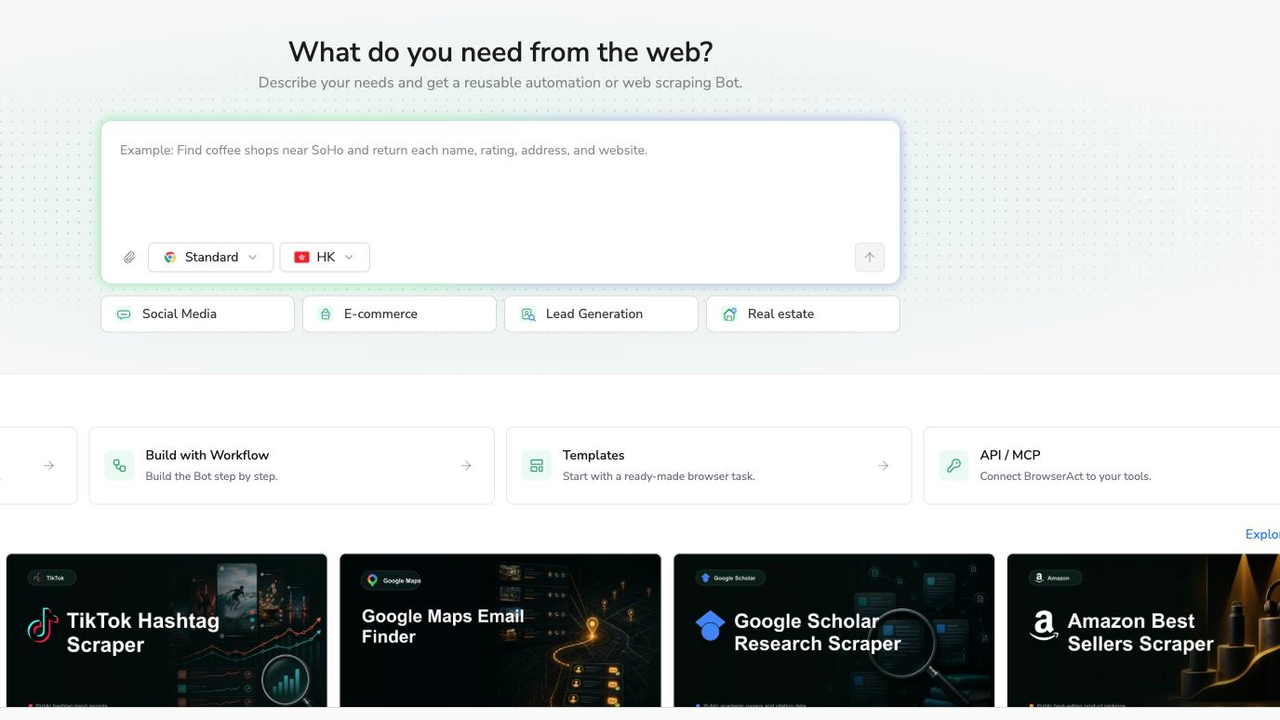
The current BrowserAct creation screen. This is a real product screenshot, not an AI-generated interface.
2. Copy the complete pilot prompt
This prompt reproduces the scope of the Facebook access test. Replace the URL only with a target you are permitted to inspect. A different target still requires its own validation.
Scrape data from any website.
Describe the data you need. Get a Bot — a reliable, reusable scraper.
3. Handle access restrictions manually
If the run reports login or another verification step, inspect the restriction. Complete a manual handoff only when you are authorized and the interface provides one; otherwise leave the source blocked. Do not repeatedly retry credentials, bypass membership controls, or assume that a public URL guarantees access from every browser session.
The observed pilot stopped rather than logging in. That is the behavior the prompt requested. A successful Bot build does not remove the platform’s access requirements.
4. Review, deduplicate, and export
Compare the output with the original source. Check whether post URLs exist, whether counts were actually visible, and whether the result is a content table or only a diagnostic row. Export the reviewed CSV or JSON, then normalize it for a spreadsheet or downstream analysis. Do not feed a status-only row into a sentiment calculation.
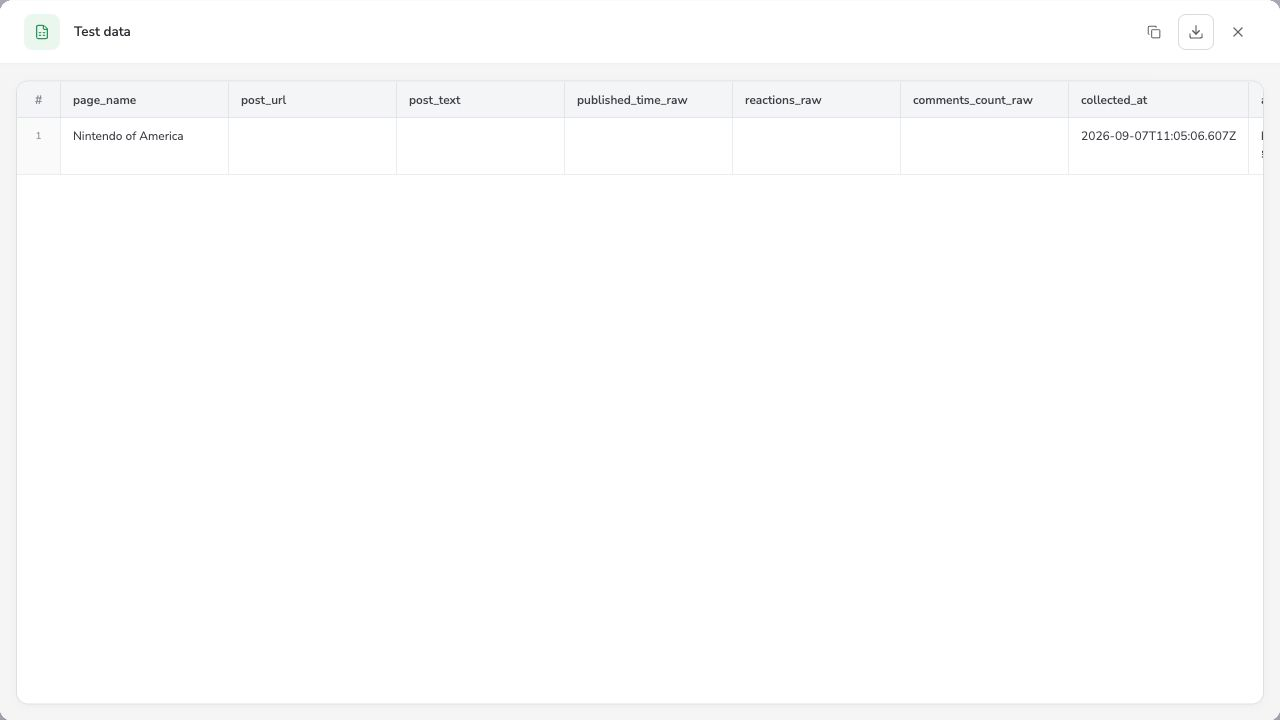
Real pilot output: one status-only row, not one collected post. The visible post fields are empty. The access-status field, outside this horizontal crop, reported a login requirement.
Choose a monitoring tool around the job it must finish
The best social media monitoring tool is the one that covers your required sources and hands usable evidence to the people who need it. “AI-powered” is not enough. A public user discussion about listening and monitoring tools includes a request for deeper sentiment analysis across platforms. That is a real requirement, but the recommendations in the replies are not independent product tests.
Start with BrowserAct for custom, limited browser collection where you need control over fields and an inspectable run. Its trade-off is that you still need to validate source access and design the reporting and response process. Do not treat a collection Bot as a complete social-care inbox or a comprehensive licensed conversation feed.
Use a managed monitoring or social-care platform when shared assignment, response workflows, contractual coverage, and support commitments drive the purchase. Hootsuite’s tool-selection guide highlights coverage, alert speed, integration, and pricing transparency as evaluation dimensions. Test those dimensions on your own source list rather than accepting a generic feature checklist.
Use official platform access or authorized exports when the required fields are available through those routes. They may be a better fit for owned-account analytics than browser collection. Verify current permissions, quotas, and supported fields for the particular platform before designing a pipeline around them.
Approach | Best fit | Strength | Limitation to validate | Cost question |
BrowserAct | Custom, bounded browser collection | Prompt-defined fields and reviewable runs | Session access, extraction completeness, downstream workflow | What do representative builds and recurring runs consume? |
Managed monitoring platform | Shared brand-care and reporting process | Packaged monitoring and team workflows | Exact source coverage, delay, export limits | Which seats, sources, historical data, and add-ons are included? |
Official access or account export | Supported platform data and owned-account reporting | Defined fields and permissions | Endpoint availability and access scope | What access tier and maintenance does the job require? |
Manual checks | Small initial baseline | Direct source review | Staff availability and consistency | How much review time is sustainable? |
Schedule checks only after the pilot passes
Move from a pilot to recurring collection only after you can explain its output. Validate at least an ordinary accessible result, a repeat observation, and a failure state. A collector that handles only the happy path is not ready to support an unattended report.
Choose cadence around the decision. A weekly competitor review and an urgent customer-care queue do not need the same schedule. Browser polling is periodic observation, not a guarantee of real-time delivery. Measure actual delay and gaps before making a response-time commitment.
Keep content alerts separate from health alerts. A new relevant complaint should reach its assigned reviewer. A source that stops returning usable observations should reach the workflow owner. Combining both in one undifferentiated stream makes it harder to tell whether the problem is the market or the monitor.
Set a bounded retry policy for transient failures and a manual stop for access restrictions. The exact policy depends on source rules and your operating requirements; more retries are not automatically better coverage.
Pro Tip: Put “last successful check” next to mention volume. A reassuring zero without a recent successful observation should not look healthy.
Make AI summaries auditable, not authoritative
AI can help group similar complaints, propose labels, or draft a digest from collected text. Keep the original records and source links available for every important conclusion. A reviewer should be able to move from “users are reporting login trouble” to the actual examples supporting that statement.
Ask the analysis stage to mark uncertainty and avoid guessing sentiment from an incomplete excerpt. Sarcasm, quotations, replies, and mixed-language posts can all change meaning. A post criticizing a competitor inside a comparison should not automatically count as negative sentiment toward your brand.
Report the denominator. “Negative share increased” means little if the source set changed or a previously accessible channel failed. Compare equivalent sources, query definitions, time windows, and review rules; otherwise describe the observations without presenting them as a trend.
Turn the report into a decision queue
A useful daily digest has three parts: new items that need review, source-health exceptions, and decisions made. Each actionable record needs a source URL, a short reason it matters, an owner, and a status. Keep automated collection read-only; drafting or publishing a response requires a separate approval process.
For a weekly listening review, group recurring questions and attach examples. Distinguish “three observed conversations asked about this feature” from “the market demands this feature.” The former is evidence you can inspect; the latter needs broader research.
Sprinklr’s enterprise monitoring guide emphasizes routing signals to teams that can act. Apply that idea at any team size: remove a report section if nobody can name the decision it supports.
Start with one source you can verify
Good social media monitoring begins with a small, honest record of what happened and what could not be checked. Pick a source, define a decision, validate the output, and assign a reviewer before expanding coverage.
For a custom browser-based pilot, build a bounded Bot in BrowserAct. Keep the access limitations visible. A monitor that admits where it stopped is more useful than a polished report that silently turns missing data into certainty.
Further reading: Social media monitoring
Frequently Asked Questions
What is social media monitoring?
It is the ongoing tracking and review of relevant social posts and conversations about a brand, product, competitor, or topic, with source evidence and a process for acting on important findings.
What is the best social media monitoring tool?
Choose by required sources, collection delay, review workflow, export needs, and total cost. BrowserAct fits custom browser collection; managed platforms may better suit shared response and listening workflows.
Can I monitor social media for free?
Manual checks and limited trials can support a small pilot. Do not assume free, unlimited, continuous coverage; verify current plan limits, source access, and the time needed to review results.
Is social media monitoring the same as social listening?
Monitoring identifies individual relevant signals. Listening analyzes patterns across those signals. Both need clear source coverage, but they serve different decisions and time horizons.
Why does a monitor return no data?
It may find no matches, hit a login restriction, reach a result limit, or fail technically. Check access status and the last successful observation before interpreting an empty result as inactivity.
Can BrowserAct monitor every social platform in real time?
Do not assume complete or real-time coverage. Validate each target and session, inspect its output, and measure the actual schedule and delay. A successful Bot build does not guarantee access to every source.


