
YouTube API
Extract structured channel and video detail metrics from YouTube keyword results via a single API call. Built for monitoring, analytics, and competitor scanning.
Published by
Ma
Maggie
September 10, 2026
Approx.Credits
270-300 Credits
Categories
BA
YouTube APIVideo ContentSocial MediaYoutube
Template ID
82305188582464621

Brief
⭐ Copy and send this to your Agent:
 Install this skill for me:
https://github.com/browser-act/skills/tree/main/youtube-api-skill
What is YouTube API?
BrowserAct’s YouTube API lets you extract structured video detail data from YouTube based on a keyword search through a single API request.
You provide KeyWords and an Upload_date filter. BrowserAct automatically runs the workflow in the background, traverses the keyword video results list, opens each video detail page, and returns clean, ready-to-use video metrics directly via API.
This tool is designed for weekly content monitoring, competitor scanning, campaign tracking, and building searchable video intelligence datasets.
What data can you get through YouTube API?
The API extracts structured fields from each video detail page, including channel-level context and video-level performance signals.
Channel fields
- channel_title: Channel name displayed on the video page
- channel_url: Channel URL
- subscribers: Subscriber count shown on the channel
Video fields
- video_title: Video title shown on the video page
- video_url: Video URL
- publish_date: Publish date or time shown on YouTube
- view_count: View count shown on YouTube
- video_duration: Video duration
- comment_count: Total comment count (if available)
- like_count: Like count (if available)
Why YouTube API is right for you?
One-call integration
Send video detail metrics directly into your CRM, BI tools, databases, or automation workflows via API.
Search-to-detail extraction
Unlike list-only extraction, this API opens each video page to capture richer fields like duration, likes, and comment counts.
Freshness control
Upload_date lets you focus on recent videos only, keeping monitoring workflows timely and relevant.
Built for workflows
Perfect for trend tracking, weekly content scans, competitor monitoring, and growth analytics.
In short
Search → API call → Video detail data delivered
API Parameters
Parameter | Description | Default | Supported values (examples) |
KeyWords | Search keywords used to find videos on YouTube | Openclaw | Any keyword or phrase e.g. Openclaw, AI agent, browser automation |
Upload_date | Filter videos by recency in YouTube search | This week | Today, This week, This month, This year |
Code to Integrate
Click Get code, replace the API key, and run the code directly in your application.
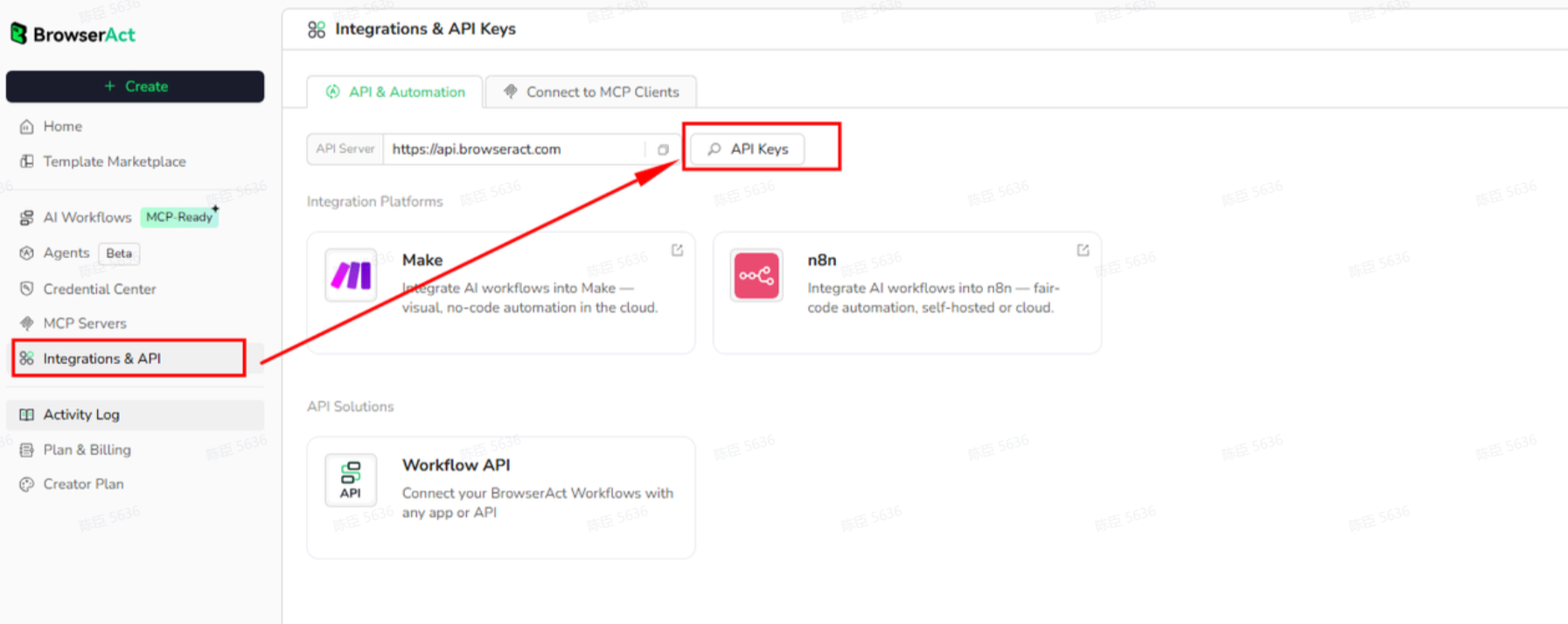
API Key, get from:
# https://www.browseract.com/reception/integrations
API_KEY = os.getenv("BROWSERACT_API_KEY", "app-abcdefghijklmn")
You only need to replace:
app-abcdefghijklmn
with your own API key, and the code will run successfully.
Your API key can be found in the API & Integrations section of the BrowserAct dashboard.
API Example
Input
KeyWords: Openclaw
Upload_date: This week
Steps
- Click Get the Code
- Run the request
- Receive structured video detail results via API
API Results
{
"channel_title": "Adrian Twarog",
"channel_url": "https://www.youtube.com/@AdrianTwarog",
"subscribers": "413K",
"video_title": "OpenClaw Tutorial for Beginners - Crash Course",
"video_url": "blob:https://www.youtube.com/541c8f4f-2ffb-4bb7-ac16-01fbb0eb8354",
"publish_date": "2026-02-18",
"view_count": "142,713",
"video_duration": "7:57",
"comment_count": "102",
"like_count": "2.1K"
Create Your Own YouTube API
To create your own YouTube API, start from a prebuilt template.
- Click Create from Template in the top-right corner
- Complete the setup
- You’ll receive a callable workflow_id
Once created, you can use the BrowserAct API to invoke your workflow programmatically and retrieve YouTube video detail data directly in your application.
Need help? Contact us at
Discord: [Discord Community]
E mail: service@browseract.com
 What can we do for you