
Universal E-commerce Product Price Scraper
Published by
je
jett
March 04, 2026
Approx.Credits
30-60 Credits
Categories
BA
Content CollectionProduct InfoPrice Monitor
Template ID
83063787359503469

Brief
Universal E-commerce Product Price Scraper automatically extracts key product information from e-commerce product pages using a product URL. The workflow opens the page, handles potential pop-ups, scrolls to the product details section, and captures structured data such as product title, brand, product URL, and current price. The extracted data is returned in JSON format, making it easy to use for price monitoring, competitor research, and automation workflows.
What Does Universal E-commerce Product Price Scraper Do?
Universal E-commerce Product Price Scraper automatically extracts key product information from e-commerce product pages using a simple product URL.
By providing a product link, the workflow opens the page, handles potential pop-ups, scrolls to the product details section, and extracts structured product data such as product title, brand, product URL, and current price.
This scraper works across multiple e-commerce websites and is ideal for price monitoring, competitor tracking, product research, and automation workflows. The collected data can be exported in structured formats such as JSON and integrated into automation platforms like Make.com, n8n, or Google Sheets.
Key Features of Universal E-commerce Product Price Scraper
• Universal Product URL Input
Scrape product data from any supported e-commerce product page using a simple product link.
• Automated Page Navigation
Automatically opens the product page and waits for the page content to fully load before extracting data.
• Pop-Up Handling Logic
Detects potential pop-ups or access prompts and automatically clicks the continue button if needed.
• Smart Content Navigation
Scrolls to the “About this item” section and expands hidden product descriptions to capture full product details.
• Structured Data Extraction
Extracts key product information including product title, brand name, product URL, and current price.
• Automation-Ready Workflow
Easily integrates with automation tools such as n8n, Make.com, and Zapier.
• JSON Output Format
Exports clean, structured product data ready for analysis or storage.
• No Coding Required
Runs directly in BrowserAct with a visual workflow builder.
What Data Can You Scrape from E-commerce Product Pages?
With Universal E-commerce Product Price Scraper, you can extract important product information from product pages.
Product Information
• Product title
• Product URL
• Brand name
• Current product price
These data points are useful for market research, price monitoring, and product analytics.
How to Use Universal E-commerce Product Price Scraper in One Click
You can quickly start scraping product data using the pre-built workflow template.
1. Register Account
Create a BrowserAct account and open the workflow template.
2. Configure Input Parameter
Enter the product page URL in the product_url parameter.
3. Start Execution
Click Start to run the automation workflow.
4. Export Data
After the workflow completes, download the extracted product data in JSON format.
Why Scrape E-commerce Product Prices?
Collecting product data from e-commerce platforms helps businesses make smarter decisions.
• Price Monitoring
Track product price changes across e-commerce platforms.
• Competitor Analysis
Analyze competitor product listings and pricing strategies.
• Market Research
Understand product positioning, brand presence, and pricing trends.
• Product Intelligence
Collect structured product data for analytics dashboards.
• Automation Pipelines
Feed product data into automated workflows, databases, or AI tools.
How to Build a Universal E-commerce Product Price Scraper Workflow: Step by Step
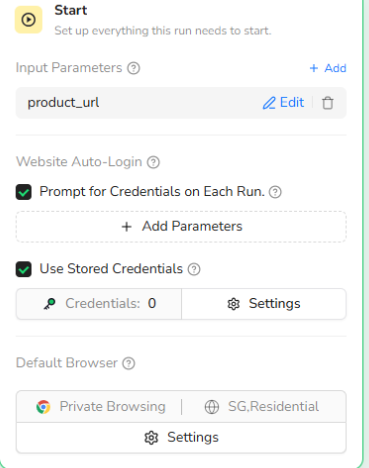
Step 1: Start Node Parameter Settings
Configure the input parameter that allows the workflow to receive a product page URL.
• product_url — The product page link to scrape.
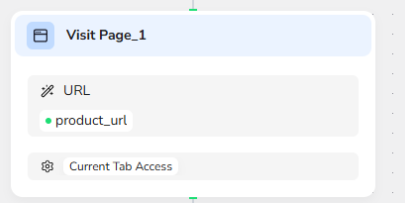
Step 2: Visit Product Page
The workflow opens the product page using the provided product URL.
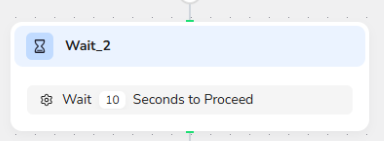
Step 3: Wait for Page to Load
A wait step ensures the page content fully loads before interacting with page elements.
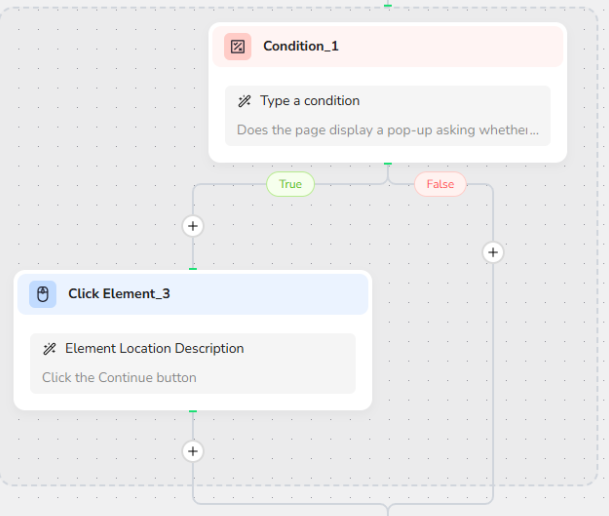
Step 4: Handle Potential Pop-Ups
The workflow checks if a pop-up appears asking for confirmation or continuation.
If detected, it automatically clicks the Continue button.
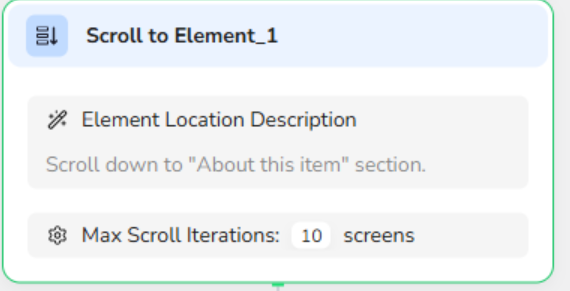
Step 5: Scroll to Product Details Section
The workflow scrolls down to the About this item section to locate product information.
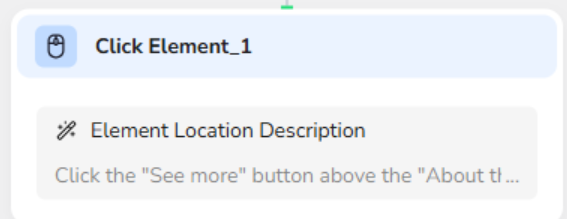
Step 6: Expand Hidden Product Content
If the product description is collapsed, the workflow clicks the See more button.
Step 7: Extract Product Data
The workflow extracts structured product information from the page.
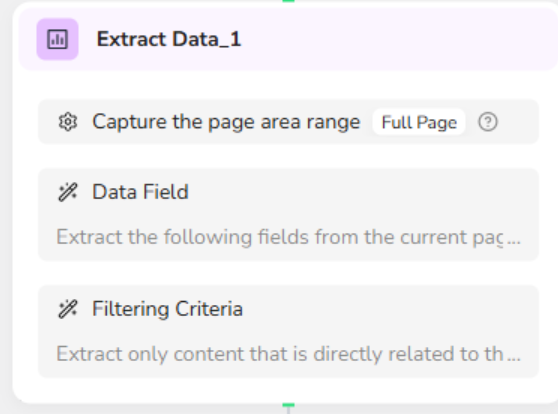
Extracted fields include:
• product_title
• product_url
• brand
• price_current_amount
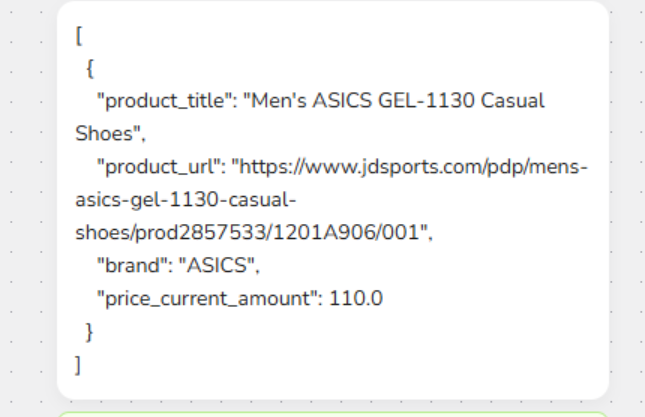
Step 8: Output Data
The final step exports the extracted data in JSON format.
Who Can Use Universal E-commerce Product Price Scraper?
This workflow is ideal for professionals and businesses that need structured product data.
• E-commerce Analysts
Track product prices and market trends.
• Competitor Research Teams
Monitor competitor product listings and pricing.
• Automation Engineers
Integrate product scraping into automation workflows.
• Data Analysts
Collect structured product data for dashboards and reporting.
• Startups and Small Businesses
Conduct affordable product and price research without coding.