
Social Media Finder
Free social media finder to discover accounts across Facebook, Twitter, Instagram, LinkedIn & more. Find someone's social media instantly—no coding needed.
Published by
Ch
Chiyee
September 10, 2026
Approx.Credits
25-35 Credits
Categories
BA
Multi-platformReal-time MonitoringSocial AnalyticsSocial MediaGoogle
Template ID
72676867414427158

Brief
What Does BrowserAct Social Media Finder Do?
Automatically discover and compile social media accounts associated with individuals, brands, or businesses across multiple platforms. Our powerful social media account finder helps you locate profiles on Facebook, Twitter, Instagram, LinkedIn, TikTok, and more—all from a single search. Capture social platform names, profile names, URLs, bio information, and follower counts without manual hunting across dozens of platforms.
Whether you're conducting background research, verifying professional contacts, or building comprehensive contact databases, this free social media finder streamlines the entire discovery process with no coding required.
Our Social Media Finder is built for seamless integration with automation platforms like Make and n8n, making it ideal for ongoing monitoring, lead generation, and competitive intelligence tasks.
Key Features of Social Media Finder
- Comprehensive Web-Wide Social Search: Discover all social media profiles associated with a name, company, or brand across the entire web—Facebook, Twitter, Instagram, LinkedIn, TikTok, YouTube, Pinterest, Reddit, and any other platform where the person or entity has a presence.
- Flexible Search Input: Find social media accounts by entering a person's name, username, or brand name—the tool searches across all platforms to discover matching profiles.
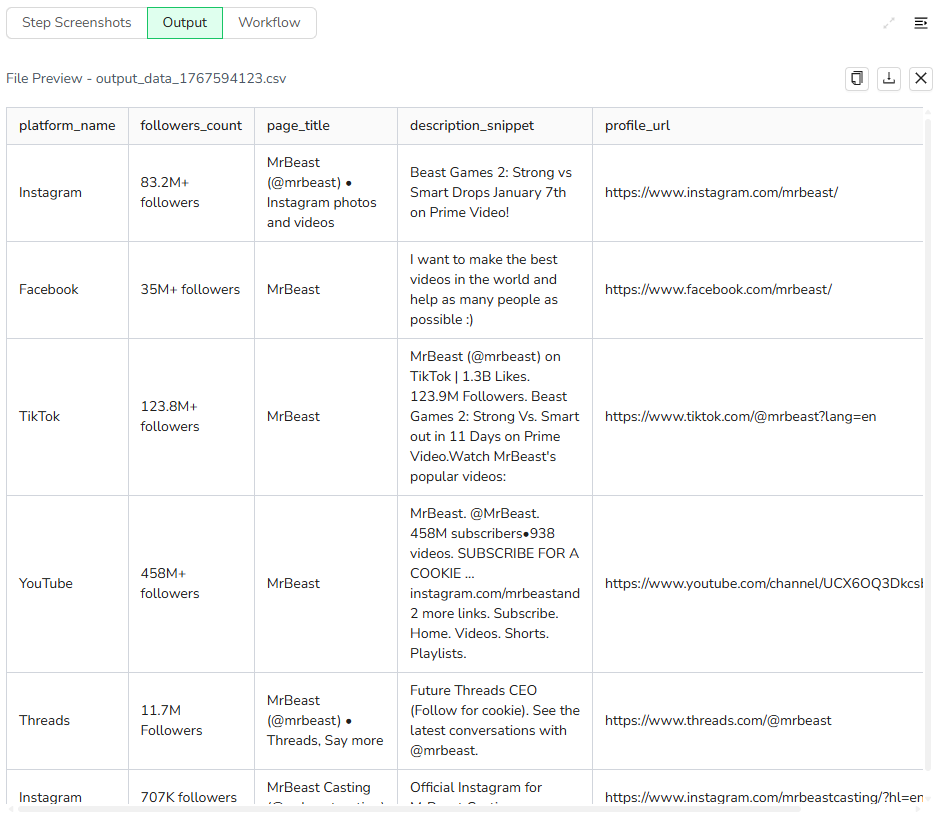
- Comprehensive Profile Data: Extract social platform names, profile URLs, username, bio description snippets, and follower counts as displayed in search results.
- Complete Profile Discovery: A single search returns all matching social media profiles across different platforms, giving you a full picture of someone's online presence in one go.
- No-Code & Free to Use: Runs directly in your browser with a simple setup; no installation or coding required.
- Privacy-Compliant: Only accesses publicly available information that anyone can view without logging in.
- Automation Integration: Connects with Make and n8n to schedule searches and auto-save results to Google Sheets or your CRM.
- Flexible Data Export: Download collected data in standard formats like CSV and JSON for further analysis.
What Data Can You Extract with Social Media Finder?
With BrowserAct's Social Media Finder, you can discover a wide range of publicly available profile information. Here's what you can find:
Profile Information
- Platform names (Facebook, Twitter, Instagram, LinkedIn, TikTok, YouTube, etc.)
- Profile URLs for direct access
- Page titles and account usernames
- Description snippets (bio text displayed under each profile)
- Follower counts
All data is extracted directly from search results, giving you a comprehensive overview of someone's social media presence across the web in a single, organized format.
How to Use Social Media Finder in One Click
If you want to quickly start discovering social media accounts, simply use our pre-built "Social Media Finder" template for instant setup.
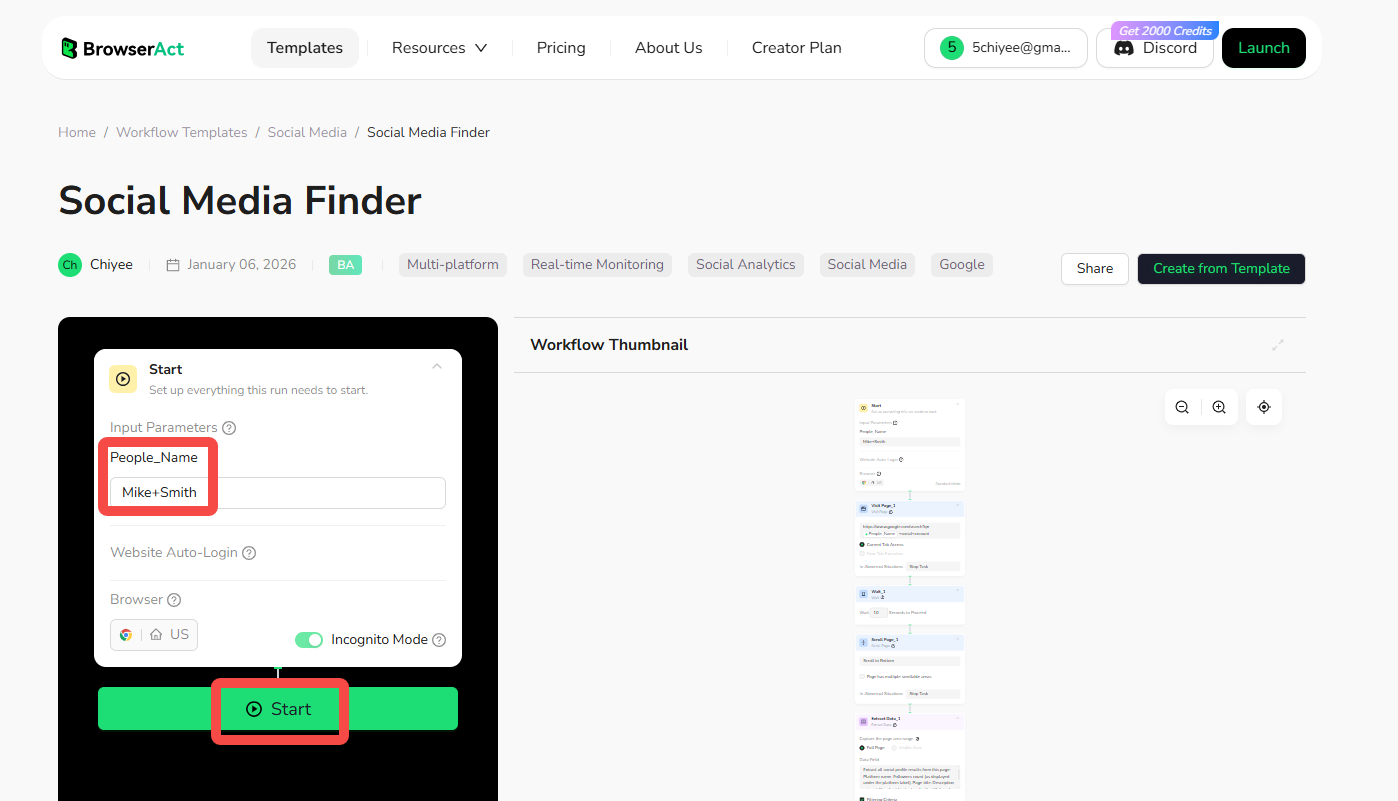
- Register & Open Template: Create a free BrowserAct account using your email, then click the Social Media Finder to open the template.
- Configure Search Parameters: Enter the person's name or username using the "+" symbol between words (e.g., "John+Smith" or "Sarah+Johnson"). This format is required for accurate searching.
- Start Execution: Click "Start" to run the discovery workflow.
- Review & Download Results: Once complete, review matched profiles and download the results file.
Why Use a Social Media Finder?
Finding someone's social media profiles manually means opening multiple browser tabs, typing names into different search bars, and sifting through irrelevant results. A social media finder automates this entire process by searching across all platforms at once and presenting organized results in minutes. Here's when this tool becomes invaluable:
- Before Meeting Someone New: Whether it's a blind date, a job interview, or a potential business partner, quickly understand who you're meeting by reviewing their public social presence beforehand.
- Reconnect with Lost Contacts: Find old friends, former colleagues, or classmates who you've lost touch with by discovering which platforms they're active on and reaching out through the right channel.
- Verify Online Dating Profiles: Confirm that someone you've met online is who they say they are by cross-referencing their dating profile with their real social media accounts.
- Check Job Candidates: HR teams and hiring managers can review a candidate's professional and public social presence to better understand their background, interests, and how they present themselves online.
- Find Content Creators and Influencers: Locate influencers across different platforms to assess their reach, engagement, and suitability for collaborations or partnerships.
- Monitor Your Own Digital Footprint: Search your own name to see what social profiles appear publicly and manage your online reputation.
- Locate Customer Service Contacts: Find official brand accounts across platforms when you need support or want to engage with a company publicly.
- Research Competitors: See which social platforms your competitors are using and how they're positioning themselves to inform your own social media strategy.
The fundamental value is simple: instead of spending 20-30 minutes manually searching each platform, you get comprehensive results in under a minute.
Who Can Use Social Media Finder?
Social Media Finder serves anyone who needs to quickly map out someone's social media presence. It's particularly useful for:
- Job Seekers and Career Changers: Research hiring managers or interviewers before your meeting, or find the right person to connect with at target companies.
- HR and Recruitment Teams: Screen candidates by reviewing their public social profiles, verify employment claims, and assess cultural fit.
- Dating App Users: Verify that matches are real people by confirming their identity across multiple authentic social profiles.
- Parents and Guardians: Check up on who their teenagers are interacting with online or verify the identity of people their children mention.
- Small Business Owners: Find potential clients, partners, or suppliers by researching their social presence before reaching out.
- Sales Professionals: Build rapport by understanding prospects' interests and background before cold outreach or sales calls.
- Content Creators and Podcasters: Research guests before interviews or locate potential collaborators across different platforms.
- Journalists and Researchers: Quickly locate sources, verify identities, and find the best platform to reach out for comments or interviews.
- Event Planners and Networkers: Research attendees before conferences or networking events to identify valuable connections.
- Online Shoppers: Verify the legitimacy of online sellers or service providers by checking their social presence and customer interactions.
- Anyone Reconnecting: Find old friends from high school, college classmates, former neighbors, or anyone you've lost touch with over the years.
Whether you're being cautious about new connections or trying to reestablish old ones, this tool gives you the information you need quickly and efficiently.
Is It Legal to Find Someone's Social Media?
Yes, using a social media finder to discover publicly available profiles is completely legal when done ethically. Our tool works by performing a google social search—essentially the same process you would do manually by typing someone's name into Google. The key difference is that our tool automates the searching, scrolling, and data extraction, saving you time while collecting only publicly visible information.
Since the data comes directly from Google search results, which only displays publicly accessible profiles that anyone can see without logging in, you're accessing the same information that's already indexed and available to the public. This means only accessing information that is visible to any public visitor without logging in or bypassing privacy settings.
You should always use the data responsibly and in compliance with privacy laws like GDPR and CCPA. Our Social Media Finder is designed to operate within these ethical boundaries, focusing exclusively on public profile discovery through standard search engines. The tool does not attempt to access private accounts, bypass security measures, or collect information that requires authentication.
However, this information does not constitute legal advice, and we recommend consulting with a legal professional to ensure full compliance for your specific use case.
How Many Profiles Can You Find?
By default, the Social Media Finder extracts results from the first page of Google search results, which typically returns around 10 results. However, our tool automatically filters these to show only actual social media platform profiles, excluding non-social media sites, news articles, or other irrelevant content.
This means you'll typically get between 5-10 social media profiles per search, depending on how many platforms the person or brand actually uses and how prominently they appear in search results.
Want to find more? You can customize the workflow to extract results from multiple pages of Google search results by adding a Pagination node. This allows you to automatically click through to page 2, 3, and beyond, discovering additional profiles that may appear lower in the rankings.
Simply adjust these pagination settings to increase your search depth—the tool scales based on your needs. Keep in mind that extracting more results will take slightly longer to process and consume more platform credits, but there are no hard technical limits preventing you from comprehensive searches.
Need help? Contact us at
- 📧 Discord: [Discord Community]
- 💬 E-mail: service@browseract.com
 What can we do for you