

What Does BrowserAct Social Media Contact Finder Do?
Social Media Contact Finder searches public web and profile pages for social media accounts connected to a company name, username, phone number, or email address. It supports batch input, returns each matched profile as an independent row, and includes profile URLs, usernames, public contact fields, match evidence, and confidence scores for research and enrichment workflows.
The default run uses company names and the Core Social Platforms scope. Change the lookup method, batch values, platform group, phone country, or match level without rebuilding the Bot.
Key Features of Social Media Contact Finder
- Search by company name, username, phone number, or email address.
- Process multiple lookup targets in one run while preserving input order.
- Choose a platform group instead of configuring platforms one by one.
- Return one flat row for every matched social profile.
- Keep unmatched targets visible through an independent
not_foundrow. - Include match reasons, evidence URLs, and confidence scores for review.
What Data Can I Extract?
| Field | Description |
|---|---|
input_index |
Original position of the lookup target in the batch. |
search_mode |
Lookup method used for the row. |
search_value |
Original company name, username, phone number, or email address. |
normalized_value |
Normalized value used during matching. |
entity_name |
Resolved company or person name when available. |
entity_type |
Resolved entity type, such as company, person, or unknown. |
platform |
Social or profile platform for the matched row. |
profile_url |
Absolute public profile URL. |
username |
Public username or handle when available. |
display_name |
Display name visible on the matched profile. |
public_email |
Public email shown by the source when available. |
public_phone |
Public phone number shown by the source when available. |
website_url |
Public website linked by the source when available. |
match_status |
Match state such as confirmed, candidate, or not_found. |
confidence_score |
Match confidence from 0 to 100. |
match_reason |
Short explanation of why the row matched or did not match. |
evidence_url |
Public page used as match evidence. |
checked_at |
Time the result was checked. |
error_message |
Row-level error details when a lookup cannot complete. |
How to Use Social Media Contact Finder
Quick Start Guide
- Open the template's Run Task tab.
- Select a lookup method and enter one target per line.
- Choose the platform scope, phone country, and match level.
- Run the Bot and review one independent row per matched profile.
- Export the result or connect the template through the API Tab.
Input Parameters
| Parameter | Configuration |
|---|---|
search_mode |
Dropdown; required; default Company Name. Options: Company Name, Username, Phone Number, and Email Address. Determines how every line in the batch is interpreted. |
queries |
Multiline text; required; default BrowserAct, OpenAI, and Figma, one per line. Blank lines are ignored and duplicate values are removed while preserving the first occurrence. |
platform_scope |
Dropdown; required; default Core Social Platforms. Options: Core Social Platforms, Social & Content Platforms, Developer Platforms, Creator & Personal Pages, and All Supported Platforms. Wider scopes can take longer. |
phone_country |
Dropdown; required; default United States. Used only in Phone Number mode to normalize the dialing code. |
match_level |
Dropdown; required; default Confirmed Only. Confirmed + Candidates also returns weaker leads and profiles that cannot be opened without signing in. |
Example Output
The table shows one complete profile row from the validated default run. Optional fields remain empty when the public source does not display them.
| Field | Result |
|---|---|
input_index |
1 |
search_mode |
Company Name |
search_value |
Figma |
normalized_value |
figma |
entity_name |
Figma |
entity_type |
company |
platform |
YouTube |
profile_url |
https://www.youtube.com/@Figma |
username |
Figma |
display_name |
Figma |
public_email |
null |
public_phone |
null |
website_url |
null |
match_status |
confirmed |
confidence_score |
99 |
match_reason |
Public YouTube profile address matches the lookup value and the page shows the same name. |
evidence_url |
https://www.youtube.com/@Figma |
checked_at |
2026-09-29T09:56:51Z |
error_message |
null |
How Does it Work?
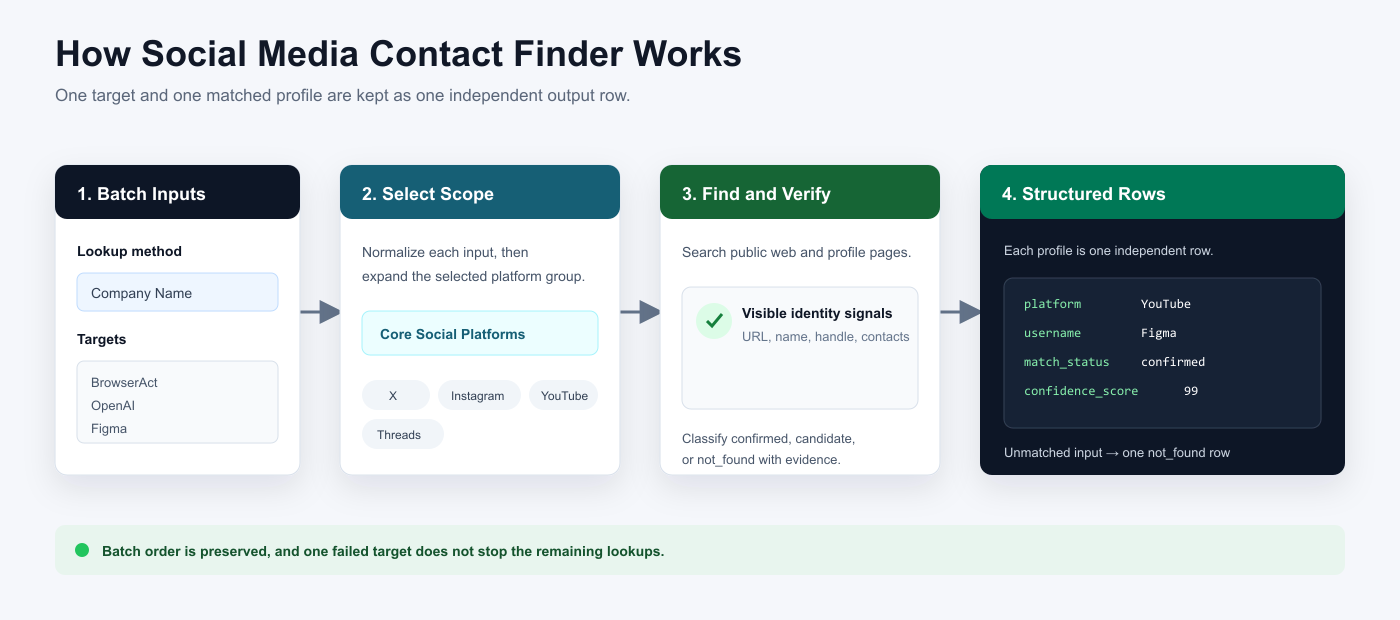
- Read the selected lookup method and normalize each non-empty batch value.
- Expand the chosen platform scope into its supported public platforms.
- Search public web and profile pages for matching accounts.
- Compare visible identity and contact signals, then classify each match.
- Return every matched profile as its own row and one
not_foundrow for an unmatched target.
How to Build a New Scraper Bot with Agent Built
Step 1: Describe the data you need
Open BrowserAct and start Agent Built from the Home prompt box or from Create > Build with Agent. Describe the public websites, lookup methods, reusable inputs, fields, and row structure you need.
Step 2: Let BrowserAct build and test the Bot
BrowserAct explores the public pages, creates the navigation and extraction workflow, and tests the result. Confirm that successful matches, optional empty fields, and unmatched inputs follow the output structure you requested.
Step 3: Run the Bot and review the result
Run the completed Bot with populated defaults first. Review source URLs, match evidence, missing optional fields, row independence, and the result count before using new batch values.
Use Cases
- Company social account discovery.
- Username and creator profile research.
- Public contact-based profile enrichment.
- Brand identity and handle audits.
- CRM and lead-research workflows.
Why Use Social Media Contact Finder?
- Replace repetitive searches across public profile platforms.
- Use one consistent row structure for several lookup methods.
- Review the public evidence and confidence behind each match.
- Keep batch order and unmatched inputs visible in the final result.
Who Can Use Social Media Contact Finder?
- Sales and lead generation teams.
- Brand and social media teams.
- Creator research and partnership teams.
- Market researchers and analysts.
- Developers and automation builders.
How Many Results Can You Find?
Enter one lookup target per line. The Bot processes the batch in order and returns each matched profile as an independent row. Selecting a wider platform scope or adding more targets can increase run time.
Automation and Export
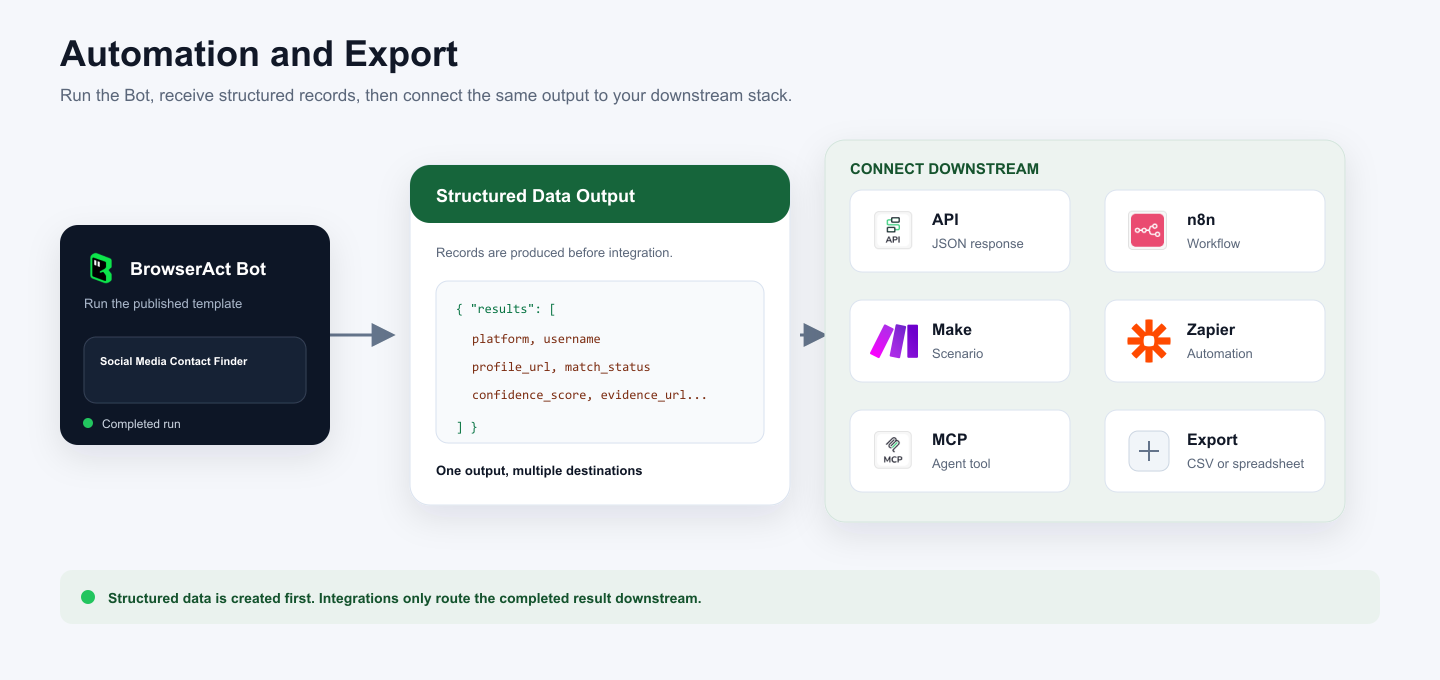
BrowserAct returns structured profile rows first. You can then use the result through the BrowserAct API, n8n, Make, Zapier, MCP-based agents, or a manual CSV or spreadsheet export.
Need Help?
Contact us at:
Discord: Discord Community
E-mail: service@browseract.com
