
Make Google Sheets Templates Scraper
Scrape and organize Google Sheets templates from Make, boosting efficiency by extracting structured data like title, description, and direct template URL—saving time and effort!
Published by
Ro
Rowan
August 21, 2026
Approx.Credits
90-150 Credits
Categories
BA
Multi-platformMake
Template ID
54062706176648047

Brief
Purpose of Make Google Sheets Templates Scraper
Manually browsing Make’s Google Sheets template library is slow and repetitive. Pages require constant scrolling, “Load More” clicks, and copy‑pasting into spreadsheets. Without a dedicated scraper, building a reliable dataset is nearly impossible.
Key Benefits of Using Make Google Sheets Templates Scraper
- Save hours of manual work by automatically fetching all Google Sheets–related templates from Make.
- Structured data output (title, description, URL) ready for analysis in CSV, JSON, or XML.
- Scales easily: extract dozens or hundreds of templates with one run.
- Data consistency: deduplication and timestamp logs ensure clean, validated results.
- Better insights: quickly identify popular workflows, common app combinations, or category trends.
Who Should Use Make Google Sheets Templates Scraper?
- Automation consultants who need to evaluate and recommend Make workflows to clients.
- Marketing teams building curated content campaigns showcasing top Google Sheets workflows.
- Data analysts tracking trends in automation adoption and app integration frequency.
- Content creators & educators creating tutorials, guides, or course materials based on real template data.
- Product & growth teams exploring automation strategies to integrate into business processes.
Make Google Sheets Templates Scraper Inputs, Outputs, and Capabilities
Input Parameters for Effective Make Templates Scraping
Parameter | Required | Description | Example Value |
target_url | Yes | The Make template listing page that includes Google Sheets templates | |
maximum_templates_results | Yes | The maximum number of templates to collect before the workflow stops | 30 |
Output Data from Scraping Make Templates
The Make Google Sheets Templates Scraper produces structured, export‑ready datasets. Every run generates results that are easy to analyze, share, or integrate into other tools.
Data Fields include:
- Basic Information
- Title (template name)
- Short description
- URL (direct link to the template on Make)
- Core Data (specific to automation template context)
- Primary app involved (e.g., Google Sheets)
- Connected apps/integrations (e.g., Slack, Gmail, Airtable)
- Category or use case (e.g., reporting, content publishing)
Supported Export Formats: JSON, CSV, XML, and Markdown (MD)
Scope and Limitations of Make Google Sheets Templates Scraper
- Supported Platforms: Works on the official Make.com template library, including Google Sheets template pages with scroll and “Load More” buttons.
- Data Types: Captures template ID, title, description, URL, app integrations, and metadata such as timestamp and run status.
- Geographic Restrictions: Generally none; proxies can be used if regional differences appear.
- Data Scale: Handles small runs (20–50 templates) or larger collections (200+ templates).
Limitations:
- Best run 2–3 times daily; avoid continuous polling.
- Each run optimized for 200–300 templates; larger sets should be split.
- Execution speed depends on connection quality.
- Public pages don’t need login, but DOM changes may require scraper updates.
How to Build Your Google Sheets Templates Scraper Workflow: Step-by-Step
Step 1: Parameter Setup
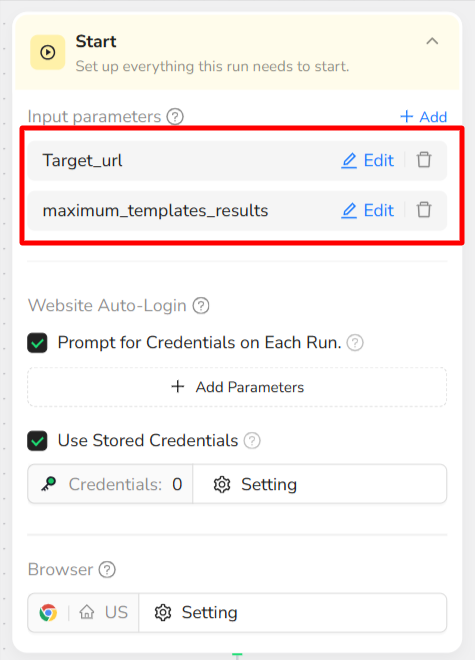
Target Website:
https://www.make.com/en/templates?search=google+sheets
Data_Limit:
Number of templates to scrape (e.g., 30).
Input Parameters:
Parameter | Description | Default Value |
target_url | Google Sheets templates page on Make.com | (see above) |
data_limit | Number of templates to collect | 30 |
💡 Tip: For fast test runs, keep data_limit = 30. You can increase it later for full extractions.
Step 2: Search & Navigation
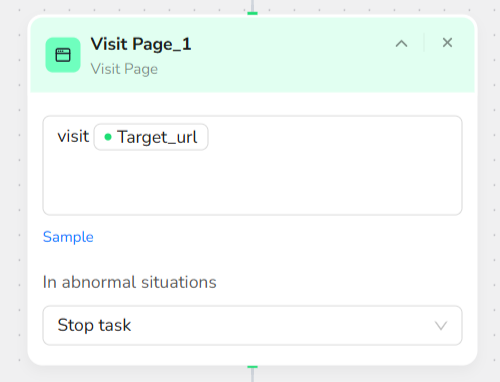
- Visit Page
- Open
/target_url(Google Sheets templates page on Make.com).
- Open
- Loop Control
- Set a loop that stops as soon as the number of collected templates reaches or exceeds
/data_limit.
- Set a loop that stops as soon as the number of collected templates reaches or exceeds
- Scroll Page
- Scroll down by about one‑third of the page each time to ensure new templates load.
- Click Element
- If a “Load More” button appears, click it to reveal additional template cards.
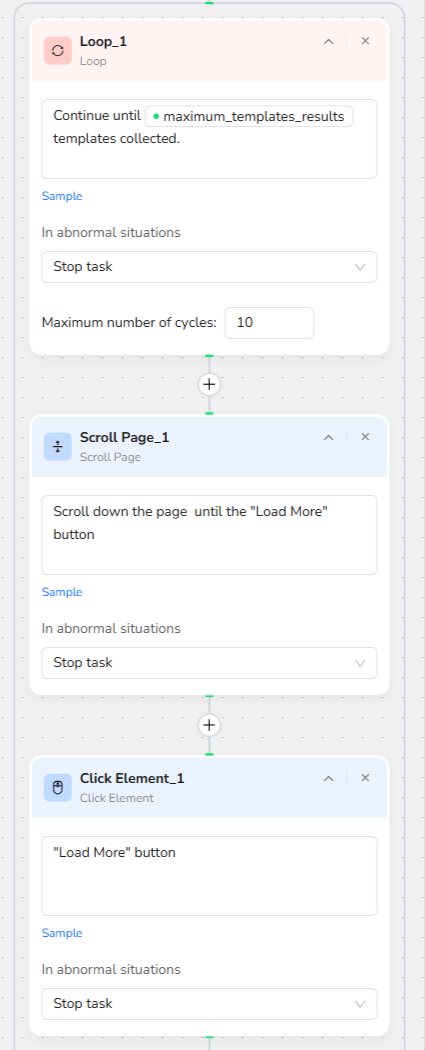
💡 This ensures the scraper keeps scrolling and loading templates until the /data_limit is reached.
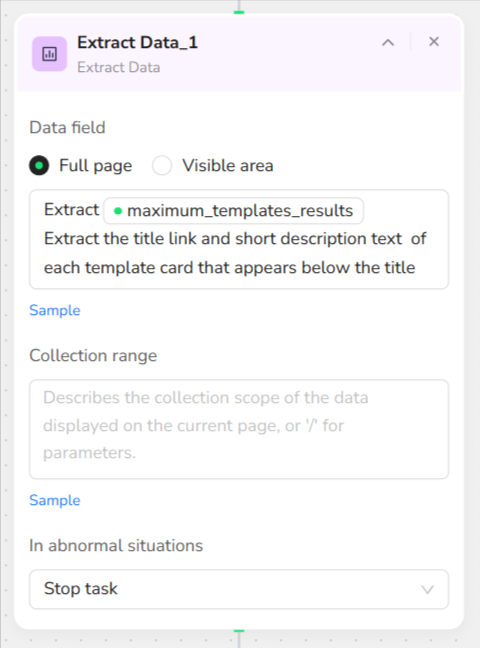
Step 3: Data Collection
Extract Data: Collect the following fields for each template card until /data_limit is reached:
- Template Title – name of the template.
- Description – short summary of what the template does.
Step 4: Data Export
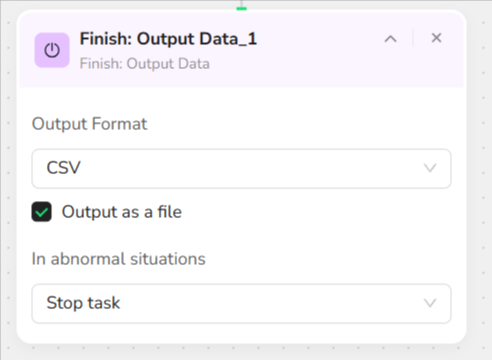
- Output Setup: Add "Finish: Output Data" action, select CSV format, and enable "Output as a file" for direct download.
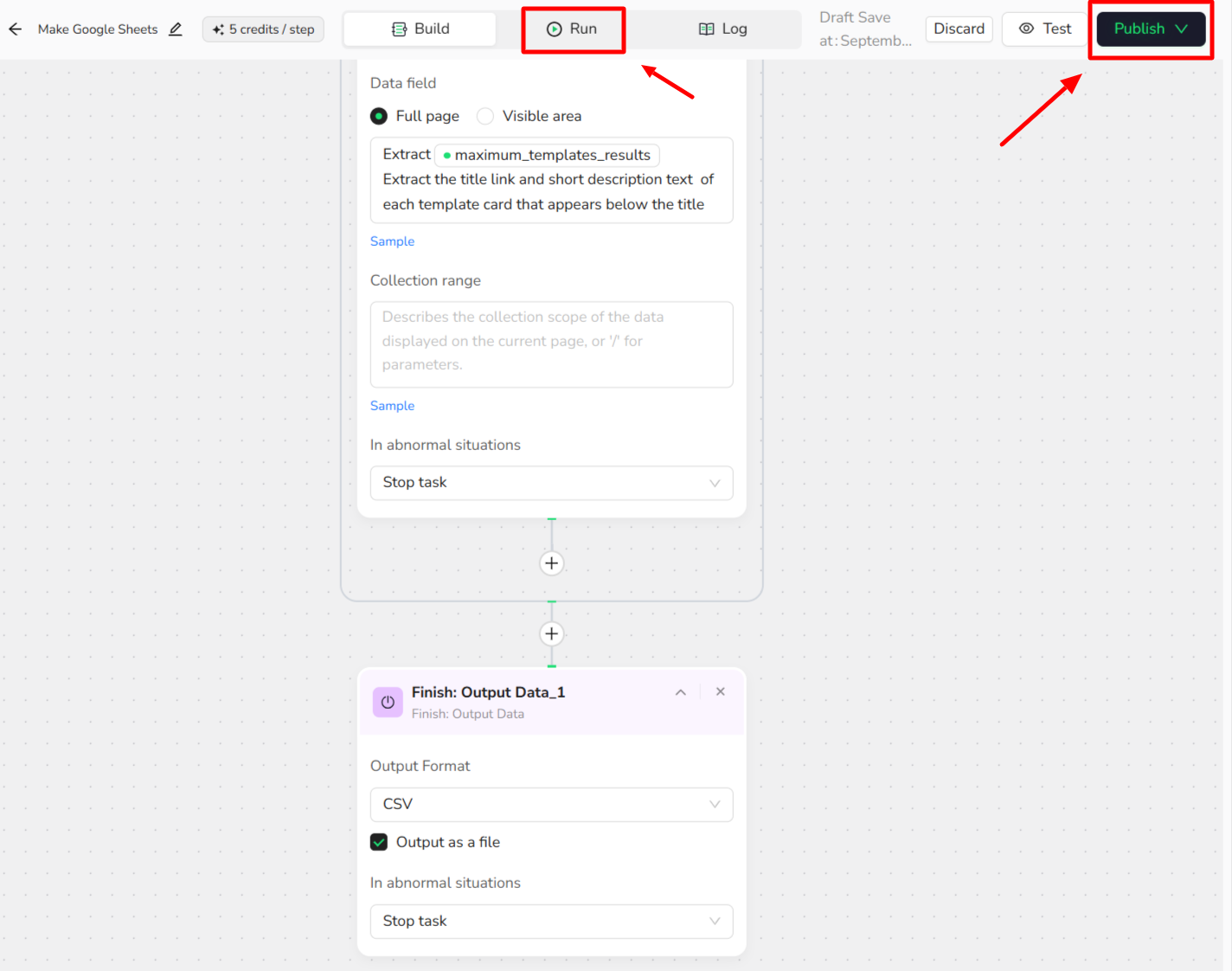
- Publish and Run: Click "Publish" to save, then go to "Run" section, adjust parameters if needed, and click "Start".
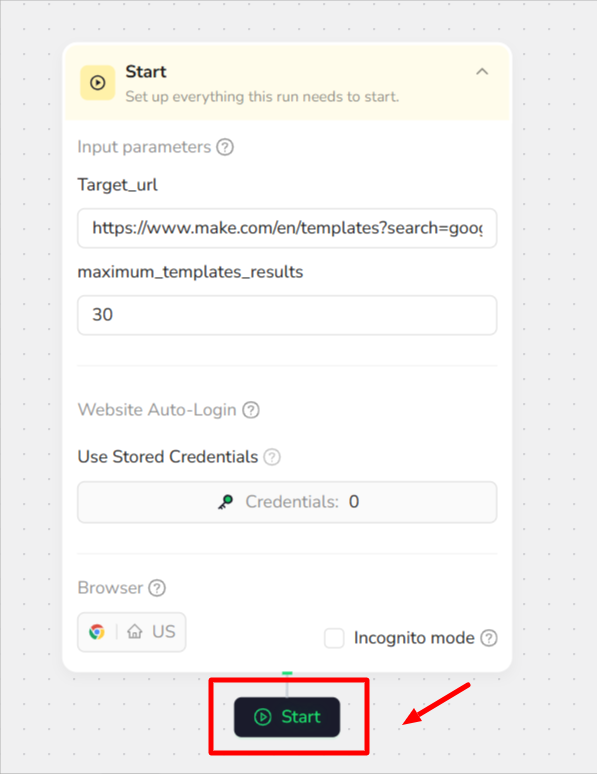
- Download Results: Once complete, download the CSV file with your scraped Google Sheets templates data.
For example:
title | link | description |
Generate ChatGPT Completions from Google Sheets Rows | Effortlessly enhance your content creation process by integrating ChatGPT with Google Sheets. This powerful template allows you to automatically generate relevant completions, ranging from SEO keywords to custom responses, boosting productivity and content quality with ease. | |
Sync Facebook Lead Ads leads with Google Sheets | https://www.make.com/en/templates/4219-save-new-facebook-lead-ads-leads-into-google-sheets | Seamlessly capture and organize new Facebook Lead Ads leads by automatically adding them to a Google Sheets spreadsheet. Streamline your lead management process and enhance productivity with this efficient automation solution. |
Send a Gmail email from a new Google Sheets row | https://www.make.com/en/templates/5770-send-a-gmail-email-from-a-new-google-sheets-row | Effortlessly send Gmail messages when a new row is added to your Google Sheets. Just ensure your spreadsheet includes these columns: |
Add new incoming emails to a Google Sheets spreadsheet as a new row | Every time you receive a new email, Make will automatically add selected data from the email to a new row in a Google Sheets spreadsheet. | |
Save Telegram messages to a Google Sheets spreadsheet | https://www.make.com/en/templates/2127-save-telegram-messages-to-a-google-sheets-spreadsheet | Every time a new message is posted to a specified Telegram chat/channel, Make will automatically add that message to your Google Sheets spreadsheet as a new row. The template uses this example spreadsheet. |
Create Canva designs with data from Google Sheets and upload to Google Drive | Easily design in Canva using data from Google Sheets, then upload your creations to Google Drive. Boost your workflow with this integrated approach. | |
Get Telegram messages for new Google Sheets rows | https://www.make.com/en/templates/2128-get-telegram-messages-for-new-google-sheets-rows | Instantly send Telegram messages with Make whenever a new row is added to your Google Sheets spreadsheet |
Create Notion database items from new Google Sheets rows | https://www.make.com/en/templates/5832-create-notion-database-items-from-new-google-sheets-rows | Automatically generate new Notion database items each time a row is added to your Google Sheets spreadsheet |
Quick Start Guide: How to Use Make Google Sheets Templates Scraper in One Click
If you don’t want to build the workflow from scratch, simply use our pre‑built “Google Sheets Templates Scraper” template for instant setup and start collecting templates effortlessly.
Step 1: Register Account
Create a free BrowserAct account using your email.
Step 2: Configure Parameters
Enter the inputs such as data_limit (e.g., “50”) — or just keep the default values to test how the scraper works quickly.
Step 3: Start Execution
Click Start to launch the workflow and begin collecting Google Sheets templates.
Step 4: Download Data
Once the run finishes, download your results file with all the scraped template data.
Common Scenarios for Using Make Google Sheets Templates Scraper
Marketing & Lead Management
- Collect templates that sync leads (e.g., Facebook Lead Ads, WhatsApp Business, Telegram) into Google Sheets to centralize customer data.
- Perfect for sales teams who need an up‑to‑date pipeline without manual copy‑paste.
Content Creation & Automation
- Scrape templates that combine Google Sheets with tools like ChatGPT, WordPress, or Canva.
- Ideal for marketers and creators who want to auto‑generate blogs, social posts, or email drafts based on structured sheet data.
Business Reporting & Analytics
- Gather templates that track campaigns, orders, or survey results (e.g., Facebook Ads data, WooCommerce orders, poll results).
- Useful for building dashboards where business metrics update automatically every day.
Get Started with Scraping TikTok Now
🚀 Start using it today!
- Create Free Account - 30-second quick registration
- Try This Workflow - Free trial
Custom TikTok Hashtag Scraper Solutions
💡 Need a customized workflow?
If the existing TikTok hashtag scraper doesn't fully meet your needs, we offer custom development services:
- 📧 Email Contact: service@browseract.com
- 💬 Discord Community: Join our Discord
 What can we do for you