
Google News Article API
Extract full article content from Google News by keyword and time range. Get titles, publishers, dates, body text, images, and URLs via API.
Published by
Ma
Maggie
September 10, 2026
Approx.Credits
250-300 Credits
Categories
BA
Data ProcessingMarket IntelligenceGoogle News
Template ID
77976226907554117

Brief
What is Google News Article API?
BrowserAct’s Google News Article API lets you extract full news article content from Google News through a single API request — no crawler scripts, no browser automation logic, and no manual export.
Unlike list-only APIs, this API searches Google News by keyword, iterates through the result list, opens each article, and extracts the complete article body.
Simply provide your search keywords and publication time range. BrowserAct automatically runs the entire workflow in the background and returns clean, structured article data directly via API.
This API is ideal for content analysis, AI training datasets, media intelligence, and long-form research workflows.
What data can you get through Google News Article API?
The API returns full article-level content for each matched news result, including:
- news_title
The full headline of the article. - publisher
The publishing source or outlet name. - publication_date
The article’s published timestamp (ISO 8601 when available). - body_content
The complete article text extracted from the article page. - current_page_url
The resolved destination URL of the article. - image_url
The primary image URL associated with the article (when available).
Why Google News Article API is right for you
Full-content extraction
Go beyond headlines and snippets. Extract complete article bodies for deep analysis.
Automated multi-step workflow
Search → open articles → extract content — fully automated behind a single API call.
Production-ready output
Clean, structured article data designed for NLP pipelines, analytics, and storage systems.
Built for research & intelligence
Perfect for trend analysis, media monitoring, competitive intelligence, and AI training datasets.
In short:
Search → API call → Full articles delivered
API Parameters
Parameter | Required | Description | Default | Supported values / Examples |
Search_Keywords | Yes | Keywords used to search Google News. Determines which articles will be opened and fully extracted. | AI | Any text, e.g. AI, startup funding, Tesla earnings |
Publish_date | Yes | Time range filter applied before full article extraction begins. | past week | any time, past hours, past 24 hours, past week, past year |
Code to Integrate
Click Get code, replace the API key, and run the code directly in your application.
API Key, get from:
# https://www.browseract.com/reception/integrations
API_KEY = os.getenv("BROWSERACT_API_KEY", "app-abcdefghijklmn")
You only need to replace:
app-abcdefghijklmn
with your own API key, and the code will run successfully.
Your API key can be found in the API & Integrations section of the BrowserAct dashboard.
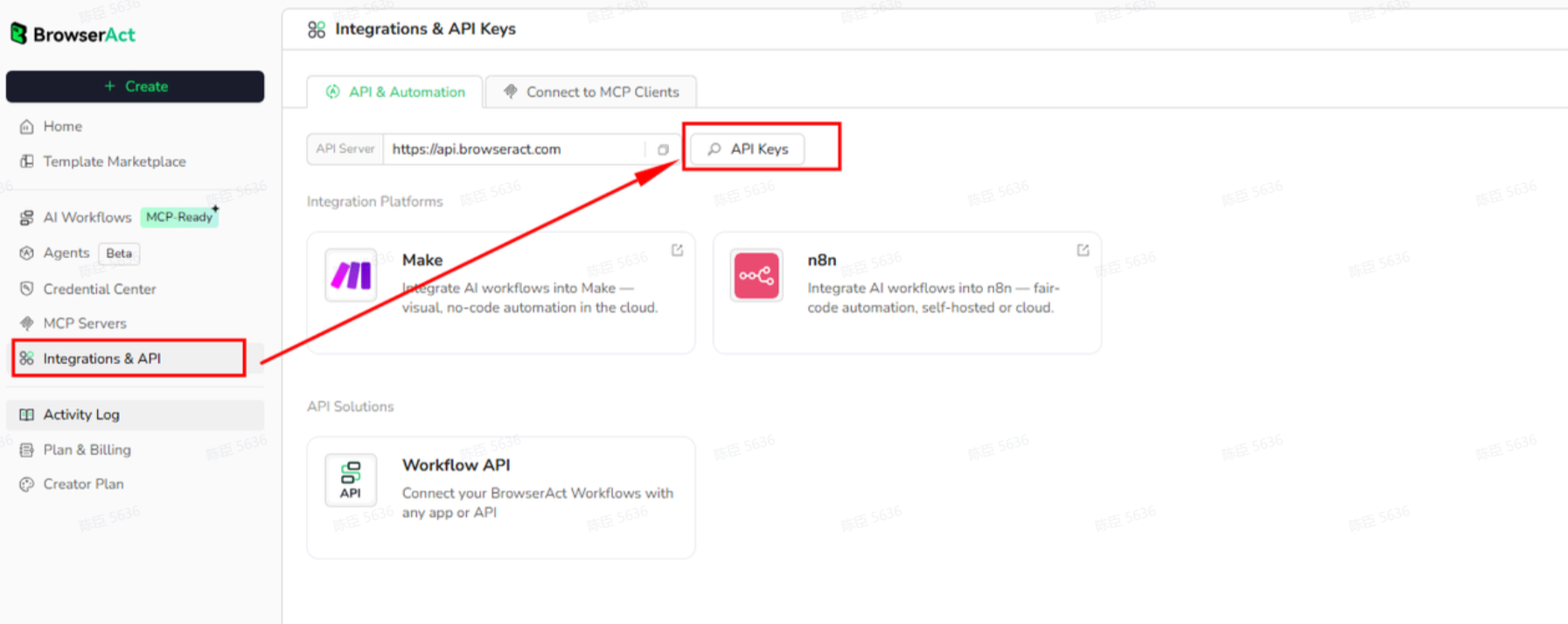
API Example
Input
- Search_Keywords: AI
- Publish_date: past week
Steps
- Click Get the Code
- Run the request
- Receive full article content via API
API Results
The API returns a structured list of full news articles.
Each item includes headline, publisher, publication date, full body text, and source URLs.
Example output (simplified):
{
  "news_title": "Changes You May See At Pizza Chains In 2026",
  "publisher": "Ashlen Wilder",
  "publication_date": "2026-01-29T06:03:00-05:00",
  "body_content": "Pizza is one of America's favorite comfort foods...",
  "current_page_url": "https://www.aol.com/articles/changes-may-see-pizza-chains-110300645.html",
  "image_url": "https://s.yimg.com/..."
}
Results are returned directly via the API and can be consumed immediately by:
- NLP and AI model pipelines
- Media intelligence platforms
- Trend analysis dashboards
- Content research systems
Create Your Own Google News Article API
To create your own Google News Article API, start from a prebuilt template.
- Click Create from Template in the top-right corner
- Complete the setup
- You’ll receive a callable workflow_id
Once created, you can use the BrowserAct API to invoke your workflow programmatically and retrieve full article content directly in your application.
Need help?
- Discord: [Discord Community]
- E-mail: service@browseract.com
 What can we do for you