
Google Maps Reviews API(For Single Place)
Extract reviews from a specific Google Maps place URL via API. Built for competitor monitoring, sentiment analysis, and reputation tracking.
Published by
Ma
Maggie
September 10, 2026
Approx.Credits
150-200 Credits
Categories
BA
Contact ExtractionCompetitor AnalysisData ProcessingGoogle Maps
Template ID
77808388011984188

Brief
What is Google Maps Reviews API (For Single Place)?
BrowserAct’s Google Maps Reviews API (For Single Place) allows you to extract reviews from a specific Google Maps place URL via a single API call, without building or maintaining your own crawler scripts.
This tool is designed for targeted review monitoring. Simply provide a maps_place_url, and BrowserAct will open that place’s reviews section and return clean, structured review data directly via API.
This is especially useful for competitor reputation monitoring, ongoing sentiment tracking, and review-based market research.
What data can you get through Google Maps Reviews API (For Single Place)?
The API extracts structured review fields from the selected place, including:
- author_name: Display name of the reviewer
- author_contributions: Total contributions shown on the reviewer profile (when available)
- author_image_url: Direct image source URL of the reviewer’s avatar
- rating: Star rating associated with the review
- comment_date: Human-readable date shown on the review
- published_time: ISO timestamp if available
- text: Review text content
- language: language: ISO 639-1 language code of the review text (when detectable)
- likes_count: Number of likes on the review (when available)
Why Google Maps Reviews API (For Single Place) is right for you
Built for competitor monitoring
Monitor reviews for a specific competitor or location directly by place URL—no broad keyword searches or extra filtering needed.
Precise, URL-driven extraction
Reviews are collected from an explicit Google Maps place URL, reducing noise and making monitoring workflows more predictable and reliable.
Zero operational overhead
No proxy configuration, crawler scripts, or anti-bot handling to manage. BrowserAct runs the entire workflow for you in the background.
Production-ready data
Consistently structured outputs designed for sentiment analysis, alerts, dashboards, and automated reporting.
In short:
Place URL → API call → Reviews delivered
API Parameters
Parameter | Description | Default | Supported values (examples) |
maps_place_url | Full Google Maps place URL used to locate the business and extract its reviews | Any valid Google Maps plac |
Code to Integrate
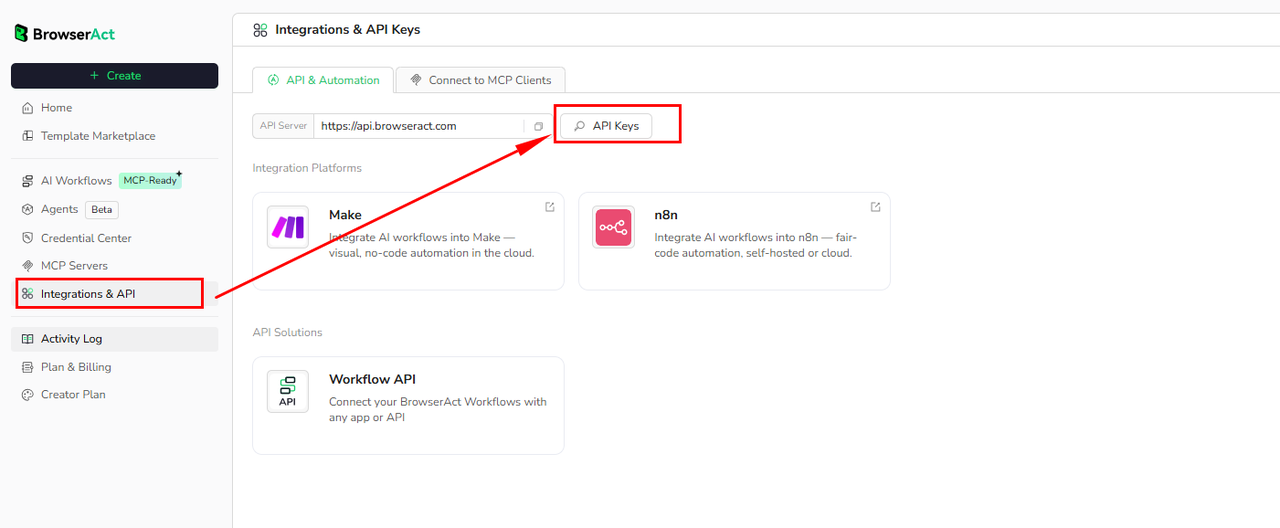
Click Get code, replace the API key, and run the code directly in your application.
API Key, get from: https://www.browseract.com/reception/integrations
API_KEY = os.getenv("BROWSERACT_API_KEY", "app-abcdefghijklmn")
You only need to replace:
app-abcdefghijklmn
with your own API key, and the code will run successfully.
You can find your API key in the API & Integrations section of the BrowserAct dashboard.
API Example
Input
- maps_place_url:
https://www.google.com/maps/place/The+Dirty+Cowgirl+Saloon/@45.5596554,-121.1752394,779216m/data=!3m1!1e3!4m12!1m2!2m1!1srestaurants!3m8!1s0x54bd852d5584e48f:0xbcf9211e60098234!8m2!3d45.5897744!4d-120.6980621!9m1!1b1!15sCgtyZXN0YXVyYW50c1oNIgtyZXN0YXVyYW50c5IBCnJlc3RhdXJhbnSaASRDaGREU1VoTk1HOW5TMFZKUTBGblNVUndjRGN0Ym14QlJSQULgAQD6AQQIABAr!16s%2Fg%2F11tn6mppz3?entry=ttu&g_ep=EgoyMDI2MDEyNi4wIKXMDSoASAFQAw%3D%3D
Steps
- Click Get the Code
- Run the request
- Receive structured reviews via API
API Results
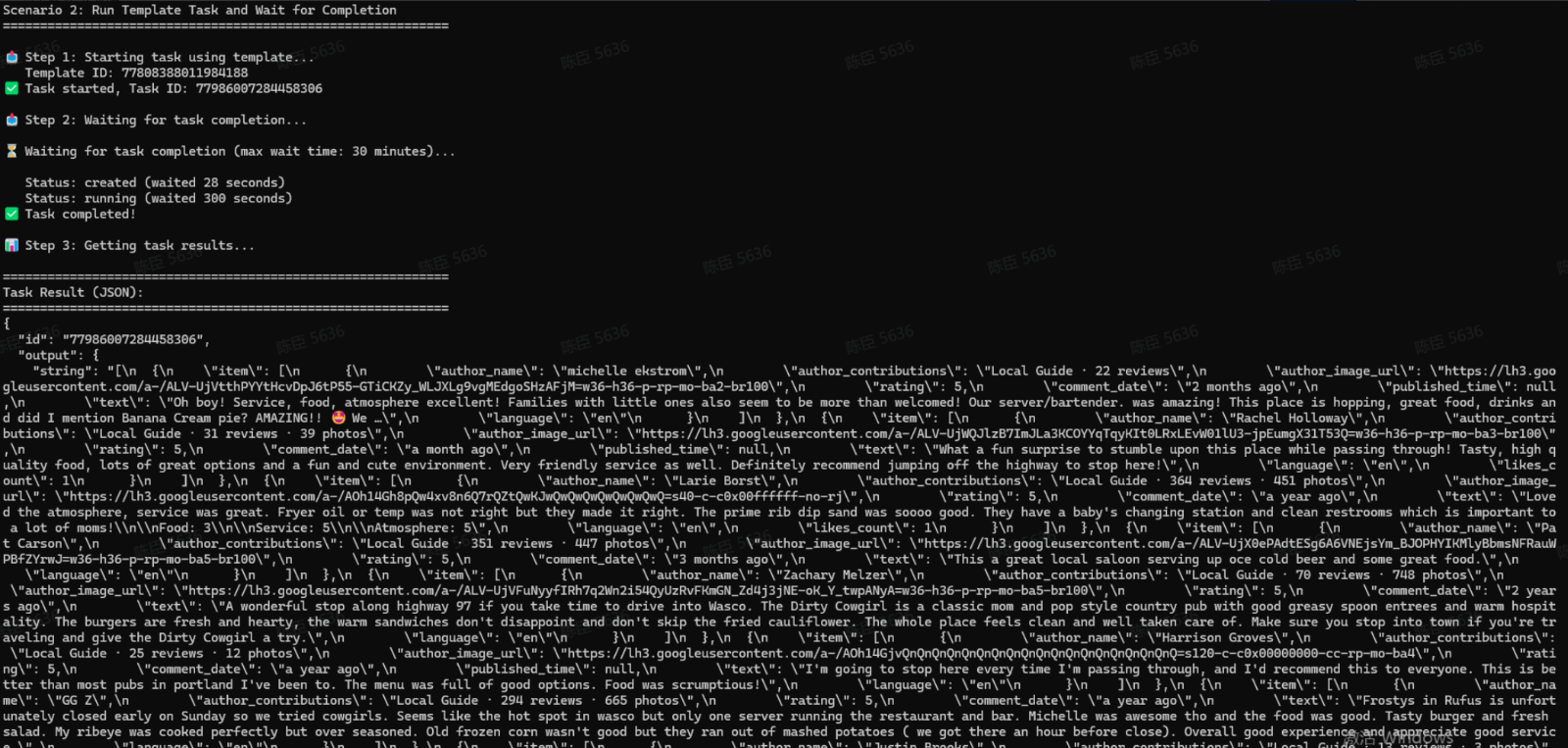
The API returns a structured list of reviews for the specified Google Maps place.
Each review item is delivered in a consistent, machine-readable format, for example:
[
  {
    "item": [
      {
        "author_name": "michelle ekstrom",
        "author_contributions": 22,
        "author_image_url": "https://lh3.googleusercontent.com/a-/ALV-UjVtthPYYtHcvDpJ6tP55-GTiCKZy_WLJXLg9vgMEdgoSHzAFjM=w36-h36-p-rp-mo-ba2-br100",
        "rating": 5,
        "comment_date": "2 ខែកន្លង",
        "text": "អូប្រុស! សេវាកម្ម អាហារ បរិយាកាសល្អ! គ្រួសារដែលមានកូនតូចក៏ហាក់ដូចជាទទួលបានច្រើនជាង! ម៉ាស៊ីនបម្រើ/អ្នកក្រឡុកស្រារបស់យើង។ ពិតជាអស្ចារ្យ! កន្លែងនេះមានអាហារឆ្ងាញ់ៗ ភេសជ្ជៈ ហើយខ្ញុំប្រាប់ថា Banana Cream pie ដែរឬទេ? …",
        "language": "km"
      }
    ]
  }
The result set is returned directly via the API and can be consumed immediately by downstream systems such as monitoring dashboards, analytics pipelines, or alerting workflows.
Create Your Own Google Maps Reviews API (For Single Place)
To create your own Google Maps Reviews API (For Single Place), simply start from a prebuilt template.
- Click Create from Template in the top-right corner
- Complete the setup
- You’ll receive a callable workflow_id
Once created, you can use the BrowserAct API to invoke your workflow programmatically and retrieve reviews directly in your application.
Need help?
- Discord: Discord Community
- Email: service@browseract.com
 What can we do for you