

Automatically extract embedded job listings from Google Search with our no-code scraper. Capture job titles, companies, locations, posting sources, schedules, dates, and job links for recruiting research and job-market analysis. Configure the request, run the Bot, and receive one predictable structured response for downstream use.
What Does the Google Jobs Scraper API Do?
This Bot reads one Google Search page and returns only the embedded jobs module. It keeps the output focused on that single result capability so it can be used independently or combined with other BrowserAct Bots.
Atomic Capability
One run reads one Google Search page and returns only the embedded jobs module.
The Bot opens a standard Google Search results page, reads the embedded jobs module, and stops after the target data is extracted or its absence is confirmed. It does not open destination pages or collect unrelated result modules.
Key Features
- Extracts one clearly defined public Google Search capability.
- Builds the fixed Google URL internally from user-facing inputs.
- Uses dropdowns for finite search settings and maps their codes automatically.
- Returns the same response envelope whether the capability appears or not.
- Preserves additional visible values from the same capability in
unclassified_fields.
Quick Start
- Open Run task.
- Review the non-empty default inputs or enter your own open-ended query.
- Choose any supported dropdown values.
- Run the Bot and review the structured result.
- Use the API Tab after the published Template ID is available.
Input Parameters
| Parameter | Configuration |
|---|---|
query |
String - Required Default: electrician jobsEnter an open-ended job search query from 1 to 300 characters. Open-ended value. |
location |
String - Required Default: Texas, United StatesEnter a city, region, or country accepted by Google search. Open-ended value. |
search_country |
Dropdown - Required Default: United StatesChoose a supported Google country context. The Bot maps the selection internally. Select from the Run Task dropdown. |
interface_language |
Dropdown - Required Default: EnglishChoose a supported Google interface language. The Bot maps the selection internally. Select from the Run Task dropdown. |
max_results |
Integer - Required Default: 10Choose the maximum number of visible job records to return, from 1 to 10. Allowed: 1-10. |
See the Inputs Tab for complete dropdown mappings, validation rules, and default request JSON.
Output Structure
| Field | Type | Description |
|---|---|---|
capability |
String | Fixed capability key: google_jobs_results. |
available |
Boolean | Whether the target capability appeared on the valid source page. |
request_metadata |
Object | Normalized inputs and source-page metadata. |
data |
Object or null | Target capability data only. |
unclassified_fields |
Object | Additional visible values from the same target capability. |
See the Output Tab for the complete schema and an example structured response.
Example Output
| Field | Result |
|---|---|
capability |
google_jobs_results |
available |
true |
request_metadata |
query: electrician jobslocation: Texas, United Statessearch_country: United Statesinterface_language: Englishdevice: Desktopmax_results: 10 |
data |
results[0].title: Journeyman Electricianresults[0].google_job_url: https://www.google.com/search?q=electrician+jobs+in+Texas%2C+United+States&hl=en&gl=us&jbr=sep:0#fpstate=tldet...results[0].company_name: Spark Powerresults[0].location: Cleburne, TXresults[0].via: Indeed |
unclassified_fields |
{} |
Repeated arrays show one real item and long media values are shortened in this documentation preview. The archived run result remains unchanged.
How Does It Work?
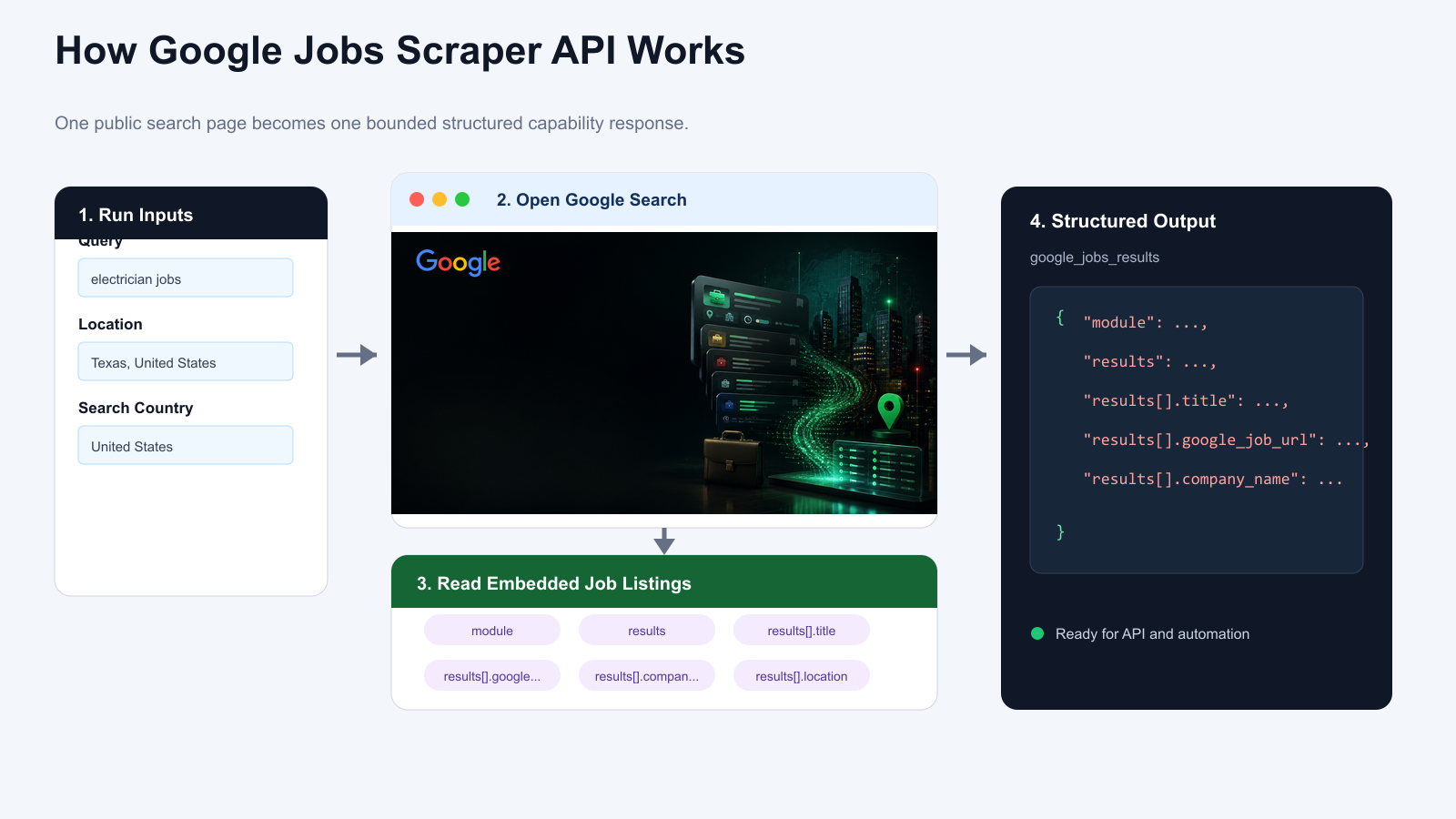
- Combines the query and location into a Google Search URL.
- Opens one standard results page on Desktop.
- Locates the embedded jobs module without entering the full Jobs surface.
- Reads the visible module summary and job cards up to max_results.
- Returns normalized job records and module metadata.
Use Cases
- Track job openings by role and location.
- Research hiring demand.
- Feed recruiting and labor-market workflows.
- Connect the structured result to an application, n8n, Make, Zapier, or an MCP-based workflow.
Create Your Own Google Jobs Scraper Bot
Step 1: Create an Editable Version
Click Create Editable Duplicate in the upper-right corner of this page. An editable version of the template will be added to your BrowserAct workspace.
Step 2: Customize the Bot When Needed
Open the duplicated Bot from your Bots list. Use Improve only when you need to change its inputs, extraction behavior, or output fields. If the existing configuration already meets your needs, use it as-is and retrieve its Bot ID from the Bots list.
Step 3: Run the Bot Through the API
Use the Bot ID with the BrowserAct API to run your workflow programmatically and retrieve complete structured results in your application.
Automation and Export
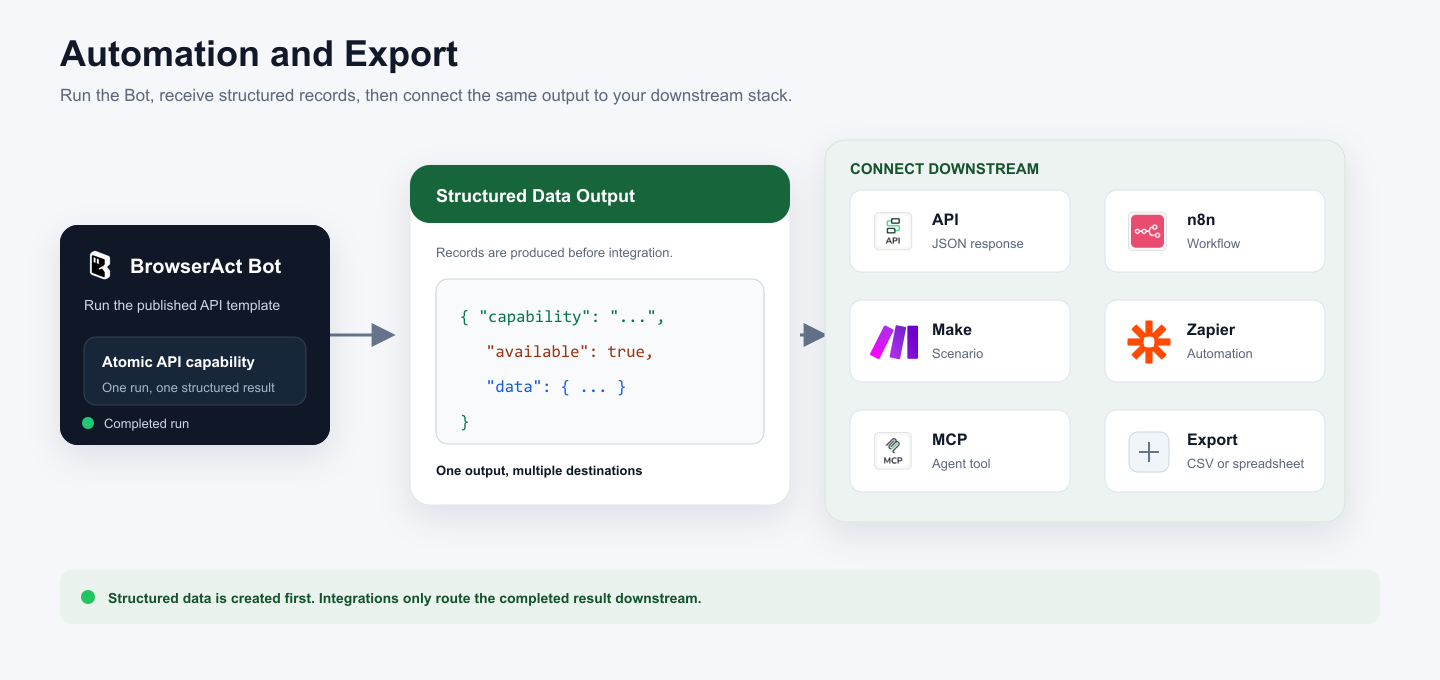
BrowserAct produces structured data first. Use the result through Run Task, the JSON API, n8n, Make, Zapier, MCP-based agents, or a supported export flow.
Need Help?
Cannot find the exact API capability you need, or need help composing several Bots?
Discord: BrowserAct Community
Email: service@browseract.com
