
Google Image API
Extract structured Google Images search results via a single API call. Fast, list-level image metadata for discovery and research.
Published by
Ma
Maggie
September 10, 2026
Approx.Credits
90-100 Credits
Categories
BA
Google Search APIData ProcessingGoogle
Template ID
82307120300629613

Brief
⭐Copy and send this to your Agent:
 Install this skill for me:
https://github.com/browser-act/skills/tree/main/google-image-api-skill
What is Google Image API?
BrowserAct’s Google Image API lets you extract structured image result data from Google Images through a single API request.
You provide KeyWords, set Country and Language, then control scrolling via Scroll_count and total volume via Datelimit. BrowserAct runs the workflow in the background, scrolls the image results list, and returns clean, list-level image metadata directly via API.
This tool is designed for creative research, content sourcing, competitor visual scanning, and building image datasets at scale.
What data can you get through Google Image API?
The API extracts structured fields directly from the Google Images results list, including:
- index: Result index in the list
- thumbnail: Thumbnail image URL (when available)
- related_content_id: Google Images related content identifier (when available)
- source: Source site name shown in results (when available)
- source_logo: Source site logo URL (when available)
- title: Image result title or caption text
- link: Click-through URL associated with the result
- is_product: Whether the result is detected as a product-style listing (when available)
Note: Data is extracted from the results list. It does not open each result detail page.
Why Google Image API is right for you
One-call integration
Send image result data directly into your database, BI tools, or automation workflows via API.
Fast list extraction
No image detail pages are opened, making this API efficient for discovery and scanning.
Localized results control
Company and Language help bias results by region and UI language for more relevant discovery.
Built for scale
Scroll_count and Datelimit let you control both depth and volume for high-throughput workflows.
In short
Search → Scroll → API call → Image list data delivered
API Parameters
Parameter | Description | Default | Supported values (examples) |
KeyWords | Search keywords used on Google Images | flower | Any keyword or phrase e.g. follower export, instagram followers, ai agent |
Country | Country or region bias for results | us | us, gb, ca, au, de, fr, es, jp, kr |
Language | UI language for the Google Images session and returned text | en | en, zh-CN, zh-TW, ja, ko, fr, de, es |
Scroll_count | Number of scroll actions to load more image results | 5 | Positive integer e.g. 1, 2, 5, 10 |
Datelimit | Maximum number of items to extract from the results list | 50 | Positive integer e.g. 20, 50, 100 |
Code to integrate
Click Get code, replace the API key, and run the code directly in your application.
javascriptCopy
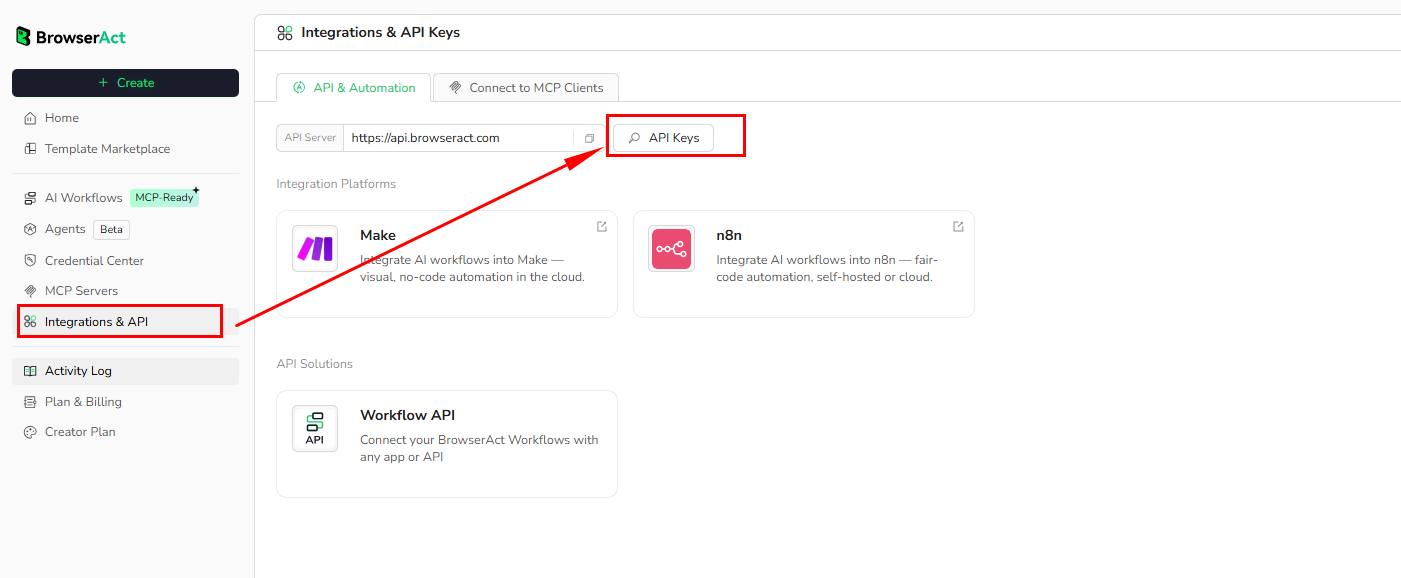
# API Key, get from: https://www.browseract.com/reception/integrations
API_KEY = os.getenv("BROWSERACT_API_KEY", "app-abcdefghijklmn")
You only need to replace:
app-abcdefghijklmn
with your own API key, and the code will run successfully.
You can find your API key in the API & Integrations section of the BrowserAct dashboard.
API Example
Input
KeyWords: flower
Country: us
Language: en
Scroll_count: 5
Datelimit: 50
Steps
- Click Get the Code
- Run the request
- Receive structured image results via API
API Results
[
{
"index": "0",
"thumbnail": "",
"related_content_id": "h1qt9pp5eJzJSM",
"source": "eternitymarketing.com",
"source_logo": "",
"title": "Choose SEO Keywords with Confidence ...",
"link": "https://eternitymarketing.com/blog/how-to-choose-seo-keywords-with-confidence",
"is_product": "false"
}
]
Create Your Own Google Image API
To create your own Google Image API, start from a prebuilt template.
- Click Create from Template in the top-right corner
- Complete the setup
- You’ll receive a callable workflow_id
Once created, you can use the BrowserAct API to invoke your workflow programmatically and retrieve Google Images list data directly in your application.
Need help? Contact us at
Discord: [Discord Community]
E mail: service@browseract.com
 What can we do for you