
Findyello Scraper
Findyello Scraper is a powerful no-code tool that automates extracting business listings, store titles, descriptions, and addresses from Findyello, making local directory analysis quick and effortless
Published by
Br
BrowserAct
March 06, 2026
Approx.Credits
85-150 Credits
Categories
BA
Content CollectionYellow Pages
Template ID
52383992944606813

Brief
BrowserAct Findyello Scraper is a powerful, no-code tool that automates scraping Findyello for business listings, store titles, descriptions, addresses, and more to easily analyze local directories, allowing you to scrape Findyello effortlessly without manual effort. It solves the exhaustion of manually compiling data from countless pages, enabling marketers, researchers, lead generators, and analysts to uncover business insights, build contact databases, and gain a competitive edge through automated Findyello data extraction.
(Note: Findyello is a comprehensive online yellow pages directory focused on Caribbean businesses, providing listings with details like addresses and phone numbers—making it invaluable for local market research, B2B outreach, and regional analysis.
Please be aware that Findyello's website may experience instability, such as 502 errors, which are inherent to the site itself and not caused by the scraper; we recommend retrying runs during off-peak hours or using proxies if issues occur, and BrowserAct is not responsible for site-related downtime.)
Purpose of Findyello Scraper
Key Benefits of Using Findyello Scraper
This Findyello data scraper helps you automate data collection to make smarter decisions. Here's what it delivers:
- Streamline Tracking: Streamline tracking of business listings, addresses, and contacts without manual work, saving hours of effort.
- Uncover Insights: Uncover local market trends and opportunities by extracting structured data like store descriptions and phone numbers.
- Gain Competitive Edge: Gain a competitive edge through AI-driven insights, including field suggestions for categories or regions not available in other tools.
- Enable Analysis: Enable precise lead generation and market mapping with customizable data extraction.
- Boost Efficiency: Boost research and outreach by turning raw Findyello data into actionable reports and strategies.
Who Should Use This Findyello Scraper?
- Marketers: Perfect for building B2B contact lists, tracking local businesses, and supporting campaigns.
- Researchers: Ideal for analyzing regional directories, business trends, and market data.
- Lead Generators: Great for extracting verified addresses and phone numbers for outreach.
- Analysts: Useful for bulk data extraction to support competitive intelligence and insights.
- Skill Requirements: No coding needed – just basic knowledge of web browsing to set up and run.
- Usage Scenarios: Use it for daily business checks, contact databases, market reports, or generating insights for business growth.
Findyello Scraper Inputs, Outputs, and Capabilities
Input Parameters for Effective Findyello Scraping
Detailed explanation of required input parameters, presented in a table for clarity:
Parameter | Required | Description | Example Value |
Country | Yes | The country to filter listings by (e.g., "Bahamas" for Caribbean focus). | "Barbados" |
Keyword | Yes | The search term for businesses or categories. | "Duty Free Shops" |
Data_Limit | Yes | The maximum number of listings to scrape in one run. | "20" |
These parameters allow for reusable setups and quick adjustments, making your Findyello scraper workflow adaptable to different tasks.
Output Data from Scraping Findyello
Explanation of the workflow's output data format and content:
Data fields include:
- Store Title: Captures the business name as displayed for easy identification.
- Store Description: Records the description shown below the title for business details.
- Address: Provides the full address for location mapping.
- Phone: Extracts the phone number for direct contact.
If you want more output data (e.g., additional fields like emails or websites), you can customize the workflow to include them.
Output supported formats: JSON, CSV, Excel, XML, ideal for easy download and integration after you scrape Findyello.
Scope and Limitations of the Findyello Scraper
- Supported Websites/Platforms: Specifically designed for Findyello directory, supporting search results, category pages, and business listings to scrape Findyello.
- Data Types: Structured business data, including titles, descriptions, addresses, and phone numbers via a Findyello data scraper.
- Data Scale: Suitable for small-scale (hundreds of listings) to large-scale (thousands) Findyello scraping, depending on credit usage.
How to Build Your Findyello Scraper Workflow: Step-by-Step
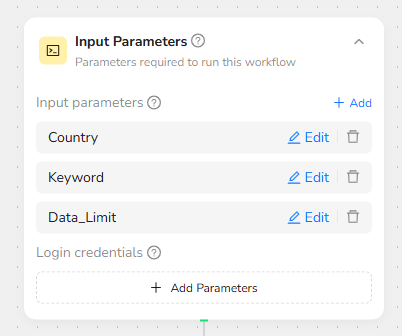
Step 1: Parameter Setup
- Country: The country to select (default: "Jamaica").
- Keyword: Search term (default: "Duty Free Shops").
- Data_Limit: Maximum listings to scrape (default: "20").
Step 2: Add Visit Page Node
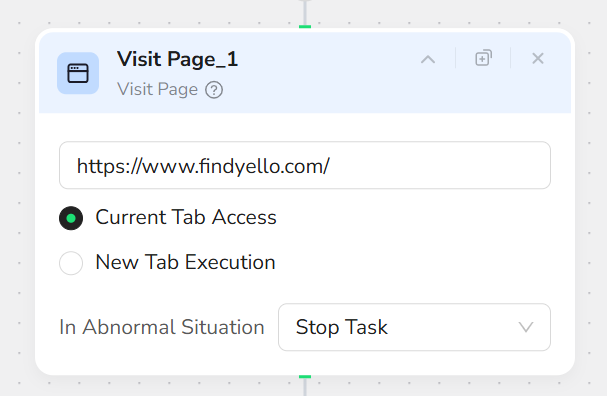
Add a "Visit Page" node and input the URL “https://www.findyello.com/”. This will navigate to the Findyello homepage.
Step 3: Add Condition Node
Add a "Condition" node and input the prompt: “Does a country-selection pop-up appear?”.
- If True: Add a "Click Element" node and input the prompt: “Click the option labeled /Country only.” This selects the target country.
- If False: Add a "Click Element" node and input the prompt: “Click the country selector next to the search icon (default is “Jamaica”).” This manually opens the country selection pop-up. Then, add another "Click Element" node and input the prompt: “Click the option labeled /Country only.”

Step 4: Add Input Text Node
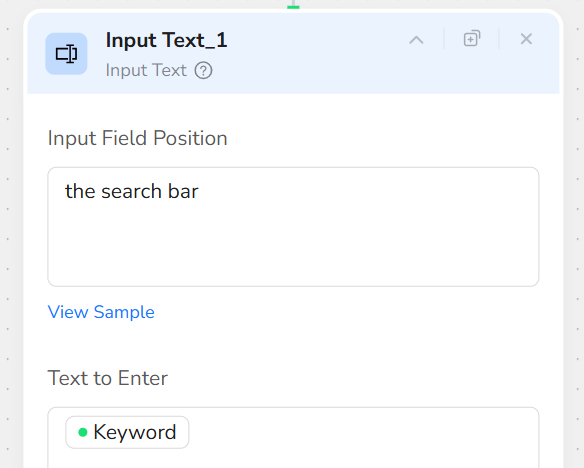
Add an "Input Text" node. In the Input Field Position, input “the search bar”. In the Text to Enter, input “/Keyword”.
Step 5: Add Click Element Node
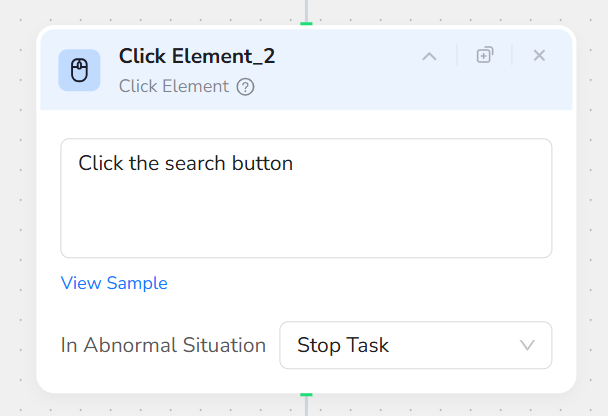
Add a "Click Element" node and input the prompt: “Click the search button”. This initiates the search with the provided keyword.
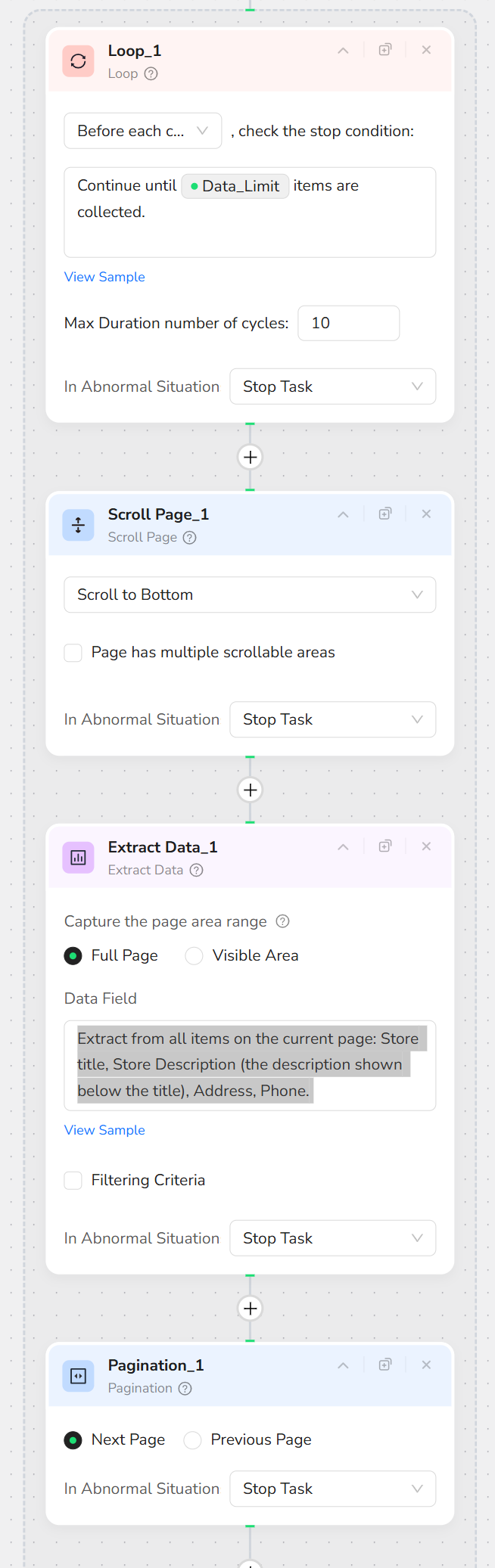
Step 6: Add Loop Node
Add a "Loop" node and input the prompt: “Continue until /Data_Limit items are collected.” This sets up a loop to collect data across pages until the limit is reached.
Step 7: Add Scroll Page Node (Inside Loop)
Inside the Loop node, add a "Scroll Page" node and select "Scroll to Bottom". This ensures all listings on the current page are loaded.
Step 8: Add Extract Data Node (Inside Loop)
Inside the Loop node, add an "Extract Data" node and input the prompt: “Extract from all items on the current page: Store title, Store Description (the description shown below the title), Address, Phone.
Format:
- Store title: the main store or listing headline; use 'N/A' if missing
- Store Description: the description shown below the title; use 'N/A' if missing
- Address: the full address shown; use 'N/A' if missing
- Phone: the phone number shown; use 'N/A' if missing"
Step 9: Add Pagination Node (Inside Loop)
Inside the Loop node, add a "Pagination" node and select "Next Page". This navigates to the next page of results if more data is needed to reach the Data_Limit.
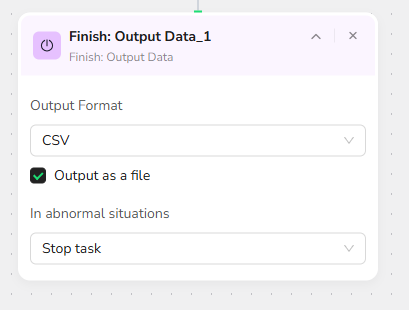
Step 10: Add Finish: Output Data Node
Add a "Finish: Output Data" node. Select "CSV" as the output format and check "Output as a file" for easy downloading. You can also choose to export in JSON, XML, or Markdown (MD) formats.
Quick Start Guide: How to Use Findyello Scraper in One Click
If you don't want to build the workflow from scratch, simply use our pre-built "Findyello Scraper" template for instant setup and start scraping Findyello effortlessly.
Step 1: Register Account
Create a free BrowserAct account using your email.
Step 2: Configure Parameters
Fill in necessary inputs like Country (e.g., "Barbados"), Keyword (e.g., "Duty Free Shops"), and Data_Limit (e.g., "20") – or use defaults to learn how to scrape Findyello quickly.
Step 3: Start Execution
Click "Start" to run the workflow.
Step 4: Download Data
Once complete, download the results file from scraping Findyello.
Common Scenarios for Using Findyello Scraper
Business Use Cases for Scraping Findyello Data
- Lead Generation: Use the Findyello scraper to build B2B contact databases with addresses and phone numbers.
- Market Analysis: Scrape Findyello for regional business trends and mappings.
- Competitor Research: Extract listings to analyze local markets and opportunities.
- Outreach Campaigns: Gather verified details for targeted marketing and sales.
Technical Integrations for Advanced Findyello Scraping
- API Calls: Integrate via API into third-party automation platforms like Make or n8n for seamless Findyello scraping.
- Scheduled Tasks: Set up regular runs to automate reports on how to scrape Findyello.
- Data Pipelines: Connect with analysis tools (e.g., Google Sheets or BI software) for ongoing data flow.
Get Started with Scraping Findyello Now
🚀 Start using it today!
- Create Free Account - 30-second quick registration
- Try This Workflow - Free trial
Custom Findyello Scraper Solutions
💡 Need a customized workflow?
If the existing Findyello scraper doesn't fully meet your needs, we offer custom development services:
- 📧 Email Contact: service@browseract.com
- 💬 Discord Community: Join our Discord
 What can we do for you