Financial Data Automation (Crypto)
A powerful no-code data extraction tool.Perfect for capturing targeted crypto market data from Yahoo Finance’s extensive digital asset listings, including paginated crypto data.
Published by
Yi
Yiruo
December 22, 2025
Approx.Credits
15-30 Credits
Categories
BA
Content CollectionYahoo Fiance
Template ID
54754804485854837

Brief
With the crypto section of Yahoo Finance (a globally renowned financial data platform), booming—are you wasting countless hours manually collecting crypto market information such as cryptocurrency names, real-time prices, 24h price changes (up/down percentages), market capitalization, 24h trading volume, circulating supply, and historical price trends? Faced with Yahoo Finance’s massive crypto listing (spanning hundreds of digital assets via its paginated results), efficiently acquiring structured crypto data to accurately understand market volatility, optimize investment strategies (for crypto investors) or enhance blockchain industry research efficiency (for analysts) has become a common challenge for many crypto investors, financial analysts, blockchain researchers, and fintech professionals. Say goodbye to tedious manual copy-and-paste and page-by-page recording of price fluctuations or market caps. BrowserAct will revolutionize the way you access Yahoo Finance’s crypto market data.
What is BrowserAct Financial Data Automation Scraper ?
BrowserAct is a powerful automated data extraction tool that allows you to easily scrape required data from any web page without programming knowledge. It can efficiently capture targeted crypto market data from Yahoo Finance’s massive list of digital assets (spanning paginated crypto listings). What can it do for you?
- Yahoo Finance Crypto Data Scraping: Our Yahoo Finance crawler can intelligently identify and extract core crypto market data from the platform, including cryptocurrency name & ticker (e.g., Bitcoin/BTC, Ethereum/ETH), real-time price (with currency denomination like USD), 24h price change (percentage & absolute value), market capitalization, 24h trading volume, circulating supply, and 7-day price high/low range.
- AI-Powered Field Suggestions: Using AI to intelligently identify the structure of Yahoo Finance’s crypto pages (e.g., paginated listing tables), it quickly suggests and extracts key fields such as "crypto name & ticker, real-time price, 24h change, market cap, 24h volume". No manual positioning is needed, and structured data is generated directly to support efficient analysis.
- Ideal Users: Suitable for crypto investors, blockchain analysts, fintech professionals, and financial data researchers. It helps you obtain structured Yahoo Finance crypto data to drive decisions (such as optimizing investment portfolios, analyzing market volatility trends) or meet research needs (like tracking crypto asset performance, comparing market cap rankings).
How to Build a Financial Data Automation (Crypto) Workflow: Step by Step
Financial Data Automation (Crypto) workflow building with BrowserAct requires no coding skills—it's automation-ready and easy to set up. Follow these step-by-step instructions to get started.
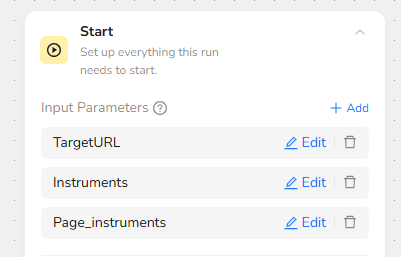
Step 1: Set Input Parameters
Define customizable inputs for flexibility:
- TargetURL: “https://finance.yahoo.com/markets/crypto/all/?start=0&count=”
- Instruments: “BTC-USD, ETH-USD, TRX-USD, DOGE-USD, BNB-USD, ADA-USD, LTC-USD, XRP-USD”
- Page_instruments: “50”, this is for the first 100 highest market caps instruments.
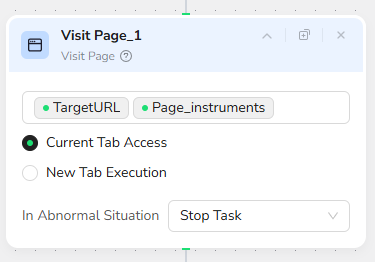
Step 2: Add Visit Page Node
Add a "Visit Page" node and input the URL “/TargetURL /Page_instruments”. This will navigate to the Yahoo Finance crypto markets page with the specified count.
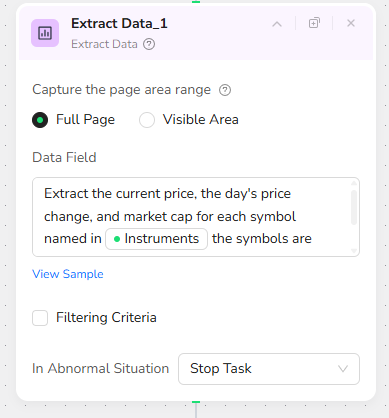
Step 3: Add Extract Data Node
Add an "Extract Data" node and input the prompt: “Extract the current price, the day's price change, and market cap for each symbol named in /Instruments the symbols are separated by "," - if there is no data for symbol don't add it to output”.
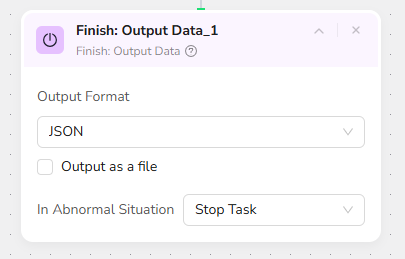
Step 4: Add Finish: Output Data Node
Add a "Finish: Output Data" node. Select "JSON" as the output format and check "Output as a file" for easy downloading. You can also choose to export in CSV, XML, or Markdown (MD) formats.