

Automatically find public people-search records on FastPeopleSearch with our no-code finder. Capture names, ages, current and past addresses, phone numbers, and source URLs for contact research and record review.
What Does BrowserAct Fast People Search Phone & Address Finder Do?
This BrowserAct template searches FastPeopleSearch by a person's name and an optional location. It keeps same-name candidates separate, opens each public profile needed for the requested result count, and returns clean phone and address records with source links.
Key Features
- Searches by a person's name with an optional city, state, or ZIP discriminator.
- Keeps different people with the same name as separate records.
- Extracts visible current and past addresses without UI labels or control text.
- Extracts visible phone numbers and preserves the public profile URL.
- Returns structured records ready for review, export, or downstream automation.
What Data Can I Extract from FastPeopleSearch?
| Field | Description |
|---|---|
full_name |
Person name displayed on the selected public profile. |
age |
Displayed age when available. |
current_location |
Current city and state shown for the candidate. |
current_address |
Current street address shown on the profile. |
past_addresses |
List of previously associated addresses shown on the profile. |
phone_numbers |
List of public phone numbers shown on the profile. |
people_search_profile_url |
Direct URL of the matched FastPeopleSearch profile. |
source_urls |
Public source pages used for the returned record. |
How to Use Fast People Search Phone & Address Finder
- Open the template's
Run Tasktab. - Enter the person's name and, when useful, a location discriminator.
- Choose how many separate candidate records to return.
- Run the Bot and review the structured phone and address results.
Input Parameters
| Parameter | Type and requirement | Default | Description |
|---|---|---|---|
person_name |
String, required | Mike Smith |
Full person name to search; 2-100 characters after trimming. |
location |
String, optional | Austin, TX |
City and state, ZIP code, or another location clue used to narrow the search. |
result_count |
Dropdown, required | 3 |
Maximum number of separate candidates to return: 1, 3, 5, or 10. |
Example Output
The table below shows one actual structured record from the default-input Live run. Long list values are shortened for readability.
| Field | Result |
|---|---|
full_name |
Michael E Smith |
age |
57 |
current_location |
Fort Myers, FL |
current_address |
16081 Via Solera Cir, Unit 105, Fort Myers, FL 33908 |
past_addresses |
2222 Walnut Manor Dr, Mansfield, TX 76063; 1080 3rd Ave S, Unit D7, Naples, FL 34102; 17167 3 Oaks PKWY, Unit 1231, Fort Myers, FL 33967; additional addresses omitted from this preview |
phone_numbers |
(614) 400-0980; (614) 348-9087; (512) 282-2251; additional numbers omitted from this preview |
people_search_profile_url |
https://www.fastpeoplesearch.com/michael-smith_id_G-5471645581254482792 |
source_urls |
https://www.fastpeoplesearch.com/michael-smith_id_G-5471645581254482792 |
How Does it Work?
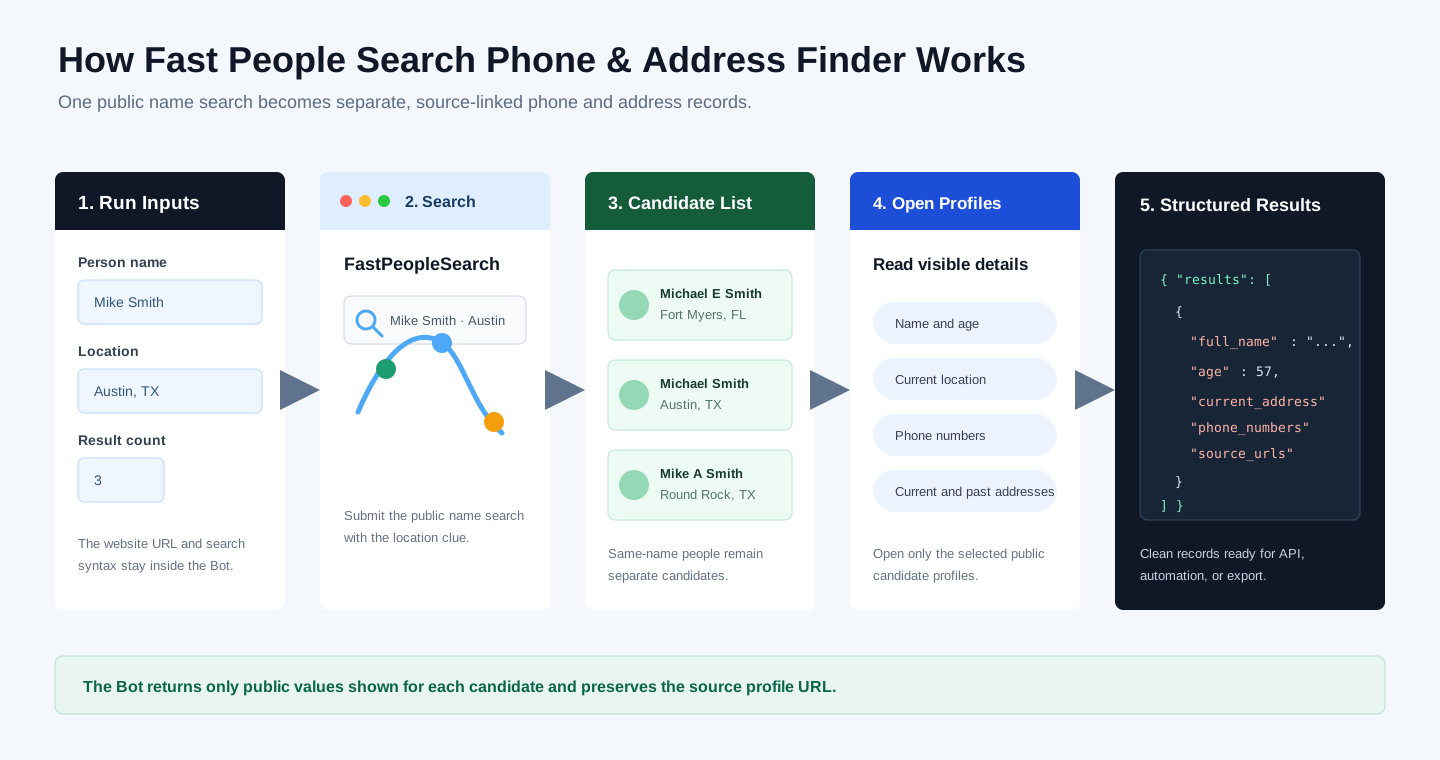
- Read the person name, optional location, and selected result count.
- Submit the name search on FastPeopleSearch and apply the location clue when provided.
- Keep matching candidates separate and open each selected public profile.
- Read the visible identity, location, phone, and address fields.
- Remove interface labels, deduplicate values, and return structured records with source URLs.
Create Your Own Fast People Search Phone & Address Finder
- Click
Create Editable Duplicatein the upper-right corner of this template page. - Keep the duplicate as-is, or use Improve to adjust the inputs, fields, or matching behavior for your use case. When no changes are needed, find the Bot ID in your Bots list.
- Use the BrowserAct API to run your Bot programmatically and retrieve its structured results in your application.
Why Use Fast People Search Phone & Address Finder?
- Replace repetitive public people-search lookups with one reusable Bot.
- Narrow common names with a location clue while preserving separate candidates.
- Review phone numbers and address history in a consistent structure.
- Preserve source URLs for follow-up checks and downstream workflows.
Who Can Use This Template?
- Researchers reviewing public contact records.
- Sales and operations teams resolving contact details.
- Agencies and data teams standardizing manual lookup workflows.
- Automation builders connecting structured people-search results to other tools.
How Many Results Can You Find?
Choose 1, 3, 5, or 10 candidate records per run. Start with a smaller value for a well-scoped person and increase it when the name is common or the location clue is broad.
Automation and Export
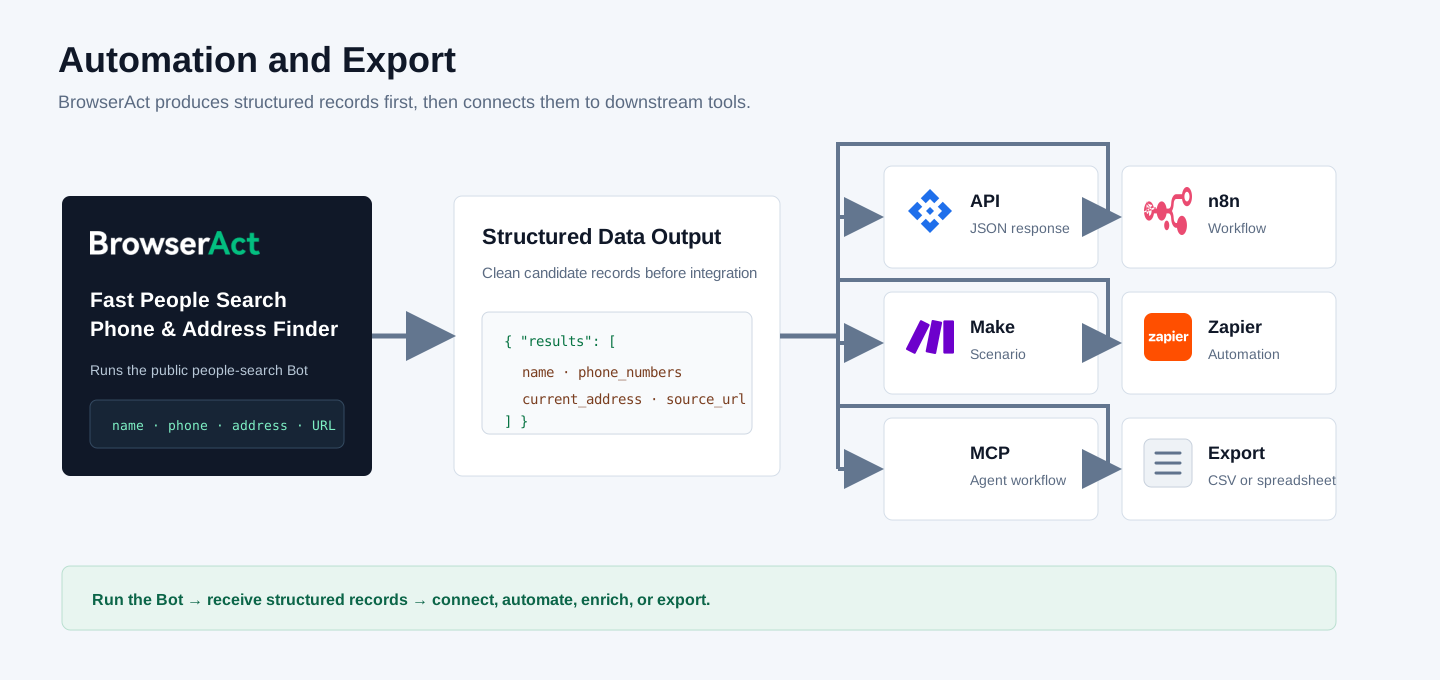
BrowserAct returns structured data first. You can then send the completed result to your application through the API, route it through n8n, Make, or Zapier, expose it to supported MCP-based agent workflows, or export it for spreadsheet review.
Need Help?
Join the BrowserAct Discord Community or email service@browseract.com.
