
Exhibitors List Scraper
Published by
je
jett
January 21, 2026
Approx.Credits
90-120 Credits
Categories
BA
Contact ExtractionMarket IntelligenceContent Collection
Template ID
75273057993830948

Brief
Exhibitors List Scraper is a BrowserAct automation workflow designed to collect structured exhibitor data from online exhibition and trade show directories.
It automatically loads exhibitor lists, opens individual exhibitor detail pages, and extracts company profiles, contact information, social media links, product categories, and feature tags at scale.
This workflow is ideal for sales teams, marketers, and researchers who need fast, reliable access to exhibitor data for lead generation, market analysis, and automation workflows—without manual browsing or coding.
What Does Exhibitors List Scraper Do?
Exhibitors List Scraper automatically extracts detailed exhibitor information from online exhibition or trade show exhibitor directories.
Starting from an exhibitors list page, the workflow loads all available exhibitors, opens each exhibitor’s detail page, and captures structured company data at scale.
It can extract company profiles including descriptions, booth numbers, contact details, websites, social media links, product categories, and special feature tags—exported in a clean, analysis-ready format with no coding required.
This scraper is designed for seamless integration with automation platforms like Make.com and n8n, making it ideal for exhibitor research, lead generation, and data enrichment workflows.
Key Features of Exhibitors List Scraper
- Customizable Parameters: Control the total number of exhibitors to extract using the
data-limitinput (e.g. 50, 100, or more). - Auto Load More Handling: Automatically clicks the “Load More” button to ensure complete exhibitor list coverage.
- Detail Page Navigation: Opens each exhibitor’s profile page to capture full company-level information.
- Rich Data Extraction: Collects company descriptions, booth numbers, contact info, websites, and social media links.
- Tag & Category Capture: Extracts product category tags and exhibitor feature labels (e.g. “NEW EXHIBITOR”).
- No-Code & Browser-Based: Runs directly in the browser with simple setup—no scripts or installations required.
- Automation Ready: Easily connects with Make.com or n8n for scheduled runs and downstream processing.
- Flexible Data Export: Outputs structured data in CSV format for spreadsheets, CRMs, or analytics tools.
What Data Can You Scrape from Exhibitor Pages?
With Exhibitors List Scraper, you can collect a wide range of publicly available exhibitor data, including:
Exhibitor Company Data
- Company name
- Full company description
- Booth / stand number
- Official website URL
Contact Information
- Contact email address
- Phone number
Online Presence
- Facebook URL
- YouTube URL
- Instagram URL
Additional Metadata
- Product categories
- Feature or status tags (e.g. “NEW EXHIBITOR”, “Inventors Spotlight”)
How to Use Exhibitors List Scraper in One Click
If you want to quickly start scraping exhibitor data, simply use the pre-built Exhibitors List Scraper template:
- Register Account: Create a free BrowserAct account using your email.
- Configure Input Parameters:
- Set
target_urlto the exhibitor list page (e.g. an exhibition’s official exhibitor directory). - Set
data-limitto control how many exhibitors to extract.
- Set
- Start Execution: Click Start to run the workflow.
- Download Data: Once completed, download the exported CSV file with all extracted exhibitor data.
Why Scrape Exhibitor Lists?
Scraping exhibitor directories allows you to systematically collect structured company data from trade shows and exhibitions. This is valuable for:
- Lead Generation: Build high-quality B2B lead lists from verified exhibitor profiles.
- Market Research: Analyze exhibitor landscapes, product categories, and industry trends.
- Sales & Outreach Preparation: Enrich CRM systems with contact details and company descriptions.
- Competitive Analysis: Track competitors, new entrants, and featured exhibitors across events.
- Event Intelligence: Understand exhibitor composition and positioning before or after trade shows.
Automating exhibitor data collection saves hours of manual research and ensures consistent, reusable datasets.
How to Build an Exhibitors List Scraper Workflow: Step by Step
Building an Exhibitors List Scraper with BrowserAct requires no coding and follows a clear, automation-ready structure:
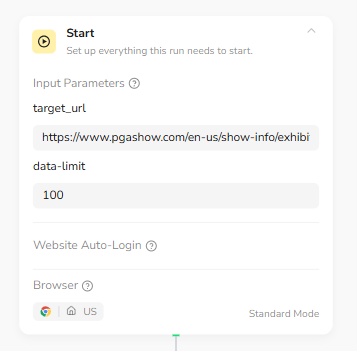
Step 1: Define Input Parameters (Start Node)
Configure the workflow inputs to control the scraping scope.
Set the exhibitor list page URL and define how many exhibitors should be extracted during this run.
- target_url: The exhibitor directory page URL
- data-limit: Maximum number of exhibitors to extract
Step 2: Open Exhibitor List Page
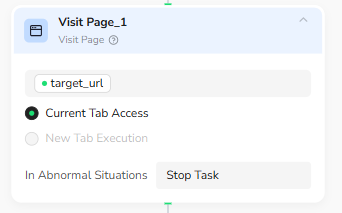
The workflow opens the exhibitor directory page using the provided target URL and prepares the browser environment for data extraction.
Step 3: Load and Loop Through Exhibitor List
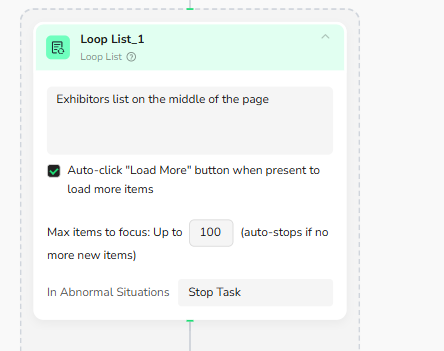
The workflow detects the exhibitor list located in the middle of the page and automatically clicks the “Load More” button when available.
It then loops through exhibitor items, up to the defined data-limit, and stops automatically when no new items are found.
Step 4: Open Exhibitor Detail Page
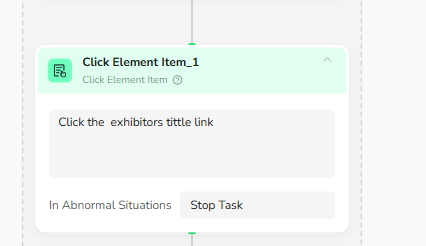
For each exhibitor item in the list, the workflow clicks the exhibitor title link to open the detailed exhibitor profile page.
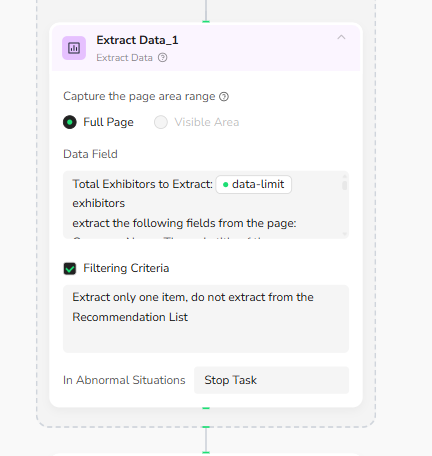
Step 5: Extract Exhibitor Data from Detail Page
Once on the exhibitor detail page, the workflow extracts structured company information, including company profile, contact details, social media links, product categories, and feature tags.
Filtering rules ensure only one complete exhibitor record is captured per page and recommendation sections are excluded.
Step 6: Export Results as CSV File
After all exhibitors are processed, the workflow outputs the collected data as a downloadable CSV file, ready for analysis or automation workflows.
Who Can Use Exhibitors List Scraper?
Exhibitors List Scraper is ideal for a wide range of users, including:
- Sales Teams & B2B Marketers: Generate qualified leads from trade show exhibitor lists.
- Market Researchers & Analysts: Study industry participation and exhibitor trends.
- Event Organizers & Agencies: Analyze exhibitor profiles and event composition.
- Business Development Teams: Identify partnership and sourcing opportunities.
- Startups & Small Businesses: Conduct affordable competitive and supplier research.
- Data Teams & Automation Builders: Integrate exhibitor data into Make.com or n8n workflows.
No matter your background, if you need structured exhibitor data quickly and reliably, this scraper provides a scalable, no-code solution.