
Billboard Hot 100 List Scraper
Quickly crawl Billboard hot song data, including ranking, artist, and streaming data.
Published by
Yi
Yiruo
October 29, 2026
Approx.Credits
300-400 Credits
Categories
BA
Content CollectionBillboard
Template ID
51304687021959514

Brief
Are you spending hours manually collecting Billboard Hot 100 chart data—song rankings, artists, titles, weeks on chart, peak positions, and more? With weekly updated charts, historical data, and music insights to browse through, finding the right data or conducting research has become incredibly time-consuming for music analysts, marketers, label executives, and trend forecasters.
BrowserAct automates the entire process. Extract structured data from Billboard Hot 100 in minutes, not hours—no coding required.
What Does BrowserAct Billboard Hot 100 Scraper Do?
Automatically extract comprehensive Billboard Hot 100 resource data with our powerful Billboard Hot 100 scraper tool. Capture song titles, artist names, current rankings, last week positions, peak positions, weeks on chart, streams/impressions, and links to chart entries from any Billboard Hot 100 page. Enjoy flexible filtering and output options for comprehensive market analysis—no coding required.
Our Billboard Hot 100 scraper is built for seamless integration with automation platforms like Make.com, making it ideal for ongoing monitoring and competitive intelligence tasks.
What Data Can I Extract from Billboard Hot 100?
With BrowserAct's Billboard Hot 100 Scraper, you can pull a wide range of publicly available data for analysis. Here's a breakdown:
Billboard Hot 100 Chart Results & Features
- Song titles
- Artist names
- Current rankings
- Last week rankings
- Peak positions
- Weeks on chart
- Streams, radio airplay, or sales metrics
- Links to songs and artists
Key Features of Billboard Hot 100 Scraper
- Customizable Parameters: Adjust extraction scope to match your research needs
- Flexible Selection: Set max items for bulk extraction across multiple pages
- Comprehensive Data Capture: Extracts complete chart profiles with all metadata
- Structured Output: Preserves data relationships for easy analysis
- Multi-Page Support: Compatible with chart listings, historical views, and search results
- Automation-Ready: Seamlessly integrates with Make.com and other platforms
How to Scrape Billboard Hot 100
Quick Start Guide: How to Use Billboard Hot 100 Scraper in One Click
If you want to quickly start experiencing scraping Billboard Hot 100, simply use our pre-built "Billboard Hot 100 Scraper" template for instant setup and start scraping Billboard Hot 100 effortlessly.
- Register Account: Create a free BrowserAct account using your email
- Configure Parameters: Fill in necessary inputs like Target_url (e.g., "https://www.billboard.com/charts/hot-100/") – or use defaults to learn how to scrape Billboard Hot 100 quickly
- Start Execution: Click "Start" to run the workflow
- Download Data: Once complete, download the results file from Billboard Hot 100 scraping
How to Build a Billboard Hot 100 Scraper Workflow: Step by Step
Billboard Hot 100 Scraper workflow building with BrowserAct requires no coding skills—it's automation-ready and easy to set up. Follow these step-by-step instructions to get started.
- Determine Your Scope
Decide the number of results to extract (e.g., 50 results with complete details). Adjust parameters based on your research needs.
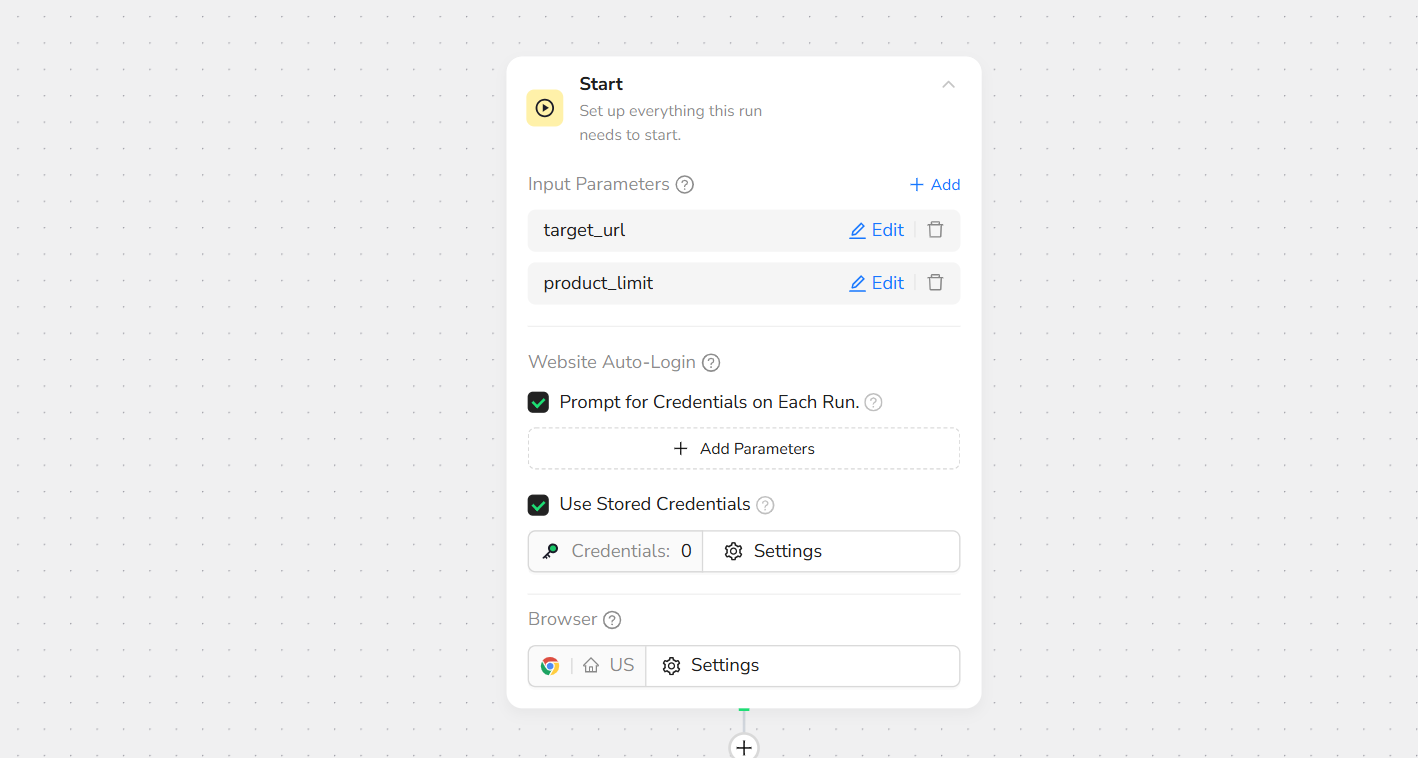
- Start Node Parameter Settings
- target_url: Enter your Billboard Hot 100 link (e.g., https://www.billboard.com/charts/hot-100/)
Note: Customize based on needs—works with chart listings, historical views, or search results.
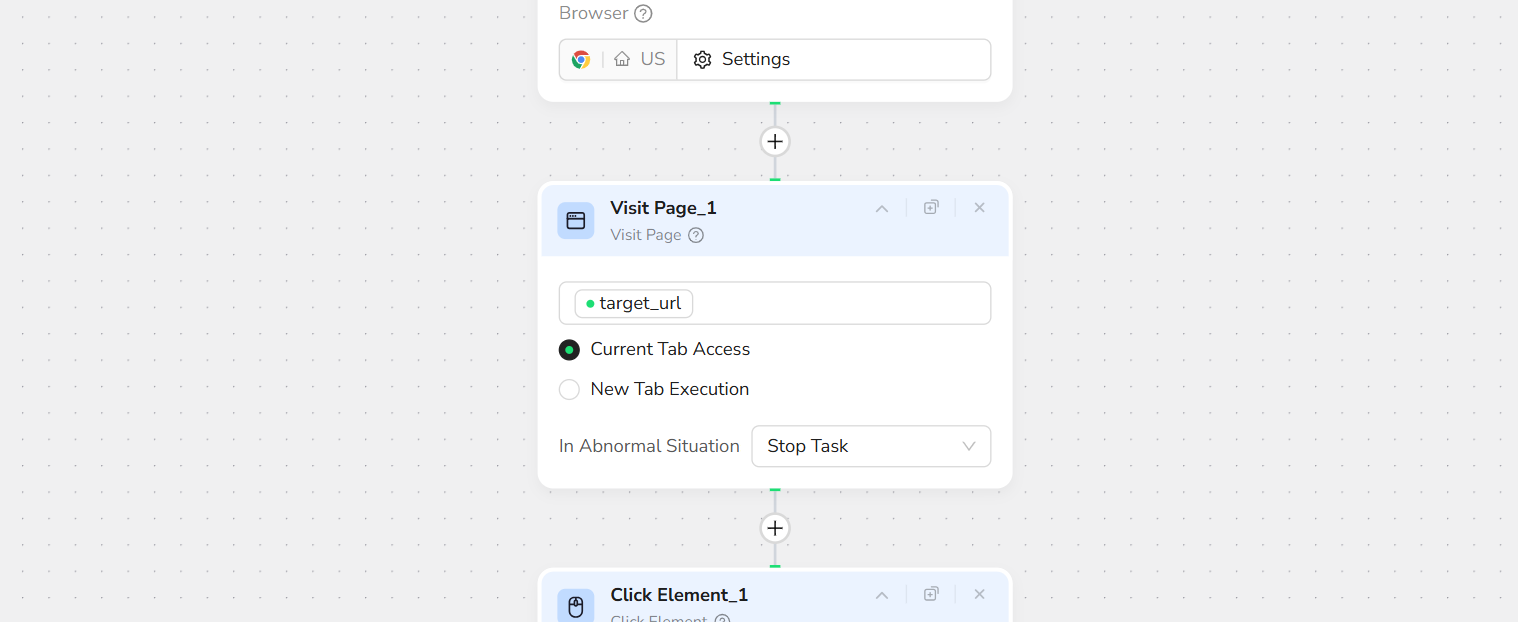
- Visit Page
In the prompt box, enter Visit / target_url – this will navigate to the target URL.
- loop node
Set loop stop condition: Until the extraction of /product_limit data is complete

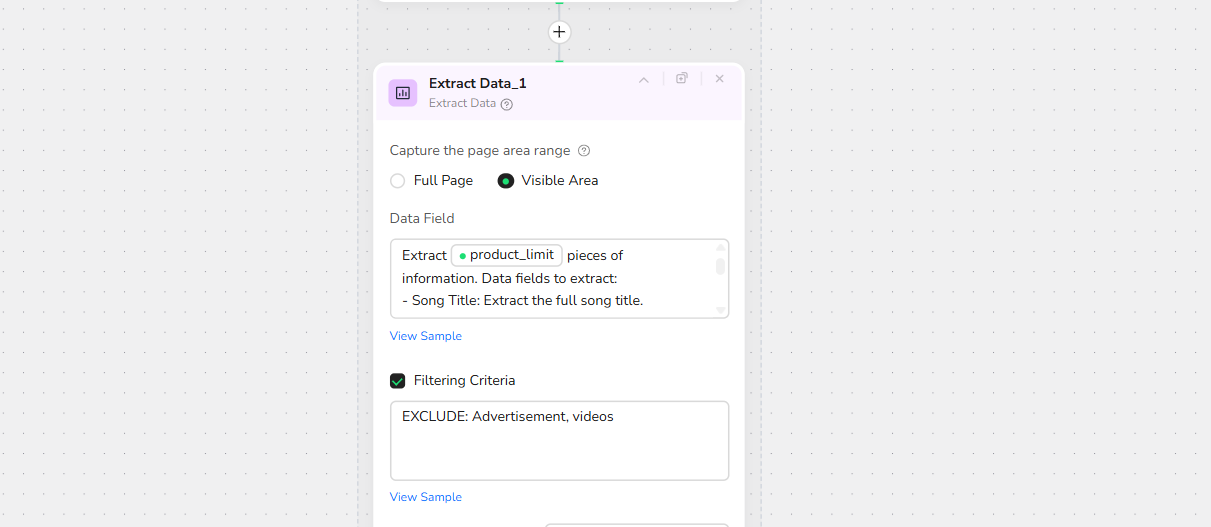
- Add Extract Data
In the prompt box, enter:
Extract /product_limit pieces of information. Data fields to extract:
- Song Title: Extract the full song title.
- Artist Name: Extract the full artist or band name (e.g., "Alex Warren," "Maroon 5")
- Current Rank: Extract the song's current chart position.
- LW: Extract the song's chart position last week.
- PEAK: Extract the song's peak chart position.
- WEEKS: Extract the number of weeks the song spent on the chart.
- Main Image URL: Source of the song's album cover.
Note: You can specify the exact location of the data to be collected on the page to increase the accuracy of data extraction.
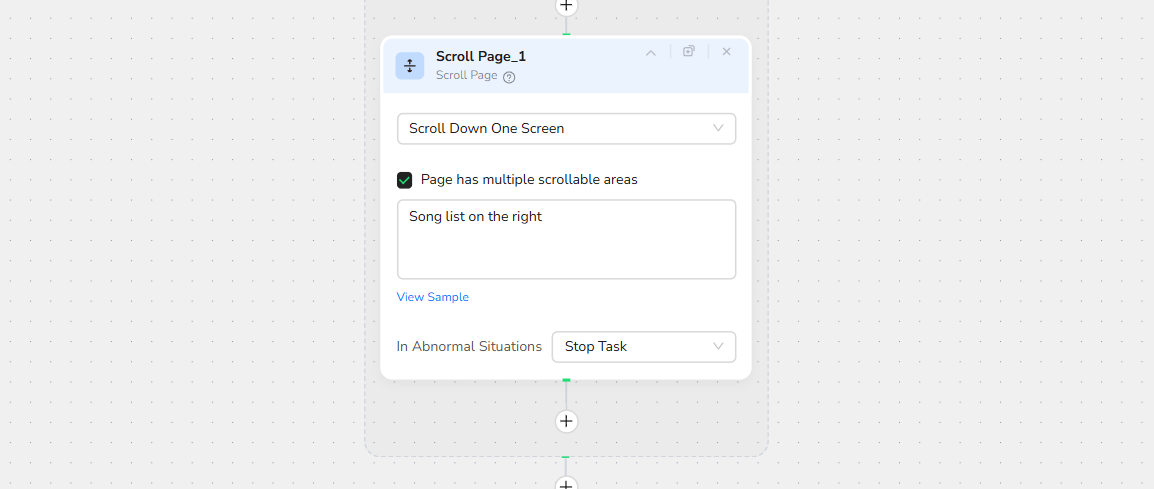
- Scroll Page
Select “ scroll down one screen”.
- Output Data
Export in JSON, CSV, XML, or Excel formats.

Key Benefits of Billboard Hot 100 Scraper
Billboard Hot 100 Scraper offers a range of advantages that make data extraction simple, efficient, and powerful. Here's why it's a top choice for Billboard chart web scraping:
✅ No Coding Required: Set up and run extractions effortlessly without any programming skills—perfect for beginners and pros alike
✅ Customizable and Flexible: Adjust parameters like item limits, data fields, and target URLs to tailor results to your exact needs
✅ Structured Data Output: Maintains organized data in structured formats (e.g., JSON, CSV, Excel) for easy analysis and integration
✅ Automation Integration: Seamlessly works with Make, n8n, and other platforms for scheduled, hands-off web scraping
✅ Cost-Effective: Start with free trials for small-scale tasks, scaling affordably for larger datasets while respecting Billboard's policies
✅ Accurate and Reliable: Handles automatic page loading, uses 'N/A' for missing data, and includes rate limit handling to ensure consistent results
These benefits make Billboard Hot 100 Scraper an efficient tool for turning raw chart data into actionable music insights.
Who Can Use Billboard Hot 100 Scraper?
Billboard Hot 100 Scraper is designed for anyone needing quick, reliable access to Billboard chart data. It's ideal for a variety of users, including:
- Music Labels & Artists: Track weekly rankings and chart performance
- Radio Programmers & DJs: Stay updated on the hottest tracks and new entries
- Playlisters & Curators: Build data-driven playlists with real-time chart hits
- Music Journalists & Bloggers: Report accurate chart movements and debuts
- Market Researchers & Analysts: Extract data for streaming trends and hit prediction
- A&R and Talent Scouts: Spot rising artists and breakout singles
- Small Labels & Startups: Conduct affordable chart monitoring without needing advanced technical skills
- Marketing Teams: Measure campaign impact through chart position changes
No matter your background, if you're looking to scrape Billboard Hot 100 without hassle, this tool is accessible and effective for both individuals and teams.
Use Cases for Billboard Hot 100 Scraper
Billboard Hot 100 Scraper is versatile for various real-world applications. Here are some key ways to use it for extracting and analyzing chart data:
📊 Chart Tracking: Collect weekly rankings, peaks, and longevity for hit analysis
🔍 Competitive Intelligence: Monitor rival artists and label performance in real time
💰 Release Strategy: Predict chart entry positions and measure launch success
⭐ Hit Detection: Identify fastest climbers, new entries, and longest-running songs
🔄 Weekly Monitoring: Automate tracking of position changes every Thursday/Friday
🛠️ Playlist Curation: Build proven-hit databases for Spotify, Apple Music, and radio
📈 Trend Analysis: Study genre shifts, seasonal patterns, and streaming dominance
🎯 Artist Development: Track career trajectories through repeated chart appearances
Whether for one-off reports or ongoing monitoring, Billboard Hot 100 Scraper helps transform official chart data into valuable insights.
Make.com Integration
BrowserAct's Billboard Hot 100 Scraper is now available as a native app on Make.com—add it to your scenarios without API hassle.
✅ Automation-Ready: Integrate with Make, n8n, or others for scheduled monitoring
✅ Rate Limit Handling: Built-in delays to comply with Billboard policies
✅ Multi-Chart Tracking: Run instances for Hot 100, Global 200, Artist 100, and more
💡 Use Case Tip: Ideal for weekly chart alerts, release tracking, and performance dashboards with complete ranking metadata
🚀 Quick Start with Make.com: Search for "BrowserAct" in Make.com's app directory and add it directly—no complex setup
Ready to Transform Your Billboard Hot 100 Data Collection?
Stop wasting hours on manual data collection. Start scraping the official Billboard Hot 100 chart every week in minutes with BrowserAct's AI-powered automation.
Try BrowserAct Free → https://www.browseract.com/
No credit card required. Get started in under 5 minutes.
Popular Use Cases:
- Artists celebrating their first Top 10 entry
- Labels measuring single performance
- Playlisters updating “Top 40” collections
- Journalists reporting accurate weekly charts
- Analysts forecasting next week’s #1
Start Your Free Trial → https://www.browseract.com/template?page=3
Need Help?
Contact us at:
- 💬 E-mail: service@browseract.com
 What can we do for you