
Amazon Reviews API(No Login Required)
Extract Amazon product reviews by ASIN with a single API call. No login required. Get ratings, review text, verified status, and variants for sentiment analysis and monitoring
Published by
Ma
Maggie
September 10, 2026
Approx.Credits
30-50 Credits
Categories
BA
Amazon APICompetitor AnalysisBusiness AnalyticsPrice MonitorAmazon
Template ID
77817507798321724

Brief
⭐ Copy and send this to your Agent:
 Install this skill for me:
https://github.com/browser-act/skills/tree/main/amazon-reviews-api-skill
What is Amazon Reviews API?
BrowserAct’s Amazon Reviews API lets you extract reviews for a specific Amazon product through a single API request — without building crawler scripts, or requiring an Amazon account login.
Simply provide an ASIN . BrowserAct opens the product’s public review pages, iterates through review pages as needed, and returns clean, structured review data directly via API.
This API is ideal for product feedback analysis, competitor review mining, QA insights, and sentiment monitoring.
What data can you get through Amazon Reviews API?
The API extracts structured review fields from the selected product, including:
- Commentator: Display name of the reviewer
- Commenter profile link: Resolved profile URL of the reviewer
- Rating: Star rating associated with the review (when available)
- reviewTitle: Review headline/title
- review Description: Full review body text
- Published at: Human-readable published date shown on Amazon
- Country: Country/region shown on the review
- Variant: Variant information such as color/size (when available)
- Is Verified: Whether the review is marked as Verified Purchase
Why Amazon Reviews API is right for you
No-login extraction
Collect reviews from publicly accessible Amazon review pages without requiring user authentication.
ASIN-driven precision
Pull reviews for an exact product using ASIN, avoiding keyword noise and mismatched listings.
Zero operational overhead
No proxy configuration, crawler scripts, or anti-bot handling to manage. BrowserAct runs the workflow in the background.
Production-ready output
Consistent, structured review records designed for sentiment analysis, dashboards, and automated reporting.
In short:
ASIN → API call → Reviews delivered
API Parameters
Parameter | Description | Default | Supported values (examples) |
ASIN | Amazon Standard Identification Number of the product | B07TS6R1SF | Any valid ASIN |
Code to Integrate
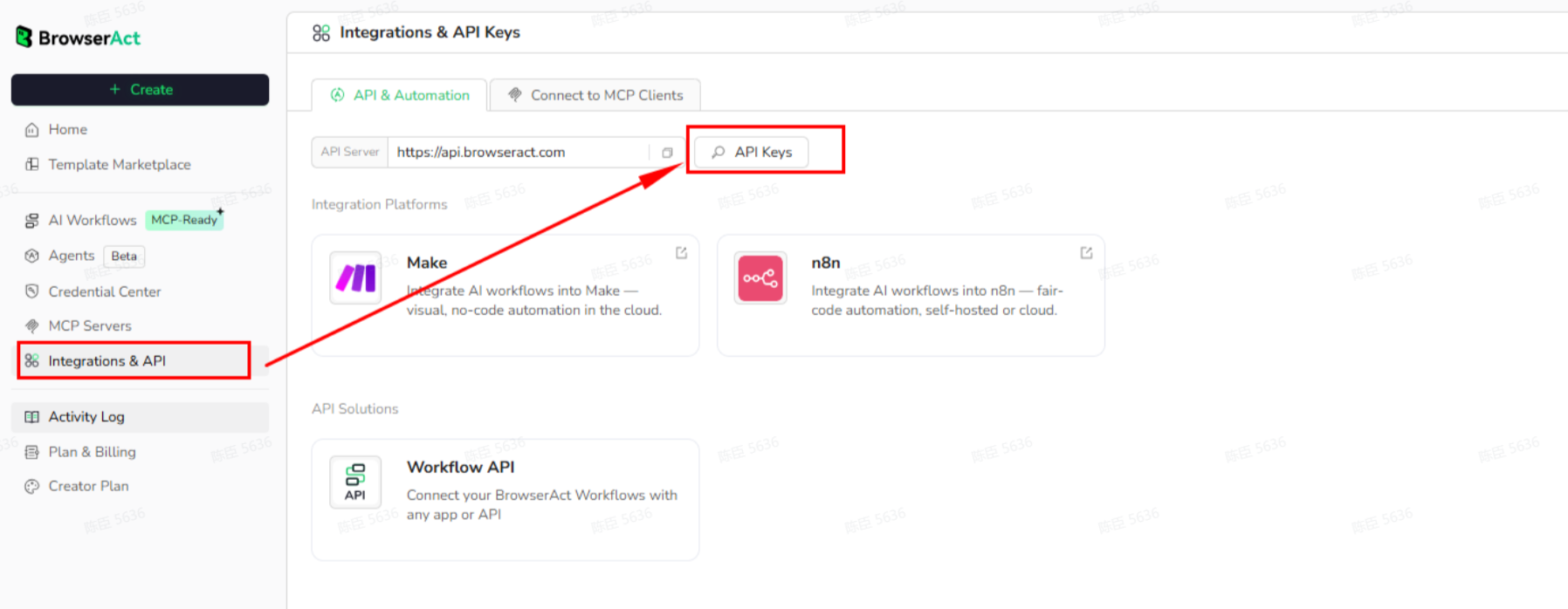
Click Get code, replace the API key, and run the code directly in your application.
API Key, get from: https://www.browseract.com/reception/integrations
API_KEY = os.getenv("BROWSERACT_API_KEY", "app-abcdefghijklmn")
Replace:
app-abcdefghijklmn
with your own API key, and the code will run successfully.
You can find your API key in the API & Integrations section of the BrowserAct dashboard.
API Example
Input
- ASIN:
B07TS6R1SF
Steps
- Click Get the Code
- Run the request
- Receive structured reviews via API
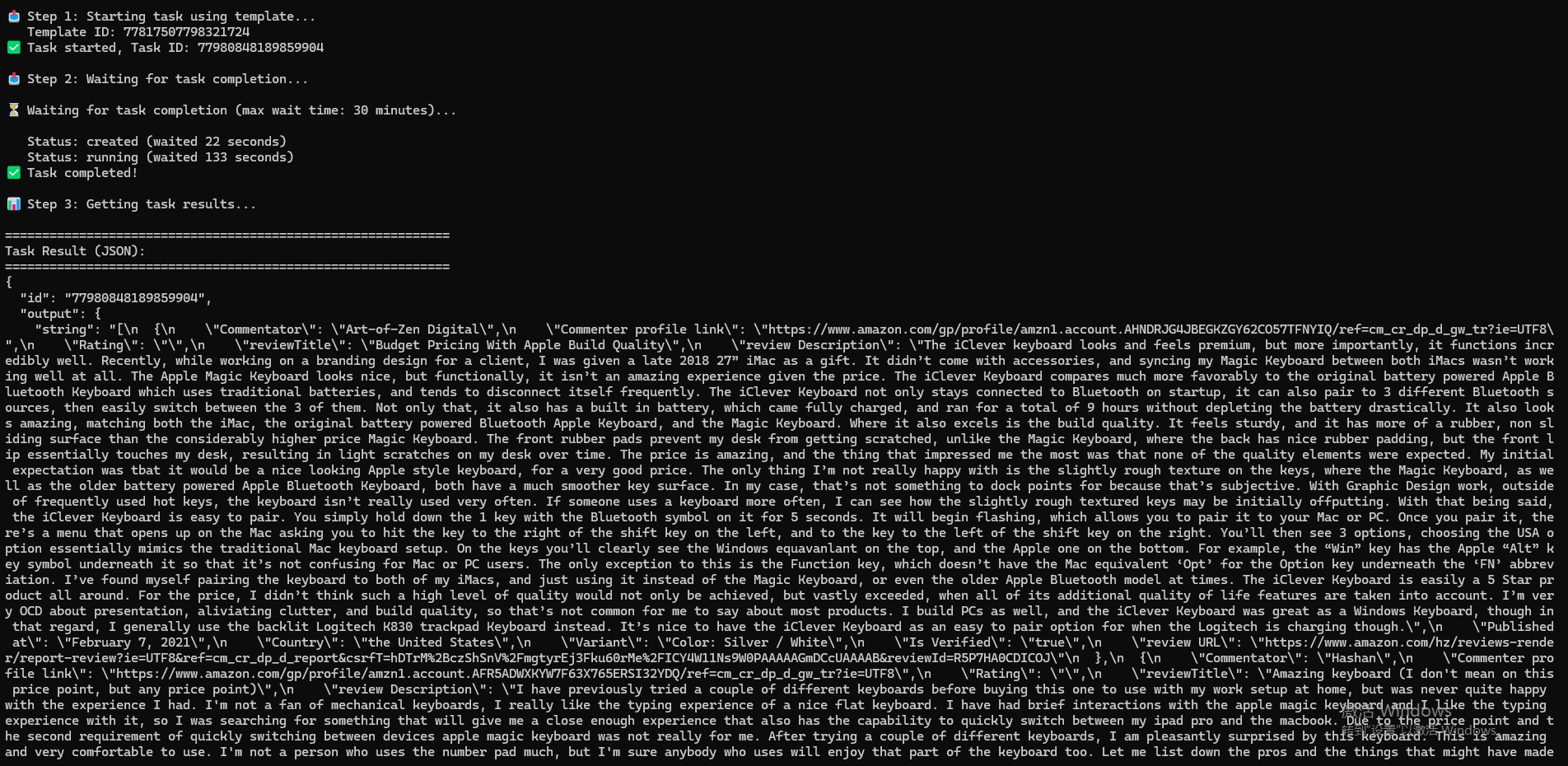
API Results
The API returns a structured list of reviews for the specified ASIN.
Each review item is delivered in a consistent, machine-readable format, for example:
{
  "Commentator": "Rick H",
  "Commenter profile link": "https://www.amazon.com/gp/profile/amzn1.account.AGT3GHWX63QIKE6JLXHCHCVK43KA/ref=cm_cr_dp_d_gw_tr?ie=UTF8",
  "Rating": 5,
  "reviewTitle": "This is a great quality, sleek and sturdy non-slip design, made from aluminum.",
  "review Description": "The iClever Bluetooth keyboard is a high quality, well built sturdy keyboard made from aluminum...",
  "Published at": "December 12, 2025",
  "Country": "the United States",
  "Variant": "Color: gray black",
  "Is Verified": true
}
Create Your Own Amazon Reviews API
To create your own Amazon Reviews API, simply start from a prebuilt template.
- Click Create from Template in the top-right corner
- Complete the setup
- You’ll receive a callable workflow_id
Once created, you can use the BrowserAct API to invoke your workflow programmatically and retrieve Amazon reviews directly in your application.
Need help?
- Discord: Discord Community
- Email: service@browseract.com
 What can we do for you