How to Access LinkedIn Year in Review 2025

Learn how to access your LinkedIn Year in Review for 2025 and explore your career growth, connections, and more with this step-by-step guide.
LinkedIn has just launched its highly anticipated 2025 Year in Review feature, giving users and businesses a chance to reflect on their year of networking, career growth, and industry trends. This annual feature has become a staple for professionals, offering valuable insights into profile activity, engagement, and content performance. As the feed fills with Year in Review highlights, now is the perfect time to dive into how this tool can help you assess your accomplishments, set new goals, and strategically plan for the year ahead.
What Is LinkedIn Year in Review?
LinkedIn’s Year in Review is a personalized professional recap that gives users a snapshot of their activity over the past year — similar to Spotify Wrapped but focused on career and networking milestones. It highlights key metrics from your interactions, connections, and profile growth throughout 2025. This feature has been rolling out on the LinkedIn mobile app and is showing up in users’ feeds and notifications as people share their recaps.
What Data the 2025 LinkedIn Year in Review Includes
The Year in Review pulls together a variety of engagement and networking metrics that help you reflect on your year. While LinkedIn doesn’t publish an official full list, many users are seeing personalized highlights such as:
- Your first year on LinkedIn — when you originally joined the platform (a fun milestone marker).
- “You put in the work” — a summary of your overall activity or how much effort you invested on LinkedIn.
- Peak activity time — when you were most active during the year.
- Skills you added — new skills you listed on your profile in 2025.
- Your first connection of the year — the earliest connection you added in 2025.
- New connections — total number of new people you added to your network.
- New followers — how many new people followed your updates this year.
- New reactions — total reactions (likes, celebrates, insights, etc.) your content received.
- The person you kept up with all year — the connection you interacted with most frequently.
These highlights come together in visually engaging “slides” you can scroll through in the app — and many people are now sharing them directly in their LinkedIn feeds.
How to Access Your LinkedIn Year in Review
📱 Step 1: Open the LinkedIn Mobile App
To get started, open the LinkedIn mobile app on your smartphone. The Year in Review feature is currently available only on mobile devices, so make sure you're using the LinkedIn app, not the desktop version.
🔝 Step 2: Locate the Year in Review Banner
Once you're logged in, scroll to the top of your LinkedIn feed, where you’ll find a special banner that says: "Here's a look back at your 2025". This banner is a direct link to your personalized Year in Review data.
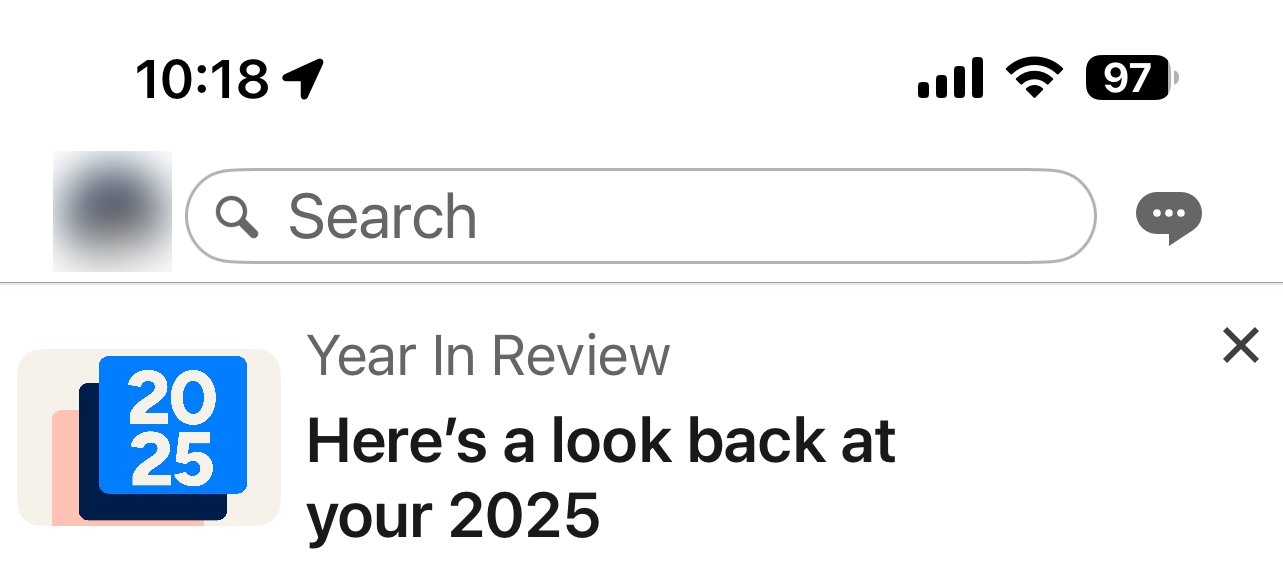
👀 Step 3: Explore Your Year in Review
Tap on the banner, and you’ll be taken through a visual summary of your professional activity in 2025. It will showcase your key metrics such as profile views, new connections, and engagement with posts. This interactive format makes it easy to reflect on your year and see your most significant accomplishments on LinkedIn.
📢 Step 4: Share Your Year in Review to Your Feed
After exploring your Year in Review, you have the option to share it directly to your LinkedIn feed. Simply tap the "Share to Feed" button, and your personalized recap will be posted for your network to see. It will automatically include the #YearInReview hashtag, allowing others to join the conversation and share their own highlights as well. This is a great way to engage with your connections and celebrate your professional achievements over the past year!
Want More Data About LinkedIn? Use BrowserAct Web Scraping
Why Go Beyond LinkedIn Year in Review
LinkedIn’s Year in Review gives you a great snapshot of your personal 2025 activity, but if you’re looking for more detailed data — like competitor trends, audience insights, or broader professional analytics — you’ll need a more powerful tool that can gather structured data from LinkedIn or other platforms automatically.
That’s where BrowserAct comes in — an AI-powered web scraping and browser automation platform that lets you extract data from virtually any website without coding.
What BrowserAct Is and How It Works
BrowserAct is a no-code AI web scraper and automation tool that helps you collect data from websites using natural language prompts or visual workflows. This means no programming skills are required. Simply instruct the platform in plain English to gather the information you need, and it automatically navigates, extracts, and structures that data for you.

Key Features of BrowserAct
- No-code scraping: Build powerful scraping tasks without writing a single line of code. BrowserAct’s simple interface lets you create data extraction tasks quickly and easily.
- AI-driven automation and integrations: BrowserAct integrates with tools like Make, n8n, and Zapier, allowing you to automate workflows and data collection. It also handles website layout changes and mimics human browsing behavior, ensuring that your scraping tasks are stable, reliable, and adaptable over time.
- Any website: You can extract data from LinkedIn job listings, profiles, company pages, and more. The platform also supports scraping from non-LinkedIn sources, making it perfect for broader market research.
- Human-like browsing: Designed to mimic real users, which helps avoid common blocking issues that traditional bots face. This ensures your scraping tasks run smoothly without interruptions.
- Anti-bot detection bypass: BrowserAct is equipped to handle anti-bot detection mechanisms such as CAPTCHAs, allowing seamless data extraction from sites with strict anti-robot measures.
- IP rotation: The platform uses IP rotation to prevent blocking and ensure continuous access to data, helping you avoid detection and maintain long-term scraping operations.
How BrowserAct Helps You Get Better LinkedIn Data
Using BrowserAct to scrape LinkedIn or related professional data lets you go far beyond what Year in Review shows:
🔍 Competitor Analysis
Automatically collect publicly available profile info, skills, titles, company data, and headline trends across your target competitors — all in structured spreadsheets or dashboards.
📈 Lead Generation Insights
Extract lists of potential leads based on roles, locations, industries, or keywords, giving you data you can directly use in outreach or CRM systems.
📂 Integration With Your Workflow
BrowserAct can plug into tools like n8n, Make, or Zapier, meaning you can automate the entire data pipeline — from scraping to analysis to reporting.
Ready to Access More Data? Start Using BrowserAct Today!
Take control of your data extraction with BrowserAct’s powerful web scraping capabilities. Whether you're looking to collect LinkedIn insights, analyze competitors, or automate lead generation, BrowserAct makes it easy and reliable.


