
YouTube Smart Scheduling Assistant (Video Extraction)
Published by
je
jett
December 19, 2025
Approx.Credits
15-30 Credits
Categories
BA
Video ContentData ProcessingSocial MediaYoutube
Template ID
66724976417311956

Brief
Detail
🎯 Core Function: Automated YouTube Content Intelligence Pipeline (Scrape, Analyze, Store)
This workflow is designed for marketing teams and data analysts who need to build a comprehensive database of video content from multiple YouTube channels. It combines BrowserAct to intelligently scrape video lists, Make.com to orchestrate batch processing from a Google Sheet list, and Gemini AI to categorize or analyze the video titles, finally storing the enriched data back into Google Sheets.
Part 1: BrowserAct Workflow Description
This core module handles the specialized navigation and raw data extraction from the target YouTube channels:
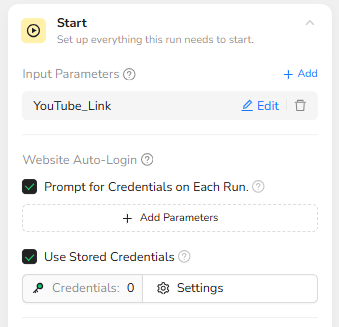
Target Channel Input (Dynamic Parameter)
The workflow is designed with a global input parameter, allowing the automation system to dynamically inject different channel URLs for every run.
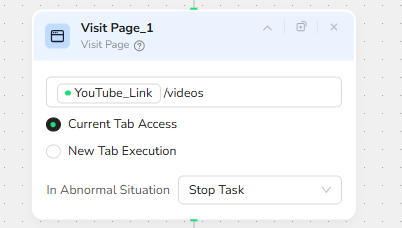
Intelligent Path Navigation
To ensure the bot captures long-form videos rather than the "Home" feed (which mixes Shorts and featured content), the workflow automatically appends /videos to the input URL.
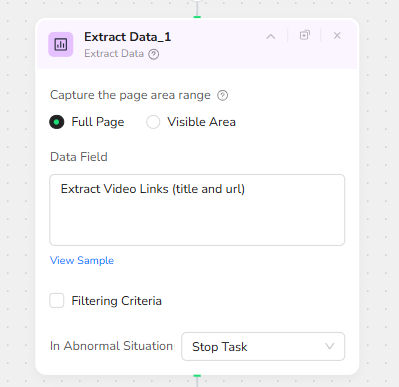
Structured Data Extraction
The Agent utilizes full-page extraction to identify video container elements, capturing the Video Title and Video URL into a structured JSON format for the automation platform to parse.
Part 2: Automation Integration with Make.com
The Make.com scenario executes the batch processing, data parsing, and AI enrichment:
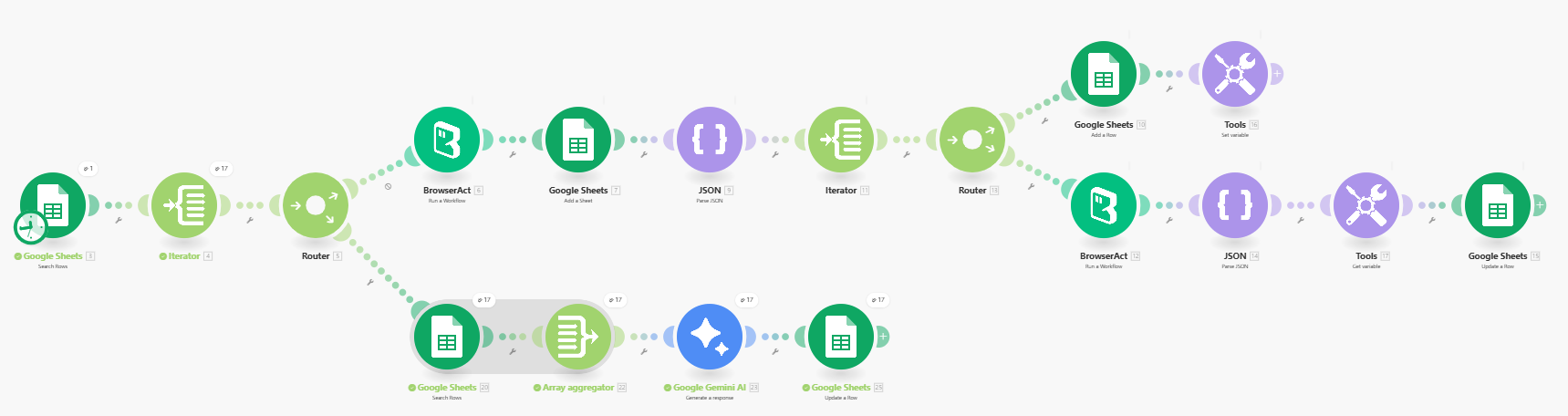
Trigger & Batch Execution
The workflow is triggered by a Google Sheet containing a list of target YouTube channels. An Iterator cycles through every channel in the list, sending the URL to the BrowserAct node to perform the live extraction.
Data Parsing & Routing
The raw JSON output from BrowserAct (containing the list of videos) is processed by a JSON Parser. A Router then directs the data flow: one path handles the creation of new sheets or rows for raw data storage, ensuring every video is logged.
AI Analysis (Gemini Integration)
The extracted video titles are passed to a Google Gemini AI node. Acting as a content analyst, the AI can categorize the video topics, generate tags, or assess sentiment based on the titles.
Final Storage
The final, AI-enriched data (Video Title, URL, and Gemini's analysis) is aggregated and updated back into the Google Sheet database, ready for review.
✨ Applicable Scenarios (Use Cases)
Competitor Landscape Monitoring: Automatically track multiple competitor channels, using AI to categorize their latest videos (e.g., "Tutorial," "Product Launch," "Vlog") to visualize their content strategy.
Niche Market Research: Input a list of 50+ influencer channels and automatically build a searchable database of thousands of video titles to identify trending topics in your industry.
Content Inventory Audit: For media agencies managing multiple client channels, this workflow automates the creation of up-to-date video inventories without manual data entry.
Lead Generation via Content: Identify videos matching specific keywords (using the AI analysis step) to find relevant content for targeted commenting or outreach.