
YouTube Smart Scheduling Assistant (Meta data Extraction)
Published by
je
jett
December 19, 2025
Approx.Credits
25-50 Credits
Categories
BA
Video ContentCompetitor AnalysisSocial MediaYoutube
Template ID
66732663523773908

Brief
🎯 Core Function: Automated YouTube Video Metrics & AI Analysis Pipeline (Scrape, Analyze, Report)
This workflow is engineered for Data Analysts, Marketers, and Content Strategists. It goes beyond simple scraping by combining BrowserAct's precision extraction with Make.com's advanced logic and Google Gemini's AI insights, delivering a comprehensive, multi-dimensional data report.
⚙️ Part 1: BrowserAct Configuration – Precision Data Extraction
This core module handles the specialized interaction with the target platform to retrieve accurate video metrics.
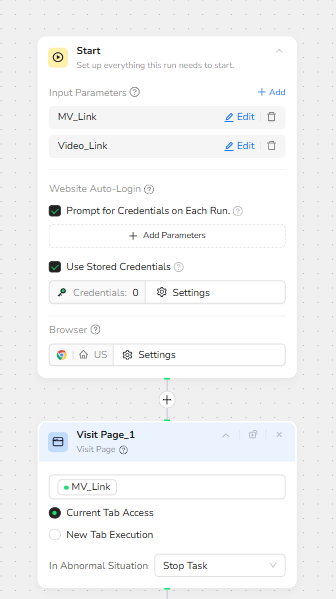
Dynamic Parameters & Initialization The workflow is designed with global input parameters: MV_Link (Target/Tool Link) and Video_Link (Specific Video URL). The automation system dynamically injects these links for every run, allowing for batch processing of multiple videos without manual intervention.
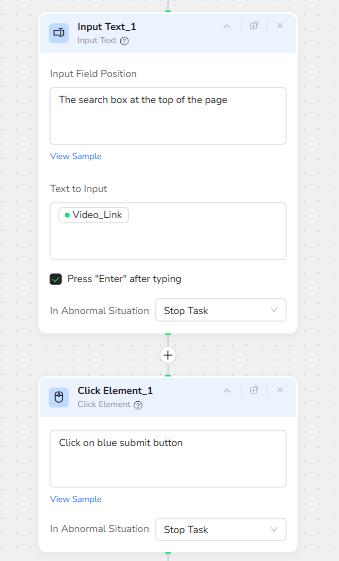
Simulated Human Interaction (Search & Query) Instead of static page visits, the bot acts like a real user. It automatically locates the search box at the top of the page, inputs the Video_Link, and clicks the submit button. This ensures the data is retrieved through the platform's native interface for maximum accuracy.
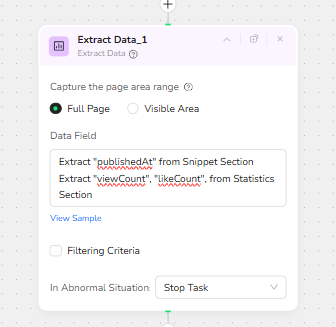
Structured Field Extraction Once the query results are loaded, BrowserAct utilizes "Full Page" extraction to capture specific performance metrics. It precisely targets and extracts publishedAt, viewCount, and likeCount, formatting this raw data into a structured JSON object for the next stage of processing.
🔗 Part 2: Make.com Orchestration & AI Integration
The Make.com scenario connects the raw data from BrowserAct with business logic to close the loop from "Acquisition" to "Insight."
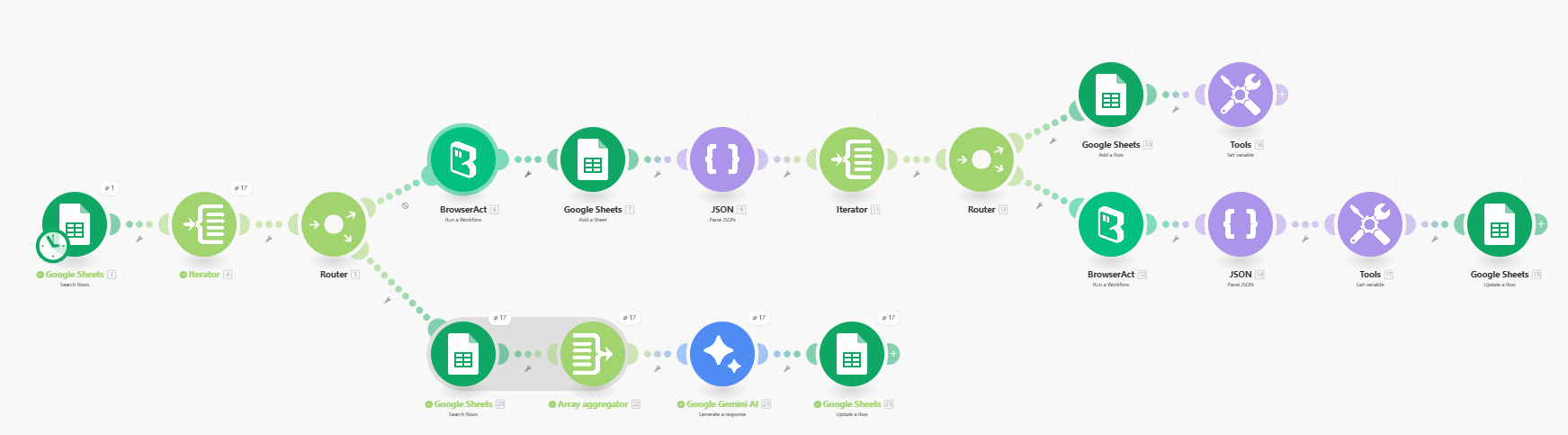
Trigger & Iteration The workflow initiates from a Google Sheet (Search Rows), pulling a list of video URLs. An Iterator ensures every single row is sent to BrowserAct for individual processing.
Smart Routing (Router Logic) After receiving data from BrowserAct, the flow splits via a Router. The Archiving Path uses "Add a Sheet" to dynamically create new tabs in your database for different datasets or categories. The Update Path writes the fresh metrics back into the specific rows.
Gemini AI Analysis The most powerful step involves Google Gemini AI. The scraped metrics (Views/Likes) and metadata are aggregated and sent to Gemini. The AI then analyzes this data to generate insights (e.g., Engagement Rate calculation, Sentiment analysis, or Viral Potential scoring).
Final Database Update The AI-enriched insights are finally updated back into Google Sheets, providing a report that includes both hard numbers and qualitative analysis.
💡 Applicable Scenarios (Use Cases)
Competitor Performance Monitoring Batch input competitor video links to track their view/like growth over time, with AI summarizing why specific videos are performing well.
Campaign Reporting Automation Agencies can automatically pull the latest metrics for client videos and generate a "Viral Score" using Gemini, eliminating manual spreadsheet updates.
Historical Data Backfilling Cleanse and update legacy video databases by scraping missing publication dates and current interaction counts.
Trend Analysis Aggregate data from high-performing videos to identify common patterns in successful content strategies.