
Youtube Comment Scraper
BrowserAct's YouTube Comment Scraper transforms the overwhelming task of analyzing YouTube engagement into an automated, intelligent process. Beyond just comments, our tool extracts the complete YouTu
Published by
we
wendy
August 21, 2026
Approx.Credits
30-60 Credits
Categories
BA
Social MediaYoutube
Template ID
52243662345682269

Brief
What Does BrowserAut YouTube Comment Scraper Do?
Automatically extract YouTube comment data, video metrics, and channel information with our powerful YouTube scraper tool. Capture comment text, author names, timestamps, like counts, reply threads, video analytics, and channel statistics from any YouTube video, channel, playlist, or search results page. Enjoy flexible filtering and output options for comprehensive audience insight analysis—no coding required.
Our YouTube Comment Scraper is built for seamless integration with automation platforms like Make.com and n8n, making it ideal for ongoing sentiment monitoring and engagement tracking tasks.
Key Features of YouTube Comment Scraper
- Customizable Parameters: Adjust
Max-resultsto control extraction depth (e.g., 20, 50, or 100 per video). - Flexible Video Selection: Set max loop items for 5, 10, or more videos from playlists or search results.
- Multi-Level Extraction: Captures video metadata, comment threads, and reply conversations for full context.
- Hierarchical Data Structure: Preserves video-comment-reply relationships.
- Universal YouTube Support: Compatible with videos, channels, playlists, and search pages.
- No-Code & Free to Use: Runs directly in your browser with a simple setup; no installation or coding required.
- Reliable Data Collection: Avoids blocks with built-in IP management system and smart scrolling, ensuring complete and uninterrupted scraping.
- Automation Integration: Connects with Make.com and n8n to schedule runs and auto-save data to Google Sheets or other platforms.
- Flexible Data Export: Download collected data in standard, analysis-ready formats like CSV, JSON, XML, and Markdown.
What Data Can You Scrape from YouTube?
With BrowserAct's YouTube Comment Scraper, you can pull a wide range of publicly available data for analysis. Here's a breakdown:
YouTube Comments
- Comment text content
- Author name and channel link
- Publication timestamps
- Like counts
- Reply counts
- Pinned status
- Creator hearts/verification
- Complete reply threads
Video Analytics
- Video title and description
- View count
- Like/dislike ratio
- Video duration
- Upload date
- Tags and categories
- Engagement metrics
Channel Information
- Channel name
- Subscriber count
- Verification status
- Channel URL
- Total video count
How to Use YouTube Comment Scraper in One Click
If you want to quickly start experiencing scraping YouTube comments, simply use our pre-built "YouTube Comment Scraper" template for instant setup and start scraping YouTube effortlessly.
- Register Account: Create a free BrowserAct account using your email.
- Configure Input Parameters: Fill in necessary inputs like
Video_url(e.g., "https://www.youtube.com/watch?v=dQw4w9WgXcQ") andMax-results(e.g., 20) – or use defaults to learn how to scrape YouTube quickly. - Start Execution: Click "Publish" to run the workflow.
- Download Data: Once complete, download the results file from YouTube scraping.
Why Scrape YouTube Comments?
Scraping YouTube comments allows you to systematically collect and analyze public audience feedback and engagement data. This process is valuable for gathering specific information that can be used for content strategy, marketing, and audience research. Here are the primary reasons to scrape YouTube comments:
- Understand Audience Sentiment: Extract comments to analyze how viewers feel about your content, products, or brand. This data provides direct, unfiltered feedback from your target audience.
- Conduct Content Research: Collect viewer feedback to identify what content resonates most, which topics generate discussion, and what questions your audience asks repeatedly.
- Track Engagement Patterns: Monitor comment volume, reply threads, and engagement metrics over time to detect trends in audience interaction and content performance.
- Monitor Brand Mentions: Systematically find and log every mention of your brand, products, or competitors across YouTube to manage online reputation and identify opportunities.
- Build Datasets for Analysis: Create structured datasets from YouTube's public comment data for use in sentiment analysis, machine learning, academic research, or detailed marketing analytics.
- Competitive Intelligence: Analyze comments on competitor videos to understand their audience's needs, complaints, and preferences.
Scraping automates the data collection process, enabling you to efficiently gather large volumes of engagement information from specific videos, channels, or search queries for structured analysis.
How to Build a YouTube Comment Scraper Workflow: Step by Step
YouTube Comment Scraper workflow building with BrowserAct requires no coding skills—it's automation-ready and easy to set up. Follow these step-by-step instructions to get started.
Step 1: Determine Your Scope
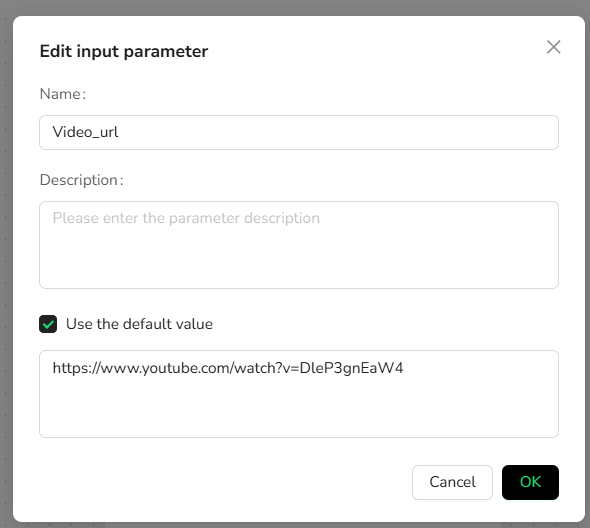
Decide the number of videos and comments to extract (e.g., 10 videos with the first 100 comments each). Adjust parameters like Video_url and max_results for flexibility.
Step 2: Start Node Parameter Settings
- target_URLs: Enter your YouTube link (e.g.,
https://www.youtube.com/watch?v=dQw4w9WgXcQfor a single video, or channel/playlist/search URL). - comment_limit: Set the number of comments per video (e.g., 100). Leave blank for unlimited extraction.
- max_results: (For playlists/search only) Set the number of videos to process (e.g., 10).
Note: Customize based on needs—works with individual videos, channels, playlists, or search results.
Step 3: Visit Page
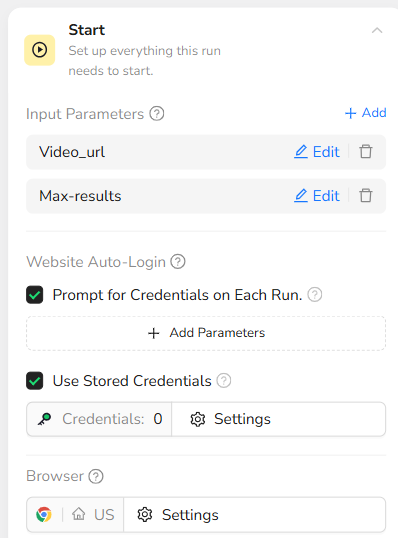
In the prompt box, enter /Video_url – this will navigate to the target URL.
Step 4: Add Loop Node (For Multiple Comments)
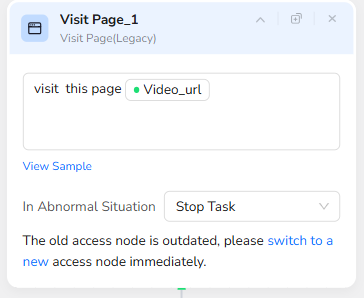
Why Use Loop List: When extracting large numbers of comments (especially 50+), YouTube uses lazy loading that requires scrolling to reveal more content. The Loop List node creates a parent-child structure that allows you to scroll incrementally and extract data in batches, ensuring complete and accurate comment collection.
Loop Prompt: "continue until /Max-results reached"
Step 5: Add Click Element
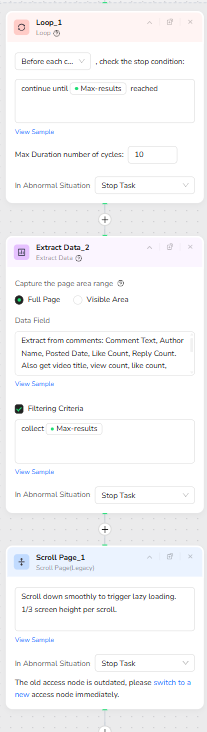
In the prompt box, enter "Extract from comments: Comment Text, Author Name, Posted Date, Like Count, Reply Count. Also get video title, view count, like count, channel name, and subscriber count. Format timestamps as 'YYYY-MM-DD HH:MM', numbers without K/M suffixes, missing data as 'N/A'.".
Note: This step is only needed if you're looping through multiple videos.
Step 6: Add Scroll Page Node
Scroll Configuration:
- Continue scrolling until you reach the comments section and load more comments
This ensures all comments load through YouTube's lazy loading mechanism.
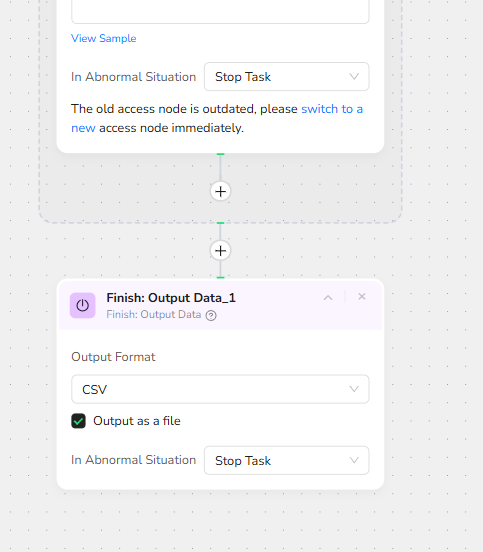
Step 7: Output Data
Export in JSON, CSV, XML, or Markdown (MD) formats.
Who Can Use YouTube Comment Scraper?
YouTube Comment Scraper is designed for anyone needing quick, reliable access to YouTube engagement data. It's ideal for a variety of users, including:
- Content Creators & YouTubers: Understand what content resonates with your audience, identify topics that spark discussion, track viewer sentiment across videos, and discover ideas for your next viral content.
- Digital Marketing Agencies: Monitor client brand mentions, track campaign performance through comment engagement, generate comprehensive reports showing audience reception and sentiment trends.
- Market Researchers and Analysts: Conduct large-scale sentiment analysis across industries, study consumer opinions about products or topics by analyzing thousands of authentic user comments.
- Brand Managers: Track brand perception in real-time, monitor what people say about your products in YouTube comments, identify customer pain points, and spot emerging PR issues before they escalate.
- Product Developers and Teams: Gather user insights on pain points and feature requests to inform product roadmaps and development priorities.
- Gaming & Entertainment Studios: Gauge audience reaction to trailers, gameplay reveals, and content updates. Understand fan theories, feature requests, and community sentiment.
- Social Media Managers: Track engagement metrics, identify trending topics, and understand audience preferences to inform content calendars.
- Data Scientists and Developers: Build datasets for machine learning, sentiment analysis models, or custom integrations with analytics tools.
- Academics and Students: Research community opinions on topics like media consumption, social behavior, or cultural trends.
- Hobbyists and Everyday Users: Explore topics of personal interest, track discussions on favorite channels, or analyze engagement patterns in specific niches.
No matter your background, if you're looking to scrape YouTube comments without hassle, this tool is accessible and effective for both individuals and teams.
Make.com Integration
BrowserAct's YouTube Comment Scraper is now available as a native app on Make.com—add it to your scenarios without API hassle.
- Automation-Ready: Integrate with Make, n8n, or other platforms for scheduled monitoring and automated workflows.
- Rate Limit Handling: Built-in delays and smart scrolling to comply with YouTube's terms of service.
- Multi-Video Tracking: Run instances for different videos, channels, or search queries simultaneously.
💡 Use Case Tip: Ideal for sentiment tracking, audience engagement analysis, competitive monitoring, and automated reporting with full video context and comment threads.
🚀 Quick Start with Make.com: Search for "BrowserAct" in Make.com's app directory and add it directly—no complex setup.
Need Help?
Contact us at:
- 📧 Discord: [Discord Community]
- 💬 E-mail: service@browseract.com