
Yellow Pages Directory Scraper
Automate Yellow Pages data extraction with BrowserAct. Scrape business names, phone numbers, addresses, emails & websites. No coding required. Free trial available.
Published by
Ma
Maggie
December 22, 2025
Approx.Credits
40-80 Credits
Categories
BA
Data ProcessingMarket IntelligenceYellow Pages
Template ID
64210679407582646

Brief
What Does BrowserAct Yellow Pages Scraper Do?
Automatically extract business contact information and company details from Yellow Pages with our powerful directory scraper tool. Capture business names, phone numbers, addresses, websites, categories, ratings, reviews, and operating hours from any Yellow Pages search results or category listings. Enjoy flexible filtering and output options for comprehensive lead generation and market research—no coding required.
Our Yellow Pages scraper is built for seamless integration with automation platforms like Make.com, making it ideal for ongoing lead generation and business intelligence tasks.
Key Features of Yellow Pages Scraper
- Customizable Parameters: Adjust total_listings to control extraction depth (e.g., 20, 50, or 100 businesses per search).
- Flexible Search Options: Set max loop items for 10, 25, or more listings from searches or category pages.
- Comprehensive Data Extraction: Captures business profiles including contact details, location data
- Location-Based Search Support: Compatible with city-specific searches, categories, and nationwide directories.
- Automation Integration: Connects with Make.com and n8n to schedule runs and auto-save data to Google Sheets or CRM systems.
What Data Can You Scrape from Yellow Pages?
With BrowserAct's Yellow Pages Scraper, you can pull a wide range of publicly available business data for lead generation and analysis. Here's a breakdown:
- Business names
- Phone numbers
- Physical addresses
- Email addresses (when available)
- Website URLs
- Business categories/industries
How to Use Yellow Pages Scraper in One Click
If you want to quickly start experiencing scraping Yellow Pages, simply use our pre-built "Yellow Pages Scraper" template for instant setup and start extracting business leads effortlessly.
- Register Account: Create a free BrowserAct account using your email.
- Configure Input Parameters: Fill in necessary inputs like YP_Link (e.g., "https://www.yellowpages.com/search?search_terms=Plumbers&geo_location_terms=Sacramento"), city_location=Sacramento; total_listings=3; business_category=Plumbers – or use defaults to learn how to scrape Yellow Pages quickly.
- Start Execution: Click "Start" to run the workflow.
- Download Data: Once complete, download the results file from Yellow Pages scraping.
Why Scrape Yellow Pages?
Scraping Yellow Pages allows you to systematically collect and analyze public business data from local directories. This process is valuable for gathering specific information that can be used for lead generation, sales prospecting, and market analysis. Here are the primary reasons to scrape Yellow Pages:
- Generate Sales Leads: Extract business contact information to build targeted prospect lists for B2B sales outreach and cold calling campaigns.
- Build Local Databases: Create comprehensive datasets of businesses by category and location for market mapping, franchise planning, or service provider directories.
- Verify Business Information: Cross-check and update existing CRM data with current phone numbers, addresses, and operating hours from Yellow Pages listings.
- Analyze Market Density: Map business distribution across cities or regions to identify underserved areas and expansion opportunities.
- Monitor Industry Trends: Track new business listings and closures in specific categories to understand market dynamics and emerging opportunities.
Scraping automates the data collection process, enabling you to efficiently gather large volumes of business information from specific locations or categories for structured sales and marketing campaigns.
How to Build a Yellow Pages Scraper Workflow: Step by Step
Yellow Pages Scraper workflow building with BrowserAct requires no coding skills—it's automation-ready and easy to set up. Follow these step-by-step instructions to get started.
Step 1: Determine Your Scope
Determine the number of businesses to extract (e.g., 50 businesses and their complete contact information), the business's location, and the business category. Parameters such as total_listings can be adjusted for greater flexibility.
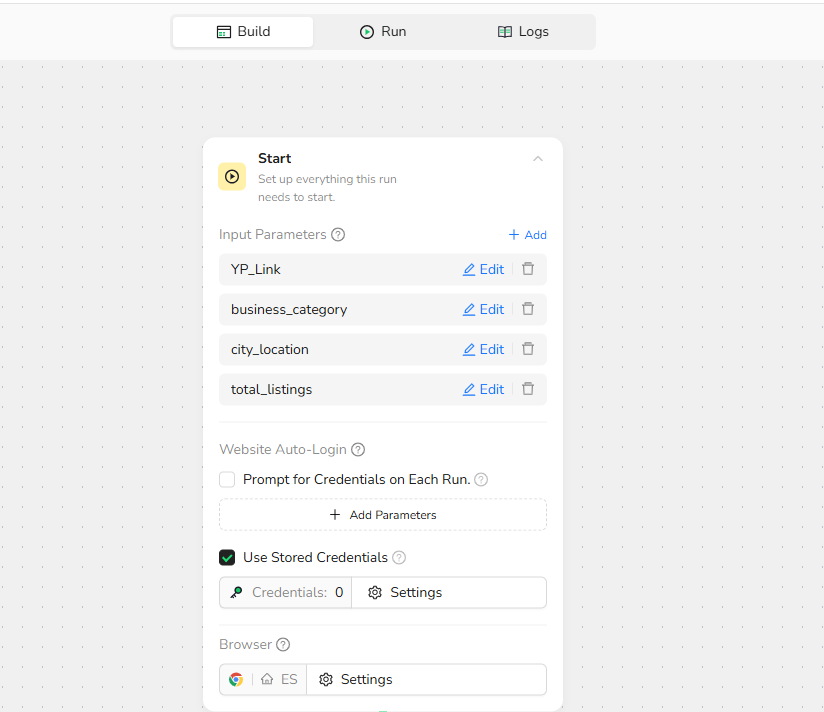
Step 2: Start Node - Input Parameter Settings
Configure the following input parameters to customize your scraping task:
- YP_Link: Enter the Yellow Pages search URL (e.g.,
https://www.yellowpages.com) - business_category: Specify the business category you want to scrape (e.g., "plumber", "restaurant", "dentist")
- city_location: Define the target location (e.g., "New York, NY", "Los Angeles, CA")
- total_listings: Set the number of businesses to extract (e.g., 50). Leave empty for unlimited extraction.
Note: These parameters give you precise control over your scraping scope—perfect for targeted lead generation campaigns.
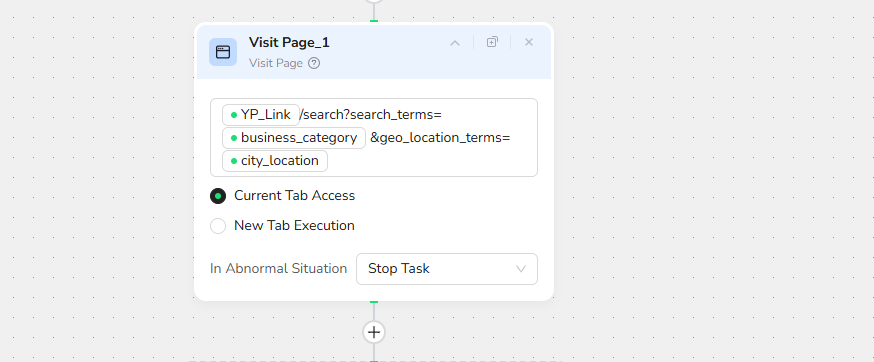
Step 3: Visit Page - Navigate to Yellow Pages
Action: Visit the target URL using the parameter: /YP_Link/search?search_terms= /business_category &geo_location_terms= /city_location
This step automatically navigates your browser to the Yellow Pages search results page based on your specified parameters.
Step 4: Loop - Iterate Through Business Listings
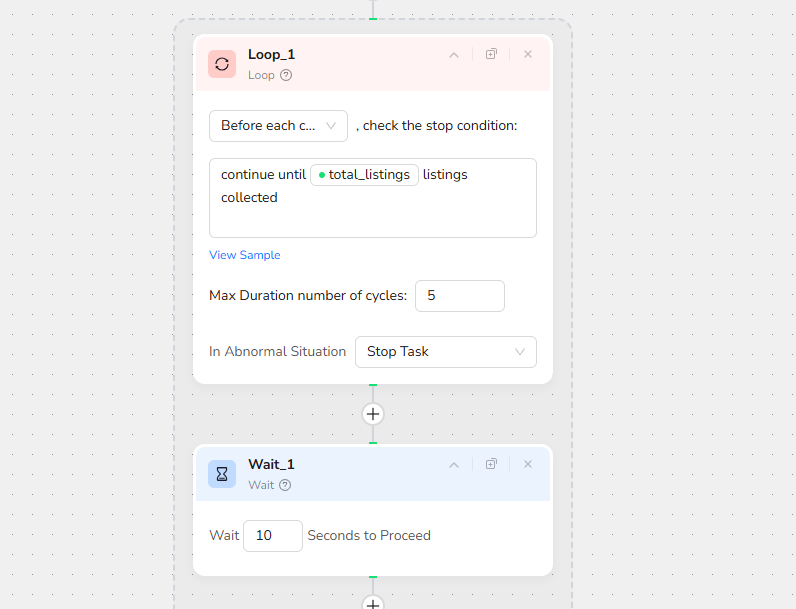
Loop Configuration
- Loop Prompt: "Loop through the business listing results in the main content area of the page"
- Loop Condition: Before each loop, check the stop condition: continue until
total_listingsbusinesses are collected - Max Duration of Cycles: 5 (default, adjustable based on your needs)
This creates a loop that systematically processes each business listing on the page, ensuring comprehensive data extraction.
Note: The loop intelligently handles pagination and stops when your target number of listings is reached.
Step 5: Wait - Ensure Page Load Stability
Wait Time: 10 seconds to proceed
This brief pause ensures all dynamic content fully loads before extraction begins, preventing missing data.
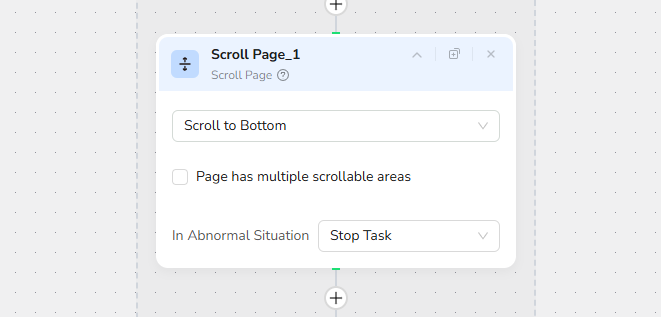
Step 6: Scroll Page- Access All Listings
Scroll Action: Scroll to Bottom
Purpose: Yellow Pages uses lazy loading—scrolling ensures all business listings on the current page are fully loaded and visible in the DOM.
Note: The page may have multiple scrollable areas; this action focuses on the main content area.
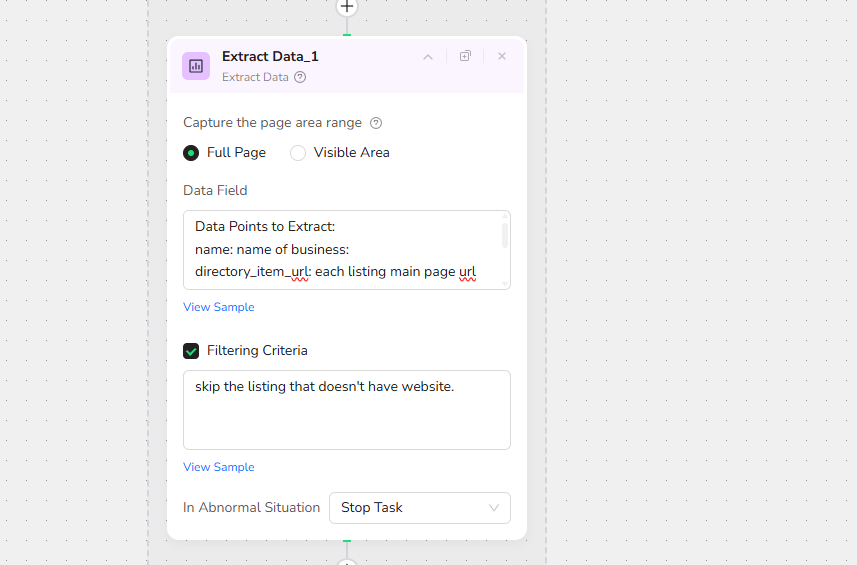
Step 7: Extract Data - Capture Business Information
Extraction Scope: Capture the entire page area range
Data Configuration:
- Full Page: ✓ Selected
- Visible Area: Available option
Data Field:
no: incremental counter for non-skipped collected listing
Data Points to Extract:
name: name of business:
directory_item_url: each listing main page url
website: website URL of business
city: city name
phone: phone number
address: location address
Filtering Criteria:
skip the listing that doesn't have a website.
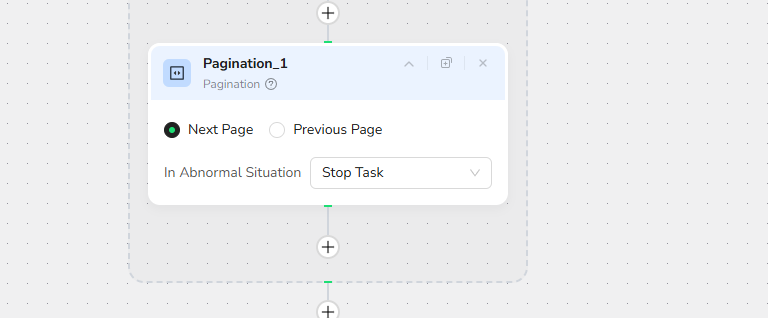
Step 8: Pagination - Continue to Next Page
Navigation Actions:
- Next Page: Click to load the next set of results
This ensures complete coverage of all available listings matching your search criteria.
Step 9: Finish Output Data - Export Your Results
Output Format: JSON
Alternative Formats: You can also output as a file in CSV, XML, or Markdown (MD) formats
Data Structure: The output maintains the hierarchical relationship between business listings and their associated details, making it easy to import into CRMs, spreadsheets, or databases.
Example Output:
"no": 1,
"name": "ABC Plumbing",
"directory_item_url": "https://www.yellowpages.com/sacramento-ca/mip/abc-plumbing-544109437?lid=1002194118957",
"website": "https://www.abcplumbingandhvac.net",
"city": "Sacramento",
"phone": "(844) 717-6818",
"address": "205 22nd St, Sacramento, CA 95816"
},
Who Can Use Yellow Pages Scraper?
Yellow Pages Scraper is designed for anyone needing quick, reliable access to business directory data. It's ideal for a variety of users, including:
- Sales Teams and Business Development Professionals: Build targeted prospect lists and generate qualified leads for B2B outreach campaigns.
- Marketing Agencies: Create local business databases for client prospecting, digital marketing campaigns, and geo-targeted advertising.
- Market Researchers and Analysts: Study business distribution, market saturation, and competitive landscapes across different regions.
- Franchise Developers: Identify market gaps and underserved territories for franchise expansion planning.
No matter your background, if you're looking to scrape Yellow Pages without hassle, this tool is accessible and effective for both individuals and teams.
Make.com Integration
BrowserAct is now available as a native app on Make.com - simply add it to your scenarios without complex API setup.
API Integration with Make
Automated Yellow Pages Lead Generation with BrowserAct
An automated business intelligence system that tracks local businesses, extracts contact information, monitors competitor listings, stores data in Google Sheets, and sends alerts for new businesses—all running on autopilot via Make.com.
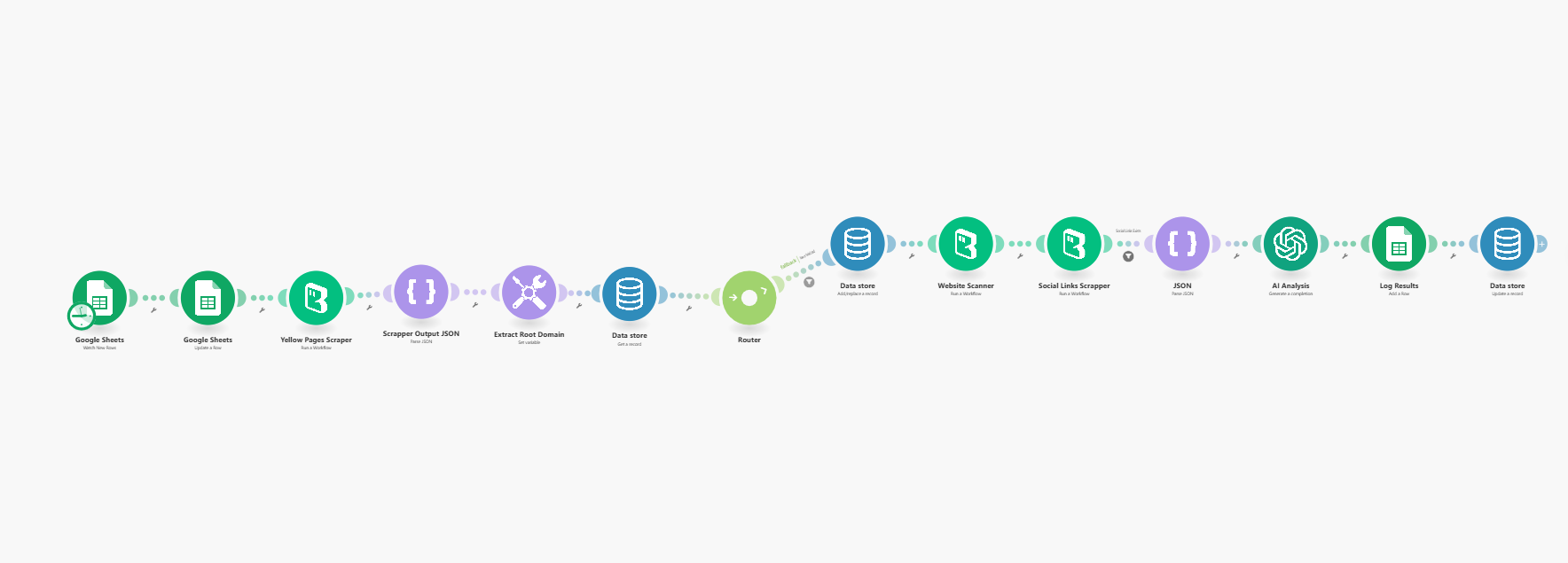
Key Features:
- Automated Data Collection - Scrapes Yellow Pages business listings for contact details
- Google Sheets Integration - Automatically logs business data with timestamps for CRM sync and historical tracking
- Scheduled Execution - Runs automatically at your chosen intervals (daily/weekly/monthly)
- Multi-Location Support - Track businesses across multiple cities or categories simultaneously
- Multi-Location Tracking: Run instances for different cities, categories, or search terms simultaneously.
Need help? Contact us at
Discord: [Discord Community]
E-mail: service@browseract.com
 What can we do for you