
Twitter/X Follower Growth Dashboard Sync
Published by
je
jett
December 19, 2025
Approx.Credits
50-100 Credits
Categories
BA
Competitor AnalysisContent CollectionSocial MediaX
Template ID
68878981828600043

Brief
X Profile + Followers Scraper (BrowserAct + Make)
This workflow automates collecting a target X (Twitter) profile’s basic metrics and followers list, then passes the result into Make.com for parsing, iteration, storage in Google Sheets, and optional notifications (Slack/Telegram). The critical part is login reliability: X often triggers sign-in flows, verification, or temporary blocks. To avoid silent failures, the BrowserAct workflow is built to detect “login-required” states and pause for manual completion when needed.
What you will get at the end
Step 1 produces structured profile data (username, display name, following count, followers count, profile URL).
Step 2 optionally opens the Followers view, loads entries by scrolling, and extracts follower usernames and names.
Step 3 returns JSON to Make.com, where Make parses it, iterates over list items, and writes to Google Sheets (update and/or append), then sends notifications if configured.
🧠 BrowserAct Workflow (Login First, Then Target Page)
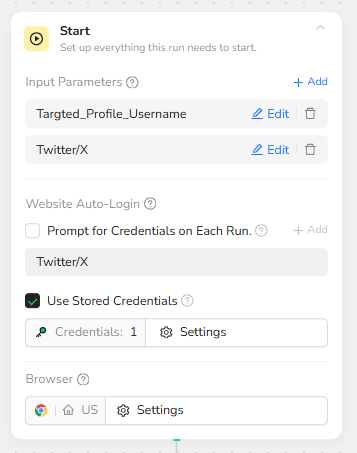
Step 0: Start node input parameters
You configure two inputs so the workflow can run for any target without editing nodes each time.
Targeted_Profile_Username should be the handle without “@” (example: RytJohnson).
Twitter/X should be the base domain (example: https://x.com).
Use Stored Credentials should be enabled so BrowserAct can reuse the saved X session where possible.
Step 1: Visit the official login entry point
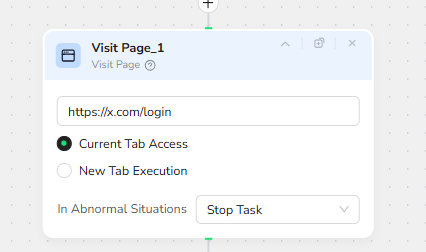
Instead of jumping directly to a target profile and triggering unpredictable popups, the workflow first opens the stable login route.
Visit Page 1 should navigate to https://x.com/login using Current Tab Access.
Step 2: Condition check for “login required”
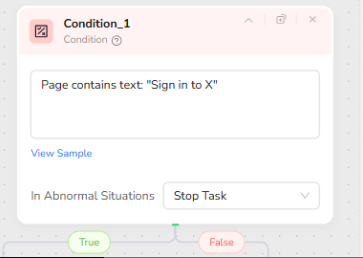
This condition is the switch that decides whether we need Human Interaction.
The condition should detect the presence of a login page or login modal text. A reliable signal is the phrase “Sign in to X”. If the page contains it, we assume the session is not authenticated and we must login manually.
Step 3A: Human Interaction when login is required
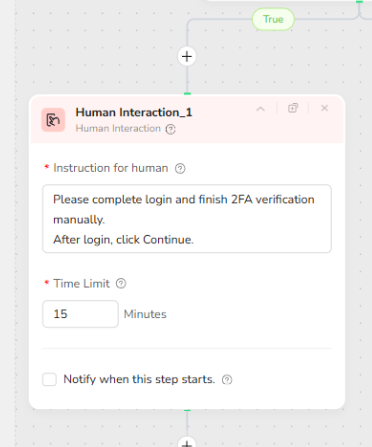
If the condition is TRUE, BrowserAct pauses and waits for you to complete the login.
You must type the identifier, password, and finish any 2FA/verification code.
After you successfully land on a normal X page (no login prompt blocking the screen), click Continue in the Human Interaction step.
Time Limit should be set long enough for receiving codes (15 minutes is acceptable, 20 minutes is safer if you often wait for verification).
Step 3B: No Human Interaction when already logged in
If the condition is FALSE, BrowserAct assumes the session is already authenticated and continues automatically. No manual action is needed in this run.
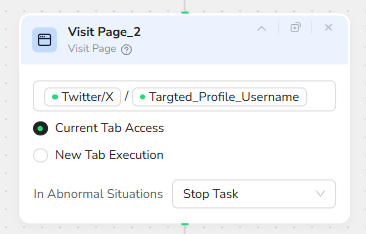
Step 4: Visit the target profile page
Now the workflow navigates to the target profile URL.
Visit Page 2 should be Twitter/X + Targeted_Profile_Username, for example https://x.com/RytJohnson.
This step must happen after login is settled, otherwise X may redirect you to password reset or block the login flow.
Step 5: Extract profile metrics
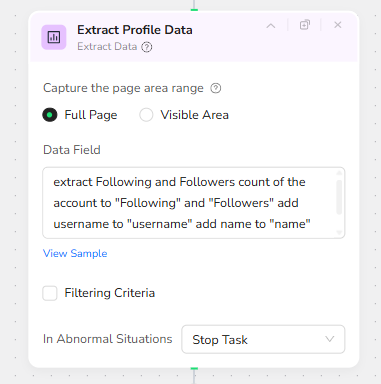
Extract Data (Full Page) collects the core fields from the profile page.
At minimum, extract the Following count, Followers count, username, display name, and profile URL.
This is the part that allows Make.com to update a “profile summary” row in Google Sheets.
Step 6: Enter Followers view
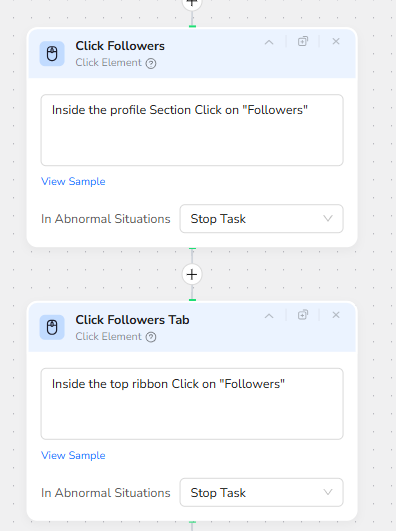
Click Element steps open the Followers list.
First click the Followers entry in the profile section.
Then click the Followers tab in the top ribbon if needed (some layouts require an extra confirmation click).
These clicks are necessary to reach the scrollable follower list content.
Step 7: Scroll to load more followers
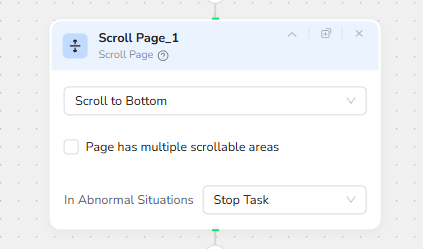
Scroll Page is used to trigger lazy-loading so more follower entries appear.
Scroll direction should be “Scroll to Bottom”.
If X has multiple scrollable areas, enable “Page has multiple scrollable areas” only when you confirm the scroll is not affecting the follower list.
Step 8: Extract followers list data
Extract Data (Full Page) captures follower items currently loaded on the screen.
The extraction goal is “Followers Name and Username”.
This output should be a list, because Make.com will iterate over it later.

⚙️ Automation Orchestration with Make.com
This Make.com scenario acts as a lightweight orchestration layer that consumes the structured JSON output generated by the BrowserAct workflow. Its responsibility is not web automation, but data processing, routing, and delivery.
Trigger & Workflow Invocation
The scenario starts by running the BrowserAct workflow as its first module. Make waits for BrowserAct to fully complete and return a JSON payload before continuing.
If BrowserAct requires human interaction (such as X login or 2FA), the Make scenario pauses automatically and resumes once the BrowserAct run finishes—no manual re-run in Make is required.
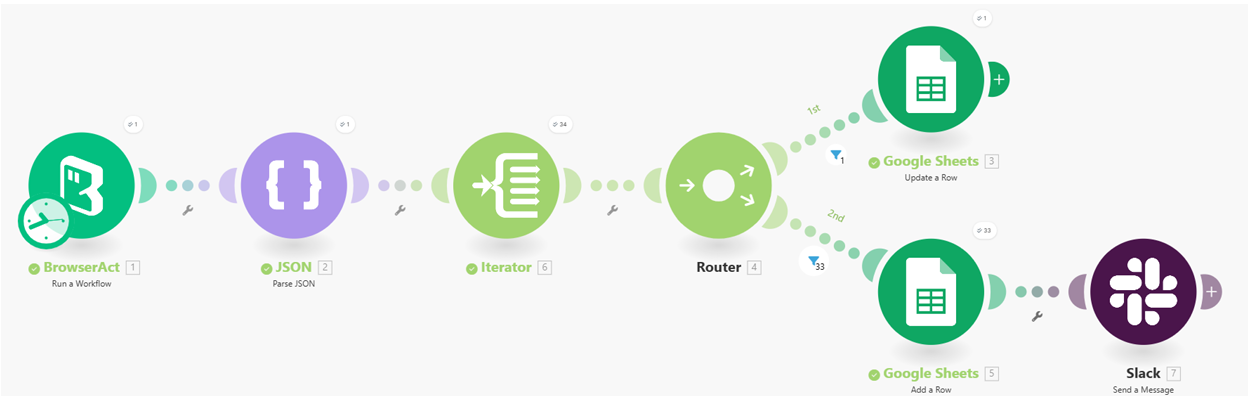
JSON Parsing
The raw output from BrowserAct is passed into a JSON Parse module.
This step transforms the unstructured response into clean, addressable fields that can be reused across subsequent modules.
Iterator for List Processing
When the BrowserAct output contains arrays (for example, follower lists), an Iterator is used to process each item individually.
This allows downstream modules (such as Google Sheets or notifications) to handle one record per operation.
Routing Logic
A Router splits the data flow into multiple paths.
Typical usage includes:
• One path for updating or maintaining a profile-level summary
• Another path for handling individual list items (such as followers)
This keeps the scenario readable and avoids overloading a single linear flow.
Data Storage & Notifications
Depending on the route:
• Google Sheets modules are used to update existing rows or append new rows
• Slack or Telegram modules send notifications when new data is added or specific conditions are met
Each module operates on already-structured data, keeping the Make layer simple and stable.
✨ Applicable Scenarios (Use Cases)
Profile Monitoring & Tracking
Automatically keep X profile metrics (followers, following, name changes) up to date in Google Sheets without manual checks.
Audience Collection & Analysis
Build a growing dataset of followers for a target account, enabling later analysis, filtering, or enrichment workflows.
Internal Alerts & Reporting
Send Slack or Telegram notifications when new followers are detected or when profile metrics change beyond a threshold.
Downstream Automation Pipelines
Use the structured output as input for additional AI analysis, CRM syncing, or lead qualification workflows without touching the scraping logic again.