
TripAdvisor Scraper for Restaurant Reviews
A TripAdvisor Scraper is a tool that lets you automatically extract structured restaurant data and reviews from TripAdvisor. It helps you collect insights without manually copying information.
Published by
Ch
Chiyee
December 19, 2025
Approx.Credits
30-50 Credits
Categories
BA
Travel DataTripAdvisor
Template ID
47908406968714575

Brief
TripAdvisor stands out as a leading travel app overflowing with a lot of content, featuring extensive lists of hotels, attractions, restaurants, and more—making it a treasure trove for uncovering trends and sharpening business strategies. Scraping this site unlocks powerful insights, but manually navigating and collecting data, such as restaurant details and reviews, can be incredibly time-consuming for owners, marketers, travel analysts, and researchers.
Enter BrowserAct: your go-to TripAdvisor scraper that automates the process. In this guide, we'll focus on scraping restaurant information and reviews as a prime example, helping you scrape TripAdvisor reviews effortlessly and gain actionable insights into top dining destinations.
BrowserAct TripAdvisor Scraper Features and Workflow Capabilities
BrowserAct is a powerful automated data extraction tool that lets you scrape TripAdvisor without any coding knowledge. It's designed as an efficient TripAdvisor review scraper, making it easy to pull data from any webpage. What can it do for you?
- TripAdvisor Data Scraping: Our TripAdvisor scraper intelligently identifies and extracts data from TripAdvisor, such as restaurant names, addresses, ratings, review counts, and full review texts. This workflow capability enables seamless scraping of restaurant reviews and information, automating the collection of structured data from search results, restaurant profiles, or review pages for quick integration into your analysis or marketing strategies.
- AI-Driven Field Suggestions: Powered by AI, it smartly analyzes page structures to suggest and extract key fields, like restaurant ratings, reviewer details, review dates, and sentiment scores—perfect for data analysis or market research. The workflow acts as an intelligent assistant, automatically detecting and pulling details without manual setup for accurate, customizable insights.
- Ideal Users: Tailored for restaurant owners, travel marketers, review analysts, and hospitality researchers, helping you obtain structured TripAdvisor data to drive business decisions and growth. This workflow streamlines tasks like monitoring restaurant reviews or analyzing trends, turning raw data into actionable strategies with minimal effort.
How to Use BrowserAct as a TripAdvisor Scraper
You can use BrowserAct as a robust TripAdvisor review scraper to scrape TripAdvisor, extracting detailed parameters for restaurant listings and reviews. Users can fine-tune the final extracted information via the workflow. Here's a breakdown of key fields you can target, including core ones with specific formatting and some advanced options for deeper insights:
- Name: The restaurant's name, e.g., "Joe's Diner".
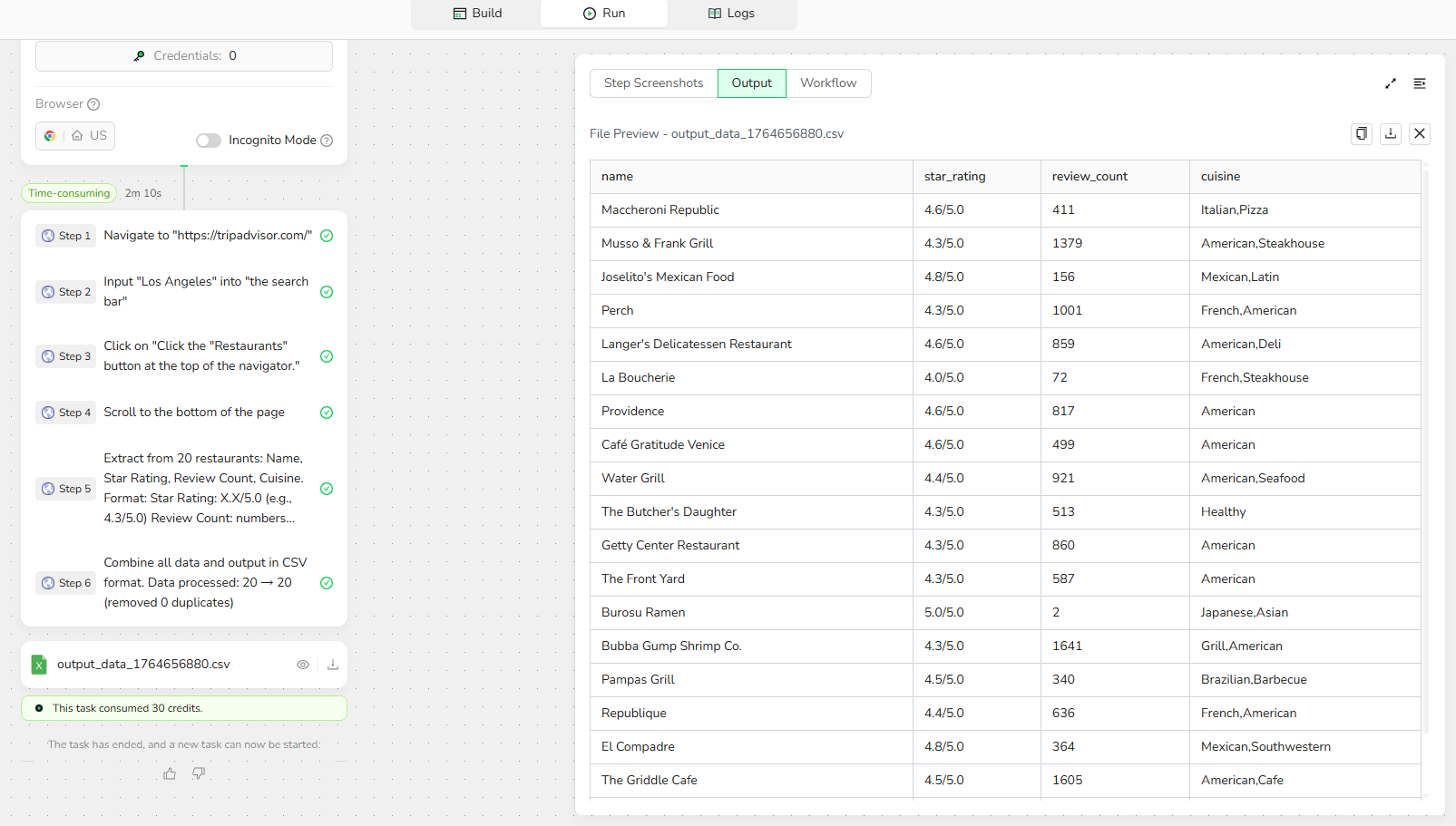
- Star Rating: Overall rating, formatted as "X.X/5.0" (e.g., "4.5/5.0").
- Review Count: Number of reviews, e.g., "250".
- Cuisine: Types of food offered, e.g., "Italian, Pizza".
Step 1: Parameter Setup
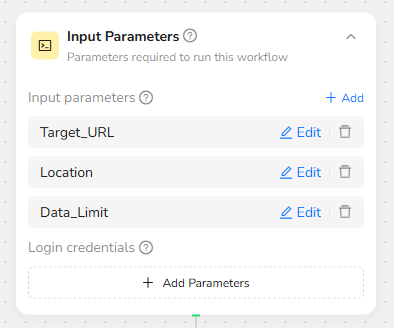
- Target Website: Base TripAdvisor URL (e.g., "https://www.tripadvisor.com").
- Location: City or area for search (e.g., "New York").
- Data_Limit: Number of restaurants or reviews to scrape (e.g., "20").
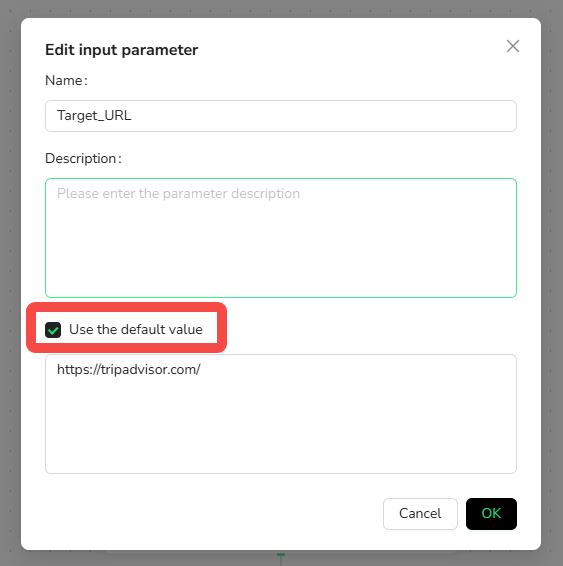
- Click "Use the default value" for each and set defaults (e.g., default location to "New York"). This allows quick runs without manual tweaks. Parameters are reusable with automatic type detection, making your workflow flexible for actions like visiting pages.
Step 2: Add Visit Page Node
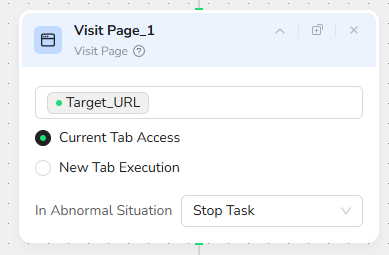
Add a "Visit Page" node and input the URL “/Target Website”. This will navigate to the TripAdvisor homepage.
Step 3: Add Input Text Node
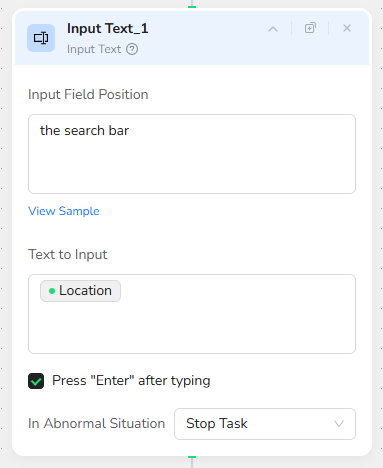
Add an "Input Text" node. In the Input Field Position, input “the search bar”. In the Text to Enter, input “/Location”.
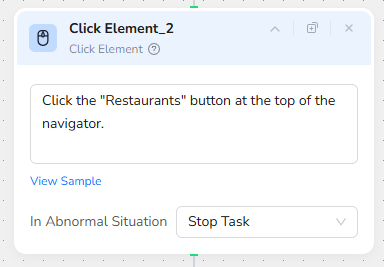
Step 4: Add Click Element Node
Add a "Click Element" node and input the prompt: “Click the "Restaurants" button at the top of the navigator.”. This filters the search to restaurants in the specified location.
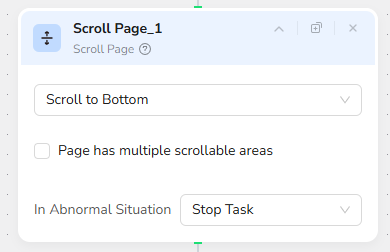
Step 5: Add Scroll Page Node
Add a "Scroll Page" node and select "Scroll to Bottom". This ensures all restaurants on the page are loaded.
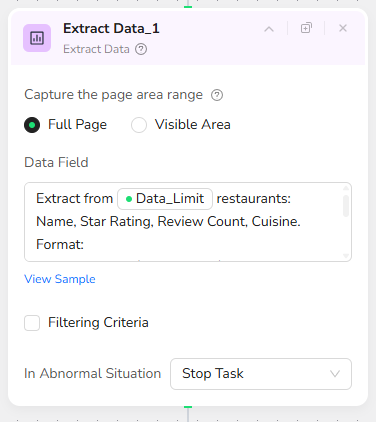
Step 6: Add Extract Data Node
Add an "Extract Data" node and input the prompt: “Extract from /Data_Limit restaurants: Name, Star Rating, Review Count, Cuisine.
Format:
Star Rating: X.X/5.0 (e.g., 4.3/5.0)
Review Count: numbers only (e.g., 1234)
Cuisine: primary cuisine type; if multiple, join with commas
Missing data: "N/A"”.
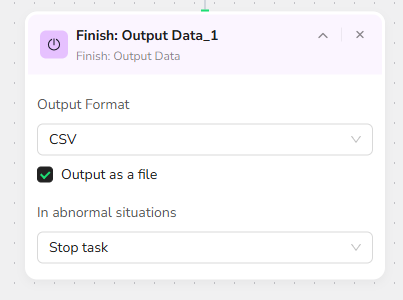
Step 7: Add Finish: Output Data Node
Add a "Finish: Output Data" node. Select "CSV" as the output format and check "Output as a file" for easy downloading. You can also choose to export in JSON, XML, or Markdown (MD) formats.
Step 5: Download the Results
- Once the run completes, download the generated CSV file containing your scraped TripAdvisor data.
With these simplified steps, you'll master how to scrape TripAdvisor using BrowserAct as your TripAdvisor review scraper, streamlining data collection for restaurant analysis.
Why Scrape TripAdvisor Data?
Scraping TripAdvisor data with a TripAdvisor scraper like BrowserAct delivers significant competitive advantages and insights. Here are the key benefits, including perspectives for both business owners and analysts:
- Market Trend Analysis: Monitor trending restaurants, cuisines, and visitor patterns on TripAdvisor to spot emerging trends, guiding menu updates and marketing for owners, or helping analysts identify popular spots.
- Competitor Analysis: Track competitors' reviews, ratings, and feedback to refine your own strategies and stay ahead—owners can compare offerings and address gaps in customer satisfaction.
- Review and Sentiment Insights: Extract reviews and ratings for sentiment analysis, understanding guest preferences and improving services—owners benefit by responding to feedback, while analysts gauge overall trends.
- Business Optimization: Analyze scraped data like review counts and scores to optimize operations, boosting reputation; analysts can use it for in-depth hospitality research.
- Customer Feedback Management: Bulk-scrape reviews to identify common praises or complaints, enabling targeted improvements—ideal for ongoing monitoring with a TripAdvisor review scraper.
- Automated Reporting and Monitoring: Automate data collection to generate reports, track metrics like rating changes, and save time—perfect for owners building dashboards or analysts studying long-term patterns.
 What can we do for you