
Telegram Channel Curator Bot
Published by
je
jett
December 19, 2025
Approx.Credits
30-50 Credits
Categories
BA
Video ContentContent CollectionSocial MediaYoutube
Template ID
67457177136141526

Brief
📲 Detail
🎯 Core Function: Automated YouTube-to-Telegram Content Curation Bot
This workflow turns any YouTube link sent to a Telegram bot into a fully formatted, high-value Telegram post. It combines BrowserAct to navigate and extract key information from the YouTube video page, Make.com to orchestrate the end-to-end automation, and Gemini AI to transform raw transcript and metadata into a curated recommendation post that is automatically published into a Telegram channel while confirming completion back to the user.
When a user sends a YouTube URL to the Telegram bot, the system validates the link, scrapes the page for title, description, and transcript, uses AI to generate a “Quick Look” style post with pros, cons, and tools, then posts it directly into a chosen Telegram channel and replies “It’s Done!” to the original user.
📘 Part 1: BrowserAct Workflow Description
This BrowserAct module is responsible for visiting the YouTube page, expanding the relevant sections, locating the transcript, and extracting all the important data needed for AI generation and Telegram posting.
Target Link Input (Dynamic Parameter)
The BrowserAct workflow is designed with a single global input parameter, allowing Make.com to inject the exact YouTube link received from Telegram on each run.
The Start node defines the parameter:
Target_link – the YouTube URL passed in from the Make scenario. The workflow is configured so each execution works on the specific video requested by the user, rather than a hard-coded URL.

Visit the YouTube Video Page
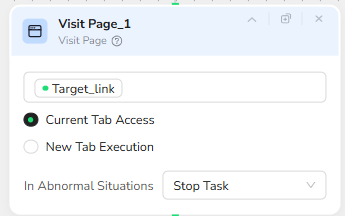
The next node, Visit Page_1, uses the Target_link parameter as the URL to open. It runs in “Current Tab Access” mode to maintain a stable context throughout all subsequent actions, ensuring the same page instance is used for clicking, scrolling, and extracting.
In abnormal situations, the node is set to “Stop Task”, so BrowserAct will fail fast instead of continuing with an invalid or partially loaded page.
Expand the Description Section
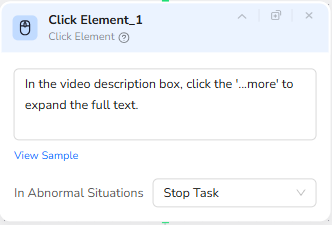
Once the page is loaded, the Click Element_1 node focuses on the video description box and clicks the “…more” button to expand the full text. This ensures long descriptions are fully visible and can be captured later during extraction.
The instruction inside the node reads:
“In the video description box, click the '...more' to expand the full text.”
If the button cannot be found or clicked, the workflow stops, protecting downstream nodes from operating on incomplete page content.
Check for Transcript Visibility and Scroll if Needed
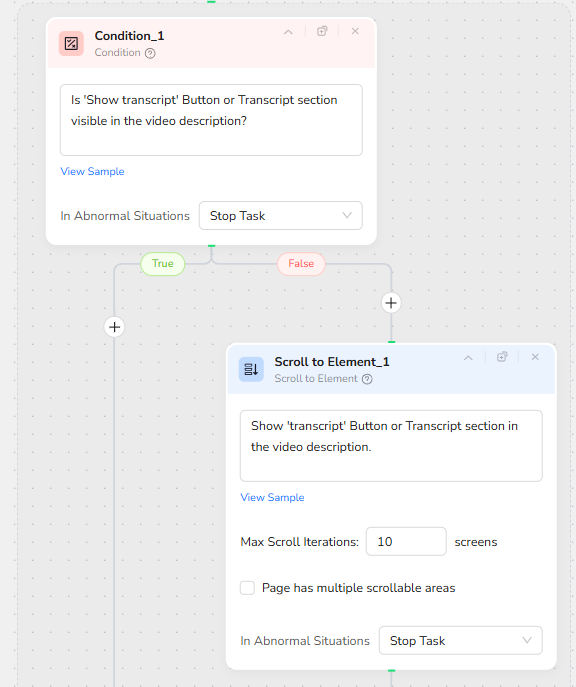
Because YouTube’s “Show transcript” button or transcript section may initially be off-screen, a Condition node and a Scroll to Element node work together to ensure the transcript UI is visible before interacting with it.
The Condition_1 node checks:
“Is 'Show transcript' Button or Transcript section visible in the video description?”
If the answer is True, the workflow continues directly to the next step.
If the answer is False, BrowserAct executes Scroll to Element_1.
Scroll to Element_1 is configured with this instruction:
“Show 'transcript' Button or Transcript section in the video description.”
The node scrolls the page up to 10 screen lengths to bring the transcript section into view. The “Page has multiple scrollable areas” option is left unchecked, assuming the main document scroll is sufficient on a standard YouTube video page.
Both nodes are configured to “Stop Task” on abnormal situations, which prevents the workflow from hanging if the page structure has changed drastically.
Open the Transcript Popup
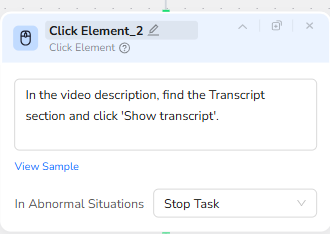
After confirming that the transcript section is visible, the Click Element_2 node interacts with the “Show transcript” area. Its instruction reads:
“In the video description, find the Transcript section and click 'Show transcript'.”
This opens the transcript popup or panel on the right side of the YouTube interface, exposing the full text of the video’s spoken content for extraction.
If this click fails, the workflow stops, signaling that transcript retrieval is not possible for this particular video.
Structured Full-Page Data Extraction
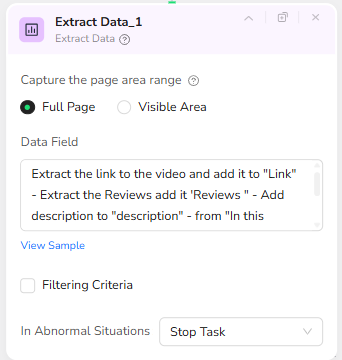
The final BrowserAct node, Extract Data_1, captures the relevant information from the fully prepared page. It is configured to operate on “Full Page” rather than only the visible area to ensure all necessary text—from description to transcript—is available.
The Data Field instruction can be written as a clear sequence of extraction tasks:
“Extract the link to the video and add it to ‘Link’.
Extract the Reviews and add them to ‘Reviews’.
Add the video description to ‘description’.
From the ‘In this video’ section on the right side of the page, extract the Video Transcript and add it to ‘Transcript’.”
This configuration produces a structured payload that includes:
Link – the canonical URL of the YouTube video
Reviews – key review or highlight text found on the page (if applicable)
description – the expanded video description text
Transcript – the full transcript text from the “In this video” transcript section
On error, the node is set to “Stop Task” so Make.com receives a clear failure and can handle it gracefully.
🤖 Part 2: Automation Integration with Make.com
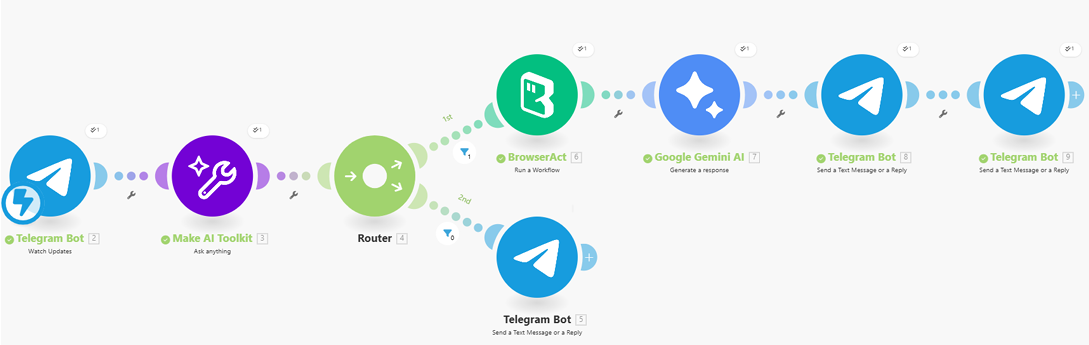
The Make.com scenario orchestrates the Telegram interaction, link validation, BrowserAct call, AI generation, and final message delivery. It routes valid links through the full BrowserAct + Gemini chain and gracefully handles invalid inputs.
Trigger: Telegram Bot Updates
The workflow begins with a Telegram Bot “Watch Updates” module, which listens for new messages sent to the bot. Whenever a user sends a message (for example, a YouTube URL), this module captures the chat ID and message text and passes both downstream to the AI validation step.
Input Validation with AI (Make AI Toolkit)
Next, the Make AI Toolkit (Ask anything) module analyzes the incoming message. Its prompt instructs the AI to inspect the message text and decide whether it contains a valid YouTube link.
The logic is:
If the message contains a valid YouTube link, extract that link and return it as the “Answer”.
If the message does not contain a valid video link, return “False” as the “Answer”.
This single AI call effectively normalizes user input, allowing people to send plain links or short messages containing links without requiring strict formatting.
Smart Routing: Valid vs. Invalid Links
A Router module splits the flow into two paths:
Valid Link Path
If the AI Answer is not “False”, the scenario proceeds to call the BrowserAct workflow and then Gemini.
Invalid Link Path
If the AI Answer equals “False” (case-insensitive), a Telegram Bot module immediately replies to the user with a friendly error message such as:
“The link is not Valid.”
This ensures the user quickly understands that they need to send a proper YouTube URL.
BrowserAct Integration: Run the Curator Workflow
On the valid link route, a BrowserAct “Run a Workflow” module is triggered. It is configured to:
Connection: the user’s BrowserAct account
Search Workflows From: “My Workflows”
Workflow: “Telegram Channel Curator Bot” (the BrowserAct workflow described in Part 1)
Input Parameters:
Target_link = {{3.answer}} – the validated YouTube link from the AI step
This node sends the YouTube URL into BrowserAct, waits for the automation to finish, and returns the structured output string that includes the link, description, reviews, and transcript.
AI Content Generation with Gemini
Once BrowserAct has produced its structured JSON output, a Gemini AI module (e.g., gemini-2.5-flash) transforms this raw data into a highly readable Telegram post.
The system instruction defines the tone and structure: an expert Social Media Content Curator specializing in AI and tech tools, generating a “scannable” and high-value post based on the provided JSON (Title, Transcript, Description, etc.).
Key goals include:
Hook the reader with a bold, catchy headline.
Summarize the value of the video in 1–2 sentences.
Provide a “Quick Look” section with Pros and Notes/Cons.
Offer a direct “Watch the Tutorial” link back to YouTube.
Formatting constraints are aligned with Telegram’s HTML parse mode:
Use only HTML tags supported by Telegram such as <b>, <i>, <a>, <code>, and <pre>.
Do not use Markdown syntax like ** or __.
Keep the output within a safe character limit suitable for captions or text messages.
The input to Gemini typically concatenates the BrowserAct output and the original link, for example:
“{BrowserAct_output_JSON} | Link : {YouTube_link}”
The Gemini result is a ready-to-send HTML string containing headline, summary, tools list, pros and cons, and a clickable YouTube link.
Publishing to the Telegram Channel
Next, a Telegram Bot “Send a Text Message or a Reply” module posts the curated message directly into a designated Telegram channel, such as @shoaywbs.
Configuration details include:
chatId = the target channel handle (for example, “@shoaywbs”)
text = the Gemini output
parseMode = “HTML” to interpret the formatting tags correctly
This ensures that the post appears in the channel with bold headings, emojis, and a clickable “Watch on YouTube” link, ready for subscribers to consume.
User Confirmation: It’s Done
To close the loop, another Telegram Bot module sends a confirmation back to the original user chat, using the chat ID from the first trigger.
It sends a simple message such as:
“It’s Done !”
This makes the experience feel responsive and clear: when the user sends a YouTube link, they receive feedback that the request has been processed and the curated post has been published.
🚀 Applicable Scenarios (Use Cases)
Content Curation for AI and Tech Channels
Channel owners or community managers can drop YouTube links into the bot and instantly generate polished, structured recommendation posts featuring pros, cons, tools used, and direct watch links.
Educational Playlists and Learning Communities
In knowledge-sharing Telegram groups, members can submit tutorial links, and the bot will create concise summaries and key takeaways, helping others decide which videos to watch.
Product and Tool Evaluation Feeds
For channels focusing on AI tools, SaaS platforms, or automation workflows, this system can quickly turn tutorial or review videos into standardized posts that highlight strengths, limitations, and setup complexity.
Competitive and Trend Monitoring
Teams can forward competitor videos to the bot and collect AI-generated assessments of how those videos position tools, processes, or workflows, making it easier to track trends over time.
By tying together Telegram, BrowserAct, Make.com, and Gemini AI, this Telegram Channel Curator Bot delivers an end-to-end pipeline from raw YouTube link to refined, channel-ready content with minimal manual effort.