
Steam Market Monitor
Published by
je
jett
December 19, 2025
Approx.Credits
75-100 Credits
Categories
BA
Real-time MonitoringContent CollectionPrice MonitorSteam
Template ID
67477202070936022

Brief
Detail
🎯Core Function: Steam Market Discount Monitor and Telegram Deals Bot
This workflow automatically visits the Steam store, collects the latest discounted games, compares them with an existing Google Sheets database, and only sends new or updated deals to a Telegram channel. It combines BrowserAct for intelligent web navigation, Make.com for orchestration and data routing, Gemini AI for reconciliation and message generation, and Google Sheets for long-term storage of all deals.
🧩 Part 1: BrowserAct Workflow Description
This core module controls the Steam website navigation and raw discount data extraction.
Start Node and Global Setup
The workflow begins with a Start node that configures the environment and parameters.
The global input parameter “Steam” is used as the target URL for the Steam store.
Website Auto-Login is enabled with stored credentials so the workflow can reuse an existing session if needed, without asking for credentials on every run.
The browser is configured to use a specific profile and region (for example Chrome, US), ensuring consistent page layout and pricing display across runs.

Visit Steam Storefront
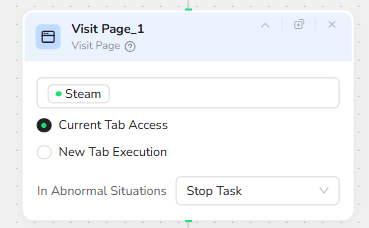
Next, a Visit Page node opens the Steam store based on the “Steam” parameter.
The node is configured to use Current Tab Access rather than opening a new tab, which keeps the run lightweight and easier to control.
Once the page is fully loaded, the workflow is ready to search for the discount content.
Scroll to the “Discounts & Events” Section
Because the discounts area is not always visible above the fold, the workflow uses a Scroll to Element node.
The instruction is to scroll to the “Discounts & Events” section, with a maximum of 10 scroll iterations.
This makes the automation robust to different screen sizes and minor layout shifts: it will scroll up to 10 screens until that section becomes visible, then stop.

Open the Full Discounts Page (“Browse More”)
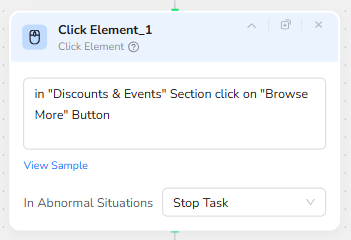
Once the discounts section is visible, a Click Element node is used to click the “Browse More” button inside the “Discounts & Events” area.
This interaction takes the bot from the homepage teaser block to the dedicated discounts listing page where many more discounted games are available.
Loop to Load More Games (Scroll and Show More)
On the main discounts page, Steam uses infinite scroll and “Show more” behavior to progressively load additional game cards.
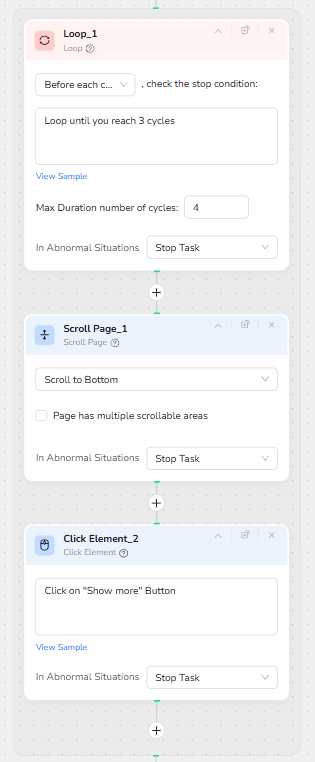
To capture a meaningful volume of deals, the workflow introduces a Loop block.
The Loop node is configured with:
Loop until you reach 3 cycles, with a maximum of 4 cycles allowed.
Within this loop, two actions are executed on each cycle:
- A Scroll Page node scrolls to the bottom of the discounts page. This triggers Steam’s lazy loading so more items are prepared.
- A Click Element node clicks on the “Show more” button, prompting Steam to append additional rows of discounted games to the page.
Repeating this sequence several times ensures that the automation sees many more deals than would be visible on the initial screen, while still keeping the run time bounded.
Full-Page Data Extraction of Discounted Games
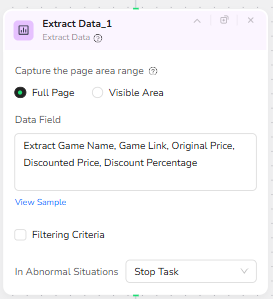
After the page has been expanded by the loop, a final Extract Data node captures the actual discount information.
The capture range is set to Full Page so that all loaded game cards are included.
The Data Field is configured to extract the following attributes for each game:
Game Name, Game Link, Original Price, Discounted Price, and Discount Percentage.
The result is a clean, structured dataset of current Steam discounts that can be passed directly into the Make.com scenario.
🎯 Part 2: Automation Integration with Make.com
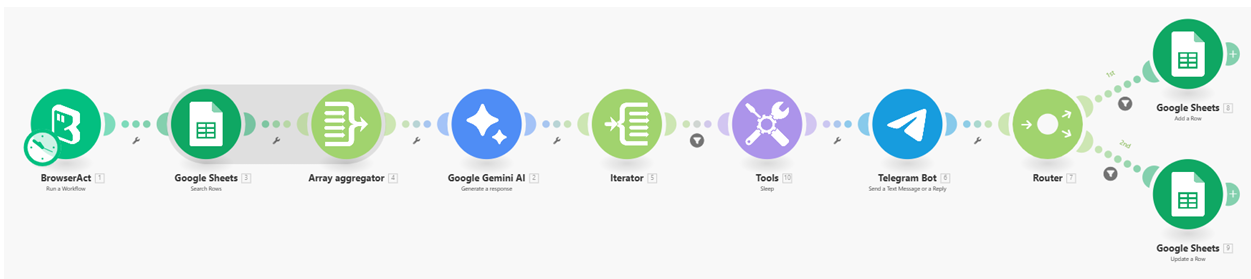
Once BrowserAct finishes extracting the discounted games, Make.com handles three things:
comparing data, generating formatted messages, and updating Google Sheets.
Data Retrieval and Preparation
The freshly scraped BrowserAct output is passed into Make.com.
A Google Sheets module loads the existing deal records so the system knows which games were previously captured.
Both datasets are then prepared into arrays for clean comparison.
AI-Based Comparison and Message Creation
A Gemini AI node receives the new deals together with the historical sheet data.
The AI determines whether each game is NEW, UPDATED, or unchanged.
For NEW and UPDATED games, Gemini produces a ready-to-send Telegram message in HTML format, along with structured metadata (discount, prices, link, row_number).
Sequential Processing and Rate Control
An Iterator processes each deal one by one.
A short Sleep delay is added before posting to avoid Telegram rate limits.
Telegram Delivery
For every NEW or UPDATED game, a Telegram Bot module posts the AI-formatted discount card to the selected channel.
Database Maintenance
A Router splits the flow:
NEW → Add a new row
UPDATE → Modify the existing row
Google Sheets modules write the corresponding data back into the database, ensuring it always reflects the latest Steam prices.
Result
Make.com transforms the BrowserAct output into a complete automated system:
it identifies changes, formats messages, sends them to Telegram, and maintains a clean historical record—without any manual work.
✨ Applicable Scenarios (Use Cases)
Personal Steam Deal Tracker: Automatically monitor your favorite games or general store discounts, receiving curated deal posts in a private Telegram channel without manually visiting Steam.
Gaming Community Discount Channel: Run this workflow on a schedule to power a public Telegram channel that continually surfaces new or improved Steam discounts, with no human moderator required.
Price Change Alerting: Use the UPDATE logic to focus on games whose discounts have changed, surfacing only improvements or major price shifts for a more signal-rich deal feed.
Historical Discount Database: Keep a long-term Google Sheets archive of all deals seen by the bot, enabling later analysis such as typical discount percentages, pricing trends, or seasonal promotion patterns.