
Shopify Price Scraper
Automatically extract Shopify product prices, sale prices, variants, and inventory status. Perfect for competitive pricing analysis, dynamic repricing, and market research with no coding required.
Published by
Ma
Maggie
February 04, 2026
Approx.Credits
55-100 Credits
Categories
BA
Competitor AnalysisShopify
Template ID
67451704330687446

Brief
What Does BrowserAct Shopify Price Scraper Do?
Shopify Price Scraper is an automated data extraction tool designed to collect comprehensive pricing and product information from Shopify-powered online stores. It systematically retrieves key product data including regular prices, discounted prices, product brands, and URLs without manual effort.
Unlike manual browsing or basic web scraping tools, this specialized scraper understands Shopify's store structure and can efficiently extract structured pricing data at scale - whether you need information from a single product, an entire category, or multiple competitor stores simultaneously.
Who Can Use Shopify Price Scraper?
- E-commerce Pricing Managers - Monitor competitor pricing strategies in real-time to adjust your own pricing for maximum competitiveness and profit margins
- Market Research Analysts - Collect pricing trends across product categories to identify market opportunities and optimal price positioning
- Dynamic Pricing Teams - Feed real-time competitor price data into repricing algorithms for automated competitive pricing strategies
- Retail Buyers - Compare wholesale costs against retail prices to evaluate supplier margins and negotiate better terms
How to Build a Reddit Scraper Workflow: Step by Step
Before You Begin
This example extracts pricing data from a Shopify product page
Feel free to adjust this to your needs!
1.Start Node
Parameter Settings
- Page_limit: The number of pages you want to extract is set to 2 by default.
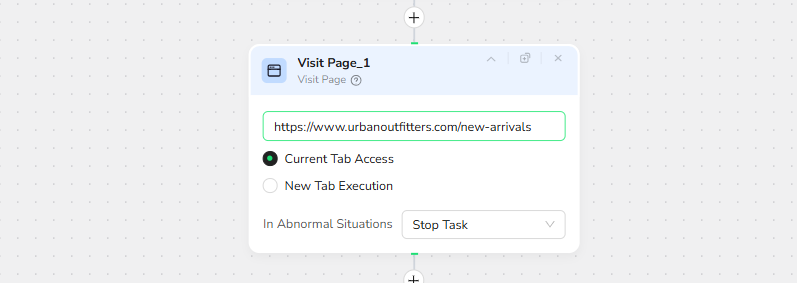
2.Add Visit Page
Navigate to https://www.urbanoutfitters.com/new-arrivals
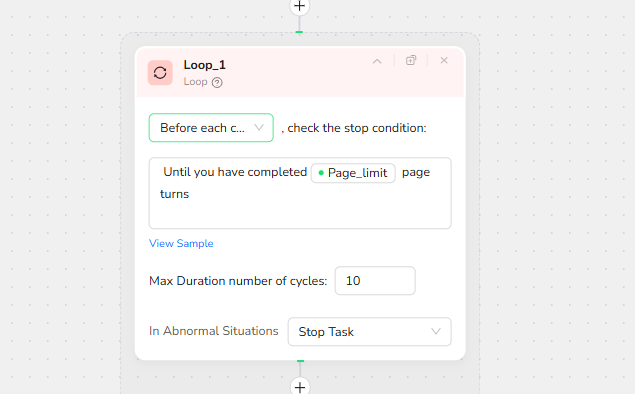
3.Add Loop Node
Stop condition: Until you have completed /Page_limit page turns
Max iterations: 10 (to handle products with multiple variants)
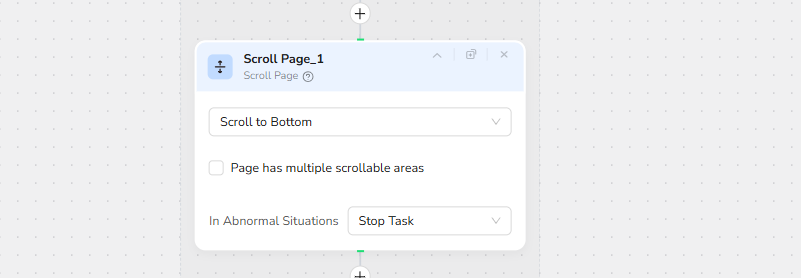
4.Scroll Page (for Pagination)
Select "Scroll to Bottom"
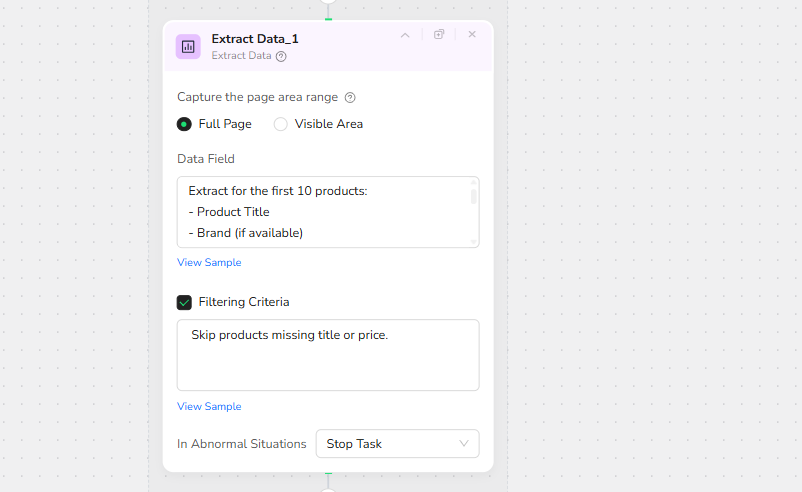
5.Extract Data
Select “Full Page”
Data fields to extract:
Extract for the current Page :
- Product Title
- Brand (if available)
- Current Price
- Original Price (if discounted)
- Product URL
- Image URL
- Remove any currency symbols and format prices as numbers only.
Filtering Criteria
- Skip products missing title or price.
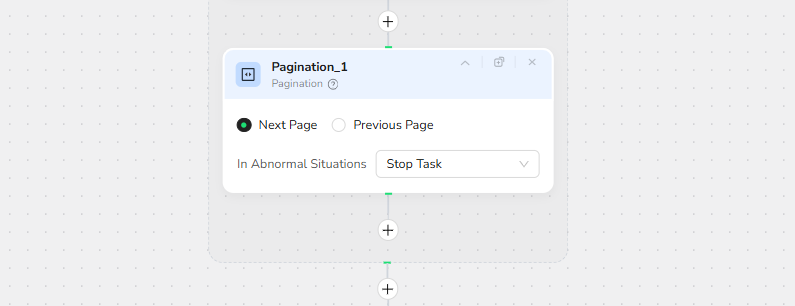
6.Pagination
Select pagination method:
- Next Page button (for product listing pages)
7.Output Data
The default output is in JSON format.Choose from multiple format options to suit your needs:
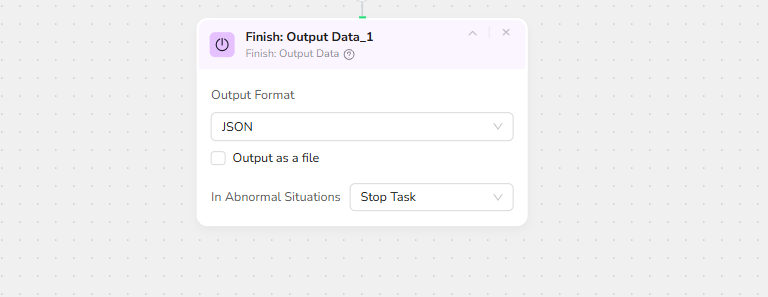
- JSON - Perfect for pricing APIs, database imports, and real-time price monitoring dashboards
- CSV - Ideal for Excel, Google Sheets, competitor price comparison matrices, and BI tools
- XML - Great for enterprise ERP systems and automated pricing feeds
- Markdown (MD) - Easy-to-read format for pricing reports and stakeholder presentations
Make.com /N8N Integration
BrowserAct is now available as a native app on Make.com/N8N - simply add it to your scenarios without complex API setup.
Key Features:
- Automated Price Monitoring: Schedule hourly, daily, or weekly price checks across multiple competitors
- Price Change Alerts: Receive instant Slack/email notifications when competitor prices drop below your threshold
- Historical Price Charts: Auto-generate Google Sheets dashboards with pricing trends and competitor benchmarks
- Repricing Recommendations: Get AI-powered suggestions on when to adjust your prices for maximum competitiveness
- Saves Time: Automate hours of manual price checking and spreadsheet updates
Advanced Use Cases:
Pricing Strategists - Daily competitor price digest with automated margin analysis and repricing recommendations
Inventory Managers - Real-time stock status monitoring to identify competitor out-of-stock opportunities
Marketing Teams - Correlation analysis between competitor discount campaigns and your own sales performance
Finance Teams - Automated profitability reports by comparing competitor prices against your cost basis
Need Help?
Contact us at:
💬 Discord: Discord Community
📧 E-mail: service@browseract.com