
Send Quora Home Page Updates to Telegram
Published by
je
jett
December 19, 2025
Approx.Credits
480-500 Credits
Categories
BA
Market IntelligenceContent CollectionSocial MediaQuora
Template ID
68684048244935397

Brief
🚀 Workflow Template: Quora Home Feed Updates to Telegram (with Optional Slack Alerts)
🎯 Core Function
This automation monitors the Quora home feed, extracts each post’s key content (text + up to two image URLs), optionally handles second-step verification with human assistance, and then sends clean, structured updates to Telegram. In the Make.com scenario, the BrowserAct output is parsed into JSON, iterated post-by-post, optionally rewritten/normalized by Gemini, and routed to either “Send Photo” or “Send Text” in Telegram. A separate Slack branch can be used for error notifications or internal logging.
Part 1: BrowserAct Workflow Description
- Start Node: Environment + Login Setup
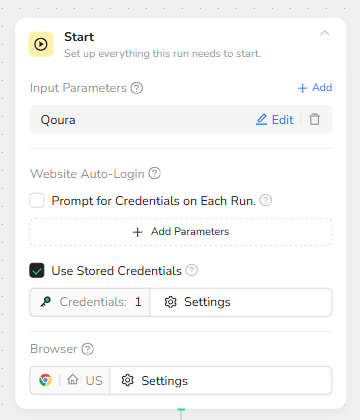
The workflow begins by defining what the run needs in order to start successfully: an input parameter for the target site (Quora) and a login strategy using saved credentials. The goal is to enter Quora in an authenticated state so the home feed content can be loaded reliably.
What this step is doing
It defines the Quora parameter as the target site context for later nodes.
It enables “Use Stored Credentials” so the workflow can log in without asking you every run.
If you enable “Prompt for Credentials on Each Run,” BrowserAct will ask you every time (not recommended for automation unless you rotate accounts often).
- Visit Page: Go to Quora and Login (Legacy Node)
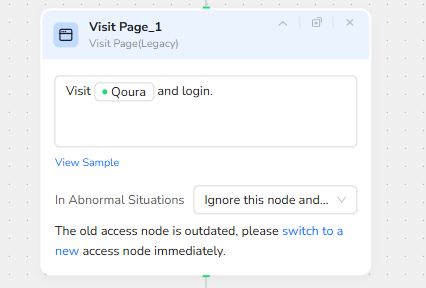
This node opens Quora and performs the login using the stored credentials. It is the entry point that should land you on a logged-in feed page.
Important note from the node itself
It shows this is a legacy access node and suggests switching to the newer access node. If your run frequently breaks after Quora UI changes, switching to the newer access node is usually the first upgrade to do.
- Condition: Detect Whether Second-Step Verification Is Required
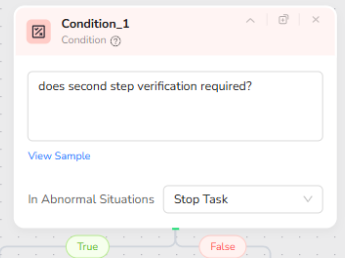
Quora can trigger additional verification (email code, device confirmation, etc.). This condition step checks if the page state indicates second-step verification is required. If true, it branches to Human Interaction so you can complete it manually. If false, it continues scraping normally.
Why this matters
This is the difference between a workflow that “sometimes works” and a workflow that is stable for real-world use.
Without this guardrail, your extractor and loop steps will fail because the page becomes a verification page, not a feed page.
- Human Interaction: Manual Verification Window
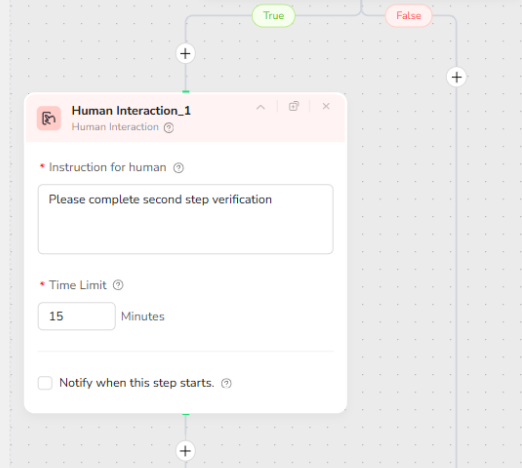
If the condition detects verification, this node pauses and tells you exactly what to do: complete the second-step verification. The time limit defines how long BrowserAct will wait before stopping or timing out.
Recommended usage
Set a realistic time limit (for example, 10 to 15 minutes).
Only use this branch when you expect occasional verification. If verification happens every run, your account or access environment needs to be stabilized.
- Loop List: Iterate Through the Post List and Avoid Duplicates
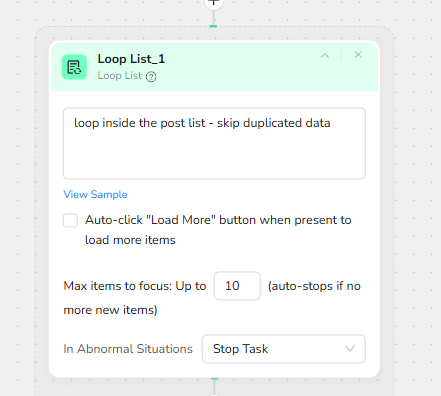
Once you are on the actual feed page, Loop List identifies the repeating “post container” elements and iterates through them. This is where you define “what counts as one post.”
Key settings shown
It loops inside the post list and is designed to skip duplicated data.
You can enable auto-click “Load More” when present to load more items.
The max items setting is set to up to 10, meaning it will focus on up to 10 posts per run.
Practical advice
Start with 5 to 10 items until everything is stable, then increase if needed.
If “list identification failed,” it usually means you are not on the feed page (you are on verification, an error page, or a different layout).
- Extract Data Item: Build a Clean Output for Each Post
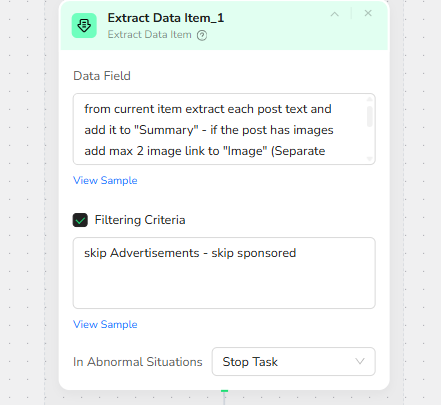
Inside each loop item, this extractor collects structured fields for downstream automation. Your instruction indicates the output should include:
Summary: the post text content (or main text)
Image: up to two image URLs if the post contains images (kept separate)
It also includes a filtering rule to skip advertisements or sponsored content.
Why this structure is important
Make.com needs consistent fields so the JSON parsing and routing are predictable.
Filtering ads prevents your Telegram channel from being polluted with irrelevant sponsored posts.
- Scroll Page: Advance to the Next Post (Legacy Node)
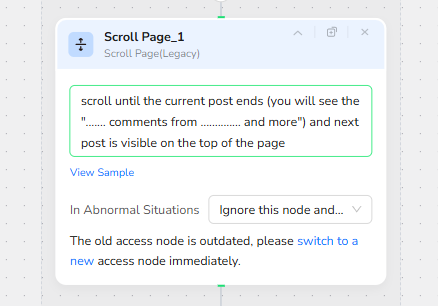
After extracting a post, this step scrolls until the current post ends. Your note references a specific UI marker like “... comments from … and more,” and requires the next post to be visible at the top of the page. This is a navigation tactic to ensure the loop progresses through the feed correctly.
Why this is needed
Feeds like Quora dynamically load content. If you don’t scroll properly, you may re-read the same post or never load the next posts in a stable way.
Again, the node warns it is legacy and suggests switching to a newer access node for better stability.
Expected Output of BrowserAct
At the end of the BrowserAct run, the workflow returns a structured result that includes a list/array of posts, where each post has fields like Summary, Image (one or more URLs), by (author when available), and Link (post URL when available). This becomes the input payload for Make.com.
🚀 Part 2: Automation Integration with Make.com
This Make.com scenario is responsible for orchestrating the data flow, AI processing, and message delivery after BrowserAct completes the scraping task.
Workflow Overview
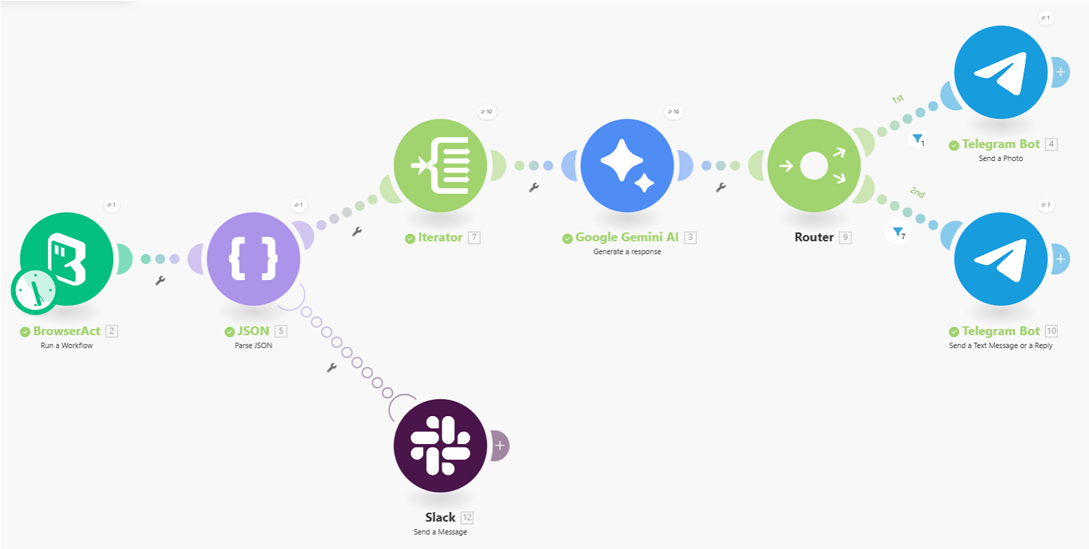
The scenario starts by receiving the raw JSON output generated by the BrowserAct workflow. This output contains a list of extracted Quora posts.
JSON Parsing
The JSON module parses the raw response into a structured format, making each post’s content, image, author, and link accessible to downstream modules.
Item Iteration
An Iterator processes the parsed results one post at a time. This ensures each Quora post is handled independently and avoids mixing data between items.
AI Content Formatting
Each individual post is sent to the Google Gemini AI module. The AI standardizes the content into a clean JSON structure, deciding whether the output should be treated as text-only or image-based content.
Conditional Routing
A Router evaluates the AI output and directs the flow based on the content type:
- Posts with images are routed to a “Send Photo” Telegram module.
- Text-only posts are routed to a “Send Message” Telegram module.
Message Delivery
The final formatted content is delivered to Telegram, ensuring each post is sent in the most appropriate format for readability.
✨ Applicable Scenarios (Use Cases)
Competitor Content Monitoring
Automatically track Quora home feed discussions related to competitors or key topics, and push summarized updates to Telegram for fast internal review.
Trend & Topic Discovery
Continuously collect high-engagement Quora posts and use AI to normalize the content, helping teams identify emerging questions, themes, and user interests.
Community Insight Feeds
Build a private Telegram channel that mirrors curated Quora discussions, allowing founders, marketers, or researchers to stay informed without manually browsing.
AI-Assisted Content Curation
Leverage Gemini AI to clean, structure, and format raw Quora posts into readable updates, reducing noise and improving signal quality.
Lightweight Research Automation
Use the workflow as a low-maintenance research assistant that periodically delivers fresh discussion content without manual scraping or copy-pasting.