
Review Consensus Article Builder
Published by
je
jett
January 13, 2026
Approx.Credits
55-100 Credits
Categories
BA
Market IntelligenceReviewsBusiness AnalyticsProduct InfoReddit
Template ID
66946893998983894

Brief
✨ Detail
🎯 Core Function: Review Consensus Article Builder
This workflow is designed for content teams, affiliate marketers, and product reviewers who want to turn raw web sentiment into long-form, WordPress-ready product review articles with almost no manual work. It combines BrowserAct to scrape Google, Reddit, and Amazon, Make.com to orchestrate batch processing from a Google Sheet list, and Gemini AI to transform the extracted JSON into an HTML review article that can be stored and published automatically.
🧩 Part 1: BrowserAct Workflow Description
This core BrowserAct module handles the live web research for each product. Given a single Product_Name, it navigates across Google, Reddit, and Amazon, then outputs structured JSON fields that Make and Gemini can consume.
Global Input Parameters
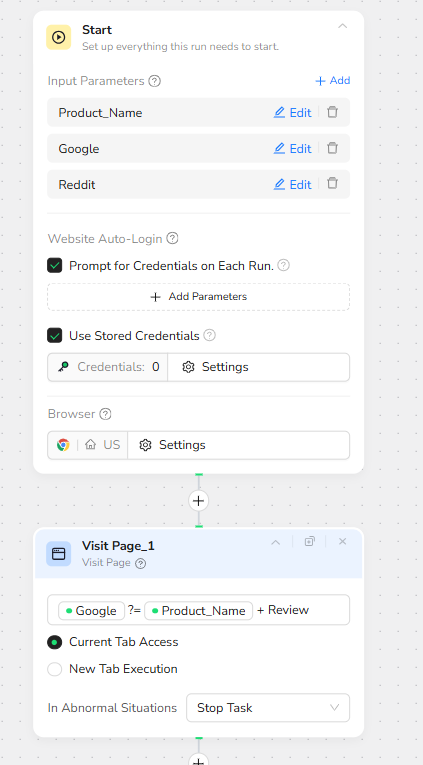
The workflow is driven by a global input parameter set:
Product_Name – the only required input, used in all search queries.
Google – optional, reserved for future overrides of the default Google entry point.
Reddit – optional, reserved for future overrides of the default Reddit entry point.
The Start node is configured to prompt for credentials when needed and to reuse stored browser credentials. This ensures that any region or account-specific settings are preserved, while still allowing secure logins when sites require authentication.
Google Research: AI-Enhanced Overview and References
To build a broad understanding of the product, the workflow first visits Google and issues a review-focused query. The Visit Page node opens Google with a search string equivalent to:
Product_Name + Review
The browser operates in the current tab to keep the navigation linear and predictable.
Immediately after loading the results, a Click Element node targets the “AI Mode” button on the Google interface. This step opens the AI summary or enhanced results panel, which often aggregates key pros, cons, and referenced websites into a single, highly scannable view.
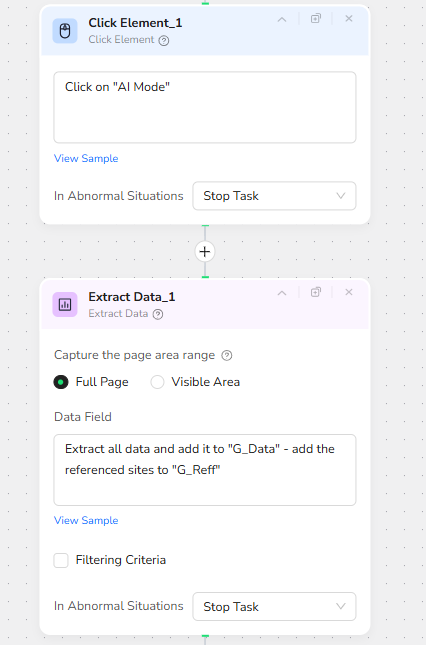
Once AI Mode is active, Extract Data_1 captures the full page. The Data Field configuration instructs BrowserAct to:
Extract all available content into a field named G_Data.
Collect all referenced or cited websites into a separate field named G_Reff.
G_Data becomes the high-level, blended viewpoint from search results and AI summaries, while G_Reff provides a clean list of external sources that can later be used for credibility, citations, or cross-checking.
Reddit Deep Dive: Real-World Discussions and Pain Points
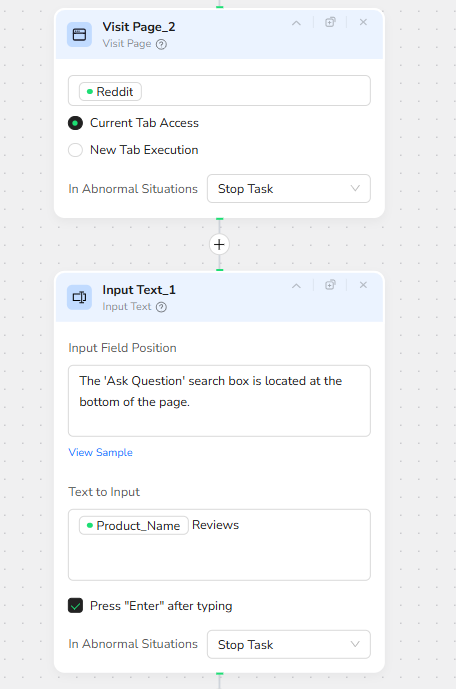
After capturing the Google layer, the workflow navigates to Reddit to mine genuine user conversations. Visit Page_2 opens Reddit in the same browser tab, using the default homepage or a region-specific entry.
The next node, Input Text_1, is designed around the layout of the Reddit page. It targets the “Ask Question” or search input field, described in the configuration as being located at the bottom of the page. The text it types is:
Product_Name Reviews
The node is configured to press Enter automatically after typing, triggering Reddit’s internal search or query submission and loading results that are tightly focused on review-style content.
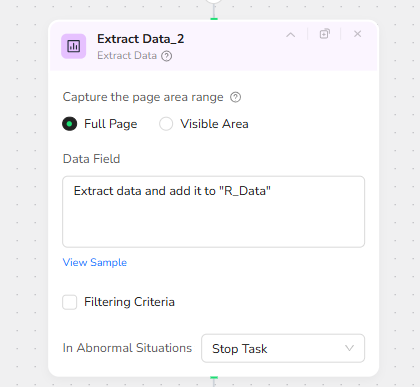
Once the results are visible, Extract Data_2 again captures the full page. The Data Field maps this content into a dedicated field:
R_Data – a structured representation of Reddit posts, comments, and discussion snippets related to the product.
This Reddit layer tends to surface authentic sentiment: complaints about sizing, quality issues, longevity, or surprising strengths that may not appear in polished marketing copy.
Amazon Product Detail and Review Harvesting
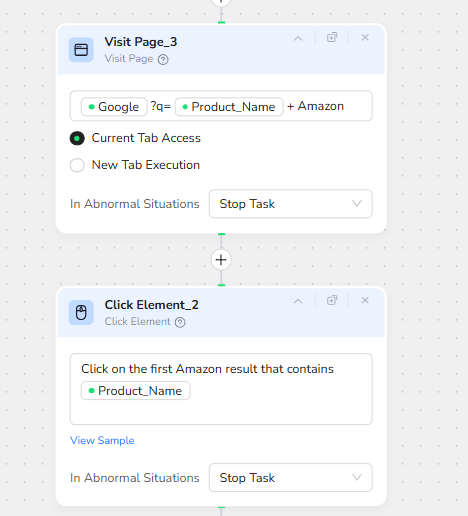
Next, the workflow moves into conversion and purchase territory by analyzing Amazon. Visit Page_3 opens Google again, this time with a query equivalent to:
Product_Name + Amazon
This indirection through Google is intentional: it allows the bot to land on the correct local Amazon domain (for example .com, .co.uk, .de) and to prioritize the most relevant product page.
Click Element_2 scans the search results and clicks on the first Amazon result that contains the Product_Name. This typically leads either directly to a product detail page or to an Amazon search/listing page featuring multiple related items.
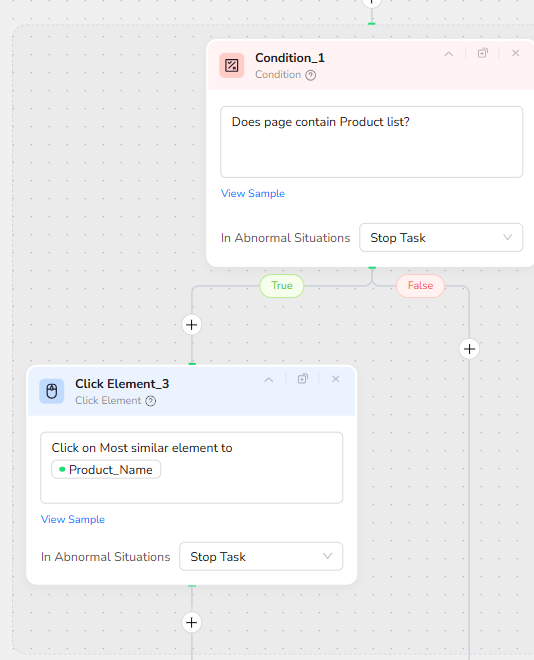
To handle both scenarios reliably, the workflow introduces a conditional decision step. Condition_1 evaluates whether the current page appears to contain a product list (for example multiple product tiles or cards).
If the condition is true, Click Element_3 is triggered. This node finds the item whose text is most similar to Product_Name and clicks it, drilling into the specific product detail page. If the condition is false, the workflow assumes it is already on the correct detail page and continues.
Finally, Extract Data_3 is used on the Amazon product page. With Full Page capture enabled, its Data Field configuration splits the content into two structured outputs:
Product details – a rich block of product specifications, marketing bullet points, and descriptive copy.
Reviews – user review content including star ratings, titles, and review text.
These two fields give the later AI stage enough signal to reason about build quality, durability, sizing experiences, common complaints, and standout strengths from actual purchasers.

By the end of the BrowserAct workflow, all relevant perspectives are consolidated into a single JSON bundle, typically including G_Data, G_Reff, R_Data, Product details, and Reviews. This JSON is handed back to Make.com for orchestration and article generation.
🚀 Part 2: Automation Integration with Make.com
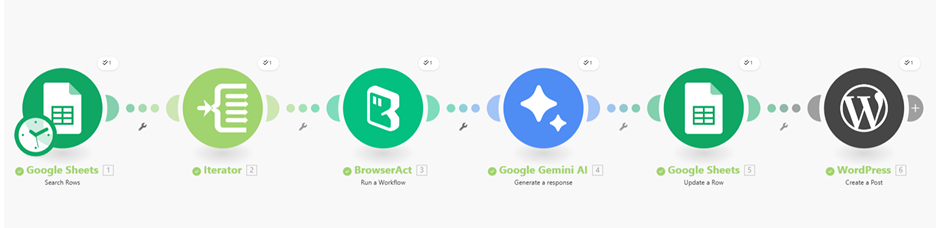
The Make.com scenario turns the BrowserAct research engine into a fully-automated content pipeline, capable of processing dozens or hundreds of products from a simple Google Sheet.
Trigger and Batch Execution via Google Sheets
The scenario starts with a Google Sheets module that reads rows from a central “Product Article Builder” spreadsheet. Each row contains at least one key field:
Product Name – the input that will be forwarded to BrowserAct.
With headers enabled, Make can iterate cleanly from the second row downward, treating each product as a separate job. An Iterator module then loops through all returned rows, ensuring that the downstream steps run once per product without any manual intervention.
Live Web Research with BrowserAct
For every product in the sheet, the Iterator passes Product_Name to the BrowserAct module configured with the “Review Consensus Article Builder” workflow ID. The Make module simply injects the Product_Name as a workflow input parameter; BrowserAct does the heavy lifting described in Part 1 and returns a JSON payload containing all the scraped and structured data from Google, Reddit, and Amazon.
This design keeps the Make scenario clean: it does not need to know any of the browser details, selectors, or navigation quirks. Its only responsibility is to pass in the product name and receive the normalized output.
AI-Powered Article Generation with Gemini
The next stage in the Make scenario is the Gemini AI module. It is configured with a detailed system prompt that explains the reviewer persona (seasoned e-commerce critic and fashion editor) and the expected HTML article structure.
The JSON returned by BrowserAct (G_Data, G_Reff, R_Data, Product details, Reviews, and related fields) is sent as the user content. Gemini is instructed to:
Synthesize information across all sources rather than just repeat numbers.
Address discrepancies between Amazon star ratings and external skepticism (for example Fakespot grades or negative Reddit sentiment).
Analyze fit, sizing, material quality, durability, and common complaints such as pilling, thin fabric, or shallow pockets.
Return output as raw HTML only, using tags like h1, h2, p, ul, li, blockquote, and hr, ready to be pasted into the WordPress HTML editor.
The result is a long-form, well-structured article that feels like a professional, human-edited review while still being generated automatically.
Structured Storage Back into Google Sheets
Once Gemini produces the HTML, a second Google Sheets module updates the original row for that product. The Product Name column remains unchanged, while a dedicated Article column is filled with the generated HTML content.
This means the spreadsheet becomes a master index of products and their associated review articles. The sheet can be used for auditing, manual edits, quick copying, or downstream integrations such as newsletter generation or CMS imports.
Automated Publishing to WordPress
The final step in the Make scenario is a WordPress “Create Post” module. It takes two primary inputs:
Title – usually mapped to Product_Name with a suffix like “Critics” or “Review”, ensuring SEO-friendly, descriptive post titles.
Content – the full HTML article produced by Gemini.
By posting directly to WordPress as a standard post type, the workflow can either publish live content immediately or create drafts for later human review, depending on how the status field is configured. Categories, tags, and featured images can be added as future extensions.
✨ Applicable Scenarios (Use Cases)
Product Review Websites at Scale:
Owners of affiliate or review sites can maintain a simple Google Sheet of product names. The workflow automatically researches each product, generates an in-depth consensus review, and publishes it as a WordPress article, turning a small editorial team into a high-output content engine.
E-commerce Brand Intelligence:
Internal marketing or product teams can use the system to continuously monitor how their own products are perceived across Google, Reddit, and Amazon. The generated articles double as internal “sentiment reports”, summarizing strengths, weaknesses, and recurring customer complaints.
Competitor Benchmarking:
By feeding competitor product names into the sheet, companies can quickly generate side-by-side review articles that highlight where rivals are praised or criticized. This can inform positioning, messaging, and product roadmap decisions.
Niche Research and Buying Guides:
For bloggers or creators building niche buying guides (for example “Best Budget Hoodies” or “Top Wireless Earbuds for Commuters”), the workflow can rapidly produce detailed product pages. These pages become the building blocks for comparison lists, round-ups, and curated recommendation posts.
Agency and Freelancer Operations:
Content agencies and freelance writers can use this pipeline as an internal research assistant. Instead of manually browsing multiple sites for every new product brief, they receive a pre-structured article draft with citations and sentiment already synthesized, allowing them to focus on brand voice and refinement.
Across all these scenarios, the Review Consensus Article Builder turns what used to be hours of manual research and writing into a repeatable, automated process—anchored in real user data and optimized for fast publication.