
Movie Critics Builder - Rotten Tomatoes
Published by
je
jett
January 05, 2026
Approx.Credits
125-150 Credits
Categories
BA
ReviewsContent CollectionRotten Tomatoes
Template ID
67634575609701078

Brief
Detail
🎬Core Function: Automated Movie Critics Article Builder (Rotten Tomatoes + Google Images + AI HTML Writer)
This workflow is designed for content teams, entertainment bloggers, and SEO writers who want to automatically generate long-form movie review articles. It combines BrowserAct to scrape Rotten Tomatoes and Google Images, Make.com to orchestrate batch processing from a Google Sheet of movies, and Gemini AI to synthesize critic reviews into a polished HTML article, finally storing the result back into Google Sheets for easy publishing or export.
🎯 Part 1: BrowserAct Workflow Description
Dynamic Movie Input Parameters
The BrowserAct workflow is built around a flexible Start node with four input parameters: Rotten_Tomatoes (the base URL of Rotten Tomatoes), Movie (movie title), Year (production year), and Google_Images (Google Images search endpoint). By defining these as global inputs, the same workflow can be reused across many movies. Make.com or another orchestrator only needs to swap these values to generate articles for different titles.

Google Images Search for Visual Assets
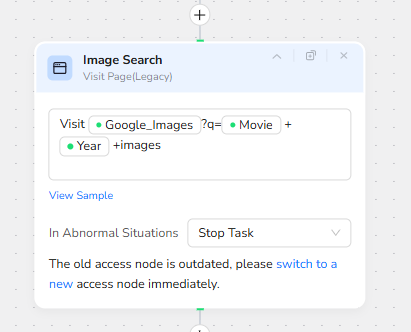
To provide rich visuals for the final article, the workflow begins by visiting Google Images. The Visit Page node constructs a dynamic search URL using the Google_Images base parameter, then appends a query composed of the Movie name, the Year, and the keyword “images”. This ensures the search focuses on the right movie and time period, surfacing posters, stills, or promotional art relevant to that specific release.
High-Quality Image Extraction with Filtering
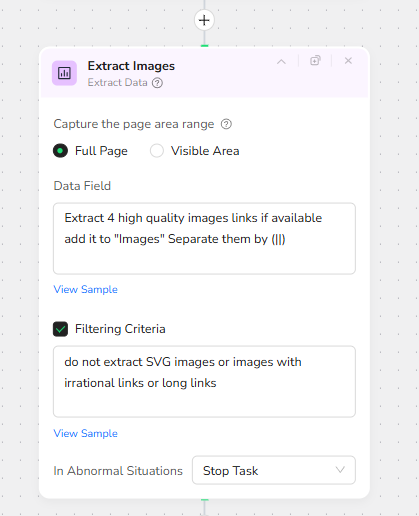
Next, an Extract Data node runs over the Google Images results. It is configured to capture the full page and extract up to four high quality image links. All collected image URLs are added to an “Images” field and concatenated using a double-pipe separator for easy parsing downstream. A Filtering Criteria rule is applied to avoid noisy or unusable links: SVG images and any irrational or overly long URLs are skipped. This keeps the image set clean, stable, and safe for embedding in articles.
Navigating to Rotten Tomatoes Search Results
After gathering visuals, the workflow switches context to Rotten Tomatoes. A Visit Page node uses the Rotten_Tomatoes input parameter and dynamically appends the path and query string “/search?search=Movie Year”. This builds a valid Rotten Tomatoes search URL combining the movie title and year so that the search results page is tightly scoped to the correct movie, even when there are remakes or multiple adaptations with similar names.

Clicking the Correct Movie Result
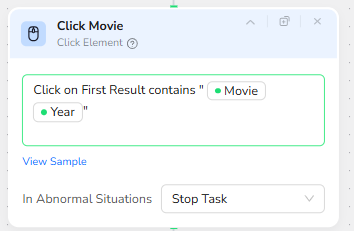
Once the search results load, a Click Element node is responsible for drilling into the correct movie page. It is configured to click on the first search result whose text contains both the Movie title and the Year. This text-based condition acts as a simple but effective disambiguation strategy: among many possible search results, the one that matches title plus year is usually the exact movie page that should be reviewed.
Extracting Structured “Movie Info” Data
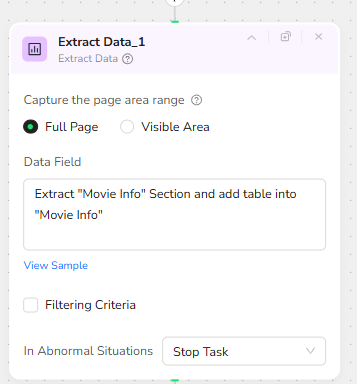
With the individual movie page open, the next Extract Data node targets the “Movie Info” section. It captures key metadata such as title, production year, cast list, Tomatometer score, and poster URL, and stores this as a structured table into a “Movie Info” object. This structured dataset is critical for AI: it feeds the later Gemini prompt with factual details that can be trusted and reused in the HTML article, especially for info boxes, sidebars, and SEO-friendly summaries.
Expanding the Critics Reviews Section
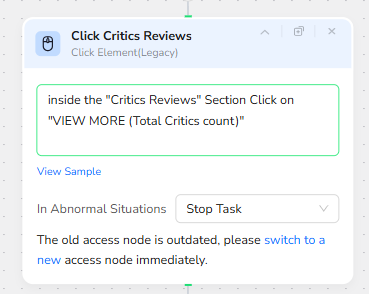
To build a critic consensus article, the workflow must go beyond a single rating. A Click Element node focuses on the Critics Reviews area of the page and presses the “VIEW MORE (Total Critics count)” button. This expands the full critics list instead of only relying on the default truncated set, ensuring that the downstream analysis is based on a more complete collection of professional reviews.
Looping Through Individual Critics Reviews
A Loop List node is then used to iterate through the critics reviews list. It loops inside the visible review cards and can be configured with a maximum number of items to focus on (for example, five reviews), auto-stopping when no more new items are found. This prevents infinite scrolling and keeps the dataset at a manageable size while still representing a diverse range of critic opinions.

Opening Each Full Review Page
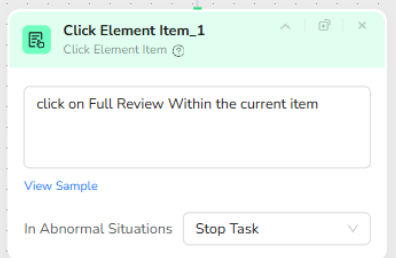
Inside the loop, a Click Element Item node acts on each individual list item. For the current review card, it clicks on the “Full Review” link or button, navigating to the critic’s full article or the detailed review page. This allows the workflow to access the complete text of each review instead of only the short blurb shown in the Rotten Tomatoes list.
Extracting Critics Links and Full Review Text
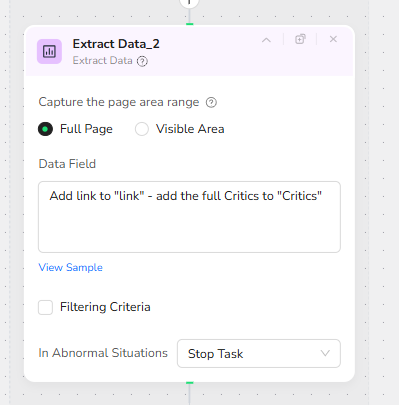
Finally, an Extract Data node runs on each full review page opened during the loop. It adds the review page URL into a “link” field and extracts the entire critic review text into a “Critics” collection. Over the loop’s iterations, the workflow accumulates an array of objects that pair source links with full review content. Together with the Movie Info and Images, this creates a rich JSON payload containing everything needed to synthesize a long-form article.
At the end of the BrowserAct workflow, all three components—Images, Movie Info, and Critics—are combined into a single JSON object. This object becomes the structured input to the automation layer and the Gemini AI model.
✨ Part 2: Automation Integration with Make.com
End-to-End Scenario Overview
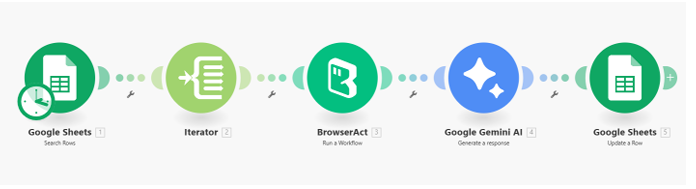
The Make.com scenario handles batch execution, orchestration, and data persistence. It chains together Google Sheets, an Iterator, BrowserAct, Google Gemini AI, and Google Sheets again, creating a loop that can generate articles for an entire movie list with minimal manual effort.
Trigger and Movie List Intake
The scenario is typically triggered with a Google Sheets “Search Rows” module that reads from a spreadsheet containing a list of movies to process. Each row might include columns such as Movie Name (A), Production Year (B), and a placeholder column for Article HTML (C). This sheet acts as the central task list, controlling which movies are queued for article generation.
Row-by-Row Processing via Iterator
An Iterator module takes the batch of rows returned from the spreadsheet and breaks them into individual items. Each movie row becomes a separate execution path: the Movie and Year fields are mapped into the BrowserAct input parameters, while other fields such as row number are preserved for later updates. This is where the process scales: dozens or hundreds of movies can be dispatched to BrowserAct in sequence.
Calling BrowserAct to Scrape Movie and Critics Data
For each iterated row, a BrowserAct module invokes the “Movie Critics Builder – Rotten Tomatoes” workflow. The module maps the Movie, Year, Rotten_Tomatoes base URL, and Google_Images endpoint into the BrowserAct input parameters. Once executed, BrowserAct returns a structured JSON payload containing the Images array, Movie Info object, and Critics review list for that specific movie.
AI Article Generation with Gemini
The JSON payload from BrowserAct is then passed to a Google Gemini AI module. A carefully crafted system prompt instructs Gemini to behave as an expert web content creator and movie critic, taking the structured data (images, movie metadata, and multiple critic reviews) and synthesizing a single comprehensive HTML article. The prompt specifies strict formatting requirements: an engaging introduction, a Movie Details info box with poster, cast, year, and Tomatometer, subheadings such as “What Critics Are Saying” and “The Verdict”, embedded images with alt text, blockquote-based pull-quotes with citations, and an optional “Related Movies” section derived from other entries in the Movie Info list. The output is a fully formed HTML string ready to be pasted into a WordPress HTML editor.
Writing the HTML Article Back into Google Sheets
Finally, a Google Sheets “Update a Row” module writes the results back to the source spreadsheet. Using the stored row number from the iterator, the module updates the corresponding row’s columns: Movie Name (A) and Production Year (B) are preserved, while the Article HTML (C) column is populated with the Gemini result. Additional columns can be reserved for debugging, status flags, or export markers if needed. At this point, each movie in the sheet has a complete, AI-written review article linked to it.
🎨 Applicable Scenarios (Use Cases)
Editorial Content Automation for Movie Blogs
Online movie magazines and blogs can use this workflow to automatically generate first drafts of long-form reviews for new releases. Editors simply maintain a spreadsheet of upcoming titles, then let the system harvest critics’ perspectives and assemble structured HTML articles that can be lightly edited and published.
SEO-Optimized Review Libraries for Entertainment Sites
Streaming aggregators, cinema chains, or entertainment portals can build large libraries of review pages at scale. By combining structured Movie Info with critic consensus and multiple images, each generated article is both informative to readers and rich in SEO signals such as headings, alt text, and internal structure.
Competitive Critical Reception Tracking
Studios, distributors, and marketing teams can use the workflow as a monitoring tool. By periodically rerunning it on the same titles, they can track how critical sentiment evolves, compare reviews across different critics, and mine pull-quotes for use in trailers or promotional materials.
Research and Academic Analysis of Film Criticism
Researchers and film students can automate the collection and synthesis of critics’ writings on specific movies or themes. The structured JSON output from BrowserAct can be stored for quantitative analysis, while the HTML articles provide an accessible narrative summary derived from multiple sources.