
Forex Watchdog
Published by
je
jett
January 27, 2026
Approx.Credits
25-50 Credits
Categories
BA
Real-time MonitoringMarket IntelligenceFinancial DataYahoo Fiance
Template ID
67448222131425750

Brief
📈 Detail
🎯 Core Function: Automated Forex & Stock Market Snapshot for Telegram
This workflow is designed for traders, analysts, and finance enthusiasts who want an always-up-to-date snapshot of the global markets delivered straight into Telegram. It combines BrowserAct to scrape live data from forex and stock pages, Make.com to orchestrate the scheduling and message flow, and Gemini AI to convert raw JSON into a clean, card-style HTML summary that looks great inside Telegram chats.
🤖 Part 1: BrowserAct Workflow Description
This core module handles the live navigation and structured data extraction from two different pages: a forex rates page and a stock market page. The result is a clean JSON object containing Name, Price, and Change% for all tracked instruments.
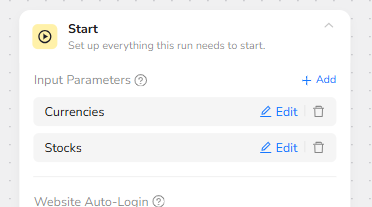
Start Node – Market Inputs and Credentials
The workflow begins with a Start node that defines two logical input parameters: Currencies and Stocks. In the default configuration, you do not need to type anything into these fields; each parameter is already wired to the correct target website inside the workflow.
The node is set to use stored credentials and a predefined browser profile, so any required cookies, session data, or login flows are handled automatically. Prompt for Credentials can be enabled when the target sites require fresh login on each run, but in most cases the stored credentials are enough.
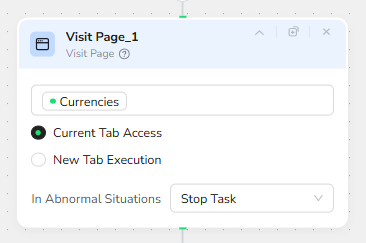
Visit Page_1 – Open the Forex Data Page
The next step is Visit Page_1, which uses the Currencies parameter as its URL source. Instead of opening a brand-new tab, the node runs with Current Tab Access, keeping the entire journey in a single browser context. This reduces overhead and ensures that cookies, localization settings, and credentials remain consistent across subsequent steps.
When this node finishes, the browser is positioned on the live forex rates page, ready for structured scraping.
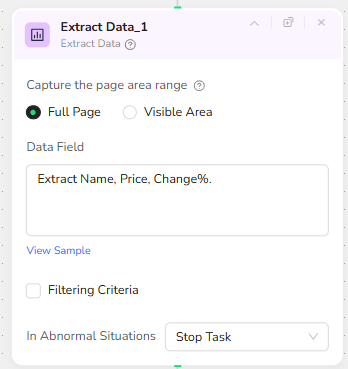
Extract Data_1 – Capture Forex Name, Price, and Change%
Once the forex page is loaded, Extract Data_1 runs a full-page extraction. The Capture the page area range setting is configured to Full Page, so the agent can scan the entire DOM and identify all relevant rows in the rate table.
The Data Field prompt explicitly instructs the agent to “Extract Name, Price, Change%.” This tells BrowserAct to detect each instrument’s label (for example, “EUR/USD”), its latest traded price, and the percentage change over the selected period. The result is a structured JSON array of forex instruments, which will later be merged with stock data.
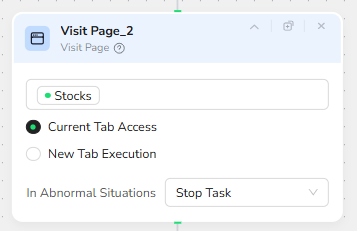
Visit Page_2 – Switch to the Stock Market Page
After finishing the forex extraction, the workflow reuses the same browser tab to navigate to the stock market page. Visit Page_2 uses the Stocks parameter as its URL source, again using Current Tab Access.
This sequential design ensures that both forex and stock data are captured within one continuous browsing session, avoiding multiple logins or scattered browser contexts.
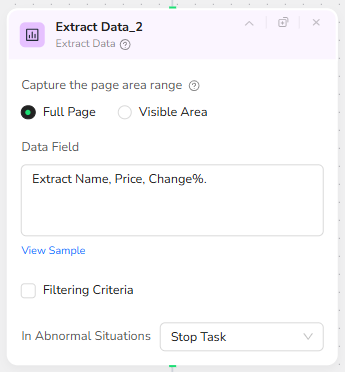
Extract Data_2 – Capture Stock Name, Price, and Change%
On the stock market page, Extract Data_2 repeats the same extraction pattern. It uses Full Page scanning and the same Data Field instruction: “Extract Name, Price, Change%.”
Because the extraction logic is consistent across both pages, the output for stocks mirrors the forex structure. This makes it trivial for downstream automation to group instruments by type while keeping a unified schema.
At the end of the BrowserAct workflow, the forex and stock arrays are bundled into a single JSON payload. This combined object is exposed to Make.com as the workflow’s output, ready for AI formatting.
🌐Part 2: Automation Integration with Make.com
The Make.com scenario glues everything together: it schedules BrowserAct runs, invokes Gemini AI to format the message, and finally pushes the result into Telegram.
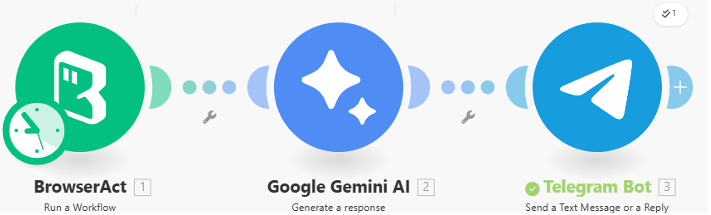
BrowserAct Node – Scheduled Market Data Fetch
In Make.com, the first module is a BrowserAct “Run a Workflow” node that calls the Forex Watchdog BrowserAct workflow by its ID. This node can be triggered on a fixed schedule (for example, every 15 minutes or every market open/close), ensuring that each run fetches fresh forex and stock data.
The input parameters Currencies and Stocks are left blank in Make as well, so the BrowserAct workflow uses its internal default URLs. The Timeout is configured generously to allow the two page visits and extractions to complete even under slower network conditions.
Gemini AI Node – Card-Style Telegram Formatter
The BrowserAct node returns the combined JSON string, which is passed directly into a Gemini AI “Generate a Response” module. The system prompt instructs Gemini to act as a Telegram Data Formatter and to convert the raw JSON into a card-style message.
Inside the prompt, Gemini is told to:
• Group any instrument whose name contains “/” under a “💱 FOREX” section, and all others under “🏢 STOCKS”.
• Wrap both Price and Change% in <code> tags to create a grey “box” effect in Telegram.
• Insert a separator line “──────────────” between each item.
• Use trend icons (🟢, 🔴, ⚪) to visually indicate positive, negative, or neutral movements.
• Respect Telegram’s 4096-character limit by counting as it generates, always fully completing the FOREX section and trimming from the bottom of the STOCKS section if necessary.
The result is a clean, HTML-formatted snapshot that looks like a professional dashboard when rendered in Telegram.
Telegram Bot Node – Deliver the Market Snapshot
The final module is a Telegram Bot “Send a Text Message or a Reply” node. It sends Gemini’s HTML output to a predefined channel, group, or private chat ID, with Parse Mode set to HTML.
Because the message uses only allowed tags (<b> and <code>), it renders reliably on both mobile and desktop Telegram clients. Each run of the scenario posts a fresh MARKET SNAPSHOT card, giving subscribers a near real-time view of forex and stock movements without ever opening a browser.
✨ Applicable Scenarios (Use Cases)
• Real-Time Market Monitoring: Retail traders can subscribe to the bot in Telegram to receive scheduled market snapshots before their trading sessions, during key market hours, or around important economic events.
• Multi-Asset Watchlist for Teams: Trading desks or investment clubs can configure the bot to post into a shared Telegram group, ensuring everyone has the same forex and stock context before making decisions or discussing strategies.
• Morning Briefings and Closing Reports: Portfolio managers can run the scenario at market open and close to automatically generate “Opening Bell” and “Closing Summary” messages that summarize intraday moves.
• Education and Demo Accounts: Educators or brokers can use the bot in demo groups to teach new traders how to read forex and stock movements, using the consistent card format as a visual teaching aid.
• Lightweight Market Intelligence for Non-Specialists: Product managers, executives, or sales teams who need quick market awareness can follow the bot instead of logging into complex terminals, getting an at-a-glance view of key instruments directly in their everyday chat app.