
Digital Content Automation (DCA) for Timely News
Published by
je
jett
December 19, 2025
Approx.Credits
50-100 Credits
Categories
BA
Competitor AnalysisReal-time MonitoringData ProcessingMarket IntelligenceForbes
Template ID
66943517489891542

Brief
🎯 Core Function: Intelligent News Collection, Enrichment, and Delivery
This workflow automates the process of collecting fresh news articles from a target media site (e.g., Forbes Innovation), transforming the raw page into structured JSON, enriching each article with AI-generated analysis via Google Gemini, and finally delivering tailored summaries to Telegram. It combines BrowserAct for robust web navigation and data extraction, and Make.com for orchestration, AI calls, and multi-channel delivery.
🧩 Part 1: BrowserAct Workflow Description
Dynamic Input Parameters
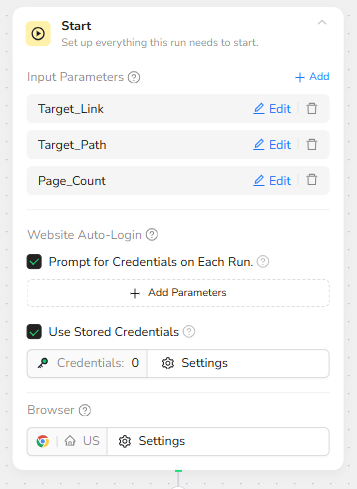
The BrowserAct workflow is built around three global input parameters so that Make.com can fully control what gets scraped on each run:
• Target_Link – the base URL of the news website (for example, https://www.forbes.com).
• Target_Path – the relative path of the category page (for example, innovation).
• Page_Count – the number of pagination loops or “load more” cycles to execute.
At runtime, Make passes these values into the Start node, which makes the BrowserAct workflow reusable for different sections or even different sites, simply by changing the parameters in Google Sheets.
Category Page Navigation
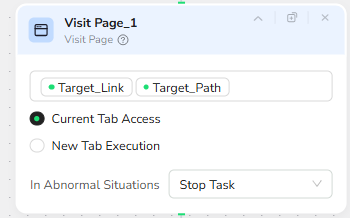
The Visit Page node concatenates Target_Link and Target_Path to construct the full category URL. This ensures the automation always lands directly on the correct topical landing page, instead of a generic homepage. The node is configured to run within the current browser tab for efficiency.
For example, if Target_Link = https://www.forbes.com and Target_Path = innovation, the workflow opens:
https://www.forbes.com/innovation
Loop Control for Pagination
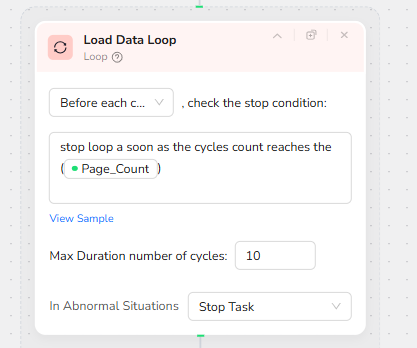
To support multi-page extraction, a Loop node (Load Data Loop) uses the Page_Count parameter as its stop condition. Before each cycle, the loop checks whether the current cycle index has reached the user-defined Page_Count. If so, it exits the loop; if not, it continues.
This design lets Make decide how “deep” the scraper should go into the archive: a Page_Count of 1 grabs only the latest page; higher values collect more historical articles.
Smart Scrolling to Find “More Articles”
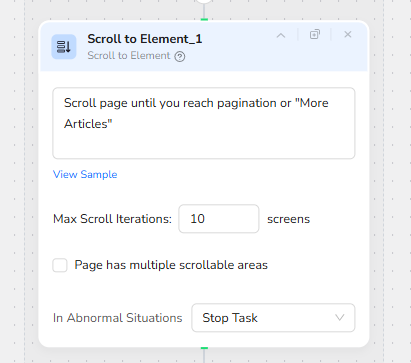
Within each loop cycle, a Scroll to Element node scrolls the page until pagination controls or a “More Articles” button appear. Instead of relying on fixed coordinates, the node uses visual and DOM analysis to detect where the page exposes additional content.
Max scroll iterations are capped (for example, 10 screens) to prevent endless scrolling if the page’s structure changes. This makes the workflow more robust to front-end redesigns.
Clicking Pagination Controls
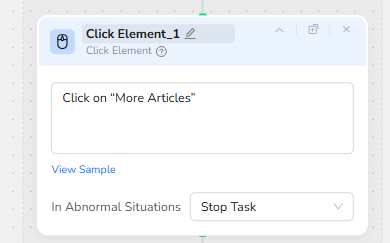
Once the scroll step confirms the presence of a “More Articles” control, a Click Element node interacts with it. This simulates a human click on the “More Articles” button, triggering the site to load additional articles on the same page.
By chaining scrolling and clicking inside the loop, the workflow efficiently traverses multiple article batches without needing separate URLs.
Structured Data Extraction
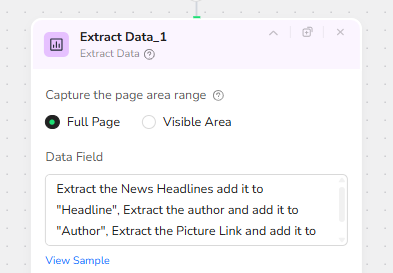
After each pagination cycle, an Extract Data node captures content from the full page area. It is configured to:
• Extract the headline text and map it to the “Headline” field.
• Extract the author name and map it to the “Author” field.
• Extract the article’s hero image URL and map it to the “Pic” field.
• Extract the article URL and map it to the “Link” field.
The node is set to skip duplicated data so that articles already captured in previous loops are not repeated. This prevents Make from processing the same article multiple times.
JSON Aggregation for Downstream Automation
At the end of the BrowserAct workflow, all extracted records are combined into a single JSON array. Each element follows a consistent schema:
{
"Headline": "...",
"Author": "...",
"Pic": "...",
"Link": "..."
}
This compact JSON payload is returned to Make.com, ready to be parsed, iterated, and enriched by AI.
⚙️ Part 2: Automation Integration with Make.com
Trigger & Read Categories
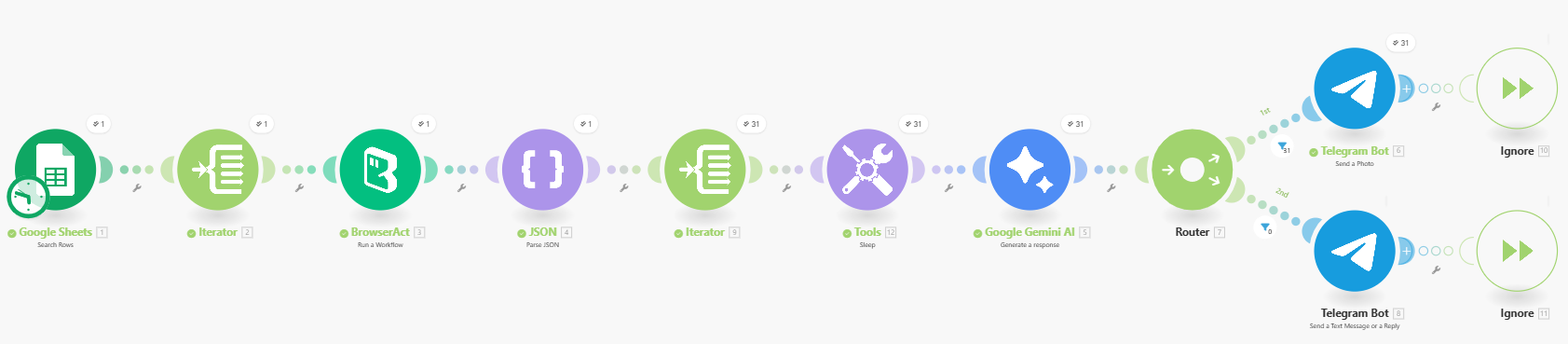
The scenario is triggered on a schedule in Make.com and starts by reading a simple Google Sheet. Each row contains one news category (for example “innovation”), which is passed as the Target_Path parameter for BrowserAct.
Run BrowserAct and Parse JSON
For every category row, Make calls the BrowserAct workflow with Target_Link, Target_Path, and Page_Count. BrowserAct returns a JSON list of articles, which is immediately parsed so that each headline becomes an individual item flowing through the scenario.
AI Enrichment with Gemini
Each article item is sent to a Google Gemini AI module. Gemini creates a short summary or classification based on the headline and link, turning raw scraped data into quick, readable insights. A short Sleep step can be used to avoid hitting API limits when there are many articles.
Smart Routing to Telegram
Finally, a Router checks whether an article has a valid image URL. If it does, the article is sent as a Telegram photo message with an HTML caption. If not, it is sent as a clean text-only message. This keeps the Telegram feed consistent while fully automated from scraping to delivery.
🚀 Applicable Scenarios (Use Cases)
Competitive News Monitoring
Track specific sections of major business or tech sites (for example, innovation, leadership, or AI) and automatically push AI-summarized headlines into a private Telegram channel for founders or product teams.
Executive Briefing Feeds
Create a curated news digest for executives by focusing only on categories that matter (for example, policy, regulation, or M&A). Gemini condenses each article into a short insight, and Telegram becomes a real-time briefing feed.
Thematic Research Streams
Use the Google Sheet as a research control panel: add paths for different themes such as climate, fintech, or Web3. The workflow scrapes each category, tags and summarizes the articles, and sends them to different Telegram channels or groups.
Content Ideation for Writers and Marketers
Writers or content marketers can subscribe to a Telegram feed generated by this workflow to spot emerging story ideas. Each push includes headline, summary, and source link, making it easy to jump into full articles for deeper research.
Client-Facing News Alerts
Agencies or consultants can maintain separate Telegram channels per client, each powered by a different configuration in the Google Sheet. Clients receive timely, AI-curated news relevant to their industry without needing to manage any scraping or AI logic themselves.