
Competitors Shopify Website New Product Monitor
BrowserAct’s no-code Shopify competitor monitor tracks new products from rivals’ stores—scrapes product names, prices & details fast, helping you stay ahead of market trends!
Published by
Yi
Yiruo
December 19, 2025
Approx.Credits
60-100 Credits
Categories
BA
Content CollectionShopify
Template ID
60027591559672976

Brief
Are you spending hours manually collecting Shopify e-commerce data—store setup steps, benefits, features, plans, tips, FAQs, and more? With various promotional sections, success stories, and business insights to browse through, finding the right data or conducting research has become incredibly time-consuming for entrepreneurs, marketers, e-commerce developers, and business analysts.
BrowserAct automates the entire process. Extract structured data from Shopify promotional sites in minutes, not hours—no coding required.
What Does BrowserAct Shopify Scraper Do?
Automatically extract comprehensive Shopify resource data with our powerful Shopify scraper tool. Capture section titles, step-by-step guides, benefit lists, feature descriptions, pricing plans, testimonials, FAQ entries, and links to related pages from any Shopify promotional page. Enjoy flexible filtering and output options for comprehensive market analysis—no coding required.
Our Shopify scraper is built for seamless integration with automation platforms like Make.com, making it ideal for ongoing monitoring and competitive intelligence tasks.
What Data Can I Extract from Shopify?
With BrowserAct's Shopify Scraper, you can pull a wide range of publicly available data for analysis. Here's a breakdown:
Shopify Promotional Content & Features
- Section titles
- Step-by-step guides
- Benefit lists
- Feature descriptions
- Pricing plan details
- Testimonials and quotes
- FAQ questions and answers
- Links to starting pages and resources
Key Features of Shopify Scraper
- Customizable Parameters: Adjust extraction scope to match your research needs
- Flexible Selection: Set max items for bulk extraction across multiple pages
- Comprehensive Data Capture: Extracts complete promotional profiles with all metadata
- Structured Output: Preserves data relationships for easy analysis
- Multi-Page Support: Compatible with promotional sections, plan tables, and FAQ lists
- Automation-Ready: Seamlessly integrates with Make.com and other platforms
How to Scrape Shopify
Quick Start Guide: How to Use Shopify Scraper in One Click
If you want to quickly start experiencing scraping Shopify, simply use our pre-built "Shopify Scraper" template for instant setup and start scraping Shopify effortlessly.
- Register Account: Create a free BrowserAct account using your email
- Configure Parameters: Fill in necessary inputs like Target_url (https://hiutdenim.co.uk/collections/do-one-thing-well) – or use defaults to learn how to scrape Shopify quickly
- Start Execution: Click "Start" to run the workflow
- Download Data: Once complete, download the results file from Shopify scraping
How to Build a Shopify Scraper Workflow: Step by Step
Shopify Scraper workflow building with BrowserAct requires no coding skills—it's automation-ready and easy to set up. Follow these step-by-step instructions to get started.
1.Determine Your Scope
Decide the number of results to extract (e.g., 10 results with complete details). Adjust parameters based on your research needs.
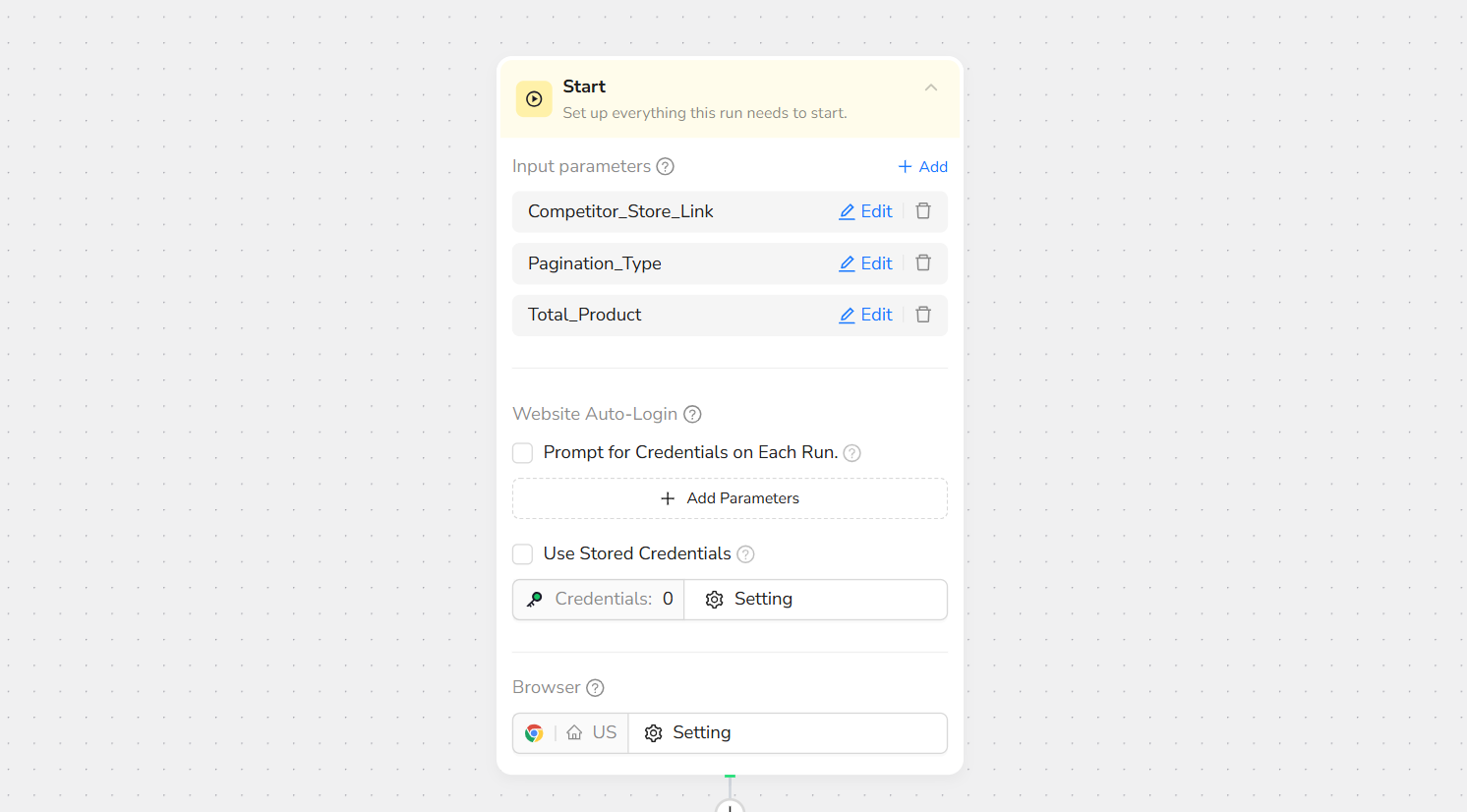
2.Start Node Parameter Settings
- Competitor_Store_Link: Enter your Shopify link (e.g., https://hiutdenim.co.uk/collections/do-one-thing-well)
Note: Customize based on needs—works with promotional sections, plan tables, or FAQ lists.
- Pagination_Type: Load More
- Total_Product : (e.g., 15 results with complete details)
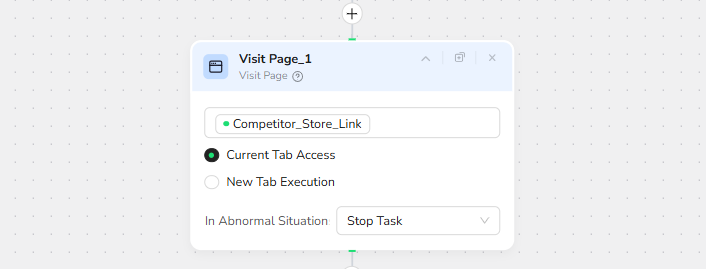
3.Visit Page
In the prompt box, enter Visit / Competitor_Store_Link – this will navigate to the target URL.
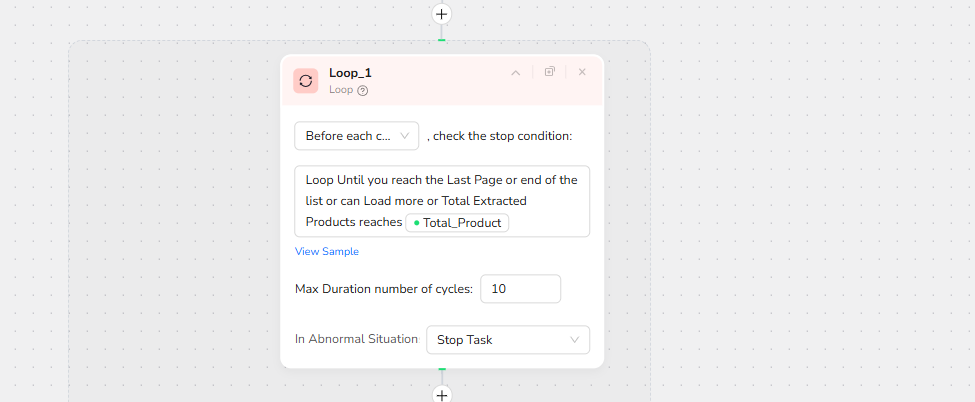
4. Loop
Loop Configuration
- Loop Prompt: "Loop Until you reach the Last Page or end of the list or can Load more or Total Extracted Products reaches /Total_Product
- Loop Condition: Before each loop, check the stop condition:
- Max Duration of Cycles: 10 (default, adjustable based on your needs)
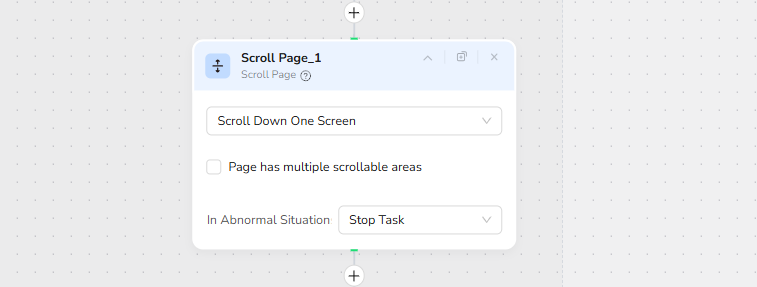
5.Scroll Page
Scroll Action: Scroll Down one Screen
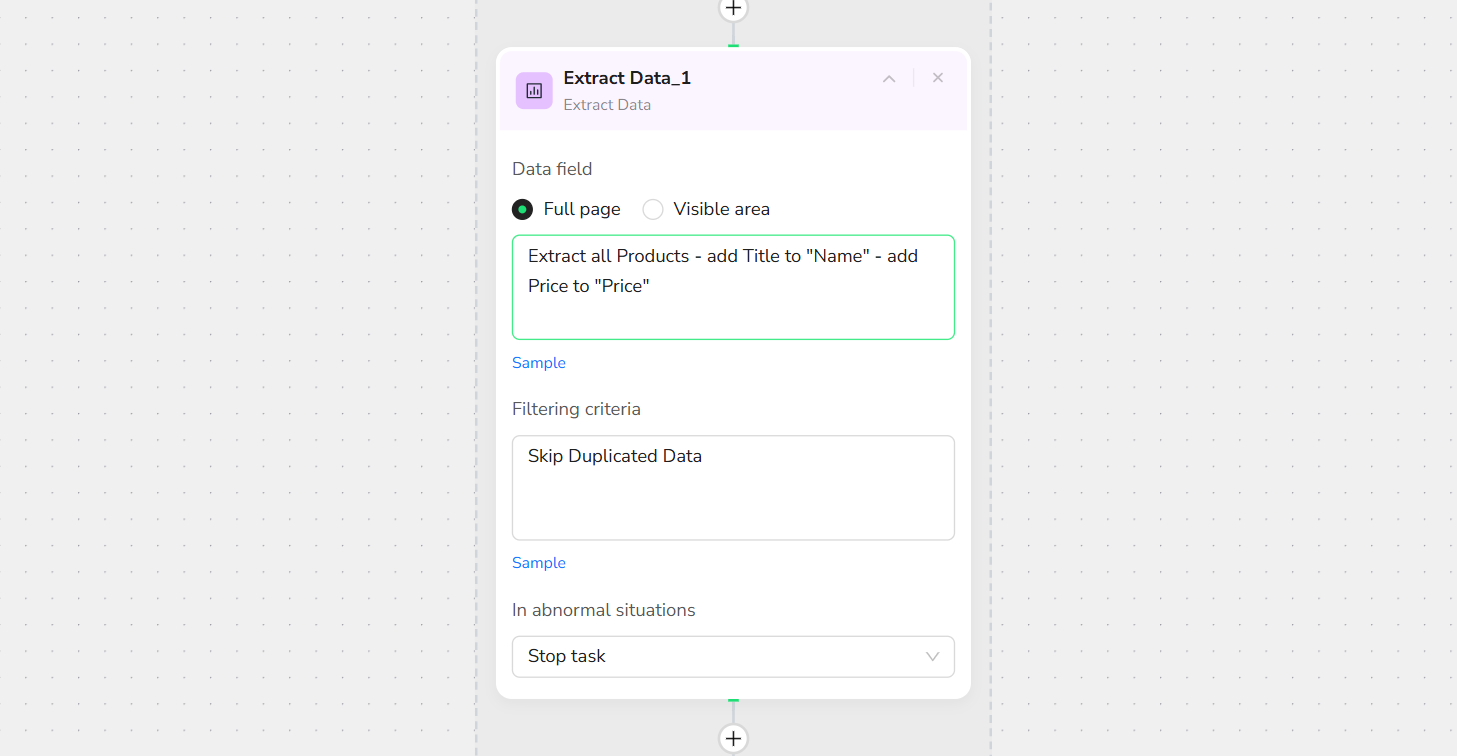
6. Add Extract Data
Data Configuration:
- Visible Area: ✓ Selected
Data Field: Extract all Products - add Title to "Name" - add Price to "Price"
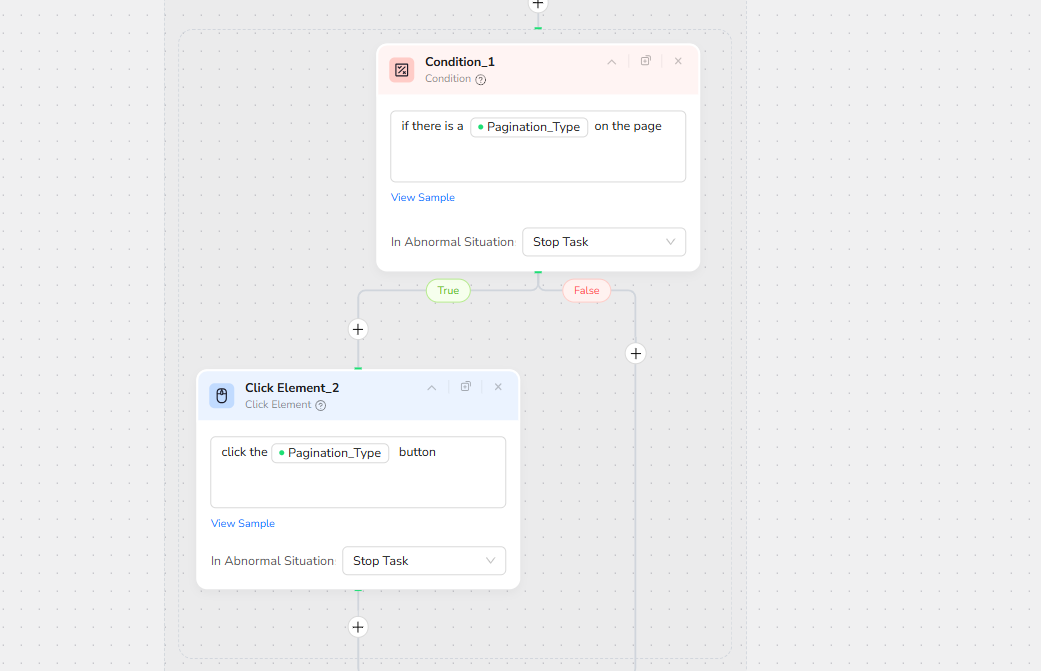
7. Condition
Prompt: if there is a /Pagination_Type on the page
8.Click Element
click the /Pagination_Type button
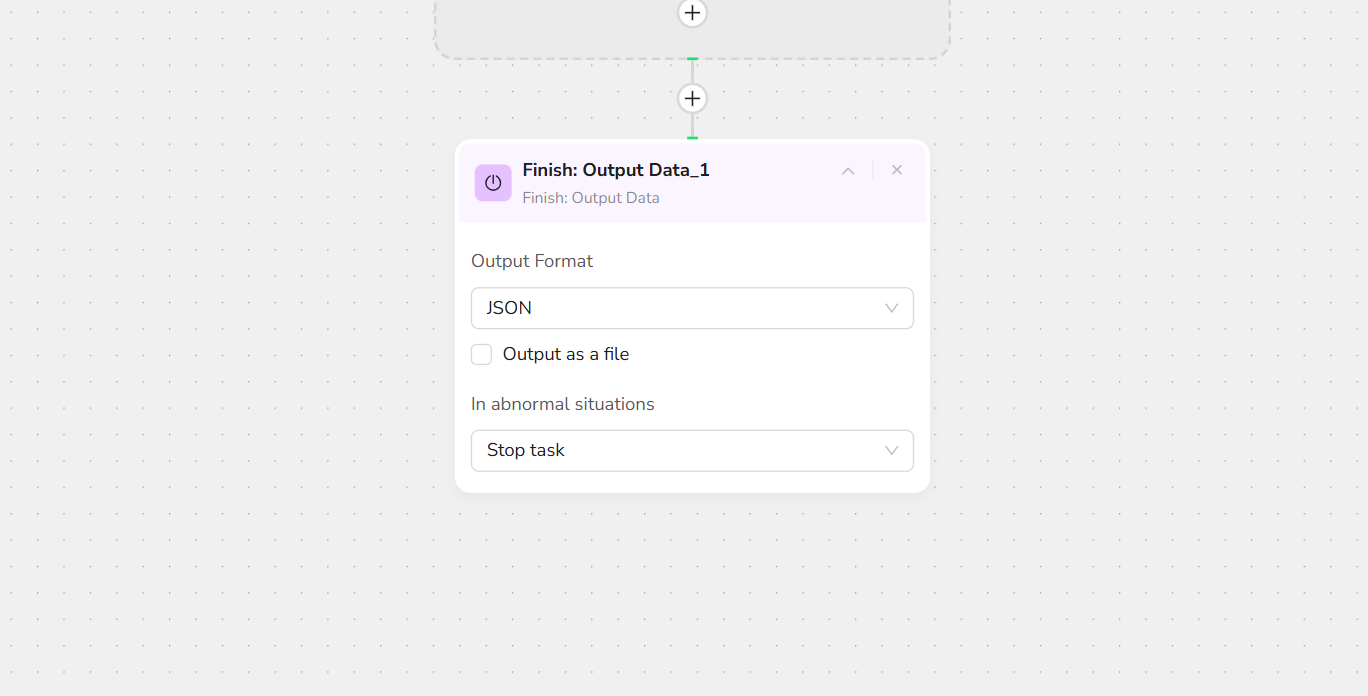
9.Output Data
Export in JSON, CSV, XML, or Excel formats.
Key Benefits of Shopify Scraper
Shopify Scraper offers a range of advantages that make data extraction simple, efficient, and powerful. Here's why it's a top choice for Shopify web scraping:
✅ No Coding Required: Set up and run extractions effortlessly without any programming skills—perfect for beginners and pros alike
✅ Customizable and Flexible: Adjust parameters like item limits, data fields, and target URLs to tailor results to your exact needs
✅ Structured Data Output: Maintains organized data in structured formats (e.g., JSON, CSV, Excel) for easy analysis and integration
✅ Automation Integration: Seamlessly works with Make, n8n, and other platforms for scheduled, hands-off web scraping
✅ Cost-Effective: Start with free trials for small-scale tasks, scaling affordably for larger datasets while respecting Shopify's policies
✅ Accurate and Reliable: Handles automatic page loading, uses 'N/A' for missing data, and includes rate limit handling to ensure consistent results
These benefits make Shopify Scraper an efficient tool for turning raw Shopify data into actionable insights.
Who Can Use Shopify Scraper?
Shopify Scraper is designed for anyone needing quick, reliable access to Shopify data. It's ideal for a variety of users, including:
- E-commerce Entrepreneurs: Extract setup guides and success stories to launch faster
- Marketers & Growth Hackers: Analyze promotional strategies and conversion tactics
- Store Developers: Capture feature lists and integration ideas for custom builds
- Digital Agencies: Manage client onboarding with comprehensive platform data
- Market Researchers & Analysts: Extract data for trend analysis and market intelligence
- Dropshippers: Gather insights on pricing plans and scaling tips
- Small Businesses & Startups: Conduct affordable competitive research without needing advanced technical skills
- Academics & Students: Research e-commerce trends and platform ecosystems
No matter your background, if you're looking to scrape Shopify without hassle, this tool is accessible and effective for both individuals and teams.
Use Cases for Shopify Scraper
Shopify Scraper is versatile for various real-world applications. Here are some key ways to use it for extracting and analyzing Shopify data:
📊 Market Research: Collect data on features, plans, and trends for informed decision-making
🔍 Competitive Intelligence: Scrape promotional content to identify strengths, weaknesses, and market opportunities
💰 Pricing Analysis: Track plan tiers and compare value across e-commerce platforms
⭐ Quality Assessment: Analyze testimonials and success metrics to identify top-tier strategies
🔄 Update Monitoring: Track new features, guides, and promotional shifts
🛠️ Onboarding Toolkit: Build comprehensive databases to streamline store setup for clients
📈 Trend Tracking: Monitor emerging e-commerce tools and popular categories in the Shopify ecosystem
🎯 Strategy Research: Identify proven tactics and assess their implementation
Whether for one-off projects or ongoing monitoring, Shopify Scraper helps transform Shopify data into valuable insights.
Make.com Integration
BrowserAct's Shopify Scraper is now available as a native app on Make.com—add it to your scenarios without API hassle.
✅ Automation-Ready: Integrate with Make, n8n, or others for scheduled monitoring
✅ Rate Limit Handling: Built-in delays to comply with Shopify policies
✅ Multi-Section Tracking: Run instances for different pages, plans, or FAQ categories
💡 Use Case Tip: Ideal for competitive analysis, onboarding automation, and market research with complete promotional metadata
🚀 Quick Start with Make.com: Search for "BrowserAct" in Make.com's app directory and add it directly—no complex setup
Ready to Transform Your Shopify Data Collection?
Stop wasting hours on manual data collection. Start scraping Shopify guides, plans, and strategies in minutes with BrowserAct's AI-powered automation.
Try BrowserAct Free → https://www.browseract.com/
No credit card required. Get started in under 5 minutes.
Popular Use Cases:
- 🛍️ Entrepreneurs launching stores faster
- 💻 Marketers analyzing growth tactics
- 📊 Analysts tracking e-commerce trends
- 🏢 Agencies managing client onboarding
- 🚀 Developers building custom solutions
Start Your Free Trial → https://www.browseract.com/template?page=3
Need Help?
Contact us at:
Discord: [Discord Community]
E-mail: service@browseract.com
 What can we do for you